










On this page
- How Shopify conversion rate optimization works
- Find the leak before you change anything
- Product page changes that increase Shopify conversion rate (1–8)
- Collection, search and navigation changes (9–13)
- Cart changes (14–17)
- Checkout and Shop Pay changes (18–23)
- Speed and trust changes (24–27)
- How to test CRO changes with Shopify Rollouts
- How much traffic a Shopify CRO test needs
- Shopify CRO priorities by store size
- Frequently asked questions
- What we’d do first
Most Shopify stores we audit do not have a traffic problem. They have a leak at one specific step: a product page that hides the delivery date, a cart that surprises people with shipping, a mobile menu nobody can use. Fix that one step and the same ad spend buys more orders.
That is what Shopify conversion rate optimization really is: finding the step where buyers drop out, changing it, and proving the change worked. Below are 27 changes that lift sales on Shopify stores, grouped by funnel step, plus how to test them with Shopify’s native Rollouts experiments and how much traffic a test needs. For industry numbers, see our average Shopify conversion rate benchmarks.
Key takeaways
- Diagnose before you change anything. Shopify’s conversion funnel report shows whether you lose people at add-to-cart, at checkout or at payment, and each leak has different fixes.
- The biggest single reason shoppers abandon is extra costs: 40% of US abandoners cite shipping, tax or fees, according to Baymard. Show the full cost earlier.
- Shopify Rollouts now runs native A/B experiments on themes and checkout (Grow plan or higher), managed under Markets > Rollouts.
- Most small stores cannot detect a 10% lift in purchase conversion within a month. Test product page changes against add-to-cart rate instead, or ship low-risk fixes without a test.
- Shopify changed how it counts sessions in late September 2026. Treat that date as a new baseline before comparing conversion rates.
How Shopify conversion rate optimization works
Based on our experience working with Shopify stores, conversion rate optimization is most effective when treated as an ongoing process rather than a one-time redesign. Improving product pages, simplifying navigation, building customer trust, and reducing checkout friction can collectively improve the shopping experience. “The biggest conversion gains often come from small, consistent improvements that make it easier for customers to find what they need and complete their purchase,” says Sunny Goyal, Co-Founder of Bytecode Technologies.
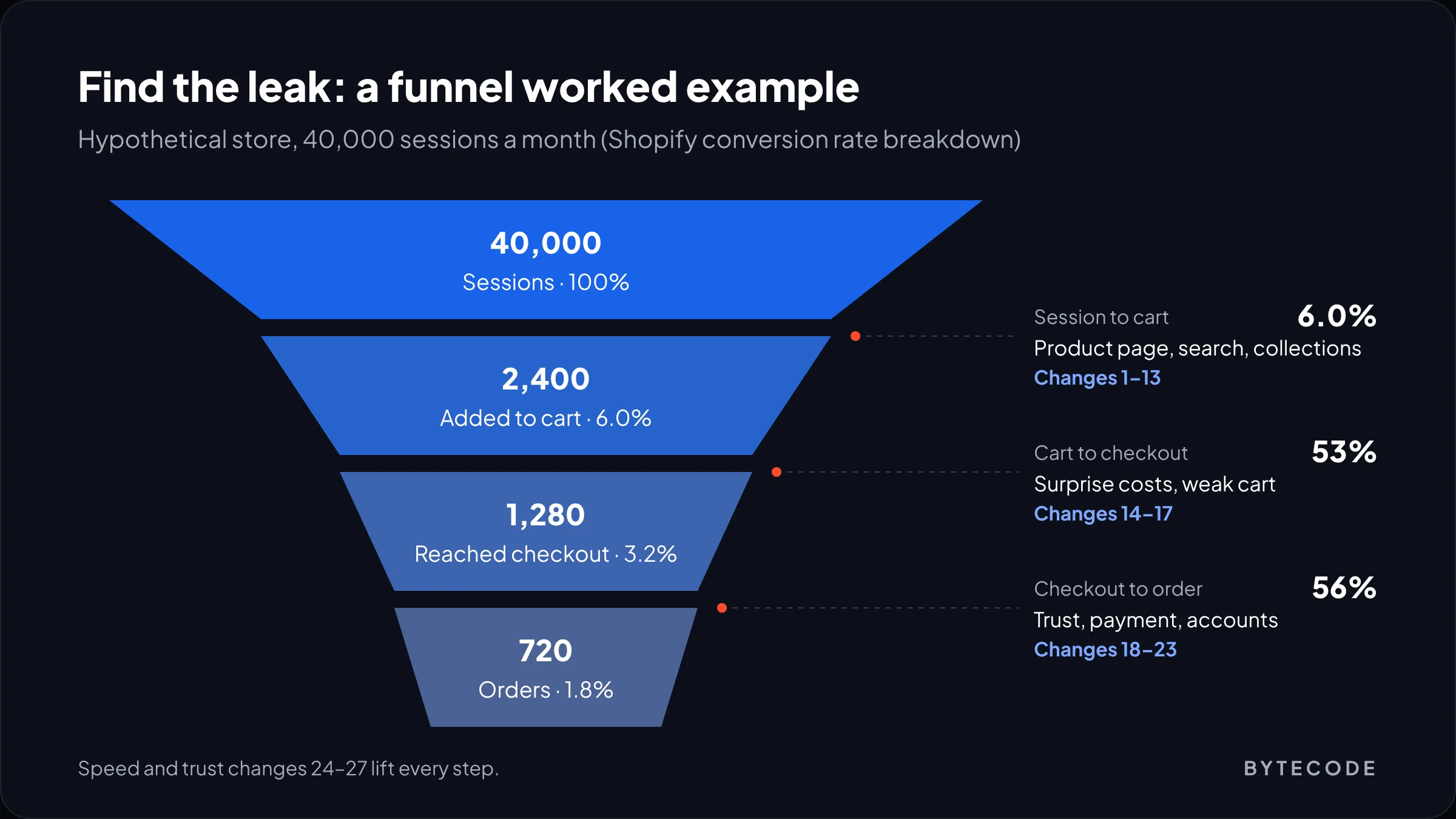
That funnel is the most useful screen in Shopify CRO. A store-wide rate tells you something is wrong. The funnel, in the conversion rate breakdown report under Analytics > Reports, tells you where.
Watch out: on September 21, 2026 Shopify changed how Analytics counts sessions, filtering bot and system traffic more consistently. Orders are unaffected, but session-based numbers like conversion rate can shift. Shopify’s advice is to treat the change as a new baseline, so do not credit a CRO change made that week.
Find the leak before you change anything
Start by reading your funnel as ratios between steps, not as one number. The step with the worst hand-off is where most of your 27 possible changes should come from.
Say (hypothetically) your store gets 40,000 sessions a month. 2,400 of them add to cart (6.0%), 1,280 reach checkout (3.2%) and 720 place an order (1.8%). So 53% of carts reach checkout, and 56% of checkouts finish. Both hand-offs are leaking, but they need completely different fixes. Then split the report by device: if mobile add-to-cart trails desktop badly, the problem is the mobile product page or navigation, not checkout.
| Where the funnel drops | What it usually means | Changes to try first |
|---|---|---|
| Sessions to add-to-cart is low | Shoppers cannot find the product, or the product page does not answer their questions | 1–13 (product page, collections, search) |
| Add-to-cart to reached checkout is low | Surprise costs, weak cart, or people using the cart as a wishlist | 14–17 (cart) |
| Reached checkout to order is low | Trust, payment options, forced accounts or errors at payment | 18–23 (checkout and Shop Pay) |
| Mobile far behind desktop at every step | Speed or layout on small screens | 24–25, then 4 and 9 |
| Fine on most products, poor on a few | Product-level issues: price, photos, reviews, stock | 3, 6, 7 on those products only |
Then watch 20 session recordings of mobile visitors who added to cart and left. Numbers tell you where. Recordings tell you why.
Product page changes that increase Shopify conversion rate (1–8)
The product page is where most stores can increase Shopify conversion rate fastest. Baymard’s product page benchmark rates 52% of leading desktop sites and up to 62% of mobile sites as mediocre or worse, and the failures are specific and fixable.
1. Put the total cost, delivery date and returns next to the buy button
Baymard found 67% of sites give no total cost estimate near the buy section, and 44% do not link the return policy from the product page, even though 60% of users look for it there. One line under the price (“Free UK delivery over £50, arrives Thursday, 30-day returns”) answers three objections at once.
2. Show sizes and variants as buttons, not dropdowns
57% of sites in the same benchmark still hide size selection inside a dropdown. Buttons show what is in stock at a glance and save a tap on mobile.
3. Add in-scale and on-model photos
Shoppers judge size from images: 42% try to, per Baymard, yet 37% of sites have no in-scale image. Add one photo with a hand, a person or a familiar object for every hero product.
4. Keep add-to-cart in reach on mobile
On long mobile pages the button scrolls away. A sticky add-to-cart bar is a small change and an easy test.
5. Turn on accelerated checkout buttons
Shopify’s accelerated checkout buttons let shoppers skip the cart and pay with Shop Pay, Apple Pay, Google Pay or PayPal from the product page. Which button appears depends on your payment settings and the shopper’s device and payment history. The trade-off: these buttons buy a single variant only, so on stores where baskets usually hold several items, test them rather than assume.
6. Get reviews onto every best seller, and answer the bad ones
Collect reviews first on high-traffic products, then reply to negative ones: 89% of sites in Baymard’s benchmark leave them unanswered, and a calm, specific reply often reassures more than another five-star review.
7. Rewrite the first 50 words of the description around objections
Open with what the buyer is unsure about (fit, compatibility, materials), not brand story. Move specs into a metafield-driven table.
8. Show unit price on multi-packs and bundles
81% of sites skip price per unit on multi-packs. If the 3-pack is the better deal, show it in numbers.
For a full teardown of the product template, see our guide to Shopify product page design.
Collection, search and navigation changes (9–13)
If shoppers cannot find the right product, the product page never gets a chance. These changes target sessions to add-to-cart.
9. Rebuild the mobile menu around how customers shop
Menus often mirror the internal catalogue. Customers shop by need or occasion, so name menu items in their words, taken from your search terms.
10. Add filters that match real buying attributes
Shopify’s Search & Discovery app builds collection filters from product options, tags and metafields. Filter on what people actually choose by (size, material, use case), not on everything you have data for.
11. Tune site search with synonyms and boosts
The same app supports synonym groups and product boosts. Review search queries monthly and fix the ones that return nothing. “Sofa” and “couch” should land on the same results.
12. Set a deliberate default sort
Default to best selling, or curate the first two rows by hand on your highest-traffic collections.
13. Put stock and sale signals on product cards
Swatches and one badge per card (“low stock”, “sale”) save a click. More than one turns the grid into noise.
Cart changes (14–17)
Cart changes fix the hand-off between adding a product and starting checkout. The main enemy here is surprise. Extra costs (shipping, tax, fees) are the top abandonment reason in Baymard’s cart abandonment research, cited by 40% of US shoppers who abandoned, and 12% left because they could not see or calculate the total upfront.
14. Show a free-shipping progress bar
“You are £8 away from free delivery” turns a cost into a goal. Set the threshold a little above your current average order value.
15. Show an estimated total, including shipping, before checkout
Show the flat rate, or the cheapest option and its arrival date. Nobody should see a new number for the first time on the payment step.
16. Offer one relevant add-on, not a carousel
One complementary product (the case for the phone) with a single tap to add. A carousel of eight unrelated products usually distracts more than it sells.
17. Test cart drawer against cart page
Drawers keep people browsing; cart pages have room for delivery and trust details. Neither always wins, so test it on reached-checkout rate.
From our team: on most stores we audit, the cart is the most neglected template. It gets traffic from every product, so a small change there reaches more sessions than any single product page fix.
Checkout and Shop Pay changes (18–23)
Checkout changes on Shopify are limited by design, and that is mostly a good thing: the core checkout is already well built. What you control depends on your plan. According to Shopify’s checkout and accounts documentation, branding (logo, colours, fonts) is available on Basic and above, apps on the thank you and order status pages are available on Basic and Plus, and apps inside the information, shipping and payment steps are Plus only.
18. Turn on Shop Pay
Shop Pay is Shopify’s strongest conversion feature. Shopify reports that Shop Pay lifts conversion by up to 50% compared with guest checkout, and that its mere presence raises lower-funnel conversion by 5%. Those figures come from a study Shopify commissioned from an unnamed consultancy and published on its own blog, so read them as directional.
19. Never force account creation
18% of US abandoners in Baymard’s data left because the site required an account. Offer the account after the order instead.
20. Brand the checkout so it looks like your store
19% of abandoners did not trust the site with their card. Use the checkout and accounts editor to match logo, colours and fonts. It takes an hour.
21. Add trust and delivery content inside checkout (Plus)
On Plus, checkout UI extensions can add delivery promises, guarantees or gift notes in the steps themselves. Shopify Functions can hide or reorder payment and delivery options by market or basket. We cover the build side in Shopify checkout customization.
22. Offer the payment methods your market expects
9% of abandoners left because there were not enough payment methods. Check what each of your markets expects, from buy now, pay later to PayPal.
23. Use the thank you page for the second sale
App blocks on the thank you and order status pages work on Basic and up. Use them for account sign-up or a referral offer. They raise what each conversion is worth.
Not sure which step is leaking on your store?
Send us read access to your Shopify analytics and we will map your funnel and name the three changes we would test first.
Speed and trust changes (24–27)
These changes lift every step at once. They are rarely exciting and often the highest-return work on a store.
24. Remove app scripts you no longer use
Uninstalled apps often leave snippets in theme.liquid. Audit quarterly.
25. Fix the largest image on mobile
The hero image is usually the Largest Contentful Paint element. Size it correctly and do not lazy-load it. Our Shopify speed optimization guide covers the other 20 fixes.
26. Show delivery dates and a clear returns policy
Slow delivery (20%) and an unsatisfactory returns policy (13%) both make Baymard’s abandonment list. If you cannot ship faster, state the arrival date.
27. Place a real test order every week
17% of abandoners hit website errors or crashes. A weekly real-card mobile order catches broken discounts and missing shipping rates before customers do.
How to test CRO changes with Shopify Rollouts
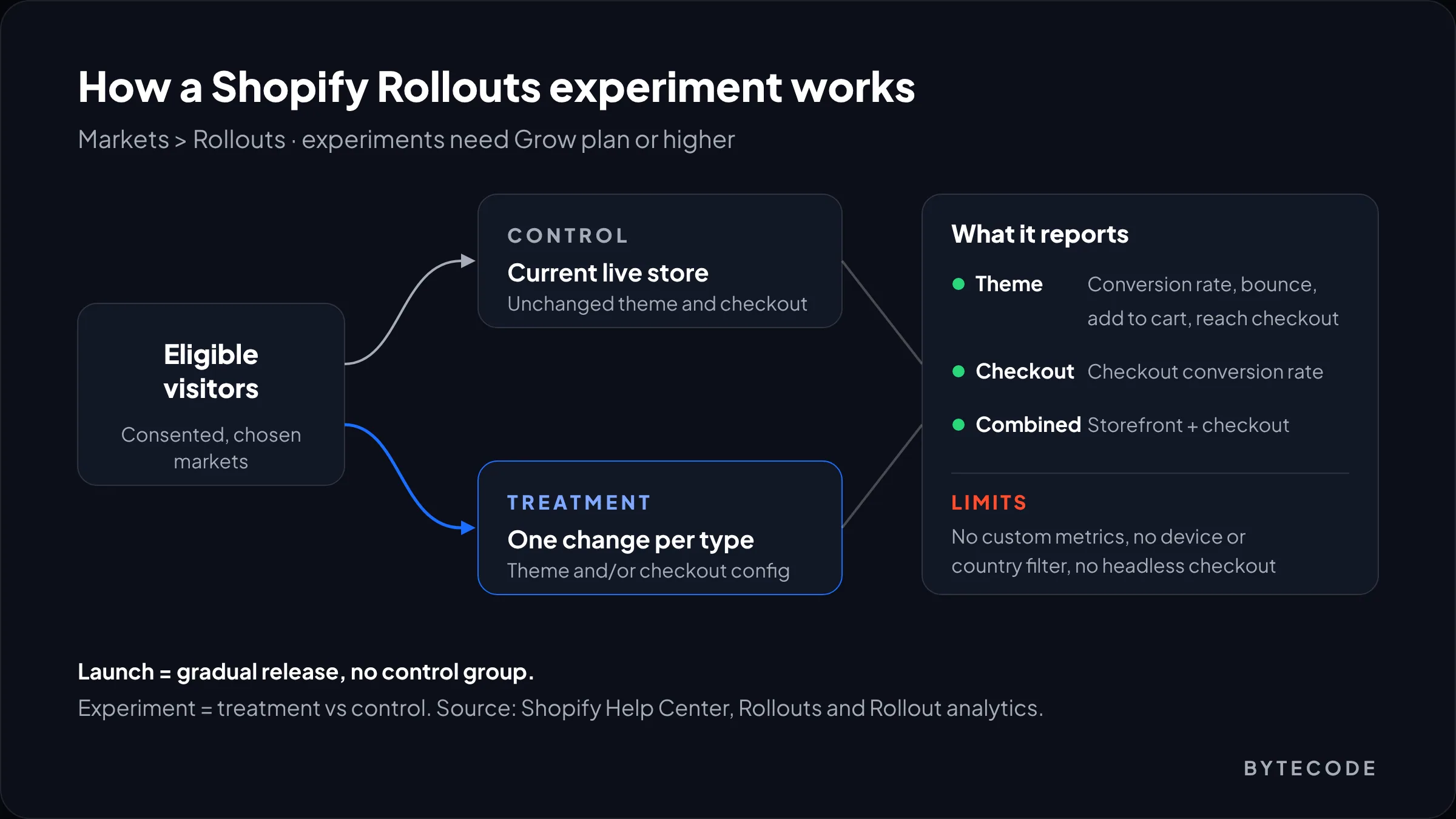
Shopify Rollouts is the native way to A/B test theme and checkout changes. It lives under Markets > Rollouts. Scheduled rollouts work on Basic and above, while experiments need the Grow plan or higher, according to Shopify’s Rollouts help page.
A rollout comes in two forms. A launch applies changes to a share of visitors (the “launch reach”) with no control group. An experiment pairs your treatment with a control (your unchanged store) and compares them. You can change the main theme, replace the checkout and accounts configuration, or both, with one change of each type per rollout.
What you get back, per Shopify’s rollout analytics documentation:
- Theme experiments: conversion rate over time, bounce rate, reached-checkout rate and add-to-cart rate.
- Checkout and accounts experiments: checkout conversion rate.
- Combined experiments: storefront metrics and checkout metrics in separate sections.
The limits matter too. You cannot customize metrics or filter results by device or country, only visitors who consent to tracking are counted, and headless checkouts are not supported. So Rollouts is excellent for template-level changes on a standard Online Store, and weaker when you need revenue per visitor or device splits. For those, a third-party testing app still earns its fee.
Our setup for a Rollouts test:
- Write the hypothesis and the one metric that decides it before you build (for example, “sticky add-to-cart raises add-to-cart rate on mobile”).
- Duplicate the live theme, make only that change, and attach it as the treatment.
- Work out the run time from the sample-size table below, and round up to whole weeks so weekdays and weekends are both covered.
- Decide on the planned end date, not the day the graph looks good.
Watch out: checking results daily and stopping the moment the treatment is ahead is the most common way to “win” a test that was never real. Small samples swing wildly in the first week. Pick the duration first and stick to it.
How much traffic a Shopify CRO test needs
A Shopify CRO test needs enough visitors in each version to tell a real lift from noise, and for most stores that is more than they expect. The table shows visitors needed per version, from our own calculation using the standard two-proportion formula at 95% confidence and 80% power. “Relative lift” means a 10% lift takes a 2.0% conversion rate to 2.2%.
| Baseline rate of the metric | Detect a 10% lift | Detect a 20% lift | Detect a 30% lift |
|---|---|---|---|
| 1% | 163,100 | 42,700 | 19,800 |
| 2% | 80,700 | 21,100 | 9,800 |
| 3% | 53,200 | 13,900 | 6,500 |
| 5% | 31,200 | 8,200 | 3,800 |
| 8% | 18,900 | 4,900 | 2,300 |
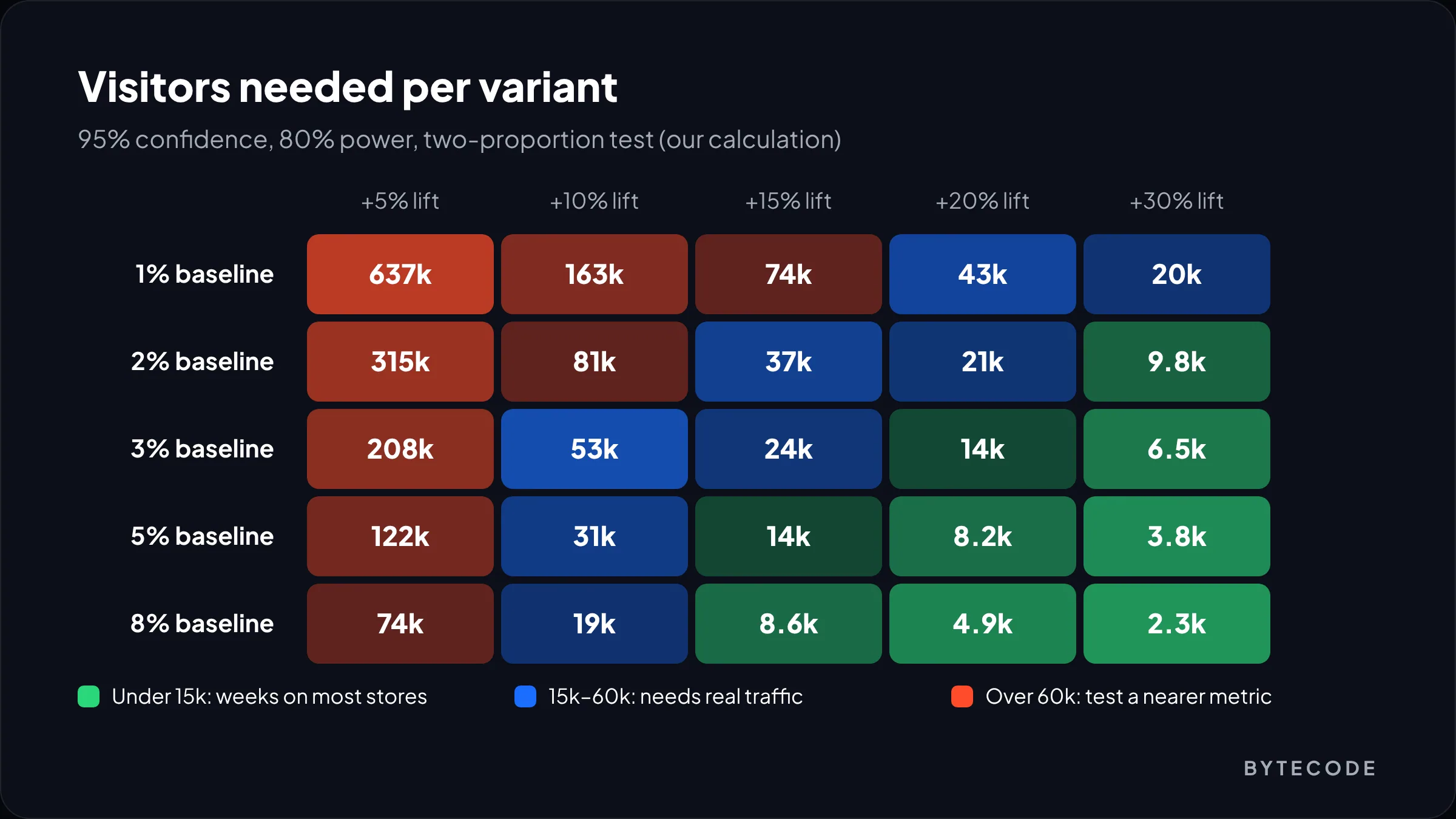
Back to our hypothetical 40,000-session store with a 50/50 split, so about 4,600 visitors per version per week. Testing a product page change against purchase conversion (1.8%) to catch a 10% lift needs about 89,800 visitors per version: roughly 19 weeks. Test the same change against add-to-cart rate (6.0%) and a 15% lift needs about 11,700 per version, which is under three weeks.
So measure each change at the step it acts on (product page on add-to-cart, cart on reached-checkout, checkout on checkout conversion), then confirm in the overall funnel the following month.
Shopify CRO priorities by store size
How you run Shopify conversion rate optimization should depend on traffic. Below roughly 10,000 sessions a month, A/B testing purchase conversion is mostly guesswork. Above 100,000, not testing is guesswork.
| Monthly sessions | What to do | How to validate |
|---|---|---|
| Under 10,000 | Ship the clear fixes (1, 2, 14, 15, 18, 19, 27) without testing. Spend time on recordings, surveys and five-person user tests. | Use a Rollouts launch with full reach, then compare funnel steps month over month |
| 10,000–100,000 | Test big swings on the highest-traffic templates: product page layout, cart drawer vs page, free-shipping threshold. | Rollouts experiments (Grow or higher), judged on the step metric |
| Over 100,000 | Run a continuous programme with one or two tests live at all times, plus checkout work on Plus. | Rollouts for template tests; a third-party tool where you need revenue per visitor or device splits |
Whatever the size, keep a log: hypothesis, change, metric, dates, result. After six months it tells you what does not work on your customers. If you would rather have a team run that programme, our Shopify conversion rate optimization service works exactly this way.
Frequently asked questions
How can I increase my Shopify conversion rate fast?
Start with changes that remove surprise: show the total cost, delivery date and returns policy near the buy button, show shipping in the cart, turn on Shop Pay and keep guest checkout. These fix the most common abandonment reasons in Baymard’s research and carry little risk, so small stores can ship them without an A/B test.
Does Shopify have built-in A/B testing?
Yes. Shopify Rollouts, under Markets > Rollouts, runs experiments that compare a changed theme or checkout configuration against your current store. Experiments need the Grow plan or higher. They report conversion, bounce, add-to-cart and reached-checkout rates, but you cannot add custom metrics or filter by device or country.
What is the average Shopify conversion rate?
It varies a lot by industry, price point, traffic source and device, so one average is not very useful on its own. We compiled sourced 2026 figures by industry in our separate benchmarks guide. For optimization, your own funnel ratios between steps matter more than any industry average.
How long should a Shopify A/B test run?
Long enough to reach the sample size you calculated before starting, and always in whole weeks, with at least two full weeks so weekday and weekend behaviour are both included. For a store with 40,000 monthly sessions, a product page test measured on add-to-cart rate typically needs about three weeks.
Does Shop Pay increase conversion?
Shopify says it does: a study Shopify commissioned found Shop Pay lifts conversion by up to 50% compared with guest checkout. The study was not independently published, so treat the figure as directional. On most stores we see, it is still the first payment setting we would switch on.
Is Shopify CRO worth it for a small store?
Yes, but not in the form of constant A/B tests. A small store gets more from fixing clear problems, watching session recordings and reading customer feedback than from tests that cannot reach significance. Formal testing pays off from roughly 10,000 monthly sessions on the tested pages.
What we’d do first
Open the conversion rate breakdown report, set it to the last 30 days after September 23, 2026, and split it by device. Find the single worst hand-off. Pick three changes from the matching group, ship the obvious one, and run a Rollouts experiment on the one you are least sure about.
Then repeat monthly. Shopify conversion rate optimization is not a redesign. It is a habit of fixing one leak at a time.
We have built and optimized stores for brands like Delsey, EcoFlow, Kerbholz and MyHarry. If you want a second pair of eyes on your funnel, our Shopify CRO team can audit it and run the testing programme with you.