










On this page
- The average Shopify conversion rate in 2026, at a glance
- Shopify conversion rate benchmark sources compared
- Ecommerce conversion rate by industry
- What is a good conversion rate on Shopify?
- How to measure your Shopify conversion rate correctly
- How much traffic you need before the number means anything
- Worked example: re-baselining a “below average” store
- What moves your number up or down besides your site
- Metrics to track alongside conversion rate
- Frequently asked questions
- The short version
A founder sends us a screenshot: 0.9% conversion rate, circled in red, with one line underneath. “Everyone says Shopify stores average 2 to 3%. What is broken?” Often nothing is. The 2 to 3% figure usually comes from a different kind of dataset, the store sells sofas, and a fifth of the sessions in the report are bots.
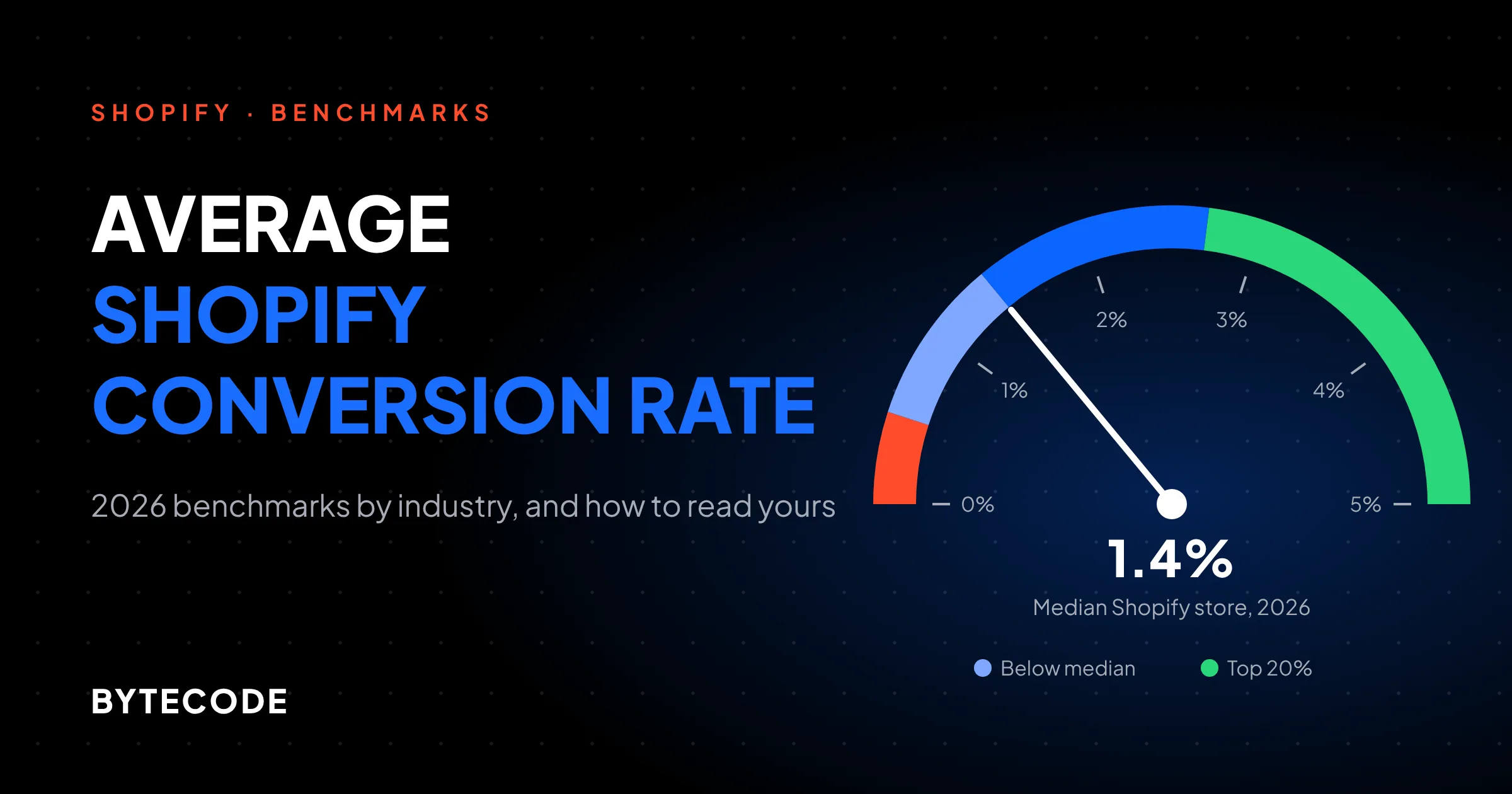
Here is the short answer. The average Shopify conversion rate in 2026 is about 1.4% at the median, according to Littledata’s panel of 433 Shopify stores (July to October 2026). Shogun’s panel of 803 Shopify stores puts the median at 1.74% for January to September 2026. The top 20% of stores convert above roughly 2.7% to 3.3%. Means run higher than medians because a few stores convert far above everyone else. Below we compare every current benchmark we could open, show where they disagree and why, break the numbers down by industry, and walk through how to measure your own rate so the comparison is fair.
Key takeaways
- The typical Shopify store converts 1.4% to 1.7% of sessions. Use the median, not the mean: means of 1.9% to 2.5% are pulled up by a small group of outliers.
- A good conversion rate on Shopify starts around 2.7% to 3.3% (top 20% to top 25%). Above 3.6% puts a store in Littledata’s top 10%.
- Industry matters more than any other single factor. Beauty, supplements and food sit near 2.4% to 3.2% at the median. Fashion and home sit near 1.0% to 1.7%.
- Shopify changed how it counts sessions in September 2026 and now filters bots by default. Compare against data from after that change, not before.
- Under about 10,000 sessions a month, normal month-to-month noise is larger than most of the gaps between benchmarks. Read trends over quarters.
The average Shopify conversion rate in 2026, at a glance
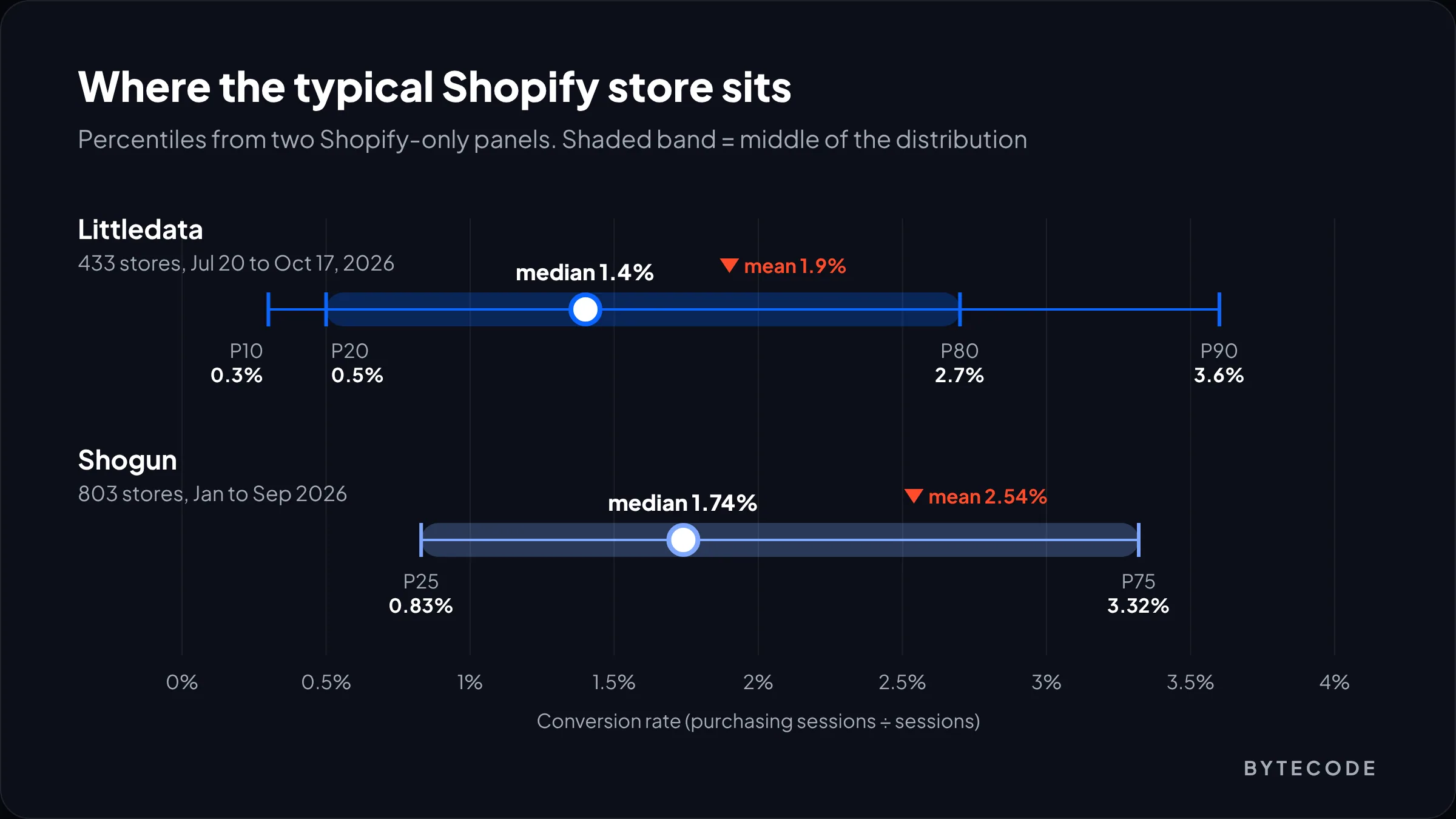
The average Shopify conversion rate is 1.4% (median) in the most recent Shopify-only dataset, with a mean of 1.9%. Most stores, the middle 60%, convert somewhere between 0.5% and 2.7%. Those figures come from Littledata’s conversion rate benchmark, built from GA4 data for 433 Shopify stores over 90 days (July 20 to October 17, 2026).
At Bytecode Technologies, we encourage Shopify merchants to look beyond industry averages and focus on improving their own conversion rates. Factors such as traffic quality, product pricing, customer trust, and checkout experience can significantly influence performance. “A store’s conversion rate is more than just a benchmark. It’s an opportunity to identify where shoppers drop off and make improvements that drive more revenue from existing traffic,” says Sunny Goyal, Co-Founder of Bytecode Technologies.
Littledata publishes the full spread, which is more useful than a single average:
| Percentile (Littledata, 433 Shopify stores) | All devices | Mobile | Desktop |
|---|---|---|---|
| Bottom 10% | 0.3% | 0.4% | 0.2% |
| Bottom 20% | 0.5% | 0.7% | 0.5% |
| Median | 1.4% | 1.6% | 1.5% |
| Top 20% | 2.7% | 2.9% | 3.1% |
| Top 10% | 3.6% | 4.1% | 5.1% |
Two details matter. The mean (1.9%) sits well above the median because a minority of stores convert very well, so against a mean most stores look below average by construction. And Littledata only includes stores with at least 1,000 sessions and 90 purchases in the period, so very new stores are not in the sample.
Shopify conversion rate benchmark sources compared
Current benchmarks range from 1.4% to 2.66%, and the spread comes from what each one measures: which stores, which period, mean or median, and sessions or visitors. None of them is wrong. They answer different questions, so you need to know which one you are reading before you compare.
| Source | Sample | Period | Headline figure | What it measures |
|---|---|---|---|---|
| Littledata | 433 Shopify stores, GA4 via server-side tracking | Jul 20 to Oct 17, 2026 | 1.4% median, 1.9% mean | Sessions with a purchase ÷ all sessions |
| Shogun | 803 active Shopify stores | Jan to Sep 2026 | 1.74% median, 2.54% mean | Orders ÷ sessions on Shogun-instrumented pages |
| IRP Commerce | Merchants on IRP’s own platform (size not published) | September 2026 | 1.97% | Transactions ÷ sessions, all categories |
| Statista | Selected sectors, worldwide (method not detailed on the free page) | Q2 2026 | 1.4% average | Online shopping conversion by sector |
| Dynamic Yield (as cited by Shopify) | More than 400 brands | Rolling, industry data from June | 2.66% global average | Purchases ÷ visitors, cross-platform |
The Shopify-only panels agree on the shape. Shogun’s benchmark puts the 25th percentile at 0.83% and the 75th at 3.32%. Its median runs higher than Littledata’s (1.74% against 1.4%) because the filters differ: Shogun drops stores below 0.1%, Littledata drops stores under 90 orders.
IRP Commerce’s market data comes from stores on IRP’s own platform, not Shopify: 1.97% for September 2026, up from 1.68% a year earlier. Statista’s sector chart shows a 1.4% average across selected sectors in Q2 2026, with skincare highest at 2.4%. Its free page does not explain the panel, so treat both as cross-checks, not targets.
The highest headline figure comes from Dynamic Yield, cited in Shopify’s own conversion rate guide as a 2.66% global average from more than 400 brands. Dynamic Yield’s panel is cross-platform brands that pay for personalization, and its formula divides purchases by visitors rather than sessions. Both push the number above a typical Shopify store. Dynamic Yield’s own page did not load its values when we checked, so we rely on Shopify’s citation.
Watch out: Shopify’s own article lists Dynamic Yield’s food and beverage rate as 4.58% in its table and 5.29% in its FAQ, and luxury and jewelry as 0.63% and 0.94%. When a benchmark is quoted second-hand, go back to the primary source or use the lower, more conservative figure.
Ecommerce conversion rate by industry
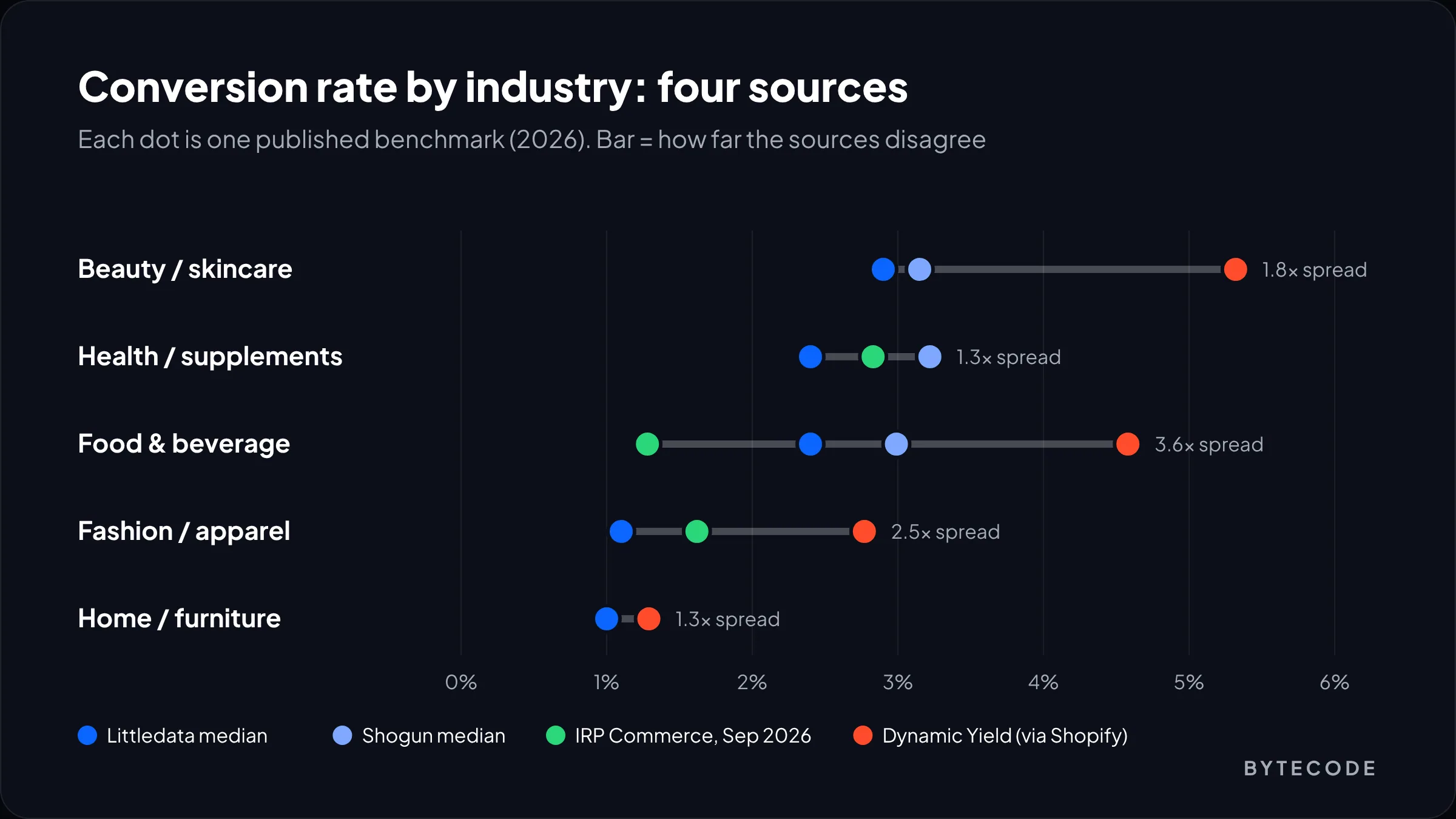
Conversion rates differ by about 3x between industries. Consumables and repeat purchases (beauty, supplements, food) convert at 2.4% to 3.2% at the median on Shopify, while considered purchases (furniture, fashion, sporting goods) sit at 1.0% to 1.7%. The table puts the current sources side by side, using each source’s own category names.
| Category | Littledata median (top 20%) | Shogun median, 2026 YTD | IRP Commerce, Sep 2026 | Dynamic Yield (via Shopify) |
|---|---|---|---|---|
| Beauty and skincare | 2.9% (4.0%) | 3.15% | n/a | 5.32% |
| Health and supplements | 2.4% (3.8%) | 3.22% | 2.83% | n/a |
| Food and beverage | 2.4% (3.2%) | 2.99% | 1.28% | 4.58% |
| Fashion and apparel | 1.1% (2.0%) | n/a | 1.62% | 2.77% |
| Home and furniture | 1.0% (1.7%) | n/a | 2.59% (kitchen and home appliances) | 1.29% |
| Consumer electronics | n/a | 1.39% | n/a | n/a |
| Sports and outdoors | n/a | 1.20% | 1.90% | n/a |
| Autos and vehicles | n/a | 1.26% | 1.76% | n/a |
| Pet care | n/a | n/a | 2.13% | 5.7% |
| Luxury and jewelry | n/a | n/a | n/a | 0.63% |
Littledata publishes an industry figure only when at least 30 stores contribute (beauty is 38 stores, fashion 71, home 62), which is why its table is short. Shogun’s page lists six industries for 2026 so far. “n/a” means that source does not publish the category, not that the rate is zero.
Where the sources disagree
Food and beverage is the clearest split: 2.4% to 2.99% in the Shopify panels, 1.28% at IRP, and 4.58% at Dynamic Yield. Home is the reverse: IRP’s “kitchen and home appliances” category (2.59%) is not the same business as a Shopify furniture brand selling $1,500 sofas. Category labels hide very different average order values, and price is one of the strongest drivers of conversion rate. When sources disagree this much, use the Shopify-only panels for targets and the others for direction.
What is a good conversion rate on Shopify?
A good conversion rate on Shopify is one in the top 20% to 25% of your own category: roughly 2.7% to 3.3% across all stores, about 2.0% in fashion, 1.7% in home and furniture, and 3.8% to 4.0% in supplements and beauty. Being at your category median is normal, not a problem.
Use this table to turn your number into a decision. It assumes you have already measured correctly (next section) and have at least a few months of data.
| Where you sit in your category | What it usually means | What we would do |
|---|---|---|
| Bottom 20% (below ~0.5% overall) | Something structural: tracking errors, junk traffic, broken mobile UX, price or shipping shock | Audit tracking and traffic sources before touching design |
| Bottom 20% to median | Common for young stores, high-price catalogs and stores heavy on paid social | Look at the funnel step that leaks most; check traffic mix |
| Median to top 20% | Healthy. Gains now come from testing, not fixing | Shift focus to revenue per session and average order value |
| Top 20% and above | Strong store, loyal or warm traffic, or a narrow audience | Protect it. Scale traffic, and expect the rate to dip as you do |
That last row is the part most benchmark posts leave out. A very high rate can mean you only reach people who already know you. Double your prospecting spend and the rate will probably fall while revenue grows. That is a good trade.
From our team: on most stores we audit, the first useful step is not a redesign. It is splitting the conversion rate by traffic source and device. A store at 1.1% overall often turns out to be 3% on email and returning visitors and under 0.5% on one paid social campaign. That changes the fix completely.
How to measure your Shopify conversion rate correctly
Your Shopify conversion rate is sessions that completed checkout divided by all sessions in the period, for human traffic only, measured over at least 30 days. Shopify’s behaviour reports define it as the percentage of sessions that resulted in a purchase. Getting the inputs right matters more than the formula.
- Use sessions, not visitors. One visitor can have several sessions. Dividing orders by visitors inflates the rate, and Shopify’s guide says so directly. Every Shopify benchmark above uses sessions.
- Filter out bots. In the admin, go to Analytics > Reports, open the report, click Controls if the panel is hidden, and check the “Human or bot session” filter. Bot classification only exists for sessions from October 7, 2025 onward.
- Use a full month or more. We compare rolling 90-day windows, the same window Littledata uses.
- Exclude your own traffic where you can. Shopify does not count desktop visits via the admin’s “View store” button, but it does count store views in the Shopify mobile app.
- Compare like with like. Same months year on year, same device split, same channel mix, and the same tool every time.
The September 2026 session change
Shopify rolled out a new session measurement from September 21 to 23, 2026. According to the Shopify Help Center note on the session update, sessions no longer end at midnight UTC, sessions without a pageview (for example a cart link that goes straight to checkout) now count, identified bot sessions are filtered out by default, and a session still ends after 30 minutes of inactivity. Orders are not affected, but conversion rate can move either way, by an amount Shopify does not state. Treat post-update data as a new baseline, as Shopify recommends.
Shopify Analytics vs GA4
Expect GA4 and Shopify to disagree: they set different cookies and handle bots differently, and where a cookie banner is in place, GA4 may miss visitors who decline. Littledata’s benchmark is built on GA4 data, so a well-configured GA4 figure is the closer match to it. For Shogun, Shopify orders divided by sessions is closer. A gap of a few tenths of a point between tools is normal.
How much traffic you need before the number means anything
At a typical 1.4% rate, a store with 5,000 sessions a month can see its conversion rate land anywhere between roughly 1.1% and 1.7% from pure chance. That is wider than the gap between Littledata and Shogun. Small stores should judge trends over a quarter, not a month.
These are our own 95% binomial intervals at a true rate of 1.4%. Real traffic is lumpier, so treat them as a floor.
| Sessions in the period | Expected orders at 1.4% | Plausible range from chance alone | Margin |
|---|---|---|---|
| 1,000 | 14 | 0.67% to 2.13% | ±0.73 pts |
| 5,000 | 70 | 1.07% to 1.73% | ±0.33 pts |
| 10,000 | 140 | 1.17% to 1.63% | ±0.23 pts |
| 20,000 | 280 | 1.24% to 1.56% | ±0.16 pts |
| 50,000 | 700 | 1.30% to 1.50% | ±0.10 pts |
Two rules come out of this. Under 10,000 sessions a month, use a 90-day window for any benchmark comparison. And ignore a 0.2-point move unless you are well past 20,000 sessions in the period. Our Shopify conversion rate optimization guide covers what to change when tests are not practical.
Worked example: re-baselining a “below average” store
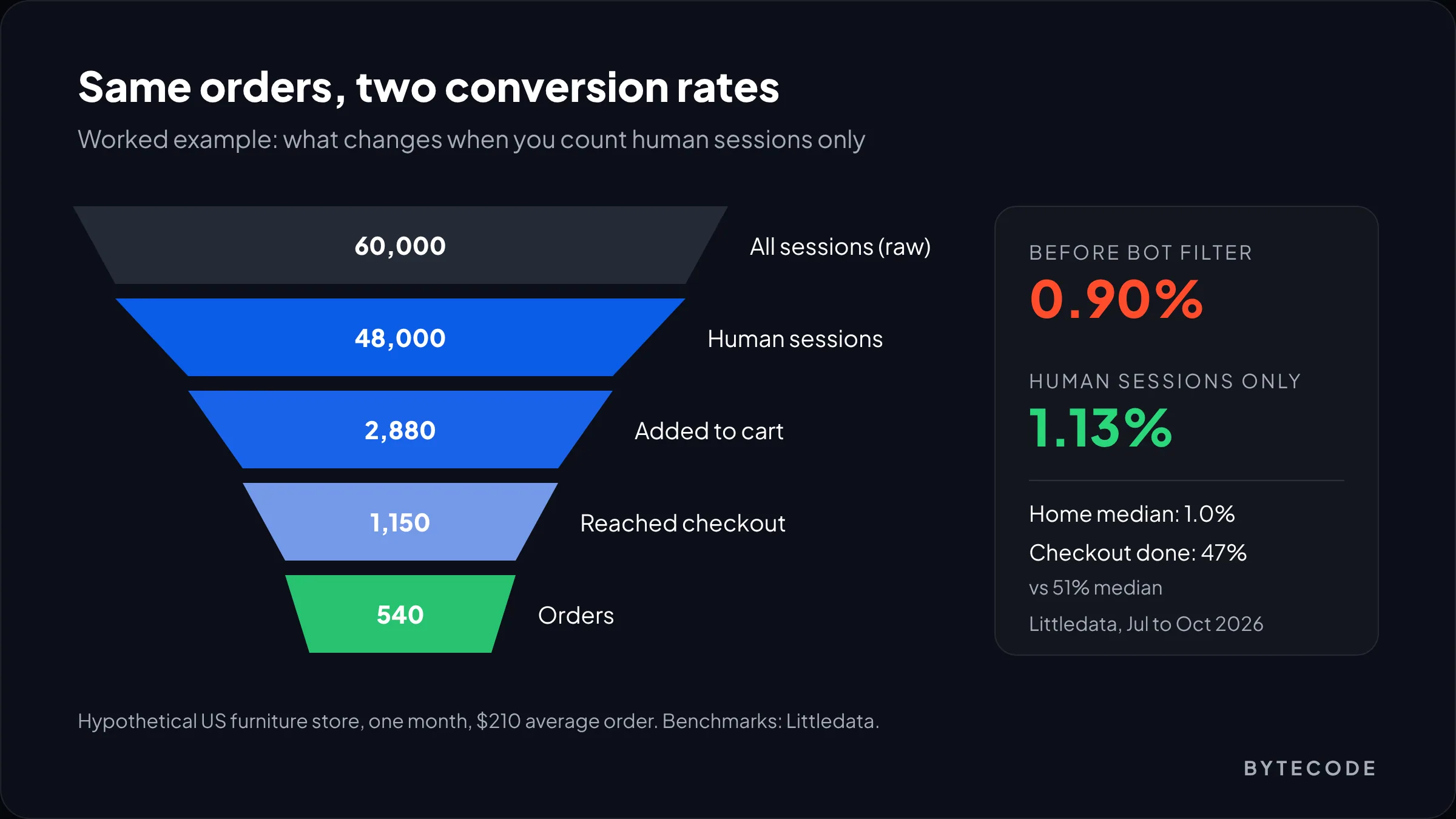
Here is a clearly hypothetical example of how measurement changes the verdict. Say a US home furniture brand on Shopify reports 60,000 sessions and 540 orders in a month. The owner reads 0.90% and compares it to a 2.66% “global average.” It looks like a store converting at a third of the norm.
Now do it properly:
- Remove bot sessions. Applying the Human filter drops sessions from 60,000 to 48,000 in this example. Conversion becomes 540 ÷ 48,000 = 1.13%.
- Pick the right benchmark. Littledata’s home and furniture median is 1.0%, with the top 20% above 1.7%. The store is slightly above its category median, not two-thirds below “average.”
- Check the funnel. Say 2,880 human sessions added to cart (6.0%) and 1,150 started checkout. Completion is 540 ÷ 1,150 = 47%. Littledata’s checkout completion benchmark has a 51% median and puts the top 20% above 67%, so checkout is slightly weak and worth a look.
- Check revenue per session. At a $210 average order, revenue is $113,400, or $2.36 per human session. Littledata’s revenue per session benchmark has a $2.44 median for home and furniture and $5.43 for the top 20%.
The verdict changes from “broken” to “average store with one leaky step.” The right move is a focused checkout review (shipping cost visibility, payment options, delivery dates), not a full redesign. If the checkout itself needs work, our guide to Shopify checkout customization explains what Checkout Extensibility lets you change.
Not sure which benchmark your store should be judged against?
Send us read access to your Shopify Analytics and we will re-baseline your conversion rate by category, device and channel, and show you which funnel step leaks most.
What moves your number up or down besides your site
Most of the gap between your conversion rate and a benchmark comes from things outside your theme: price point, traffic mix, device mix, season and how new the store is. Fix the comparison before you fix the site.
- Price and purchase type. A $30 serum and a $1,500 sofa are different decisions. This is the main reason home and furniture sits near 1.0% in Littledata’s panel while beauty sits at 2.9%. Revenue per session tells a different story: home leads Littledata’s table at a $2.44 median, against $1.83 for beauty.
- Traffic mix. Email, returning visitors and branded search usually convert far better than cold social traffic.
- Device mix. Littledata’s Shopify panel shows mobile and desktop medians nearly level (1.6% and 1.5%), while the Contentsquare retail figures quoted in Shopify’s guide show desktop well ahead (3.7% against 2%). Those panels measure different stores. Benchmark each device against itself.
- Season. Shogun’s monthly median moved from 1.95% to 1.72% between July and August 2026. Peaks and slow months shift every store at once.
- Page speed and UX. These are the factors you control directly. Slow mobile pages are the most common fixable issue we see; our Shopify speed optimization checklist covers the fixes that move Core Web Vitals.
Metrics to track alongside conversion rate
Conversion rate should never be your only scorecard. Track revenue per session as your main number, with conversion rate, average order value and checkout completion as the explanations behind it. Revenue per session cannot be gamed by cutting traffic or discounting.
| Metric | Formula | Littledata median (all Shopify) | Top 20% | Why it matters |
|---|---|---|---|---|
| Conversion rate | Purchasing sessions ÷ sessions | 1.4% | 2.7% | Shows how well traffic turns into buyers |
| Checkout completion | Purchasing sessions ÷ checkout-starting sessions | 51% | 67% | Isolates checkout friction from the rest of the site |
| Revenue per session | Revenue ÷ sessions | $1.97 | $4.13 | Combines conversion and order value; the number to manage |
A sitewide discount can lift conversion rate while lowering revenue per session; a bundle offer can do the reverse. Watch conversion rate alone and you will misjudge both. Our Shopify CRO team reports all three together for exactly this reason.
Frequently asked questions
What is the average conversion rate for a Shopify store?
The average Shopify conversion rate is about 1.4% to 1.7% at the median in 2026. Littledata’s panel of 433 Shopify stores shows a 1.4% median and 1.9% mean for July to October 2026, and Shogun’s 803-store panel shows a 1.74% median for January to September 2026. Means are higher because a few stores convert very well.
Is a 1% conversion rate good on Shopify?
A 1% conversion rate is below the overall Shopify median but normal for some categories. Littledata puts the home and furniture median at 1.0% and fashion at 1.1%. For beauty, supplements or food, where medians are 2.4% to 2.9%, 1% suggests a tracking, traffic or checkout problem worth checking.
What is a good conversion rate for Shopify?
A good Shopify conversion rate is roughly 2.7% to 3.3% across all stores, which marks the top 20% to 25% in the Littledata and Shogun panels. Compare within your category instead: the top 20% starts near 2.0% in fashion, 1.7% in home and furniture, and 4.0% in beauty.
How does Shopify calculate conversion rate?
Shopify calculates online store conversion rate as the percentage of sessions that resulted in a purchase. A session ends after 30 minutes of inactivity. Since the September 2026 update, sessions no longer reset at midnight UTC, sessions without a pageview are counted, and identified bot sessions are filtered out of reports by default.
Why is my Shopify conversion rate different in GA4?
GA4 and Shopify Analytics count sessions differently, so their conversion rates rarely match. They use different cookies, handle bots differently, and GA4 can miss visitors who decline tracking. Pick one tool as your source of truth, and compare it only with benchmarks built on the same kind of data.
Which industry has the highest ecommerce conversion rate?
Consumable categories have the highest ecommerce conversion rates. On Shopify, health and wellness (3.22% median per Shogun) and beauty (2.9% to 3.15%) lead, followed by food and beverage. IRP Commerce reports arts and crafts at 5.76% for September 2026, but that panel is not Shopify-specific.
The short version
Stop comparing your store to “2 to 3%.” The average Shopify conversion rate is about 1.4% to 1.7% at the median, and the number that matters is your category’s median and top 20%, measured on human sessions over at least 90 days.
If we were looking at your store this week, we would do three things in order. Turn on the human-only filter and re-baseline from September 23, 2026 onward. Split the rate by device and traffic source, because one weak channel usually explains most of the gap. Then check checkout completion and revenue per session against the Littledata medians to find the leaky step. Only after that would we start changing pages.
We have done this work for brands like Delsey, Kerbholz and Maker & Moss. If you want a second pair of eyes on your numbers, our Shopify conversion rate optimization services start with exactly this benchmark review.