










On this page
- The agentic commerce Shopify setup in one paragraph
- Where your products can be sold today
- How to sell on ChatGPT with Shopify
- Shopify agentic storefronts: the settings that matter
- Shopify Catalog AI: what gets a product in, and what gets it picked
- Universal Commerce Protocol, ACP, MCP and WebMCP explained
- The Agentic plan, for brands not on Shopify
- How to measure AI channel sales
- When agentic commerce is not worth your time yet
- Frequently asked questions
- What we’d do first
If you run a Shopify store that sells to US customers, your products are probably already inside ChatGPT. You did not install anything. Shopify switched it on for eligible stores in March 2026, and most of the merchants we talk to only found out when an order turned up in the admin with ChatGPT listed as the referrer.
That is the odd thing about agentic commerce Shopify merchants face right now: the channel is on by default, but the work that decides whether an AI agent recommends your product is still yours. This guide covers where your products appear, the exact admin settings, what Shopify Catalog needs from your data, how the protocols fit together, and what changed on September 28, 2026, when Shopify opened checkout to browser agents.
Key takeaways
- Agentic Storefronts is a sales channel that is active by default for eligible stores. You manage it at Sales channels > Agentic in the Shopify admin.
- ChatGPT is a discovery channel: buyers find products in the chat, then check out on your own store in an in-app browser. Google AI Mode, Gemini, Copilot and Meta can offer direct checkout inside the conversation.
- Buying through these channels is limited to US buyers for now (Meta also covers Canada and Mexico). Your store can be based anywhere.
- Inclusion in Shopify Catalog is automatic, but it is not placement. Titles, images, categories, variants, reviews and policies decide whether an agent picks you.
- Direct checkout does not support subscriptions, bundles, customizable products or local pickup, and your client-side pixels do not fire. Decide per channel whether that trade is worth it.
The agentic commerce Shopify setup in one paragraph
Shopify syndicates your eligible products into Shopify Catalog, which AI platforms read through the Agentic Storefronts channel. The sale happens on your checkout or on a Shopify-powered checkout inside the AI app, depending on the channel. You stay merchant of record, orders show channel attribution, and Shopify says there are no extra transaction fees. That is the summary from Shopify’s own explainer, updated June 18, 2026.
At Bytecode Technologies, we believe agentic commerce will fundamentally change how customers discover and purchase products online. As AI-powered shopping experiences evolve, Shopify merchants should focus on making their product information accurate, structured, and accessible to both search engines and AI agents. “The next competitive advantage in eCommerce won’t just be about attracting shoppers to your website. It will be about making your products discoverable and purchasable through AI-powered experiences,” says Sunny Goyal, Co-Founder of Bytecode Technologies.
Where your products can be sold today
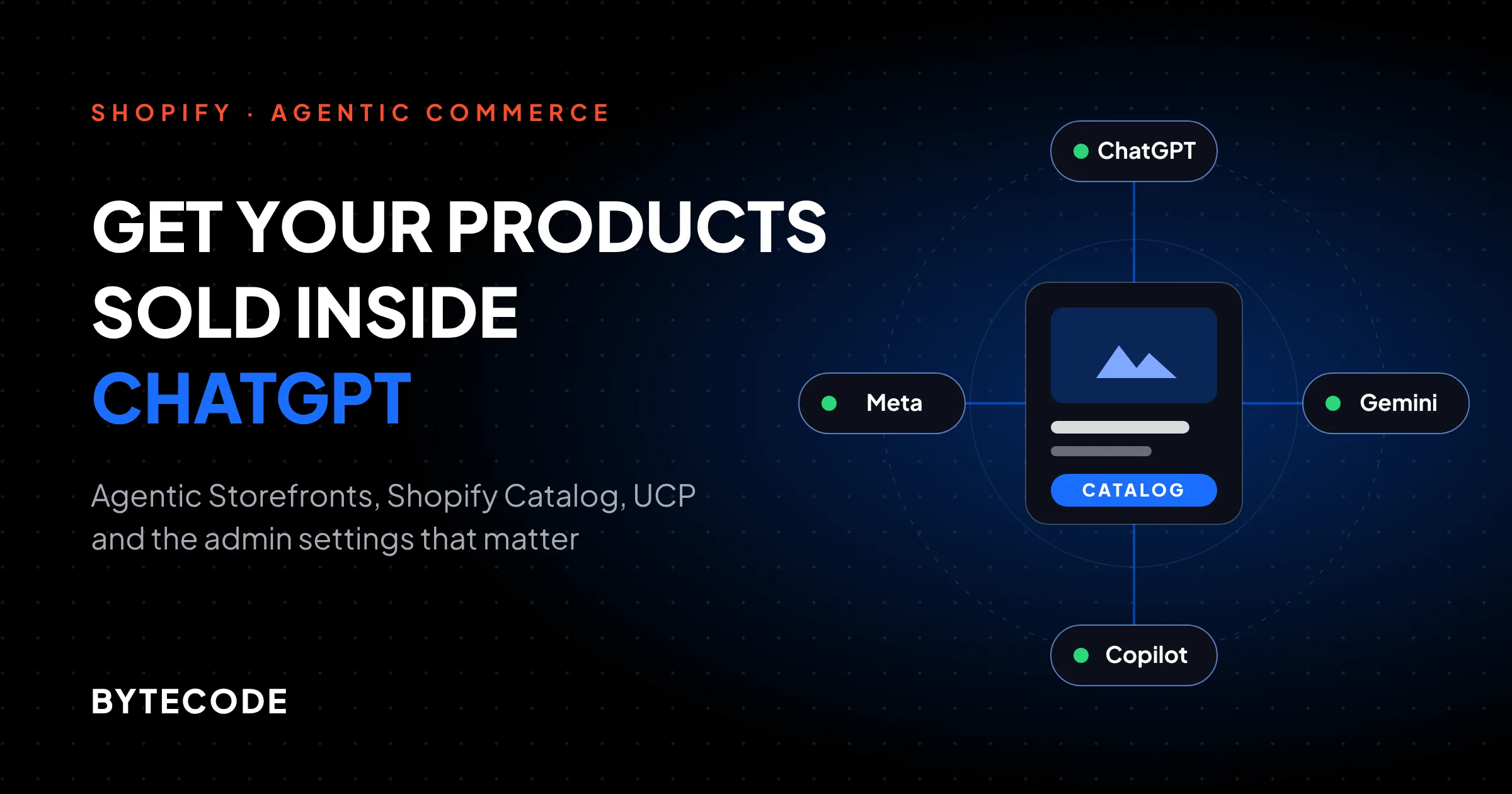
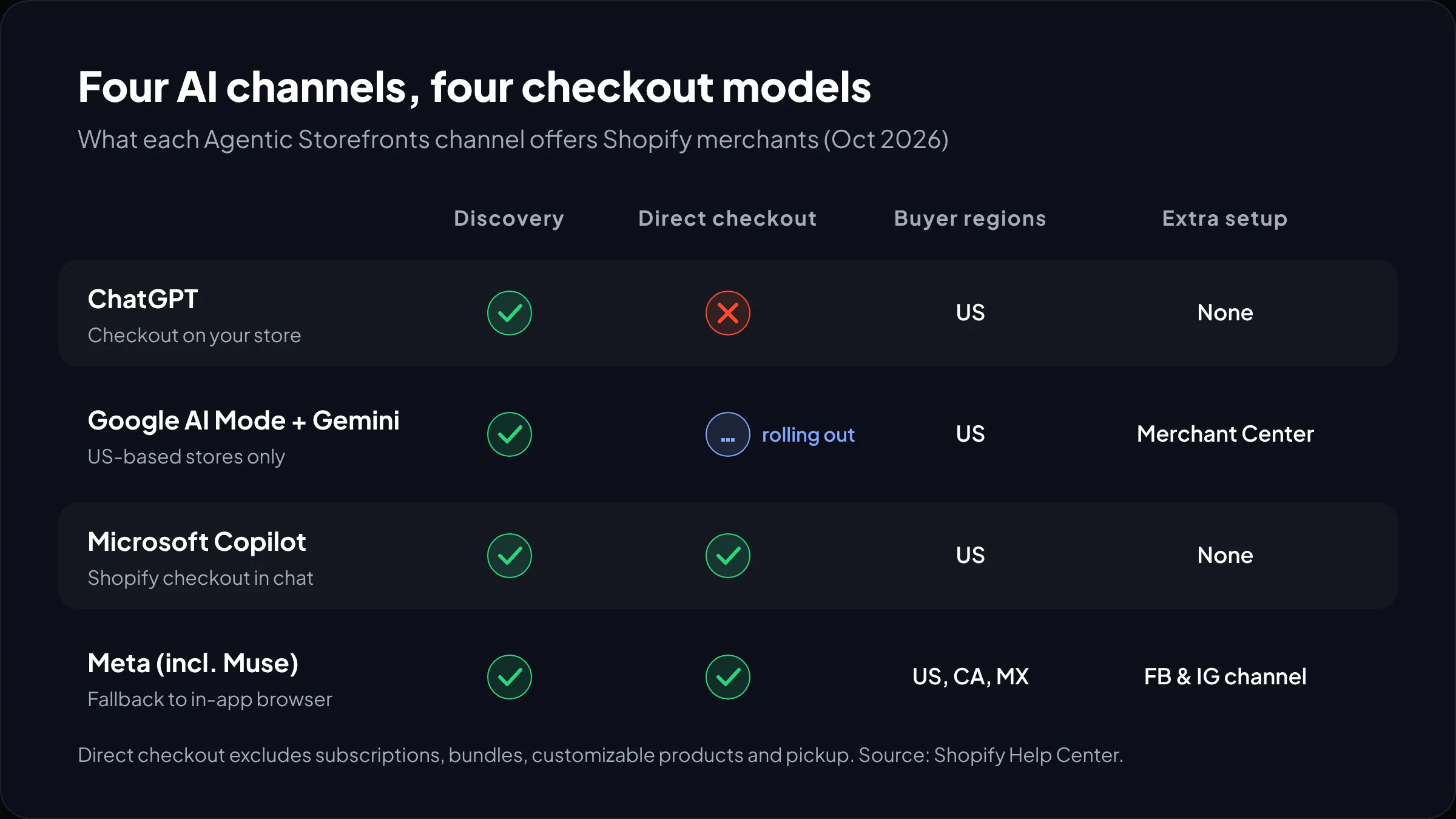
Four AI channel groups are live through Agentic Storefronts: ChatGPT, Google AI Mode and Gemini, Microsoft Copilot, and Meta surfaces such as its Muse agent, plus Shopify’s own Shop app. Each handles checkout differently.
| Channel | How the buyer pays | Buyer regions | Extra requirement |
|---|---|---|---|
| ChatGPT | On your online store checkout, opened in ChatGPT’s in-app browser or a new tab on desktop. No direct checkout option. | US | None beyond Catalog eligibility and completed policies |
| Google AI Mode and Gemini | Direct checkout inside the chat, powered by UCP (still rolling out), or redirect to your store | Direct checkout for US buyers; store must also be US-based | Google Merchant Center account, products synced through the Google & YouTube channel or a feed |
| Microsoft Copilot | Direct checkout inside Copilot, or redirect | US | None beyond Catalog eligibility and completed policies |
| Meta (including Muse) | Direct checkout on Meta surfaces, with fallback to your checkout in an in-app browser | US, Canada, Mexico | Facebook and Instagram channel with product sync for shoppable ads |
The Google, Copilot and Meta rows come from the channel pages in Shopify’s Help Center, for example the Google AI Mode and Gemini requirements. Every channel page asks for the same housekeeping: your Terms of service, Privacy policy and Return and refund policy must be filled in at Settings > Policies, and you must accept the Agentic Storefronts supplemental terms.
Note the Google row: it is the only channel that requires the store itself to be US-based. A UK or Indian entity shipping to the US can use ChatGPT, Copilot and Meta, but not Google, for now.
How to sell on ChatGPT with Shopify
To sell on ChatGPT with Shopify you need buyers in the US, products eligible for Shopify Catalog, and completed store policies. If those are true, the channel is already on. Confirm it in ten minutes:
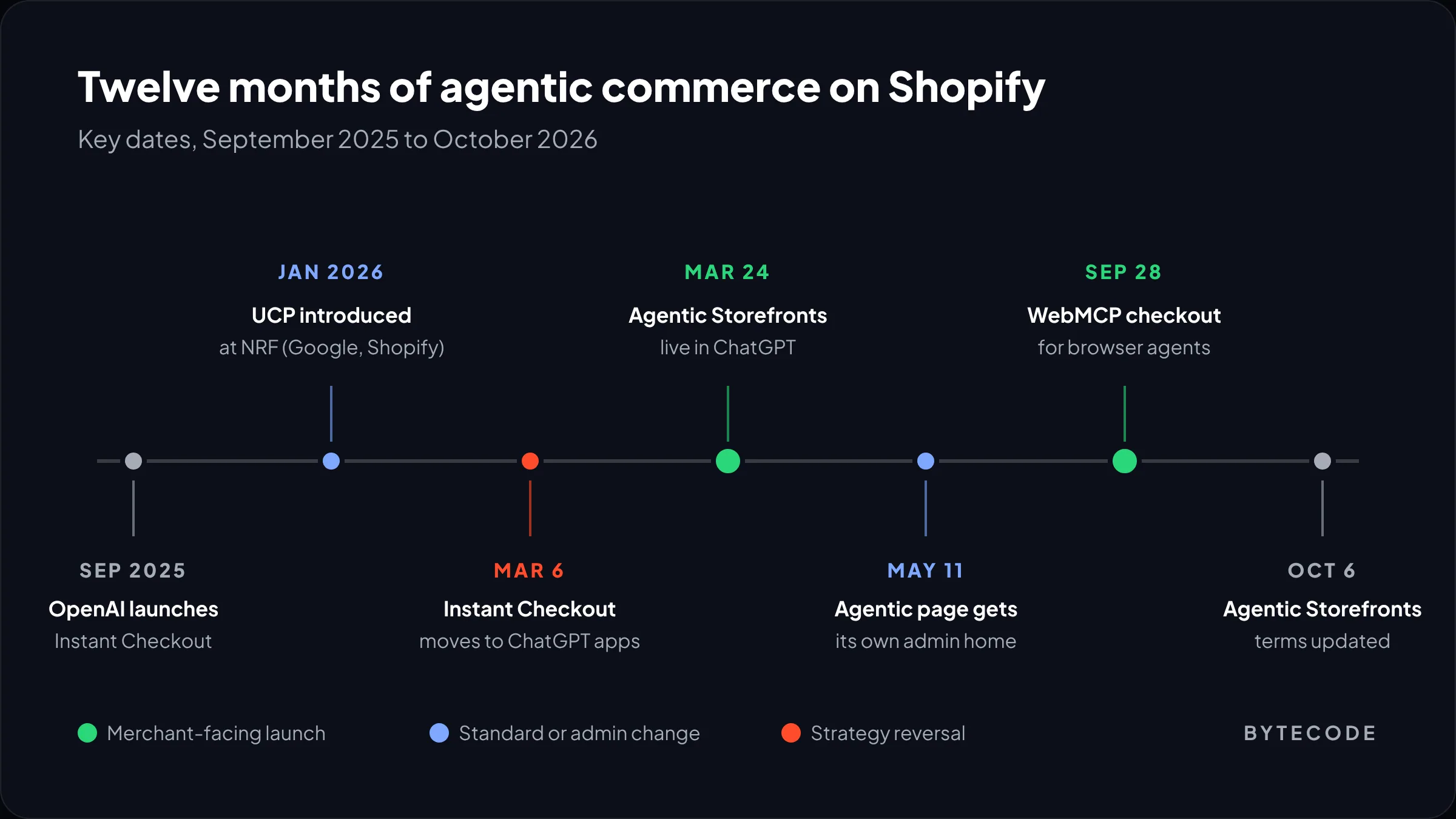
- Go to Sales channels > Agentic in your admin. Shopify gave this its own page on May 11, 2026, at admin.shopify.com/agentic.
- Under Sources > Shopify Catalog, check the product count. If you see Ineligible instead, click it for the reason.
- Open Settings > Policies and make sure all three required policies are filled in, in plain language an agent can quote.
- Back on the Agentic page, type your best-selling product name into the search field and use Preview this search to see how it might display in each channel.
- Check recent orders for ChatGPT as referrer, over 90 days rather than 30.
Why no direct checkout? OpenAI launched Instant Checkout in September 2025, with Shopify and Etsy among the first partners, then pulled back. An OpenAI spokesperson told Digital Commerce 360 in March 2026 that Instant Checkout “is moving to Apps.” The Agentic Commerce Protocol (ACP), built by OpenAI and Stripe, continues as the plumbing. For Shopify merchants the result is good: ChatGPT buyers use your own checkout, branding and post-purchase flows.
From our team: ChatGPT traffic converts on your own mobile product page. On most stores we audit, the in-app browser exposes the same problems as Instagram traffic: heavy app scripts and pop-ups covering add-to-cart. Test your top products inside the ChatGPT mobile app.
Shopify agentic storefronts: the settings that matter
Shopify agentic storefronts has four controls, all managed by Shopify by default. The Help Center page on managing agentic storefronts explains each one.
- Allow Shopify to manage for me (on by default). Channels, direct checkout and future storefronts all stay on. Turn it off to manage the rest yourself.
- Shopify Catalog access. Allow some channels and block others. Removing access can take up to 7 days, and products can still be found through ordinary web crawling.
- Auto enroll new storefronts. Keep your current channels but stop being added to new ones without review.
- Direct checkout, per channel, for Google AI Mode and Gemini, Copilot and Meta. Off means the agent sends buyers to your store.
To hide individual products from every agentic storefront, including Shop, set them to Unlisted or use the seo.hidden metafield. Be careful: Unlisted also removes the product from your sitemap, Google and your own store search.
Should you leave direct checkout on?
Direct checkout removes a step for the buyer and parts of your checkout. Shopify Functions and discount codes still run, but the Help Center lists what does not. Here is how we decide:
| Your situation | Our default | Why |
|---|---|---|
| Simple physical products, one-off purchases, card payments | Leave direct checkout on | Fewer steps for the buyer, and the order still lands in your admin |
| Subscriptions or bundles are your main offer | Turn it off, or accept one-off sales only | Subscriptions and bundles are not supported in direct checkout |
| Customizable products, local delivery or pickup | Turn it off | None of these are supported |
| You rely on checkout upsells or custom fields | Test both, compare AOV | Many checkout blocks and app blocks do not display |
| Paid media optimization depends on client-side pixels | Turn it off until server-side tracking is in place | Google Analytics and custom pixels do not fire; only server-to-server started and completed events are sent |
Watch out: the help pages confirm no added fees for direct checkout today. But the Agentic Storefronts supplemental terms (updated October 6, 2026) let Shopify charge fees on certain channels, shown in your admin, and a channel disabled after a promotional period loses that promotion. Check before toggling channels off and on.
Shopify Catalog AI: what gets a product in, and what gets it picked
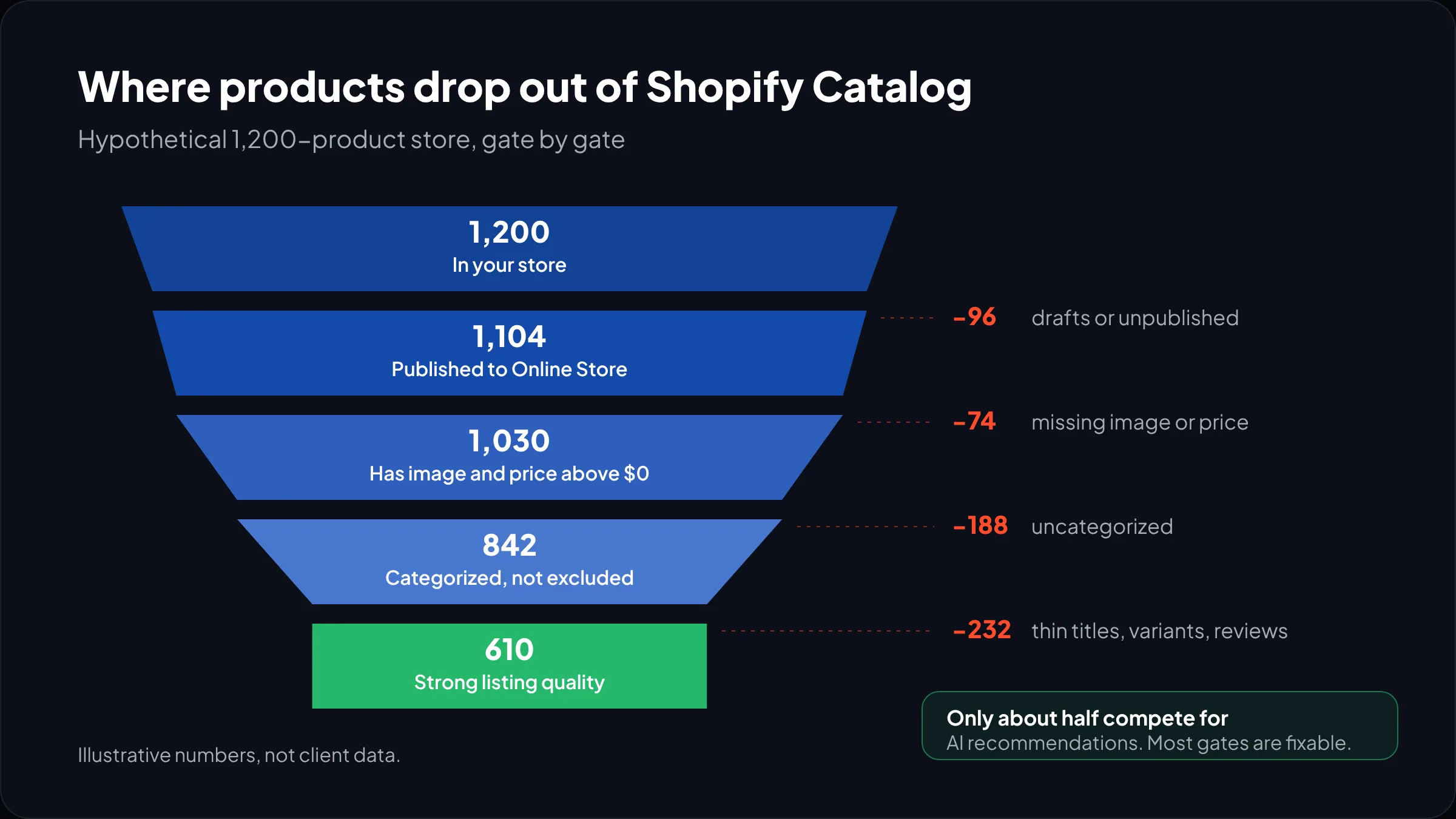
Shopify Catalog includes a product automatically if your store and the product meet its requirements, and you cannot opt out of Catalog itself. But inclusion is not recommendation; each channel ranks with its own logic. So there are two jobs: pass the eligibility gate, then make the listing good enough to win.
Gate 1: store and product eligibility
Per the Catalog requirements page, at store level you need the Starter plan or higher, no storefront password, no B2B-only mode, no development mode, a verified account with two-step authentication, and a clean history of genuine sales, prompt fulfillment and low chargebacks. At product level:
- A title and at least one product image
- A price greater than zero
- Published to the Online Store, Hydrogen or Headless channel
- An identifiable product URL, not Unlisted and not hidden from search engines
- No sensitive content, and not in an excluded category
Excluded categories catch people out: alcohol, tobacco and vaping, CBD, prescription and medical products, weapons including airsoft and toy weapons, fireworks, hazardous materials, adult and sexual wellness products, bullion, event tickets, live animals, services such as warranties, and uncategorized products. That last one is the cheapest win in this guide. Filter your products by empty category and fix them.
Gate 2: listing quality
Once a product is in, the Agentic page grades it. Its listing insights cover description completeness, image coverage, verified product reviews, variant and option completeness, and shop policy completeness. Products that did not rank show up under Improve your listing. Shopify’s explainer names the ranking factors as data quality, relevance, availability, pricing and engagement signals.
If your title, description or category live in metafields, metaobjects or tag prefixes, use Shopify Catalog Mapping so the agents read the right source. You reach it from the Agentic page: click the Catalog product count, then Review product data mapping. The same screen lets you group variants into one listing and choose whether compare-at prices are shared. We cover the data model side in our guide to Shopify metafields.
Worked example: rewriting one listing
A clearly hypothetical product: a bag brand lists “The Voyager” with a two-line lifestyle description, one image, variants named “Option 1” and “Option 2”, and no category. A shopper asks ChatGPT for “a waterproof carry-on backpack that fits a 16-inch laptop, under $150.” The product is not even in Catalog, because it is uncategorized. What we would change:
- Category: set to Luggage & Bags > Backpacks in the standard taxonomy.
- Title: “Voyager 28L Waterproof Travel Backpack, Fits 16-inch Laptop”, with filterable facts up front.
- Variants: rename to real colors (“Black”, “Olive”) so option completeness passes.
- Description: lead with dimensions, capacity, material, waterproof rating and laptop sleeve size. Keep legal disclosures in the first 6,000 characters, as the channel pages require.
- Images: add an open-compartment shot and a laptop-in-sleeve shot, not just lifestyle.
- Reviews: make sure your reviews app outputs verified reviews, a listing insight.
None of this is new SEO advice. But a human skims past a vague title, while an agent filtering on “16-inch” never sees you. More on how AI assistants choose sources in our piece on generative engine optimization.
Not sure how many of your products actually make it into Shopify Catalog?
We will audit your Agentic page, your ineligible products and your top listings, and send back a prioritized fix list.
The files agents read on your domain
Every Shopify store serves /agents.md, /llms.txt and /llms-full.txt by default. Per the Help Center page on Catalog and product discovery, you can customize them through Online Store > Themes > Edit code > Add a new template. Blocking crawlers in robots.txt.liquid affects only open-web crawling, not Catalog. Shopify’s free checker at shopify.com/agentic-readiness scans a product URL for structured data and robots.txt access.
Universal Commerce Protocol, ACP, MCP and WebMCP explained
The Universal Commerce Protocol is an Apache 2.0 open standard that Google introduced at NRF in January 2026 with Shopify as co-developer. It covers discovery, cart, checkout, payment and post-purchase, and runs over REST, MCP or A2A, as The New Stack reported at launch. Backers named by Shopify include Amazon, Mastercard, Meta, Microsoft, Stripe, Walmart and Visa. When a new AI platform adopts UCP, Shopify stores can sell there without a new integration.
| Layer | Who is behind it | What it does | Who needs to care |
|---|---|---|---|
| Universal Commerce Protocol (UCP) | Google and Shopify, with retail and payments partners | Common language for catalog, cart, checkout and orders across agents and platforms | Developers building agents or custom checkouts; merchants only indirectly |
| Agentic Commerce Protocol (ACP) | OpenAI and Stripe | Connects ChatGPT to merchants; now focused on discovery and app-based purchases | Brands building their own ChatGPT app |
| Shopify’s hosted MCP servers | Shopify | Server-to-server tools for agents to search catalogs, build carts and check out | Teams building their own shopping assistant |
| WebMCP | Proposed web standard; Shopify support live | Lets an agent running in the buyer’s browser use structured tools instead of scraping the page | Everyone, passively: it is rolling out to eligible stores |
WebMCP checkout for browser agents
On September 28, 2026, Shopify extended its WebMCP support from storefronts and carts to checkout, including Shop Pay, for all eligible merchants. TechCrunch reported that three tools were added, get_checkout, update_checkout and complete_checkout, so an agent in the buyer’s browser can read the checkout, change the address or delivery option, and place the order once the buyer authorizes it. No screenshots or scraping.
This covers agents Shopify has no partnership with: a browser agent on your store follows a structured path instead of guessing which button is “Pay.” The same report notes Amazon is reportedly blocking shopping agents; Shopify has gone the other way. Shopify had not defined “eligible” for this rollout when we checked, so treat it as rolling.
If you want to build your own agent on top of these servers, our explainer on Model Context Protocol covers the basics, and our Shopify AI and intelligence team builds custom shopping assistants on Shopify’s MCP tools.
The Agentic plan, for brands not on Shopify
The Agentic plan lets a business that runs ecommerce on another platform, such as SAP or a custom ERP, put its products into Shopify Catalog and sell through the same AI channels without replatforming. Shopify announced it as publicly available and rolled out globally in its March 24, 2026 update, the same week Agentic Storefronts went live for ChatGPT.
Per Shopify’s explainer, there is no monthly subscription: you pay standard payment rates on Shopify Checkout-powered channels, and ChatGPT sales run through your existing processor. Plan for two details: each product needs an external product URL to your existing store, and direct checkout is off by default, so you opt in per channel.
How to measure AI channel sales
The Agentic page shows sales, orders, sessions and conversion per AI channel. For a combined report, go to Explore > Understand your performance on agentic channels > Review. Analytics are not available for headless stores.
For the first 90 days we track AI-attributed revenue by channel, Catalog and ineligible product counts week by week, and the Top search queries list, which is the best free keyword research for this channel.
When agentic commerce is not worth your time yet
For some stores the honest answer is to fix the basics and wait: if most of your catalog is in an excluded category, if you do not sell to US buyers, or if revenue depends on subscriptions or configurators that direct checkout does not support.
What we would not do is buy an app that promises “ChatGPT ranking.” Shopify syndicates the data itself, and no third party controls how OpenAI or Google rank it. Do the Catalog work because it also fixes your Google Shopping feed, and the AI channels come along.
Frequently asked questions
Can I sell my Shopify products on ChatGPT?
Yes, if you sell to customers in the US, your products are eligible for Shopify Catalog and your store policies are complete. Agentic Storefronts makes eligible products discoverable in ChatGPT by default, with no app needed. Buyers check out on your own store inside ChatGPT’s in-app browser, and you only pay your standard payment processing fees.
How do I turn on Shopify Agentic Storefronts?
You usually do not need to, because it is active by default for eligible stores. Go to Sales channels > Agentic in your Shopify admin to check your Catalog product count and channel status. If it shows Ineligible, click it for the reason. To change settings per channel, first turn off “Allow Shopify to manage for me.”
What is the Universal Commerce Protocol?
The Universal Commerce Protocol (UCP) is an open standard for agentic commerce that Google introduced in January 2026, co-developed with Shopify. It gives AI agents and merchants a shared way to handle product discovery, carts, checkout, payment and orders. Shopify uses it to power direct checkout in channels such as Google AI Mode, Gemini and Copilot.
Does Shopify charge extra fees for selling in AI channels?
Not today, according to Shopify. ChatGPT, Google, Copilot and Meta sales carry only your standard payment processing fees. However, the Agentic Storefronts terms allow Shopify to charge fees on certain channels in future, shown in your admin, so check each channel page there before changing settings.
Why are my products not showing in Shopify Catalog?
The most common reasons are a missing product category, no product image, a price of zero, a product not published to the Online Store channel, or a store with a password or in development mode. Products in excluded categories, such as alcohol or CBD, are also left out. Check Sales channels > Agentic > Sources > Shopify Catalog for the reason.
Can I stop AI agents from selling my products?
Yes, partly. On the Agentic page you can turn off Shopify Catalog access for all or some third-party channels, which takes up to 7 days, or set individual products to Unlisted. You cannot opt out of Shopify Catalog itself, and AI tools can still find your public pages through normal web crawling.
What we’d do first
Open Sales channels > Agentic today and write down two numbers: products in Catalog and products in your store. The gap is your to-do list. Fix uncategorized products first, then missing images and unpublished items, then complete your three store policies.
Next, rewrite your top 20 sellers like the backpack. Then decide per channel whether direct checkout fits your offer, and set up server-side tracking before relying on AI channel data.
That is a week of work for most stores. We have built for brands like Delsey, EcoFlow and Kerbholz, and we now run this agentic commerce Shopify audit as part of our Shopify intelligence solutions.