On this page
- Shopify vs WooCommerce: the short answer
- Hosted vs self-hosted: who runs what
- WooCommerce vs Shopify cost over three years
- Upkeep, updates and security
- Customization and flexibility
- Shopify or WordPress for SEO and content?
- AI shopping and agentic commerce
- When WooCommerce is the right call, and when it isn’t
- Switching later: what a migration involves
- Frequently asked questions
- What we’d do first
Most Shopify vs WooCommerce articles end with “it depends.” That is true, and it doesn’t help you decide. So here is our answer up front: in 2026, if you sell physical products and don’t already have a WordPress developer on staff, build on Shopify. If your business runs on content, needs checkout or catalog logic that Shopify won’t allow, or sells in a category Shopify’s payment terms restrict, WooCommerce is still the better tool.
We build on both, and we migrate stores in both directions, so we see what each platform costs and where it breaks. Below we compare them on the things that decide a build: who runs which part of the stack, a sourced 3-year cost model, payment fees, upkeep, customization limits, SEO, and the new AI shopping channels. That last one has changed the Shopify vs WooCommerce question more than anything else this year.
Key takeaways
- Shopify is a hosted platform: Shopify runs the servers, security and checkout. WooCommerce is a free plugin, so the hosting, updates and security are yours.
- Platform fees are the small line on both. In our worked example, card processing and maintenance hours outweigh the Shopify plan or the WooCommerce hosting bill many times over.
- Maintenance is where WooCommerce gets expensive. WooCommerce shipped feature releases in August, September and October 2026, and every one needs testing against your plugins.
- Shopify’s 2026 AI channel work (ChatGPT, Microsoft Copilot, Google’s Gemini) has no first-party WooCommerce equivalent yet.
- WooCommerce still wins for content-led brands, unusual product logic, restricted categories, and teams that already run WordPress well.
Shopify vs WooCommerce: the short answer
Choose Shopify if you want to spend your budget on selling rather than on running servers. Choose WooCommerce if you need full control of the code and data and have the people to look after it. Everything else in the Shopify vs WooCommerce comparison is detail under those two sentences.
Here is how the two compare on the points our clients actually ask about:
| Factor | Shopify | WooCommerce | Edge |
|---|---|---|---|
| Software price | $29 to $299/mo on annual billing; Plus from $2,300/mo | Free plugin; you pay for hosting, theme and extensions | WooCommerce |
| Hosting and security | Included and managed by Shopify | Your host and your team | Shopify |
| Card fees (US, domestic) | 2.25% to 2.9% + 30¢ depending on plan | 2.9% + 30¢ with WooPayments | Shopify above Basic |
| Code access | Themes, apps and Functions inside Shopify’s limits | Full PHP and database access | WooCommerce |
| Upkeep | Shopify updates the platform; you update apps and theme | Core, plugins, theme, PHP and server all need updating | Shopify |
| Content and blogging | Basic blog | WordPress, the strongest CMS for content | WooCommerce |
| AI shopping channels | Built-in Agentic Storefronts | Third-party plugins only | Shopify |
Is one of them simply the best ecommerce platform in 2026? No. For the typical brand we talk to (physical products, $250k to $10M in annual sales, a small team), Shopify is the safer default. But “default” is not the same as “right for you,” and the sections below show where the default fails.
Hosted vs self-hosted: who runs what
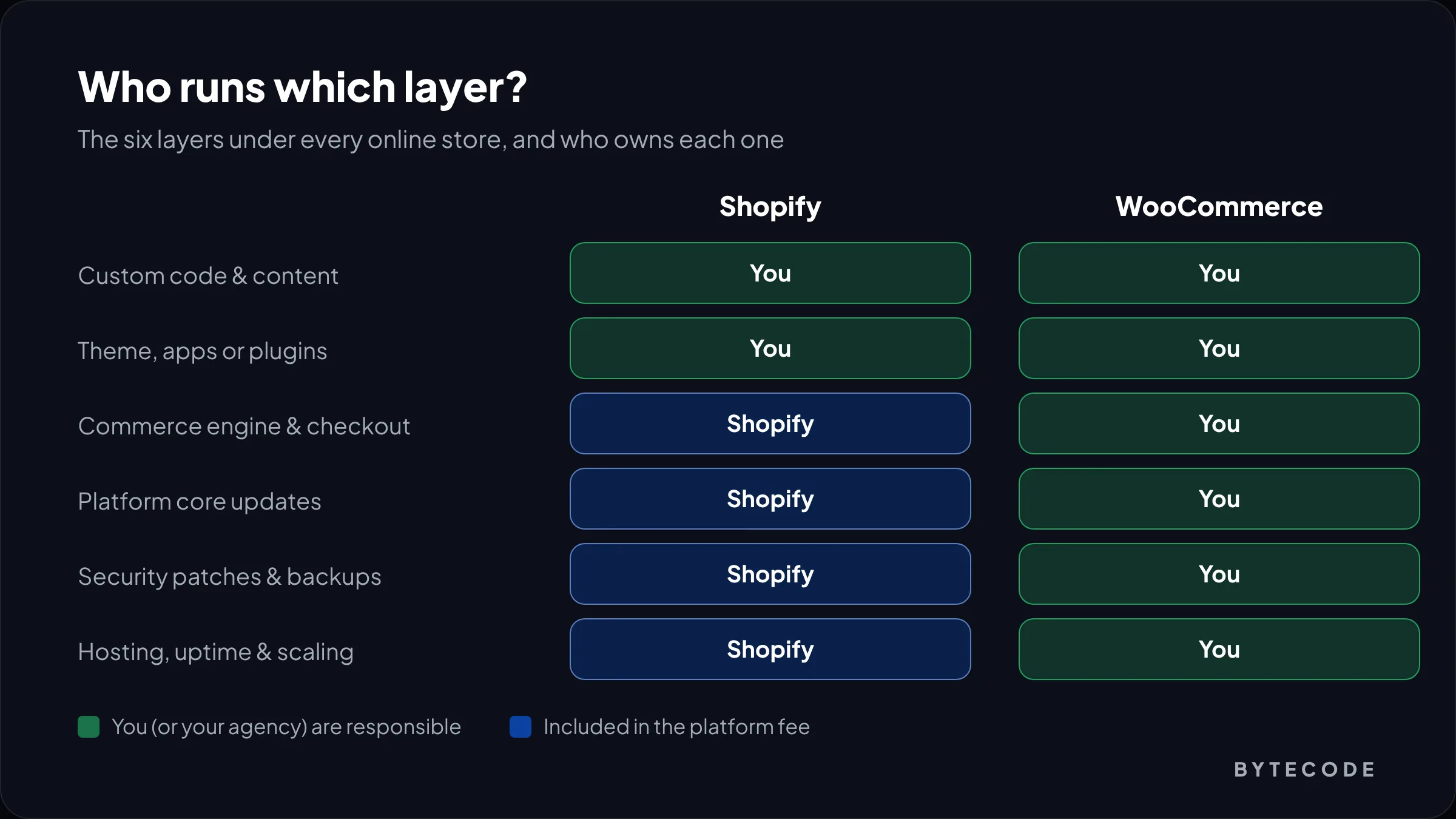
The real difference is not features. It is responsibility. Shopify is software you rent: Shopify runs the hosting, the checkout, security and platform updates. WooCommerce is open-source software you own and operate: it turns a WordPress site into a store, and everything under it is your job.
WooCommerce is a big project. The WordPress.org plugin page shows more than 7 million active installations, current version 11.2.1, and a requirement of WordPress 7.0 or higher. That popularity is real, but so is the stack it sits on:
- Server and hosting: PHP version, database, caching, backups, uptime and scaling for traffic peaks.
- WordPress core: updates to WordPress itself, which WooCommerce depends on.
- WooCommerce core: the plugin, updated on a roughly monthly cycle.
- Extensions and theme: payments, subscriptions, shipping, search, security, each from a different vendor with its own update schedule.
- Your custom code: anything your developers wrote, which must keep working through all of the above.
On Shopify, the first three layers simply aren’t yours. You still own your theme, your apps and any custom code. That is the trade: less control, much less to break.
From our team: when a WooCommerce store comes to us with a problem, it is rarely WooCommerce itself. It is usually a plugin conflict after an update, a host that can’t handle a sale, or a PHP version nobody has touched in years.
WooCommerce vs Shopify cost over three years
Over three years, a mid-sized store usually pays more for WooCommerce than for Shopify, even though WooCommerce is free. The software price is not what drives total cost. Card processing and developer hours do, and WooCommerce needs more hours.
Platform and hosting fees
Shopify’s plans cost $29, $79 or $299 a month on annual billing (Basic, Grow, Advanced), or $39, $105 and $399 billed monthly, per Shopify’s pricing page. Plus starts at $2,300 a month. We break down build budgets, Plus and agency rates in our Shopify development cost guide, so we won’t repeat that here.
WooCommerce has no licence fee, but it needs good hosting. Managed WordPress hosting from Kinsta, as one example, runs $42 a month on annual billing for a single site with 65,000 monthly visits, or $75 a month for 125,000 visits, per Kinsta’s pricing page.
Payment and transaction fees
Card fees are the biggest platform-related cost on both. Shopify Payments charges 2.9% + 30¢ online on Basic, 2.7% on Grow, 2.5% on Advanced and 2.25% on Plus, all plus 30¢, with 1% extra on international cards. If you use an outside gateway instead, Shopify adds its own transaction fee: 2% on Basic, 1% on Grow, 0.6% on Advanced and 0.2% on Plus. Both sets of numbers are on the same pricing page.
WooPayments, WooCommerce’s own gateway, has no monthly fee. In the US it charges 2.9% + 30¢ for domestic cards, plus 1.5% for international cards and 1% for currency conversion, according to eSEOspace’s October 2026 WooPayments breakdown. WooCommerce adds no platform fee of its own, so you are free to use Stripe, PayPal or any other gateway at their rates.
Watch out: the Shopify third-party transaction fee is the one that surprises people. If you plan to keep an existing gateway contract on Shopify, add 0.6% to 2% of revenue to your model. On $1M a year, that is $6,000 to $20,000.
Worked example: three years, one store, two platforms
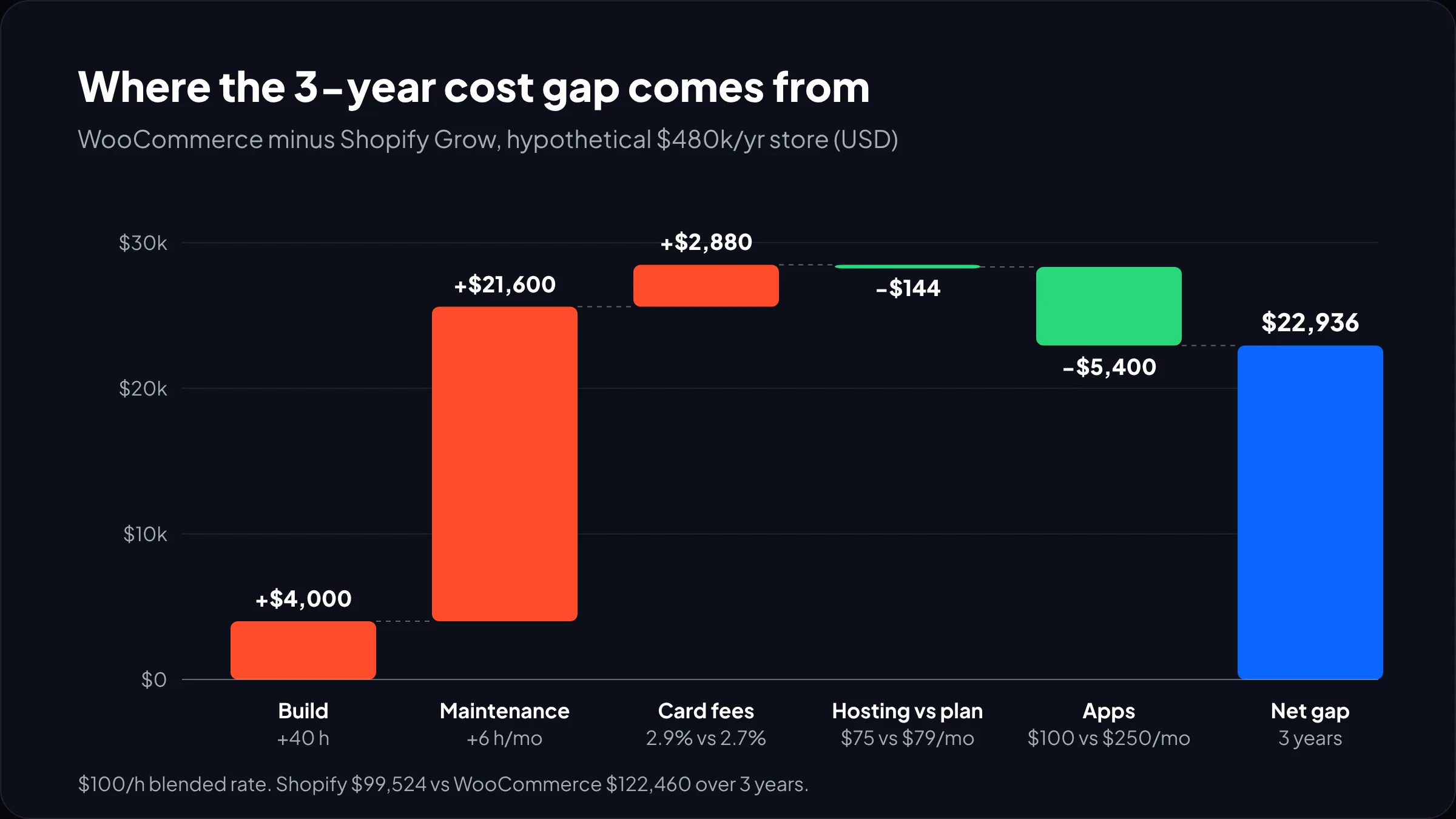
This is a clearly hypothetical model. Say you sell skincare in the US: about 400 products, $480,000 a year in online sales at a $60 average order (8,000 orders), mostly domestic cards. We use a blended rate of $100 an hour and our own planning assumptions for hours:
- Build: 200 hours on Shopify, 240 on WooCommerce. The extra 40 cover hosting setup, caching, staging, security hardening and checkout configuration.
- Maintenance: 6 hours a month on Shopify, 12 on WooCommerce, mostly testing core, plugin and PHP updates on staging before they go live.
- Apps and extensions: $250 a month on Shopify, $100 a month on WooCommerce, because many WooCommerce extensions are annual licences rather than monthly subscriptions.
| Line item | Basis | Shopify (Grow) | WooCommerce |
|---|---|---|---|
| Build (year 1 only) | 200 h / 240 h at $100 | $20,000 | $24,000 |
| Plan or hosting | Grow $79/mo / Kinsta $75/mo, annual billing | $948/yr | $900/yr |
| Card processing | 2.7% + 30¢ / 2.9% + 30¢ on $480k, 8,000 orders | $15,360/yr | $16,320/yr |
| Apps or extensions | $250/mo / $100/mo allowance | $3,000/yr | $1,200/yr |
| Maintenance | 6 h/mo / 12 h/mo at $100 | $7,200/yr | $14,400/yr |
| Year one | $46,508 | $56,820 | |
| Three-year total | Year one + 2 years of running costs | $99,524 | $122,460 |
WooCommerce comes out $22,936 more expensive over three years, and almost all of the gap ($21,600) is maintenance hours. The software price difference barely registers. WooCommerce actually wins on hosting versus the plan fee and on apps.
Now flip one assumption. If you already employ a WordPress developer whose time is paid for anyway, take maintenance out of both columns. And if content is the real product, read headless CMS vs WordPress before you commit to either. The three-year totals become $77,924 on Shopify and $79,260 on WooCommerce: almost a tie. That is the honest version of this comparison. WooCommerce is cheap when the people are already there, and expensive when you hire them.
Upkeep, updates and security
Shopify needs less upkeep because the platform updates itself. WooCommerce needs a regular update routine, and skipping it is where most security and stability problems start.
The release pace is steady. The WooCommerce developer blog lists feature releases 11.0 on August 4, 11.1 in early September and 11.2 on October 7, 2026, plus several dot releases for fixes and security. Each one is a reason to test your store on staging before you press update.
PHP is the other moving part. WooCommerce has announced that version 11.6, planned for February 2027, will require PHP 8.1 or newer, because PHP 7.4 and 8.0 no longer get upstream security support. In the same announcement, the team says about 7% of tracked stores still run PHP 7.4 and about 2% run PHP 8.0. Those stores now have a fixed deadline for a server upgrade, and probably some plugin fixes with it.
On Shopify, platform changes still create work, but on Shopify’s schedule and with long notice. Our own maintenance checklist looks quite different on each platform:
- Both: review apps or plugins quarterly and remove unused ones; test checkout after every change; watch Core Web Vitals.
- WooCommerce only: keep a staging copy; update WordPress core, WooCommerce, theme and plugins there first; check PHP version and host support; confirm off-site backups work by restoring one.
- Shopify only: track platform deprecations and app updates; keep theme customizations in separate sections so theme updates stay possible.
Customization and flexibility
WooCommerce is more flexible, full stop. You have the PHP source, the database and every hook, so almost any product, pricing or checkout behaviour is possible if you pay someone to build it. Shopify gives you less raw access but a stable, well-documented set of ways to extend it.
Shopify’s limits are real and you should check them against your catalog early. A product can have up to 2,048 variants and up to three options, per Shopify’s Help Center. Most stores never get close. A store selling configurable furniture or made-to-measure parts can hit the three-option limit in its first product. On Shopify that means metafields, a product configurator app or custom app work. On WooCommerce it is often just a plugin or some custom code.
Where WooCommerce flexibility pays off
- Complex product configurators and pricing rules tied to your own data
- Booking, membership or marketplace models built into WordPress
- Products in categories that mainstream payment providers restrict
- Strict data-residency needs, where you must choose the server’s country
Where Shopify’s guardrails help
- Checkout: Shopify’s checkout is fast and maintained for you, and changes go through checkout extensions rather than edited core files
- Discount and shipping logic through Shopify Functions, which survive platform updates
- A large app ecosystem where most common needs are a one-click install
Not sure which platform fits your catalog?
Send us your product types, integrations and sales volume, and we will tell you which platform we would build on and what it would cost to run for three years.
Shopify or WordPress for SEO and content?
For content-heavy SEO, WordPress (and so WooCommerce) is stronger. For product-page SEO on a typical catalog, both platforms do the job well, and your content and site speed matter far more than the platform.
The difference shows up in the details. WordPress gives you full control of URL structure, a mature editor, custom post types and the best SEO plugins in the business. Shopify fixes some paths (products live under /products/ and collections under /collections/) and its blog is basic. If your plan is hundreds of long guides, recipes or learning content feeding a store, that matters.
For most product-led brands, it doesn’t. Shopify handles sitemaps, canonical tags and clean product markup by default, and a fast Shopify theme beats a slow WooCommerce install on every search measure that counts. We cover the Shopify side in our Shopify SEO guide. If you are asking “Shopify or WordPress?” mainly for SEO, ask instead: how much content will we really publish, and who will maintain the site it lives on?
AI shopping and agentic commerce
Shopify is clearly ahead here. On January 11, 2026, Shopify announced Agentic Storefronts and the Universal Commerce Protocol, an open standard it co-developed with Google that lets AI agents find products and complete purchases with merchants.
In practice, Shopify merchants set up product data once and manage AI channels from the Shopify admin. The announcement names ChatGPT, Copilot Checkout inside Microsoft Copilot, and native shopping coming to the Gemini app and AI Mode in Google Search. It also introduced an Agentic plan that lets brands not using Shopify for their online store list products in Shopify Catalog. In theory, a WooCommerce brand could use that to reach the same channels, but it means running product data through Shopify anyway.
WooCommerce’s own release notes from 11.0 to 11.2 don’t mention agentic checkout. Third-party plugins on WordPress.org offer AI checkout integrations, but there is no first-party equivalent. If selling inside AI assistants is part of your 2027 plan, this alone can decide the Shopify vs WooCommerce question. We explain the setup in our guide to agentic commerce on Shopify.
From our team: whichever platform you pick, clean product data is what AI channels read. Complete titles, GTINs, attributes and accurate stock matter more than any plugin. Fix the catalog first.
When WooCommerce is the right call, and when it isn’t
Pick WooCommerce when control, content or cost of existing people outweigh the cost of running the stack. Pick Shopify when you’d rather pay a monthly fee than own servers and update cycles. We use four questions to decide:
- Is there a content engine already on WordPress? If the site already earns most of its traffic from articles, adding WooCommerce often beats moving everything.
- Does your product or checkout logic break Shopify’s limits? Check variant and option limits, pricing rules and restricted categories against the platform docs.
- Who will maintain it? If the answer is “we’ll hire someone when something breaks,” choose Shopify.
- Do AI shopping channels matter in the next 12 months? If yes, Shopify has the shorter path.
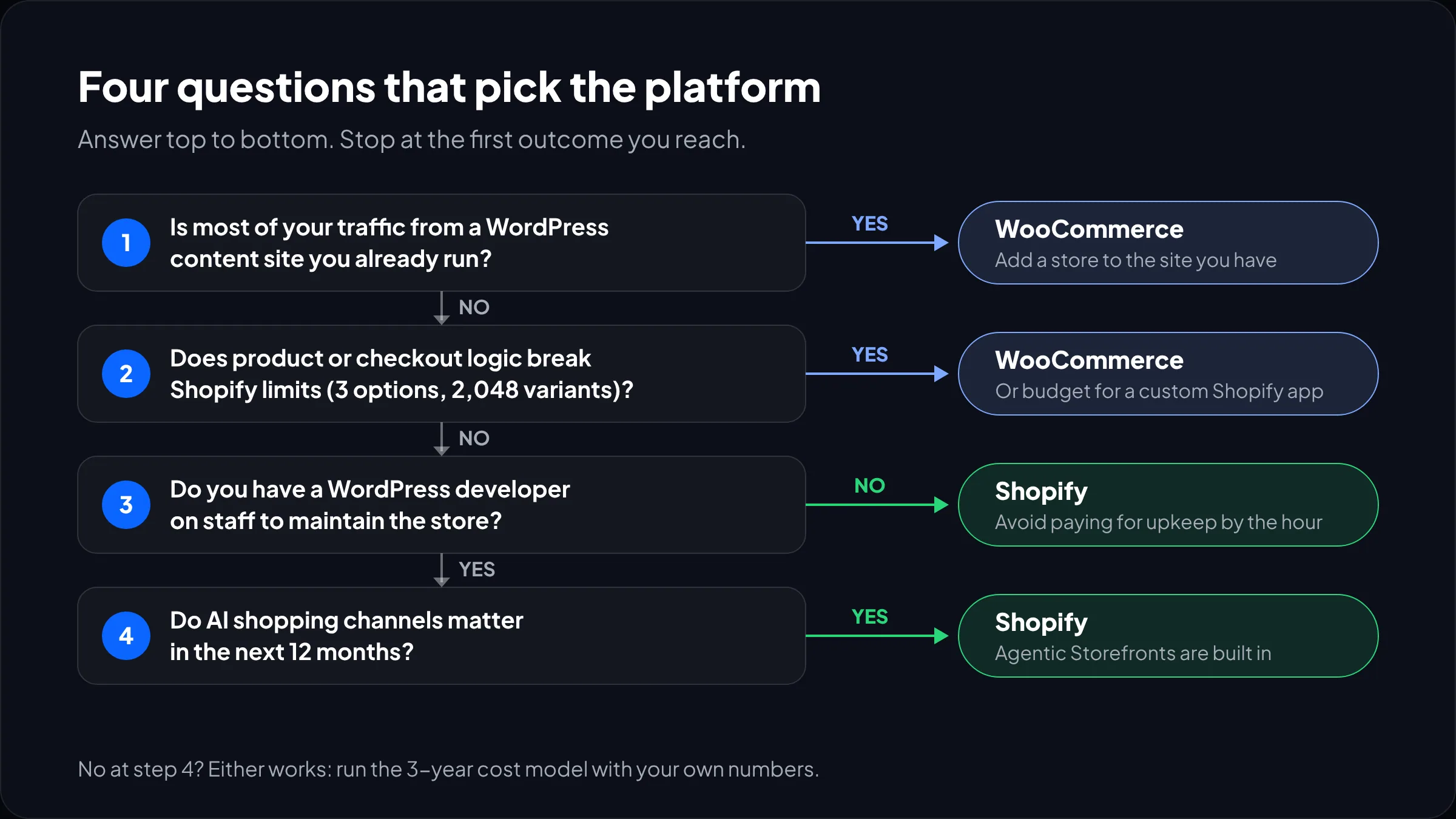
We steer fast-scaling brands with no developer away from WooCommerce. We steer publishers whose store is a side line away from Shopify.
Switching later: what a migration involves
You can move between the two, and the most common direction we see is WooCommerce to Shopify, usually when maintenance or peak-traffic problems start to cost more than the move. A migration moves products, customers and orders, rebuilds the theme, and maps every old URL to a new one with 301 redirects so search traffic carries over.
The redirect map is the part that protects your revenue. WooCommerce URLs like /product/blue-serum/ become /products/blue-serum on Shopify, and every one needs a redirect. Order history and customer accounts also need a plan, since customers usually have to activate new Shopify accounts. Our Shopify store migration service handles all of this, and the full process is in our WooCommerce to Shopify migration checklist.
Watch out: don’t pick a platform assuming you will switch later. A replatform is a project with its own cost and SEO risk. Choose for the next three years, not the next three months.
Frequently asked questions
Is WooCommerce cheaper than Shopify?
WooCommerce is cheaper to start, because the plugin is free and hosting can cost less than a Shopify plan. Over time it is often more expensive, because updates, security and fixes need developer hours. In our hypothetical 3-year model, WooCommerce cost about $23,000 more, almost entirely from extra maintenance. With an in-house developer already paid for, the two were nearly equal.
Is Shopify better than WooCommerce for beginners?
Yes. Shopify handles hosting, security, checkout and platform updates, so a beginner can launch without touching a server. WooCommerce asks you to choose a host, install WordPress, and keep core, plugins and PHP up to date. If no one on your team has run a WordPress site before, Shopify will be faster to launch and safer to run.
Which is better for SEO, Shopify or WooCommerce?
WooCommerce is better for content-heavy SEO because WordPress gives full control over URLs, content types and plugins. For product-led stores, both rank well, and speed, content quality and structured data matter more than the platform. Shopify fixes some URL paths like /products/, which rarely hurts rankings but frustrates some SEO teams.
Does Shopify charge transaction fees that WooCommerce doesn’t?
Yes, if you use a payment gateway other than Shopify Payments. Shopify then adds 2% on Basic, 1% on Grow, 0.6% on Advanced and 0.2% on Plus, on top of the gateway’s own fees. WooCommerce charges no platform fee, so you only pay your gateway, such as WooPayments at 2.9% + 30¢ for US domestic cards.
Can I move from WooCommerce to Shopify without losing SEO?
Yes, if you plan redirects carefully. Every old product, category and page URL needs a 301 redirect to its new Shopify URL, and titles, meta descriptions and content should move across unchanged. Most traffic loss after a migration comes from missing redirects or changed content, not from Shopify itself. Monitor Search Console closely for the first month.
Which is the best ecommerce platform in 2026 for a small business?
For most small businesses selling physical products, Shopify is the best ecommerce platform in 2026, because it is quick to launch and needs little technical upkeep. WooCommerce is a better fit if you already run a WordPress site, publish a lot of content, or have a developer who can maintain the store.
What we’d do first
Before comparing features, answer one question honestly: who will maintain this store every month for the next three years? If you have a name, and that person knows WordPress well, WooCommerce is a real option and may cost about the same as Shopify. If you don’t, the Shopify vs WooCommerce decision is mostly made for you.
Then run our three-year model with your own numbers: your sales, your average order, your card mix, and realistic maintenance hours. Card fees will be the biggest platform-related line either way, and maintenance will decide which one is cheaper.
We have built and supported stores for brands like Delsey, EcoFlow, Kerbholz and MyHarry. If you are already on WooCommerce and wondering whether to move, our WooCommerce to Shopify migration team will look at your setup and tell you honestly whether a move pays for itself.