On this page
- What Shopify SEO handles for you, and what it doesn’t
- Fix duplicate product URLs before anything else
- Filters, sorting and tag pages: what to let Google crawl
- Shopify SEO tips for titles, meta descriptions and handles
- Collection pages are where Shopify stores rank
- Structured data on Shopify: what’s there and what’s missing
- Shopify SEO for AI Overviews and AI shopping
- Worked example: how a 400-product store wastes crawl budget
- Speed, content and links: the rest of Shopify SEO
- How to improve SEO on Shopify: a 30-day checklist
- Frequently asked questions
- What we’d do first
Open Search Console on a typical Shopify store with a few hundred products and look at Indexing > Pages. You will usually find more URLs listed as “Alternate page with proper canonical tag” or “Crawled, currently not indexed” than pages you actually want to rank. Google is spending its time on copies of your store, not on your best collections.
That is where Shopify SEO in 2027 starts for us. The platform handles sitemaps, canonical tags, SSL and product markup well. It also creates several URLs for every product, lets filter pages multiply, and leaves collections thin unless you write for them. This guide covers what Shopify does for you, the six fixes that move rankings most, how structured data and AI Overviews change the picture, and a 30-day checklist. It includes a worked example showing how a 400-product store ends up with more than seven crawlable URLs for every page it wants indexed.
Key takeaways
- Shopify automates sitemaps, canonical tags, robots.txt and basic product schema. It does not decide which URLs deserve to rank. That part is your job.
- Fix internal links to collection-path product URLs first. Current Dawn and Horizon themes link to the clean
/products/URL, but many older and custom themes still do not. - Collection pages are the money pages for most stores. Give each one a unique title, 150 to 300 words of useful copy and links to related collections.
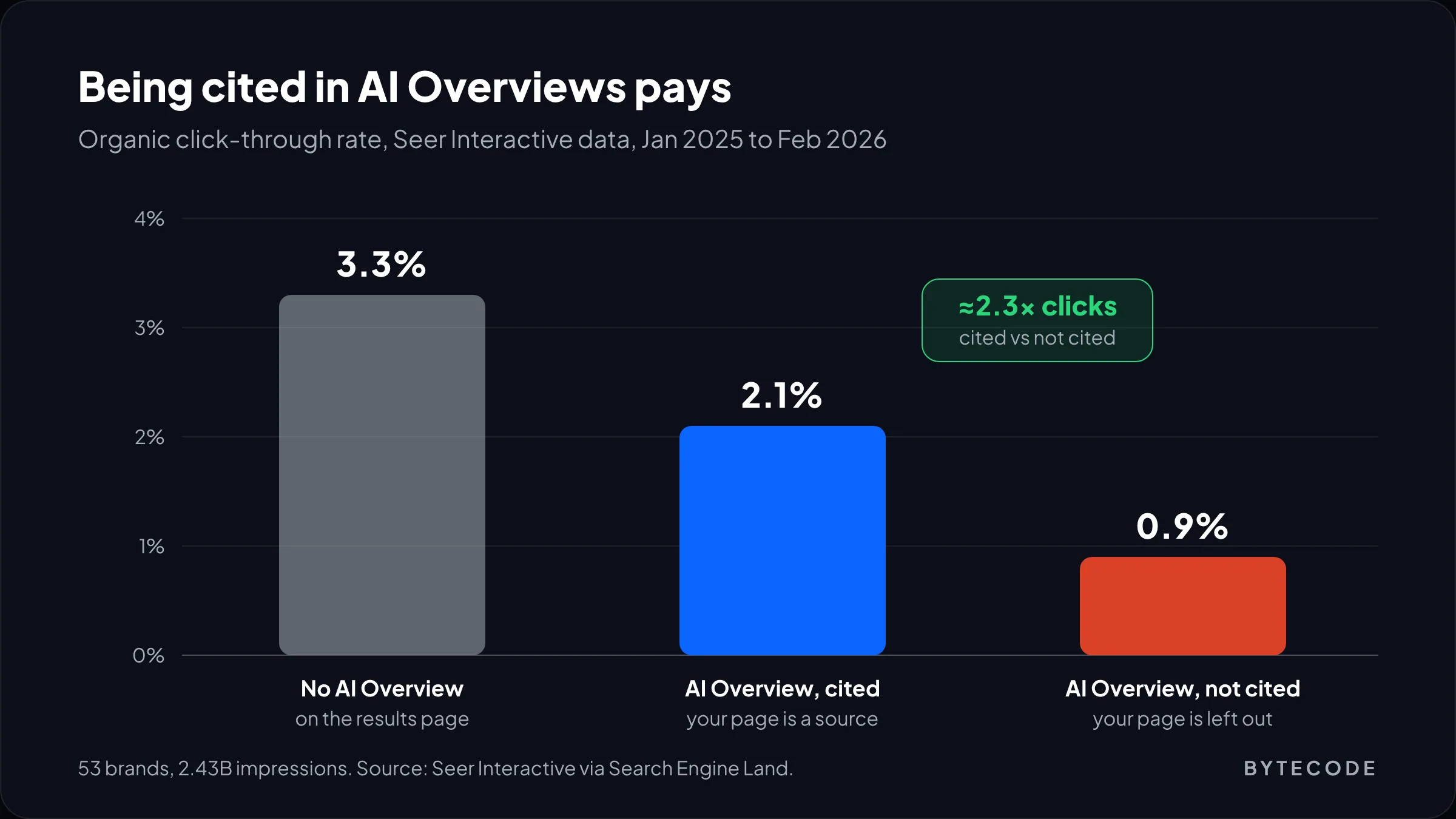
- Google says there is no special markup for AI Overviews. Getting cited still matters: in Seer Interactive’s data, cited pages got about twice the click-through rate of uncited ones.
- Most stores need fewer SEO apps, not more. Overlapping apps are a common cause of duplicate markup.
What Shopify SEO handles for you, and what it doesn’t
Shopify automates the technical plumbing and leaves the decisions to you. Per Shopify’s SEO overview in the Help Center, every store gets auto-generated canonical tags, an automatic sitemap.xml and robots.txt, theme-generated title tags that include your store name, SSL by default, and themes that include product schema markup.
That is a better start than most self-hosted platforms, but “automatic” is not “done.” Here is how we split the work when we audit a store:
| Area | What Shopify does automatically | What you still have to do |
|---|---|---|
| Canonical tags | Adds a canonical to every page, pointing product variants and collection-path URLs at the main product URL | Stop your own theme linking to non-canonical URLs, which sends Google mixed signals |
| Sitemap | Generates sitemap.xml with child sitemaps for products, collections, pages and blogs |
Submit it in Search Console and keep junk pages out of it |
| robots.txt | Blocks cart, checkout, account, internal search, sort orders and multi-filter URLs | Decide whether single-filter and tag URLs should be crawled, and edit robots.txt.liquid if not |
| Titles and descriptions | Fills them from product titles and descriptions if you leave them blank | Write titles for the queries you actually want, especially on collections |
| Structured data | Themes output Product markup | Add Organization, return and shipping policies, reviews and breadcrumbs, without duplicates |
| Content | Nothing | Collection copy, buying guides, FAQs and internal links |
Fix duplicate product URLs before anything else
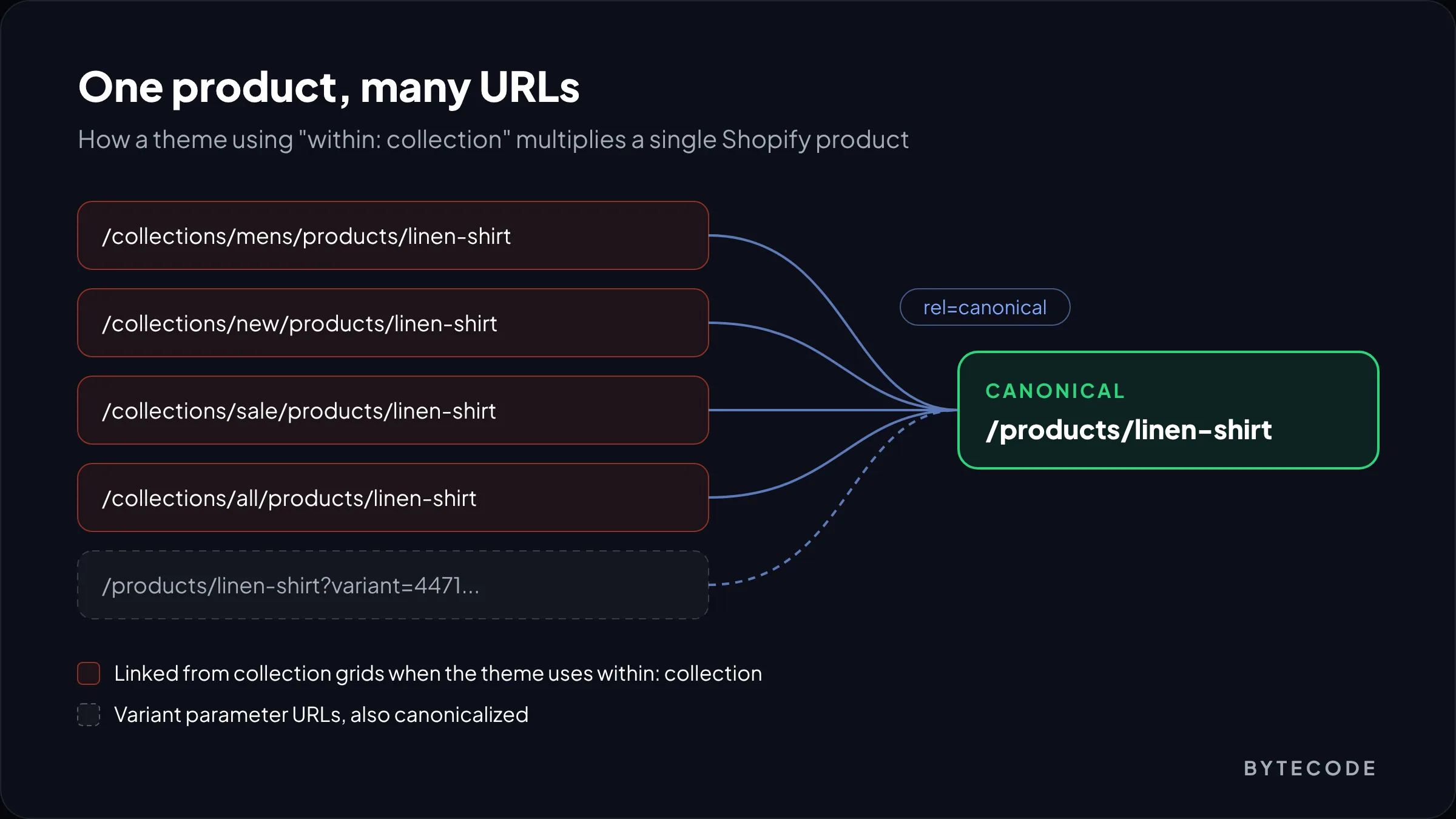
The biggest structural Shopify SEO problem is that one product can be reached at many URLs. A product lives at /products/linen-shirt, but if it sits in four collections, it can also load at /collections/mens/products/linen-shirt, /collections/new/products/linen-shirt and so on. Each version carries a canonical tag pointing back to /products/linen-shirt, so Google usually consolidates them.
“Usually” is the problem. A canonical is a hint, not an order. If your collection grids link to the collection-path version on every page, you tell Google thousands of times over that the non-canonical URL matters. That is when “Duplicate, Google chose a different canonical than the user” starts appearing in Search Console.
Where the extra URLs come from
They come from one Liquid filter. Older themes build product card links with {{ product.url | within: collection }}, which produces the collection-path URL. We checked Shopify’s current reference themes while writing this: the product card snippets in Dawn and Horizon link to plain product.url. On a recent, lightly customized theme you are probably fine. On an older premium theme or a custom build, search the code.
- In the admin, go to Online Store > Themes, duplicate your live theme, and open the code editor on the copy.
- Search all files for
within:. It typically shows up in product card, product grid item or collection snippets. - Replace
{{ product.url | within: collection }}with{{ product.url }}, and apply the same change to any variant of it. - Preview a collection, confirm product links go to
/products/..., publish, and watch Indexing > Pages in Search Console.
From our team: some merchants like collection-path URLs because the breadcrumb shows where the shopper came from. You can keep that context in the breadcrumb logic without changing the URL. It is not a trade-off.
Filters, sorting and tag pages: what to let Google crawl
Let Google crawl your collections and products, and keep it away from filter combinations nobody searches for. Shopify’s default robots.txt already blocks /search, collection URLs containing sort_by, tag combinations with a +, and URLs with two or more filter parameters. Open /robots.txt on any Shopify store to see the full set.
What the defaults leave open is single-filter URLs, such as a collection filtered by one colour or one size, plus single tag pages. Google’s own guidance on faceted navigation is clear: if you do not need filtered URLs in search, blocking them in robots.txt is the most effective long-term option, and canonical tags or nofollow on filter links are weaker.
Our rule of thumb for each URL type
- Collection pages: always crawlable and indexable. These are what you want ranking.
- Single filters with real search demand (“black linen shirts”): turn them into proper collections with their own handle, title and copy.
- Other single filters: block in
robots.txt.liquidif your catalog is large and Search Console shows them being crawled heavily. On a 50-product store, leave them alone. - Tag pages (
/collections/shirts/linen): same logic. If a tag deserves to rank, make it a collection.
To edit the rules, add a robots.txt.liquid template to your theme. Shopify’s developer docs recommend keeping the default rule groups through the provided robots Liquid object and adding your rules inside the loop, rather than pasting a static file. Save a copy of your current /robots.txt output first.
Watch out: a blocked URL can still be indexed if other sites link to it. To remove a page from Google, use noindex and leave it crawlable, or Google never sees the noindex.
For pages you want out of the index, per Shopify’s storefront SEO documentation, a metafield with namespace seo, key hidden and value 1 adds noindex and nofollow to that product, collection, page or article, and drops it from the sitemap. We use it for wholesale-only products and old campaign pages. Our guide to Shopify metafields shows how to manage fields like this in bulk.
Shopify SEO tips for titles, meta descriptions and handles
Write important titles by hand. Shopify’s Help Center allows page titles up to 70 characters but recommends staying near 60 to avoid truncation, and suggests about 160 characters for meta descriptions. On products and collections, the Title field also becomes the H1 on the page, so the main keyword belongs there too.
Edit the home page under Online Store > Preferences, and everything else in the “Search engine listing” section of each edit screen.
| Page type | Title pattern we start from | What the description should do |
|---|---|---|
| Home | Brand + what you sell + one qualifier (“Organic Cotton Bedding”) | State the category, the proof point and shipping or returns promise |
| Collection | Category keyword + modifier (“Men’s Linen Shirts, Relaxed Fit”) | Range size, price band and what makes the range different |
| Product | Product name + key attribute (“Linen Shirt in Sage, Relaxed Fit”) | Material, use case and one reason to buy now |
| Blog article | The question or task the post answers | The answer in one line, then why to read on |
Keep handles short and readable. If you change the handle of a page that already ranks, make sure a 301 redirect from the old URL exists, then load the old URL yourself to confirm it works.
Collection pages are where Shopify stores rank
For most stores, collection pages should target the highest-value keywords, because they match how people search: “women’s trail running shoes,” not a single product name. Yet many Shopify collection pages are a heading and a product grid with no text at all. Here is what we add to each one that matters:
- An intro of 40 to 80 words above the grid that says what is in the range and who it is for. Keep it short so products stay above the fold on mobile.
- 150 to 300 words below the grid: how to choose, sizing or fit notes, materials, and links to two or three related collections.
- A short FAQ answering the questions support actually gets about that category.
- Links from navigation and relevant blog posts, so the collection earns internal authority.
From our team: before writing a word, map one primary keyword to each collection in a spreadsheet. If two collections target the same phrase, merge them or change one’s angle, or neither will rank well.
Structured data on Shopify: what’s there and what’s missing
Shopify themes include product schema markup by default, as Shopify’s SEO overview notes, so check what yours outputs before installing an app.
For product results in Google, the requirements are set out in Google’s merchant listing documentation: name, image and an offers block using Offer (not AggregateOffer), with brand, GTIN, ratings and description among the recommended properties. Google also recommends describing your standard return and shipping policies once, under Organization markup, and only using product-level policies to override them.
The gaps we fill on most stores
- Organization markup with logo, contact details, return policy and shipping policy, on the home page.
- GTIN and brand on products, pulled from the barcode field and vendor.
- Review ratings from your reviews app, merged into the theme’s Product markup rather than added as a second Product block.
- BreadcrumbList on products and collections.
Watch out: the most common schema error we find is two or three Product blocks on one page, from the theme, a reviews app and an SEO app. Run a product URL through Google’s Rich Results Test. You want exactly one Product item.
Shopify SEO for AI Overviews and AI shopping
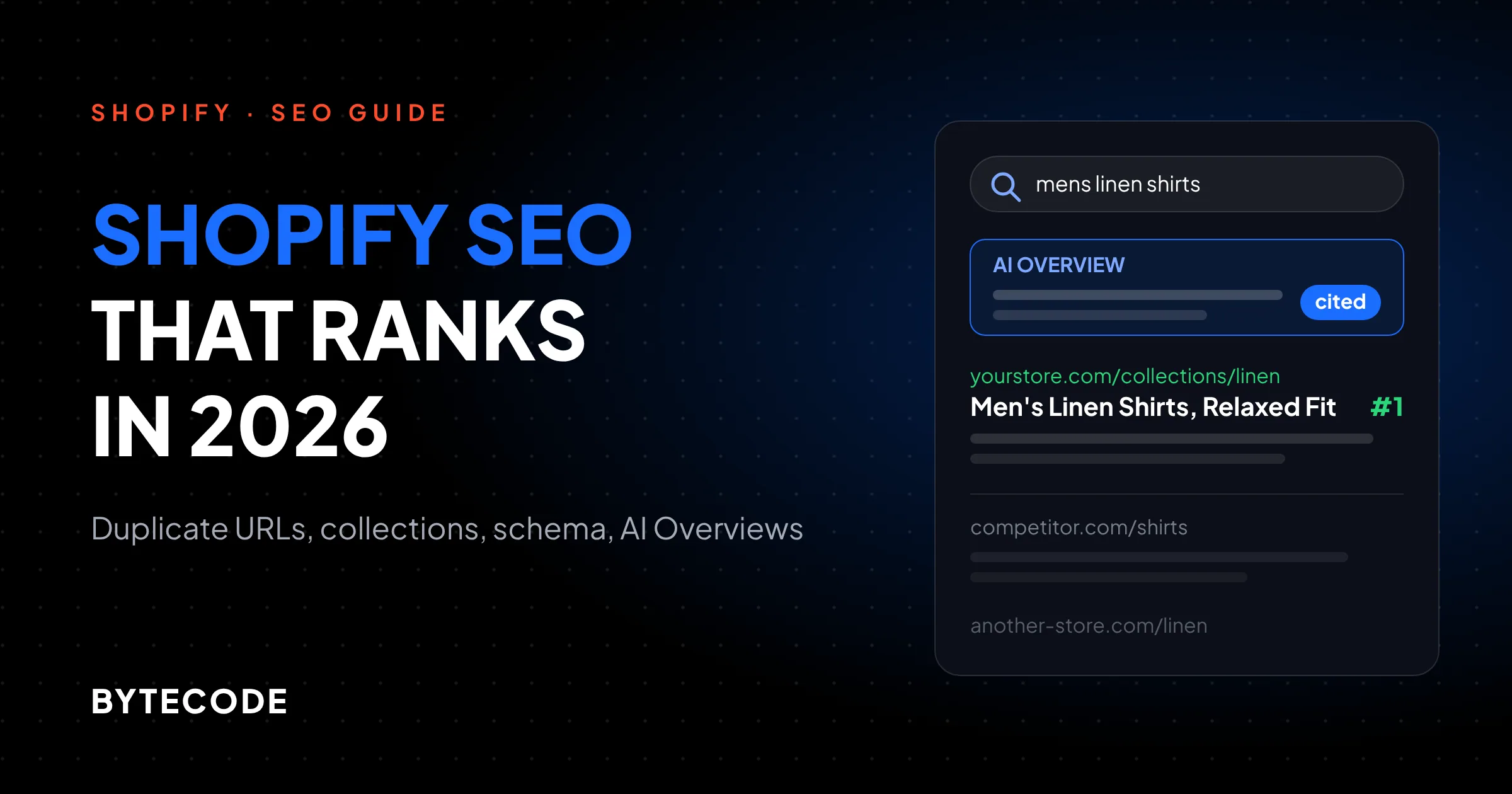
Google says there is nothing special to add for AI Overviews. Its guidance on AI features states that a page only needs to be indexed and eligible to show with a snippet, that no special schema is required, and that no new machine-readable files are needed. Good Shopify SEO is the entry ticket.
The stakes are real. Seer Interactive’s 2027 update, reported by Search Engine Land, covered 53 brands and 2.43 billion impressions. Searches without an AI Overview had organic click-through rates around 3.3%. When an AI Overview appeared, pages cited in it got about 2.1%, and uncited pages about 0.9%. Being cited is worth more than twice as much as being left out.
What makes a store page citable
- Answer-first text. A plain one or two sentence answer under each heading. That is the text AI systems lift.
- Specific facts in text, not images. Dimensions, materials, compatibility and care instructions written into the description, not only in a size-chart image.
- Consistent data. Price, stock and policies should match across the page, the markup and your Merchant Center feed.
- Buying guides that compare options honestly.
AI shopping is also moving beyond search results, into assistants that read your product data directly. We cover that side in our agentic commerce guide, and the citation side in our guide to generative engine optimization. If you want both handled together, our AI search optimization service covers classic rankings and AI visibility in one plan.
Not sure how many duplicate URLs your store has?
We will run a crawl, read your Search Console data and send back a prioritized Shopify SEO fix list for your store.
Worked example: how a 400-product store wastes crawl budget
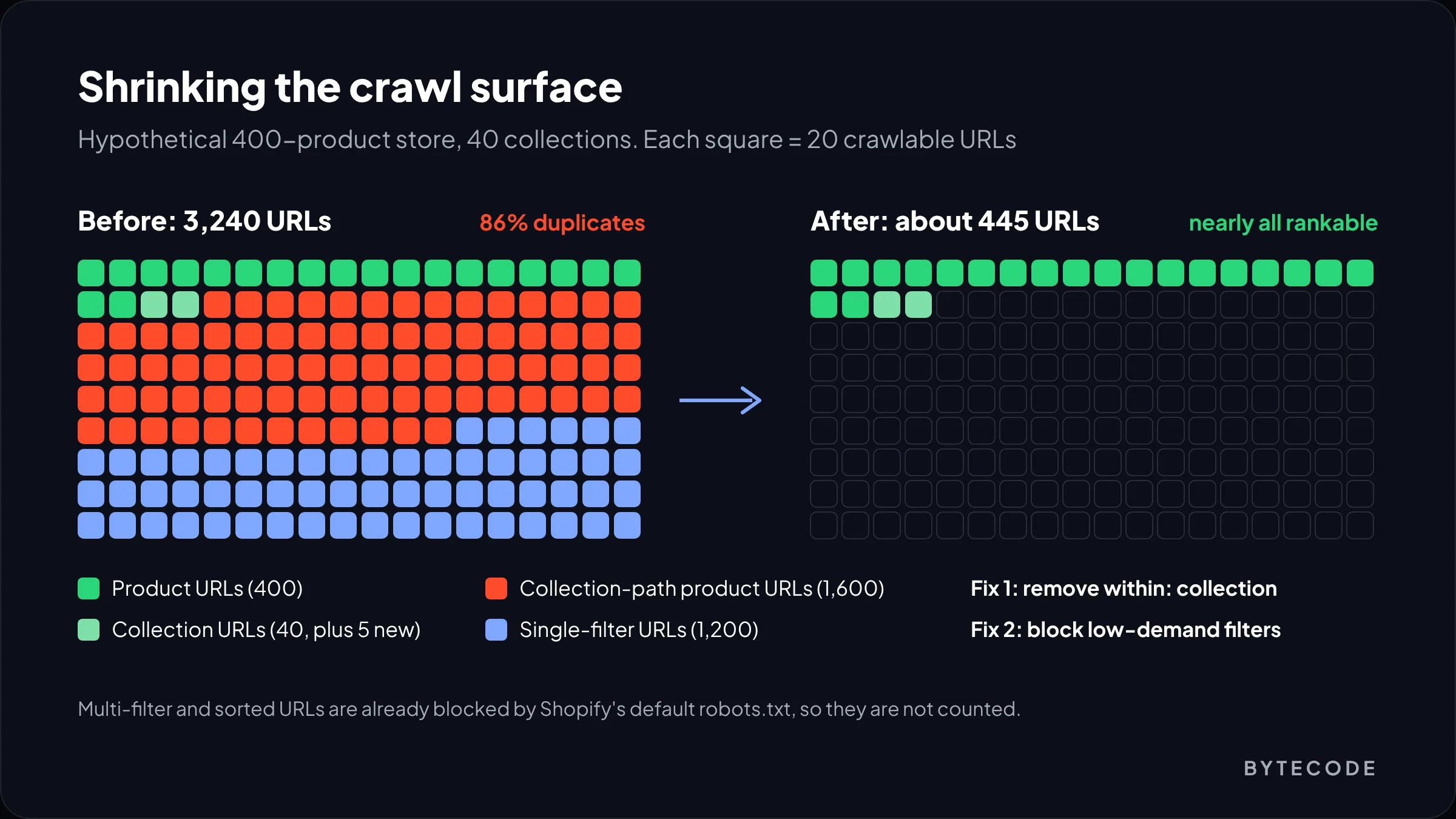
Here is a clearly hypothetical store. Say you sell outdoor apparel: 400 products in 40 collections. Each product appears in four collections on average (its category, plus “New”, “Sale” and “All”). Each collection has five filters (size, colour, material, fit, price) with about six values each. The theme still uses within: collection.
| URL type | How we counted | Crawlable URLs | Want indexed? |
|---|---|---|---|
Product URLs (/products/) |
400 products | 400 | Yes |
| Collection URLs | 40 collections | 40 | Yes |
| Collection-path product URLs | 400 products × 4 collections | 1,600 | No |
| Single-filter URLs | 40 collections × 5 filters × 6 values | 1,200 | Mostly no |
| Multi-filter and sorted URLs | Blocked by default robots.txt | 0 | No |
| Total | 3,240 | 440 wanted |
That is about 7.4 crawlable URLs for every page the store wants in Google, and 86% of the crawl surface is duplicates. Removing within: collection takes 1,600 URLs out of the internal link graph in one edit. Turning five high-demand filter values into collections and blocking the other single filters removes most of the rest. The store ends up with about 445 URLs, nearly all of which deserve to rank.
Below about 100 products, spend the time on collection copy instead. Above a few thousand, this cleanup is often the biggest technical win available.
Speed, content and links: the rest of Shopify SEO
Speed
On most Shopify stores we audit, the first problems are an oversized hero image, app scripts loading on every page, and font files nobody needs. Our Shopify speed optimization guide lists 21 fixes in priority order.
Content
The Shopify blog works when you write what buyers search before they buy: comparisons, sizing guides and care instructions. Every post should link to the one or two collections it relates to.
Links
Links that work for ecommerce are not glamorous: stockist pages, brand collaborations, local press and gift guides. Skip anything sold as a “link package.” And keep SEO apps to a minimum, since several apps injecting meta tags and JSON-LD create the duplicate-schema problem above.
How to improve SEO on Shopify: a 30-day checklist
The fastest way to improve SEO on Shopify is structure first, then on-page signals, then content. Here is our order for a store of a few hundred products.
| Week | Shopify SEO checklist items | Where |
|---|---|---|
| 1. Foundations | Verify Search Console, submit sitemap.xml, export Indexing > Pages, check the store is not password protected |
Search Console, Online Store > Preferences |
| 2. Structure | Remove within: collection, decide filter and tag rules, apply seo.hidden to thin pages, fix redirect chains |
Theme code, robots.txt.liquid, metafields |
| 3. On-page | Hand-write titles and descriptions for the home page and top 20 collections, add alt text to hero images, add collection copy | Search engine listing, product media, collection metafields |
| 4. Data and content | Audit structured data for duplicates, add Organization and policies, plan four buying-guide posts linked to collections | Theme schema, Rich Results Test, blog |
Then track clicks per collection in Search Console, not overall traffic.
Frequently asked questions
Is Shopify good for SEO?
Yes. Shopify handles the technical basics well, including sitemaps, canonical tags, SSL, robots.txt and product schema. Its weak spots are duplicate product URLs from collection paths, filter and tag pages, and thin collection pages. All of these can be fixed in the theme and admin, so Shopify stores rank as well as stores on any other platform.
How long does Shopify SEO take to show results?
Technical fixes usually show up in Search Console within a few weeks, once Google recrawls the affected pages. Ranking gains for competitive collection keywords typically take a few months, because they depend on content and links as well. Google itself notes that recrawling can take anywhere from days to months, so judge progress by trend, not by week.
Do I need an SEO app for Shopify?
Not necessarily. Editing titles, meta descriptions, alt text and redirects is already built into Shopify. An app is worth it for bulk work across thousands of products or for automating image compression. Avoid running several apps that each add meta tags or JSON-LD, because they often duplicate each other.
How do I fix duplicate content on Shopify?
Start by removing the within: collection filter from your theme’s product card links, so the store links only to the canonical /products/ URL. Then decide which filter and tag pages Google should crawl, block the rest in robots.txt.liquid, and turn high-demand filters into real collections. Finally, give each collection unique copy so they do not compete with each other.
Does Shopify add schema markup automatically?
Yes, Shopify themes include Product structured data by default. What is usually missing is Organization markup with return and shipping policies, GTINs, review ratings merged into the same Product block, and breadcrumbs. Check each page has exactly one Product item.
How do I get my Shopify store into Google AI Overviews?
There is no separate setup. Google says pages only need to be indexed and eligible for a snippet, with no special schema or files required. In practice, pages that answer questions clearly in text, keep product facts accurate and consistent, and already rank well in classic results are the ones most likely to be cited.
What we’d do first
Export Search Console’s Indexing > Pages report and compare the crawled URL count with your products plus collections. If the first is several times the second, structure is your problem, and blog content will not fix it. Start with the within: collection search and your filter rules.
If the numbers roughly match, your Shopify SEO problem is relevance, not structure. Map one keyword to each collection, write the copy, and fix titles on your top 20 collections before anything else.
We have built Shopify stores for brands like Delsey, EcoFlow, Kerbholz and Maker & Moss. For a second pair of eyes on yours, our Shopify SEO and AI search team can audit the store and hand you the fix list in priority order.