On this page
- What the Shopify Scripts deprecation changed
- Shopify Scripts to Functions: the mapping table
- How Shopify Functions work (and their limits)
- Discount Functions on Shopify: rebuilding line item scripts
- Delivery Customization: replacing shipping scripts
- Payment Customization: replacing payment scripts
- Cart Transform: bundles and line edits
- App, custom app or no-code: which route fits
- Worked example: moving a five-Script store
- How to test a Function before it touches real orders
- Frequently asked questions
- What we’d do first
If your tiered discount quietly stopped applying on July 1, or cash on delivery suddenly appeared for customers in countries where you never offered it, you are looking at the Scripts sunset. Shopify switched off every remaining Script on June 30, 2026, and nothing ran in their place.
The fix is to move from Shopify Scripts to Functions: rebuild each discount, shipping and payment rule on the Function API that now owns it, with an App Store app or your own code. Once you know which API each old Script maps to, most stores can restore their logic in days. Below: that mapping, the plan limits that catch people out, a working code example, and the testing routine we use before checkout logic goes live.
Key takeaways
- Scripts stopped running on June 30, 2026, and editing was frozen from April 15. There is no fallback: if you have not rebuilt a Script, that logic is simply gone from checkout.
- Line item scripts map to the Discount, Cart Transform and Validation APIs. Shipping scripts map to Delivery Customization (plus Discounts for free shipping). Payment scripts map to Payment Customization.
- Public App Store apps built on Functions work on every plan. Custom apps that contain Functions need Shopify Plus.
- For hide, rename and reorder rules, a $4 to $8 a month app usually beats custom code. Write your own Function when the logic is specific to your business or touches pricing.
- Test with fixtures from real checkouts and gate the first production release behind a customer tag. Keep that gated window short, because untagged shoppers get nothing while it lasts.
What the Shopify Scripts deprecation changed
The Shopify Scripts deprecation happened in two steps. From April 15, 2026, nobody could edit or publish a Script, and from June 30, 2026 every Script stopped executing. Both dates are in Shopify’s developer changelog post announcing the sunset.
The Help Center page on transitioning from Scripts confirms that published Scripts were deactivated and must be recreated with Shopify Functions.
Shopify’s developer migration guide kept the Script Editor read-only until July 30, 2026. That window has closed too, so if nobody exported the source, you are rebuilding from evidence.
If you no longer have the Script source
This is the situation we see most often now, and it is recoverable:
- Order history. Export orders from before June and read the discount titles. “Spend $150, save 15%” in the order data tells you the rule.
- The customizations report. Shopify generated a CSV-exportable report of active Script customizations under Apps > Script Editor. If anyone downloaded it, start there.
- Your own team. Customer service usually knows which shoppers saw which options. Write the rules down as plain sentences first.
Watch out: a missing Script fails silently. Checkout still works, so nothing alerts you. Shoppers just pay full price, see a shipping rate you meant to hide, or get offered a payment method you cannot support. Check your last 90 days of orders for exactly these symptoms.
Shopify Scripts to Functions: the mapping table
Each Script type now maps to one or more Function APIs: line item scripts split three ways, shipping scripts two ways, and payment scripts map one to one. The mapping is from Shopify’s migration guide; the notes are ours.
| Old Script type | Typical use | Function API now | Notes |
|---|---|---|---|
| Line item | Tiered spend discounts, BOGO, wholesale percentage, “buy 3 save 10%” | Discount | One function can apply product, order and shipping discounts |
| Line item | Bundles, merging lines, overriding line price or title | Cart Transform | Price and title overrides (lineUpdate) need Plus |
| Line item | Blocking checkout (max quantity, restricted products by region) | Cart and Checkout Validation | Shows an error and stops checkout instead of quietly changing the cart |
| Shipping | Hiding, renaming or reordering rates | Delivery Customization | Up to 25 active per store |
| Shipping | Discounted or free shipping for certain carts or customers | Discount (shipping class) | Uses the delivery target of the same Discount API |
| Payment | Hiding, renaming or reordering payment methods | Payment Customization | Wallet names like Apple Pay cannot be renamed |

The structural difference: a Script was one Ruby file that could change the cart however it liked. Each Function API is narrow. A discount function cannot hide a shipping rate, and a delivery customization cannot change a price. That feels restrictive for a week, then makes the logic far easier to reason about.
How Shopify Functions work (and their limits)
Shopify Functions are small WebAssembly modules that Shopify runs inside its own backend at fixed points in the cart and checkout. You write them in Rust or JavaScript, ship them inside an app, and Shopify calls them; nobody can invoke them by URL. The Function APIs reference lists the hard limits, and they shape how you write logic:
- Compiled module: 256 kB maximum.
- Instructions: 11 million for carts up to 200 lines (the limit scales above that).
- Input: 128 kB of input data and 20 kB of output.
- Input query: 3,000 bytes, a query cost of 30, and list arguments of at most 100 elements.
- Network: none by default. The optional fetch target that calls an external endpoint is limited to custom apps on Enterprise stores.
That last point hurts migrations. Teams want to “just check the ERP” from a Function, and on most stores you can’t. Put the data into metafields or app-owned metaobjects ahead of time and query it in the input.
Rust or JavaScript?
Shopify strongly recommends Rust, because it is less likely to hit limits on large carts. Our rule: JavaScript is fine for hide and rename logic over a few options. For discount logic that loops over every line in big B2B carts, we write Rust.
Discount Functions on Shopify: rebuilding line item scripts
Most line item scripts become a Discount Function, the API that now handles product, order and shipping discounts in one place. It uses cart.lines.discounts.generate.run for product and order discounts and a second delivery target for shipping discounts. According to Shopify’s Discount Function API reference, a single function can return savings across all three discount classes, and you can activate up to 25 discount functions per store.
Two behaviors differ from Scripts:
- Functions don’t see each other. All discount functions run concurrently, and stacking follows each discount’s combination settings. A Script that applied 10% and then checked the new subtotal has to be redesigned, not translated.
- You return candidates, not new prices. A Script edited line prices directly. A Discount Function proposes candidates with a selection strategy, and Shopify decides what applies.
A small working example (JavaScript)
Here is a typical old wholesale Script rebuilt as a Function: customers tagged wholesale get 15% off any line where they buy 6 or more units. First the input query, which tells Shopify what data to send:
query CartInput {
  cart {
    buyerIdentity {
      customer {
        hasAnyTag(tags: ["wholesale"])
      }
    }
    lines {
      id
      quantity
    }
  }
  discount {
    discountClasses
  }
}
Then the function itself, in src/cart_lines_discounts_generate_run.js:
import {
  DiscountClass,
  ProductDiscountSelectionStrategy,
} from "../generated/api";

export function cartLinesDiscountsGenerateRun(input) {
  const isWholesale = input.cart.buyerIdentity?.customer?.hasAnyTag ?? false;
  const productClassOn = input.discount.discountClasses.includes(
    DiscountClass.Product,
  );
  if (!isWholesale || !productClassOn) {
    return { operations: [] };
  }

  const targets = input.cart.lines
    .filter((line) => line.quantity >= 6)
    .map((line) => ({ cartLine: { id: line.id } }));

  if (targets.length === 0) {
    return { operations: [] };
  }

  return {
    operations: [
      {
        productDiscountsAdd: {
          candidates: [
            {
              message: "Wholesale 15% off",
              targets,
              value: { percentage: { value: "15.0" } },
            },
          ],
          selectionStrategy: ProductDiscountSelectionStrategy.First,
        },
      },
    ],
  };
}
The operation shape follows the current Discount API reference examples. Scaffold with shopify app generate extension --template discount, run shopify app function typegen after editing the query, and create the discount with the discountAutomaticAppCreate mutation, as Shopify’s discount function tutorial shows. In a real build, read the tag, threshold and percentage from a metafield so the merchant can change them without a deploy.
From our team: for wholesale specifically, check whether you still need a Function at all. If you are on Plus, B2B catalogs and price lists may replace the old Script with native settings. We compare the options in our guide to Shopify B2B and wholesale pricing.
Delivery Customization: replacing shipping scripts
Shipping scripts that hid, renamed or reordered rates become a Delivery Customization function on the cart.delivery-options.transform.run target. Its API reference (linked from the Function APIs index) allows up to 25 active on each store, and each one returns operations like deliveryOptionHide keyed by the option’s handle.
Common rebuilds we see:
- Hide express shipping for oversized or hazmat products (read a product metafield or tag in the input query).
- Rename “Standard” to show a cut-off or a delay note for certain regions.
Two catches from the docs. A delivery customization runs in checkout but not on the cart page, order edits or subscription renewals. And PO box hiding only works for carrier-service or third-party app rates, since Shopify’s own rates may not expose the address detail. For PO boxes on Shopify-calculated rates, a Validation function that blocks the address is often the safer rebuild.
Shipping discounts (free shipping for VIPs, say) are not a delivery customization. They belong in the Discount API’s delivery target.
Payment Customization: replacing payment scripts
Payment scripts move to the Payment Customization API on the cart.payment-methods.transform.run target, which can hide, rename and reorder payment methods, and on Plus can also set payment terms. The payments functions guide lists limits that trip up old Script logic:
- You can’t rename methods whose name is a logo, such as Shop Pay, Apple Pay and Google Pay.
- Wallets can be removed from the express section but not reordered.
- Hiding a method from one specific placement only works on Plus. On other plans, hiding removes the method entirely.
- Payment terms (net 30, deposits) can only be set on Plus, and not on accelerated checkouts.
- Payment customizations don’t run in Point of Sale, and inside Shop Pay they only affect the gift card field.
The classic payment Script, “hide cash on delivery above $500 or outside the home country”, is a ten-line function or a five-minute app rule. B2B rules that faked payment terms with renamed manual methods should move to real payment terms on Plus.
Cart Transform: bundles and line edits
If your line item script built bundles or rewrote line titles and prices, Cart Transform is the new home. The Cart Transform API reference gives you three operations: lineExpand splits a bundle into its components, linesMerge combines several lines into one bundle line, and lineUpdate overrides price, title or image.
Know the limits. lineUpdate is limited to Plus and development stores. Each app can install only one cart transform per store, though functions from several apps all run. And checkout rejects all three operations when a line has a selling plan, so subscription bundles need a different design.
One gap: Cart Transform reshapes lines already in the cart. A “free gift with purchase” Script now usually becomes theme code that adds the gift plus a Discount Function that makes it free.
App, custom app or no-code: which route fits
Use an existing app when the rule is a standard hide, rename, reorder or discount pattern. Build a custom Function when the logic is specific to your business, involves pricing, or needs data no app exposes. Shopify’s Help Center says you can mix routes across customizations.
| Route | Plan needed | Typical cost | Best for | Trade-off |
|---|---|---|---|---|
| Checkout Blocks (Shopify’s own app) | Plus for Functions features | Included, free app | Conditional discounts, hide/rename/reorder rates and payments, order limits | Rule builder covers common cases only |
| Third-party Functions apps (e.g. HidePay, HideShip) | Any plan | About $4 to $8 a month per app | Hiding and sorting payment or shipping methods by cart, customer or region | One more vendor; logic lives in their UI |
| Public app you build | Any plan | Development time | Agencies or brands running the same logic on many stores | App Store review and listing overhead |
| Custom app with your own Functions | Plus | Development time, no monthly fee | Business-specific pricing, tiered B2B logic, anything with metafield-driven rules | You own maintenance and API version upgrades |
Plan facts in that table come from the Checkout Blocks Help Center page, which reserves everything except Thank you and Order status content blocks for Plus, and from the App Store listing for HidePay, whose paid plans run $3.99 to $7.99 a month (its sister app HideShip lists the same tiers).
A correction to some guides we read: delivery and payment customizations do not require Plus in themselves. Stores on any plan can use public apps that contain Functions. Plus is required for custom apps with Functions and for specific capabilities like payment terms. So if you have since dropped from Plus to Advanced, the app route still works.

One practical note on custom apps
Functions-based apps need App Bridge, and custom apps created in the Shopify admin don’t support it, according to the Help Center. Create the app in the Dev Dashboard instead. Our Shopify app development team sets these up in the Dev Dashboard from day one, and we explain the wider process in our post on custom Shopify app development.
Checkout logic still missing since June?
Send us your old discount, shipping and payment rules (or a few orders that show them) and we will map each one to an app or a Function with an hour estimate.
Worked example: moving a five-Script store
Here is a hypothetical Plus store with five Scripts that went dark on June 30. Hours are our planning ranges for a developer who knows Functions, not quotes.
| Old Script | New home | Route | Planning hours |
|---|---|---|---|
| Spend $100 save 10%, $200 save 15% (line item) | Discount Function, order class | Custom, tiers in a metafield | 8 to 12 |
| Wholesale tag gets 15% on 6+ units (line item) | Discount Function, product class | Custom (the example above) | 6 to 10 |
| Hide express for oversized products (shipping) | Delivery Customization | App rule or Checkout Blocks | 1 to 2 |
| Free shipping for VIP tag (shipping) | Discount Function, shipping class | Extend the tiered function | 3 to 5 |
| Hide COD over $500 or outside the US (payment) | Payment Customization | App rule or Checkout Blocks | 1 to 2 |
Add 8 to 12 hours for app setup, fixtures, tagged production testing and handover, and the job lands around 27 to 43 hours. The biggest variable is agreeing what the old rules actually were.
How to test a Function before it touches real orders
Test in layers, from unit tests to a short tagged release in production. The test and debug guide on shopify.dev covers the tools for each layer.
- Unit tests. Vitest for JavaScript,
cargo testfor Rust. Fast, but not run inside WebAssembly. - Fixture tests.
npm testin the function folder compiles the Wasm module and checks it against every JSON file intests/fixtures/. Each fixture holds the export, target, input and expected output. - Dev store runs.
shopify app devstreams logs and writes each execution to.shopify/logs. Copy those into your fixtures, and useshopify app function replayto rerun one while you edit. - Tagged production release. Shopify’s migration guide suggests tagging a few test customers (for example
TESTER), checking that tag in the input query, and applying the logic only to them. Then remove it and runshopify app deploy. - Watch the Dev Dashboard. Every production run shows there if your app has the scopes the input query needs.
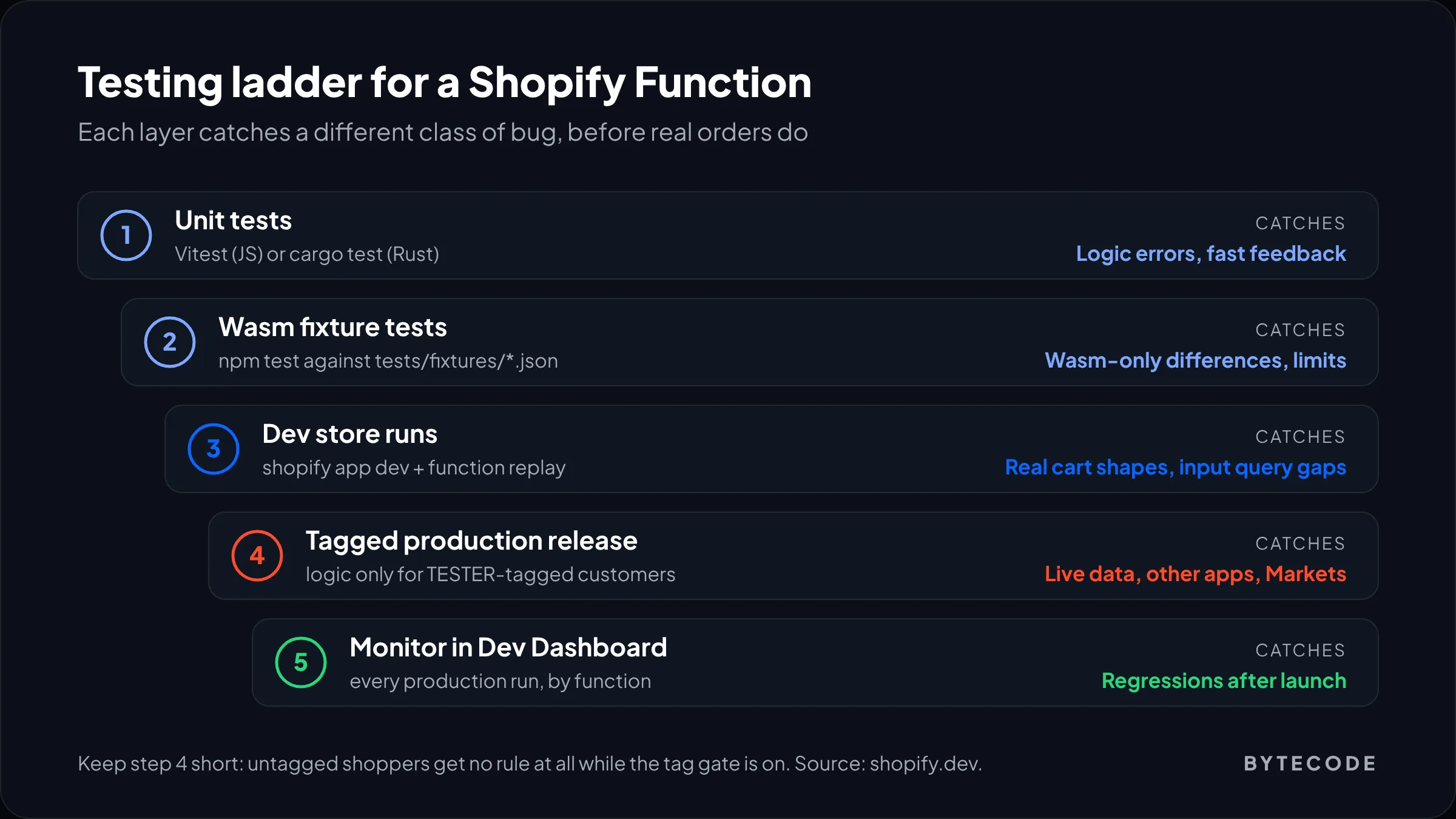
Watch out: the tag-gating step had a safety net before June, because untagged shoppers still got the old Script. That net is gone. While the tag condition is live, everyone else gets no discount and no rule at all. Run the gated phase for hours, not weeks, and pick a quiet trading window.
Frequently asked questions
Do Shopify Scripts still work after June 30, 2026?
No. Shopify stopped executing every Script on June 30, 2026, and editing or publishing was blocked from April 15, 2026. Any Script still published was deactivated, and there is no grace period or switch to turn them back on. To restore the behavior you need to rebuild it with Shopify Functions, either through an app or your own code.
What replaced Shopify Scripts?
Shopify Functions replaced Scripts. Line item scripts map to the Discount, Cart Transform and Cart and Checkout Validation APIs, shipping scripts map to Delivery Customization plus shipping discounts, and payment scripts map to Payment Customization. Functions are WebAssembly modules written in Rust or JavaScript, shipped inside apps, and run by Shopify at set points in cart and checkout.
Do I need Shopify Plus to use Shopify Functions?
Not always. Stores on any plan can use public App Store apps that contain Functions. You need Plus to run custom apps that contain Functions, and some capabilities are Plus-only, such as setting payment terms, hiding payment methods in specific placements, and overriding line prices with Cart Transform. Most of Checkout Blocks also requires Plus.
Can I write Shopify Functions in JavaScript instead of Rust?
Yes. Shopify provides templates and client libraries for both JavaScript and Rust, and any language that compiles to WebAssembly within Shopify’s limits can work. Shopify strongly recommends Rust for performance, because it uses fewer instructions on large carts. JavaScript is usually fine for simple hide, rename and reorder logic on small option lists.
How many discount functions can a Shopify store have?
A store can have up to 25 active discount functions, according to Shopify’s Discount Function API reference. Delivery customization and payment customization functions have the same limit of 25 each. Cart Transform is different: each app can install only one cart transform function per store, though functions from several apps can run together.
How long does it take to migrate Shopify Scripts to Functions?
For a store with a handful of Scripts, we plan for roughly one to two weeks including testing, and fewer hours if most rules can move to an app. In our planning, simple hide or rename rules take one to two hours each in an app, while custom discount logic takes six to twelve hours per Function. Agreeing what the old rules were often takes longer than the build.
What we’d do first
Start with evidence, not code. Pull the last six months of orders, list every discount title and every shipping or payment behavior your team remembers, and write each old Script as one plain sentence: who, what condition, what result. That list is your migration spec.
Then sort it. Hide, rename and reorder rules go to Checkout Blocks or a small Functions app this week. Anything touching price or your own data goes to a custom Function, tested with the routine above.
Moving from Shopify Scripts to Functions is less about rewriting Ruby than deciding where each rule should live. We have built Shopify stores and checkout logic for brands like Delsey, EcoFlow and Kerbholz. If you want that list turned into working Functions, our Shopify Functions and app development services are a good place to start, and our guide to checkout customization with Checkout Extensibility covers the UI side of the same checkout.