On this page
- Shopify fraud prevention: what Shopify does and what it leaves to you
- Reading Shopify fraud analysis without overreacting
- Shopify Protect: who gets it and what voids it
- Shopify chargebacks: the process, the clock and the fee
- Card-testing bot attacks: how to spot one and what to switch on
- Shopify Flow fraud tags and automated holds
- Shopify store security: lock down logins first
- Shopify staff permissions, collaborators and app access
- PCI: what Shopify’s Level 1 status leaves on your side
- Frequently asked questions
- What we’d do this week
The first sign is rarely a chargeback. It is a Monday morning with 300 abandoned checkouts from “John Doe,” or a payout that looks oddly light. By the time dispute emails arrive, the damage happened weeks ago.
Good Shopify fraud prevention is mostly unglamorous setup work done before that Monday. Shopify handles card security and gives you a free risk score on most orders. You still own four things: deciding what to do with risky orders, answering chargebacks before the deadline, controlling who can log in, and auditing what apps and scripts can touch. Below is the checklist we run on the stores we look after, including the plan limits that catch people out and two places where we think the default advice is wrong.
Key takeaways
- Shopify’s fraud analysis rates online card orders low, medium or high risk. Act on the recommendation, not on a count of red indicators.
- Shopify Protect is free, but only for US stores taking Shop Pay through Shopify Payments, and late tracking or a changed address voids it.
- A Shopify Payments chargeback costs $15 in the US (£10 in the UK, A$25 in Australia) on top of the order, and you usually get 7 to 21 days to respond.
- Staff and collaborator access is where most real breaches start. Two-step authentication, scoped roles and a quarterly access review matter more than any fraud app.
Shopify fraud prevention: what Shopify does and what it leaves to you
Shopify secures payments, scores your orders and sometimes pays your fraud chargebacks. Anything that needs a human decision stays with you. On a typical Shopify Payments store the split looks like this.
| Area | Shopify handles | You handle |
|---|---|---|
| Card data and hosted checkout | PCI DSS compliance for its own infrastructure | Scripts and pixels you add, your own PCI self-assessment |
| Order risk | Risk level, indicators and a recommended action | Fulfil, verify or cancel, and how fast |
| Fraud chargebacks | Covered by Shopify Protect on eligible US Shop Pay orders | Every other chargeback, plus keeping orders eligible |
| Bot traffic | Blocks some high-risk checkouts, temporary IP blocks | Capture settings, Flow rules, cleanup |
| Account access | Login security, enforced 2FA for Payments | Who gets an account, which role, when it ends |
The right-hand column is the job.
Reading Shopify fraud analysis without overreacting
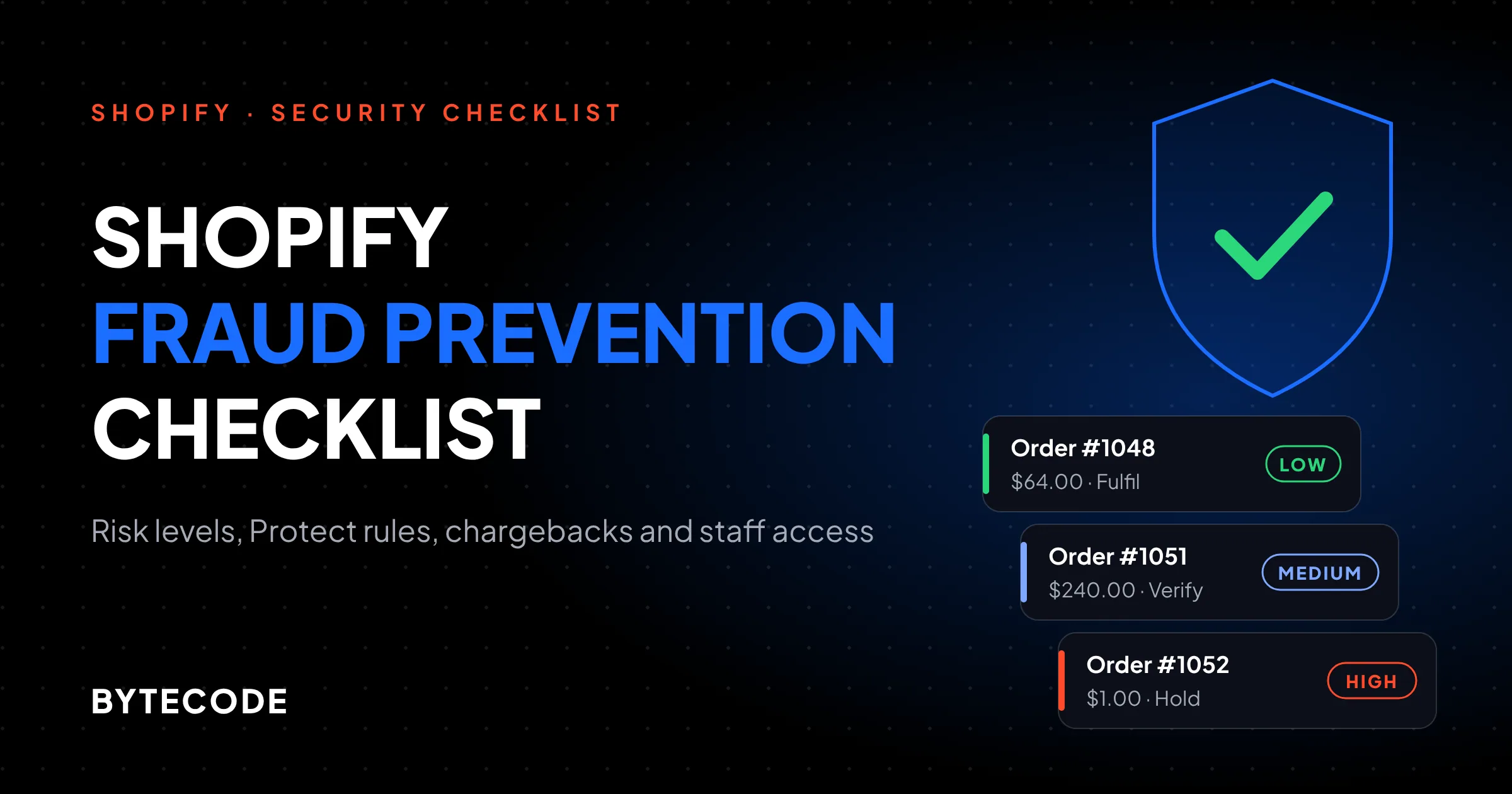
Shopify fraud analysis gives each eligible online card order a low, medium or high risk rating for a fraud-related chargeback, flags the medium and high ones on the Orders page, and tells you what to do next. According to Shopify’s fraud analysis documentation, the three recommendations are to fulfil, to confirm with the customer first, or to consider cancelling.
A flagged order also lists indicators: AVS (the address check) and CVV results, whether location matches the card, odd device or network activity, and whether several cards were tried. Shopify says plainly that indicators do not set the risk level. We still see teams cancel medium-risk orders because two indicators were red. A gift shipped to another state fails the location match every time.
The plan limits people miss
- Fraud indicators work on Basic and above. The actual recommendations need Grow or higher, or Shopify Payments.
- Some orders never get a recommendation, including POS, B2B, gift-card-paid and subscription renewal orders.
A worked example: the medium-risk order
Hypothetical: a $240 skincare order at 2 a.m., billing in Ohio, shipping to a freight forwarder in Florida, CVV correct, AVS partial, medium risk. We would not cancel. We would email the customer from the normal support address, ask them to reply to confirm, and hold fulfilment for 24 hours. Real customers reply. Fraudsters usually go quiet, and you refund before anything ships. The “Contact customer” button drafts that email but never sends it for you.
Watch out: cancelling and refunding a fraudulent order does not stop the real cardholder’s bank from filing a chargeback later. Refund before you ship. Cancelling after fulfilment loses you the goods as well as the dispute.
Shopify Protect: who gets it and what voids it
Shopify Protect covers fraud-based chargebacks on eligible Shop Pay orders, at no extra cost, but only for US stores using Shopify Payments. When a protected order gets a fraud chargeback, Shopify’s Protect page says Shopify covers the order total and the chargeback fee and manages the dispute. The page also mentions early access eligibility, so check for a protection status on your own orders before relying on it.
The fine print is where protection quietly falls away. From Shopify’s list of considerations, an order is protected only if all of these hold:
- The store is US-based with a US Shopify Payments account, and the order was paid with Shop Pay. Shop Pay Installments orders are not eligible.
- The order contains only physical items that ship. One digital product or one local pickup item in the cart removes protection from the whole order.
- Every non-refunded line item is fulfilled with valid tracking within 7 days of the order, and in transit within 10 days.
- Every item ships with a supported carrier (USPS, UPS, FedEx, DHL Express and a list of regional carriers).
- Nobody changes the shipping address after checkout. Editing it voids coverage.
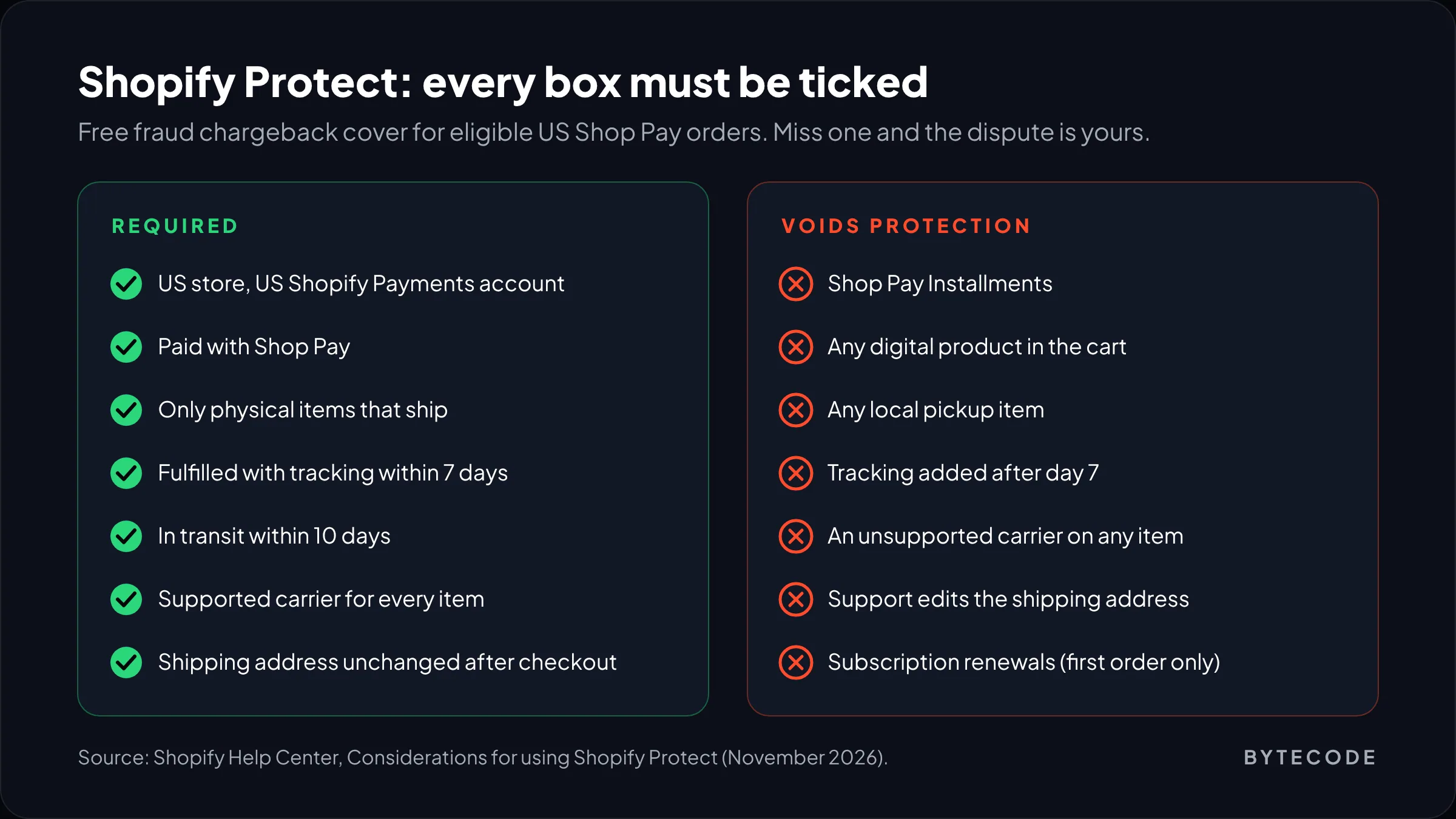
Two of these catch stores most often. The address change: a customer emails “wrong apartment number,” support kindly edits the order, and protection is gone. On big orders we cancel and ask them to reorder instead. And pre-orders: if you cannot ship within 7 days, Protect never covered that order.
From our team: for US stores, Protect is a good reason to push Shop Pay at checkout. It is not a reason to stop reviewing risk, because it covers fraud chargebacks only. “Item not received” disputes are still yours.
Shopify chargebacks: the process, the clock and the fee
When a customer disputes a Shopify Payments charge, the bank takes the disputed amount and a chargeback fee from your next payout straight away, and you usually have 7 to 21 days to submit evidence. Here are the fees in the markets our readers sell in, from Shopify’s chargeback process page:
| Store location | Chargeback fee |
|---|---|
| United States | $15 USD |
| United Kingdom | £10 GBP |
| Germany, France, Netherlands and most of the EU | €15 EUR |
| Ireland | €15 EUR plus 23% VAT |
| Australia | A$25 AUD |
Win the dispute and, in most regions, the fee comes back. Lose it and you are out the goods and the postage on top.
How the response works now
Shopify auto-attaches order data (addresses, IP, tracking, order history) and, on card disputes, an AI-drafted defence that is included by default. What many merchants miss: the response is submitted on the due date even if you add nothing.
Convenient, and the reason plenty of winnable disputes are lost. Auto-attached data proves an order existed, not that the customer got it. What wins is what only you have:
- Email or chat where the customer acknowledges the order or delivery
- Delivery photo or signature if it is not in the tracking PDF
- The return or subscription policy, plus proof they saw it at checkout
Put the strongest proof first, as Shopify recommends, and keep it short.
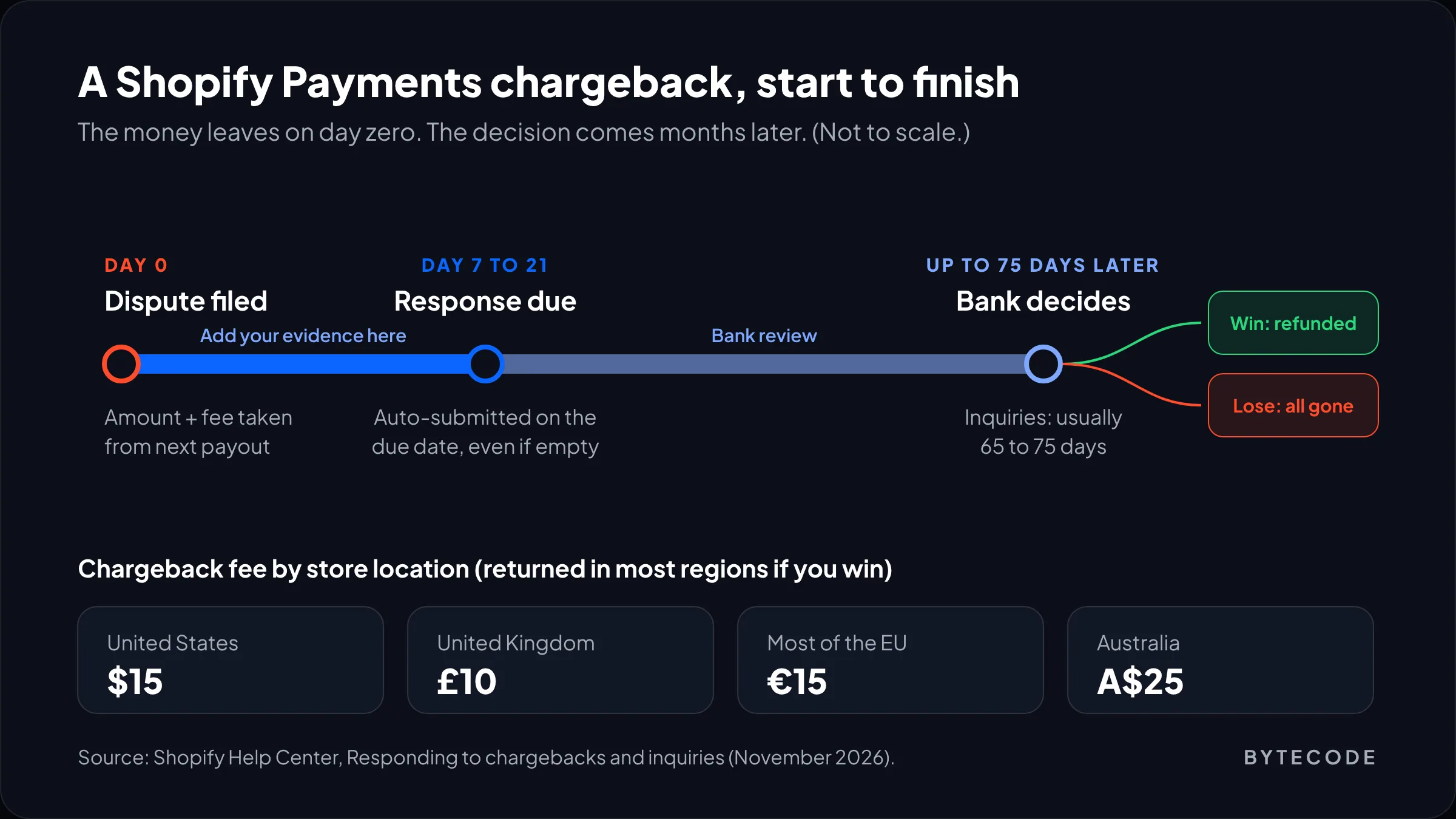
Then wait. Shopify says a chargeback decision can take up to 75 days after you submit, and inquiries usually take 65 to 75 days. Treat that cash as gone for a quarter.
Card-testing bot attacks: how to spot one and what to switch on
A card-testing attack is a bot using your checkout to find out which stolen cards still work, and you spot it by a sudden pile of failed payments and abandoned checkouts with throwaway names. The pattern we see repeats: hundreds of checkouts under “John Doe,” a new email on every attempt, rotating proxies, and a few orders that authorise and return weeks later as chargebacks.
Bots want a cheap successful authorization, so they hit your lowest-priced item, often a $1 sample or shipping add-on.
What Shopify does by itself
Shopify Payments can block some high-risk checkout attempts before an order exists, and fraud analysis can temporarily block an IP address after many orders or failed payments from it in a short window. It usually lifts within a day, and rotating proxies walk around it.
What we switch on when an attack starts
- Manual capture, temporarily. In Settings > Payments, set payment capture to manual. Voiding an authorization costs far less than refunding and disputing a capture.
- A Flow rule that captures safe orders (next section), so real customers are not left waiting.
- Hide or reprice the bait product. Unpublish the $1 item for a week.
- Turn off abandoned-checkout emails for the duration, so you are not emailing 2,000 stolen addresses from your sending domain.
- Block the obvious repeat details with Shopify’s free Fraud Control app (emails, IPs, billing details).
- Contact Shopify Support with dates and order numbers. Keep your own record of what you reported.
Hypothetical stakes: 600 overnight attempts, 8 authorise as $1 orders you capture and ship. All 8 are disputed. At $15 each in the US, that is $120 in fees for $8 of revenue. With manual capture on, you void them and lose only time.
Watch out: leaving manual capture on permanently creates its own problems. Authorizations expire, and forgotten captures lose real orders. Use it during an attack, or let Flow do the capturing.
Shopify Flow fraud tags and automated holds
Shopify Flow can tag, capture or cancel orders based on their risk level, and it is free. Shopify’s Flow fraud page lists ready-made templates under the Risk category, including “Capture payment if order is not high fraud risk” (which only works with manual capture) and “Cancel and restock high risk orders.”
Use the Order risk analyzed trigger, not Order created. Fraud analysis takes a moment to finish, and a workflow that fires on order creation can read the risk before it exists. It is the Flow bug we fix most.
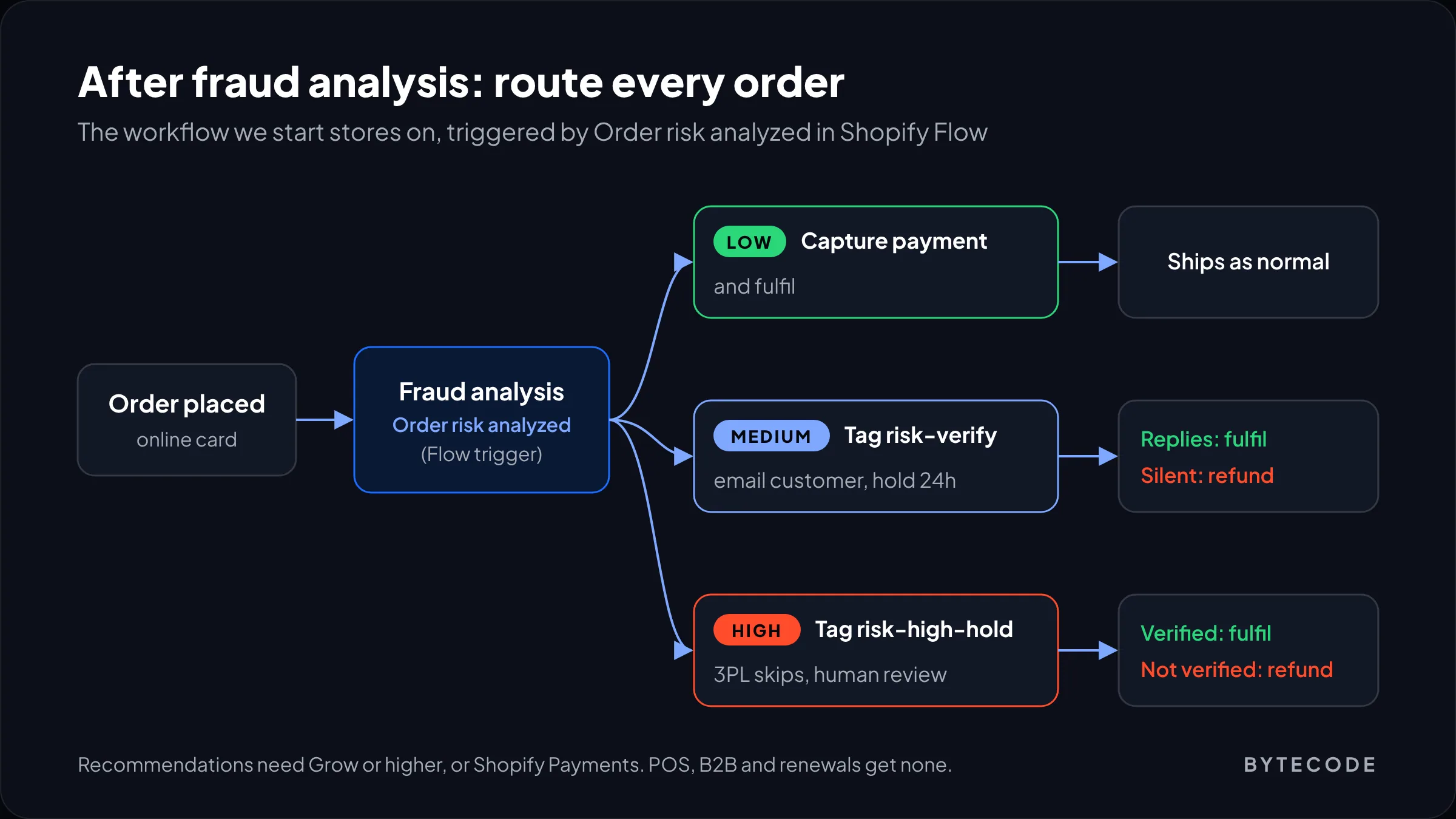
The workflow we start most stores on:
Trigger: Order risk analyzed
Condition: order risk level is HIGH
  Then:  add order tag "risk-high-hold"
         add customer tag "fraud-review"
         send internal email to ops@ (order link, risk facts)
  Otherwise if risk level is MEDIUM:
         add order tag "risk-verify"
  Otherwise:
         capture payment
Notice what is missing: automatic cancellation. We think the “cancel high risk” template is too blunt for most stores. A high-risk $900 order from a new wholesale buyer deserves a phone call. Tag it, have your 3PL skip the risk-high-hold tag, and let a person decide within a working day. Auto-cancel suits only low-value, high-volume stores.
Want a fraud and access audit before peak season?
We will review your risk workflows, Protect eligibility, staff roles and app permissions, and hand you a fix list ranked by risk.
Shopify store security: lock down logins first
Most Shopify store security incidents we see are login problems: a reused password, a phished staff account, an ex-contractor who never lost access.
Start with two-step authentication on every account, beginning with the owner. Shopify’s two-step authentication guide covers authenticator apps, physical security keys and built-in authenticators, and mentions passkeys as a secure sign-in option. SMS can no longer be added as a new method. If you use Shopify Payments, two-step is required, and payouts can be put on hold without it.
The catch: on a regular plan, a store owner cannot switch on two-step authentication for other staff. Each person sets it up themselves. Shopify Plus organizations can require secure sign-in for every user. Elsewhere you need a habit: check the Users list quarterly and give anyone without two-step a deadline.
Phishing aimed at store owners
Phishing that works on merchants looks like the platform, not a bank:
- “Your store will be closed in 24 hours” with a link to a lookalike login page
- A fake copyright or trademark complaint with a “view evidence” link
- A message, apparently from an app developer or “Shopify partner,” asking you to approve a collaborator request
Our staff rule: never sign in from an email link. Use a bookmark and look for the notice inside the admin. A passkey or security key also helps, because it will not authenticate on a fake domain.
Shopify staff permissions, collaborators and app access
Give every person and every app the smallest set of Shopify staff permissions that lets them do their job, and remove it the day the job ends.
Staff roles
Build named roles under Settings > Users > Roles rather than ticking boxes per person, for example “Support” with orders and customers but no export. We guard app installation, customer export, payment settings and staff management hardest. A customer export is exactly what a phisher wants from a hijacked support login.
Collaborator accounts for agencies and freelancers
Agencies, us included, should use collaborator accounts, never a shared login. From Shopify’s collaborator documentation:
- Each store has a 4-digit collaborator request code under Settings > Users > Security. “Generate new code” invalidates the old one.
- You can trim the auto-created role and limit access to specific apps and channels.
- Collaborators must have two-step authentication on, or they cannot log in.
- Collaborators do not count against your user limit, so nobody notices them piling up.
- Access expires automatically if a collaborator has not logged in for 90 days.
That 90-day expiry is a safety net, not a policy. An agency logging in monthly keeps access forever, so remove them when the project ends. If you are choosing a freelancer right now, our guide to hiring a Shopify developer covers the access questions to ask first.
App permission review
Apps ask for scopes at install and nobody rereads them. Each quarter, open Settings > Apps (Apps and sales channels in older admins) and ask of each one: do we use it, and does it need what it can read? A pop-up tool with write access to customers deserves a hard look. Uninstall anything nobody can explain. App access tokens are changing too, as covered in our piece on expiring offline access tokens.
We fold this review into the quarterly pass of our Shopify store maintenance service, because it is the job that gets skipped when nobody owns it.
PCI: what Shopify’s Level 1 status leaves on your side
Shopify is a PCI DSS Level 1 service provider, which covers its own infrastructure and hosted checkout, but it does not make your store compliant for anything you add yourself. That is how cside’s breakdown of Shopify and PCI DSS v4 sums it up (cside sells script monitoring, so weigh the product pitch accordingly).
The two requirements that changed the conversation are 6.4.3, which asks you to inventory, justify and authorize every script on the payment page, and 11.6.1, which asks you to detect unauthorized changes to those scripts. Both became mandatory on 31 March 2025 under PCI DSS v4.0.1. The January 2025 SAQ A update then dropped both from the questionnaire but added an eligibility criterion about protecting against script-based attacks. In practice, you should be able to explain every tag or pixel loading near payment.
What we tell clients to do:
- Keep a list of every pixel and checkout extension at checkout, with an owner and a reason.
- Use Shopify’s sandboxed customer events for tracking rather than raw scripts wherever you can. Our guide to checkout customization with Checkout Extensibility explains why
checkout.liquidwas harder to defend. - Never collect card numbers by email, chat or phone into order notes. For phone orders, send a draft order invoice.
- Ask your acquirer which SAQ they expect.
If PCI paperwork is a recurring headache, it can sit inside a maintenance retainer alongside the access reviews.
Frequently asked questions
How do I prevent fraud on my Shopify store?
Start with Shopify’s built-in fraud analysis and only fulfil orders it marks low risk without checking. Verify medium-risk orders with the customer, hold high-risk ones for review, and automate tagging with a Flow workflow on the Order risk analyzed trigger. Then require two-step authentication and scoped roles for every login.
Does Shopify cover chargebacks?
Only some. Shopify Protect covers fraud-based chargebacks on eligible Shop Pay orders for US stores using Shopify Payments, including the order value and the fee. Orders must ship with tracking within 7 days through a supported carrier and contain only physical items. Every other chargeback, including item-not-received and not-as-described disputes, is yours to answer.
How much is a Shopify chargeback fee?
With Shopify Payments, a chargeback fee is $15 in the US, £10 in the UK, €15 in most of the EU and A$25 in Australia. It is taken from your next payout with the disputed amount. If you win the dispute, the money comes back and, depending on your region, the fee usually does too.
What does a high risk order on Shopify mean?
It means Shopify’s fraud analysis thinks the order has a high chance of ending in a fraud-related chargeback, usually because of failed card checks, mismatched locations or unusual device activity. Shopify will recommend you consider cancelling it. Review it before you ship, and refund it before fulfilment if you cannot verify the buyer.
How do I stop card testing on Shopify?
Switch payment capture to manual while the attack runs, then use a Flow workflow to capture only orders that are not high risk. Unpublish the cheap product bots are targeting, pause abandoned-checkout emails, and block repeat emails or IPs with the Fraud Control app. Report the attack to Shopify Support with dates and order numbers.
Can I require two-step authentication for Shopify staff?
Only on Shopify Plus. Plus organizations can require secure sign-in for every user, but on other plans the store owner cannot turn on two-step authentication for staff, so each person must enable it themselves. Collaborator accounts are the exception: they cannot log in at all without two-step authentication turned on.
What we’d do this week
If you only have an hour before Black Friday traffic arrives, spend it on access, not apps. Check the Users list for anyone without two-step authentication, anyone who left, and any collaborator from a finished project. Remove them. Then check that your last 50 orders show risk levels at all. If not, your plan or gateway limits fraud recommendations.
Next, set up the Flow workflow above on the Order risk analyzed trigger, and decide in advance who reviews risk-high-hold orders and how fast. Write down the manual-capture switch so nobody hunts for it at 2 a.m. If you are a US store, count how many orders show a Shopify Protect status and fix the habits that void it.
Everything else on this list, from app scope reviews to the PCI script inventory, belongs on a quarterly calendar alongside the rest of your Shopify maintenance checklist. We’ve built for brands like Delsey, EcoFlow and Kerbholz, and the pattern holds at every size: the stores that stay out of trouble are not the ones with the most fraud apps. They are the ones where somebody owns the review.