On this page
- App maintenance cost at a glance
- The 15% to 20% rule, and why we budget differently
- Compulsory work: OS releases and store deadlines
- SDK and dependency updates
- Hosting, monitoring and other running costs
- Worked example: a yearly app maintenance budget
- Mobile app support: in-house team or agency retainer?
- What happens when you skip a year of app maintenance
- How to lower the cost to maintain an app
- Frequently asked questions
- What we’d do first
Picture an app that launched in spring 2025, worked fine, and then sat untouched for eighteen months. In September 2026 the team finds a payment bug and tries to ship a one-line fix. Google Play rejects the update because the app doesn’t target Android 16. App Store Connect rejects the iOS build because it wasn’t made with Xcode 26. The one-line fix is now a three-week migration.
Avoiding that is what app maintenance cost really pays for. The usual rule of thumb is 15% to 20% of the original build every year, and it is a fair starting point. But very little of that money goes on “new features.” Most of it is compulsory work set by Apple’s and Google’s calendars, plus the bug fixes and hosting bills that come with real users. Below is how we budget it line by line: the 2026 store deadlines, a worked yearly budget, and an honest look at in-house staff versus an agency retainer.
Key takeaways
- The 15% to 20% of build cost rule is a reasonable first guess, but it only holds at blended or offshore rates. At US agency rates, our worked example lands closer to 35%.
- Store deadlines set the floor. Since April 28, 2026, iOS uploads need Xcode 26, and since August 31, 2026, Google Play updates need to target Android 16 (API level 36).
- Budget in three buckets: compulsory platform work, running costs, and improvements. Only the last one is optional.
- Hosting is usually the smallest line for apps under about 50,000 monthly users. Developer hours are the largest by a wide margin.
- One in-house developer costs roughly $194,000 a year fully loaded at the US median. That only beats a retainer once you have well over 1,000 hours of work a year for them.
App maintenance cost at a glance
For most apps, yearly app maintenance cost runs from about $6,000 for a simple app maintained offshore to well over $100,000 for a complex app maintained by a US team.
These are our own planning ranges for labor only. Hosting and third-party services come on top.
| App type | Typical scope | Hours per year (keep it running) | At $70/h blended | At $150/h US agency |
|---|---|---|---|---|
| Simple | Content or catalog app, login, push, no custom backend logic | 80–120 | $5,600–$8,400 | $12,000–$18,000 |
| Mid-size | Accounts, payments, push, one backend, 1–3 integrations | 180–260 | $12,600–$18,200 | $27,000–$39,000 |
| Complex | Real-time features, many integrations, offline sync, regulated data | 400–800+ | $28,000–$56,000 | $60,000–$120,000+ |
Both rates are hypothetical: $150 for a mid-level US agency, $70 for a US lead with an offshore team. If you haven’t built yet, our breakdown of how much it costs to build an app covers build costs and regional rates.
The 15% to 20% rule, and why we budget differently
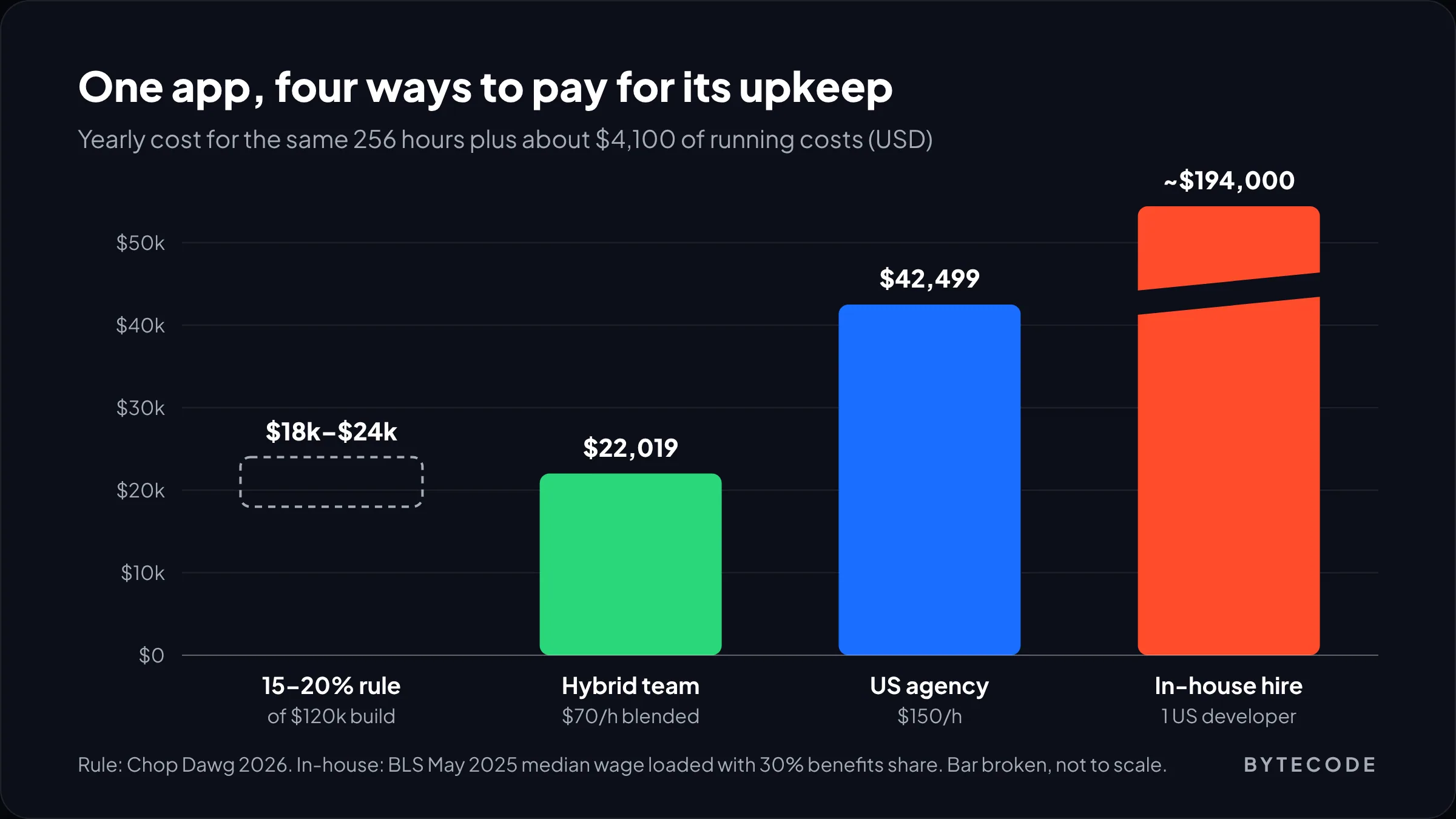
The widely quoted benchmark is that yearly app maintenance runs 15% to 20% of the original build cost. Chop Dawg, a US app agency, puts it exactly that way in its 2026 maintenance and support guide, and adds that legacy or poorly built apps can need 30% to 40% a year. For a $100,000 app, that is $15,000 to $20,000 a year.
We use the rule to sanity-check a budget, never to build one. Three reasons:
- Build cost and upkeep don’t scale together. A $60,000 app with a bespoke sync engine needs more care than a $150,000 app that is mostly beautiful screens.
- Rates move the number more than scope does. The same 250 hours is about 18% of a $100,000 build at $70 an hour and about 38% at $150.
- It hides the parts you can’t skip. A percentage invites “can we spend less this year?” For compulsory work, the answer is no.
So we split app maintenance cost into three buckets. Compulsory work is whatever Apple, Google and your SDK vendors force on you. Running costs cover hosting, monitoring and the hours for bug fixes. Improvements are what you choose to do. In a tight year you can cut the third bucket to zero. The other two stay.

Compulsory work: OS releases and store deadlines
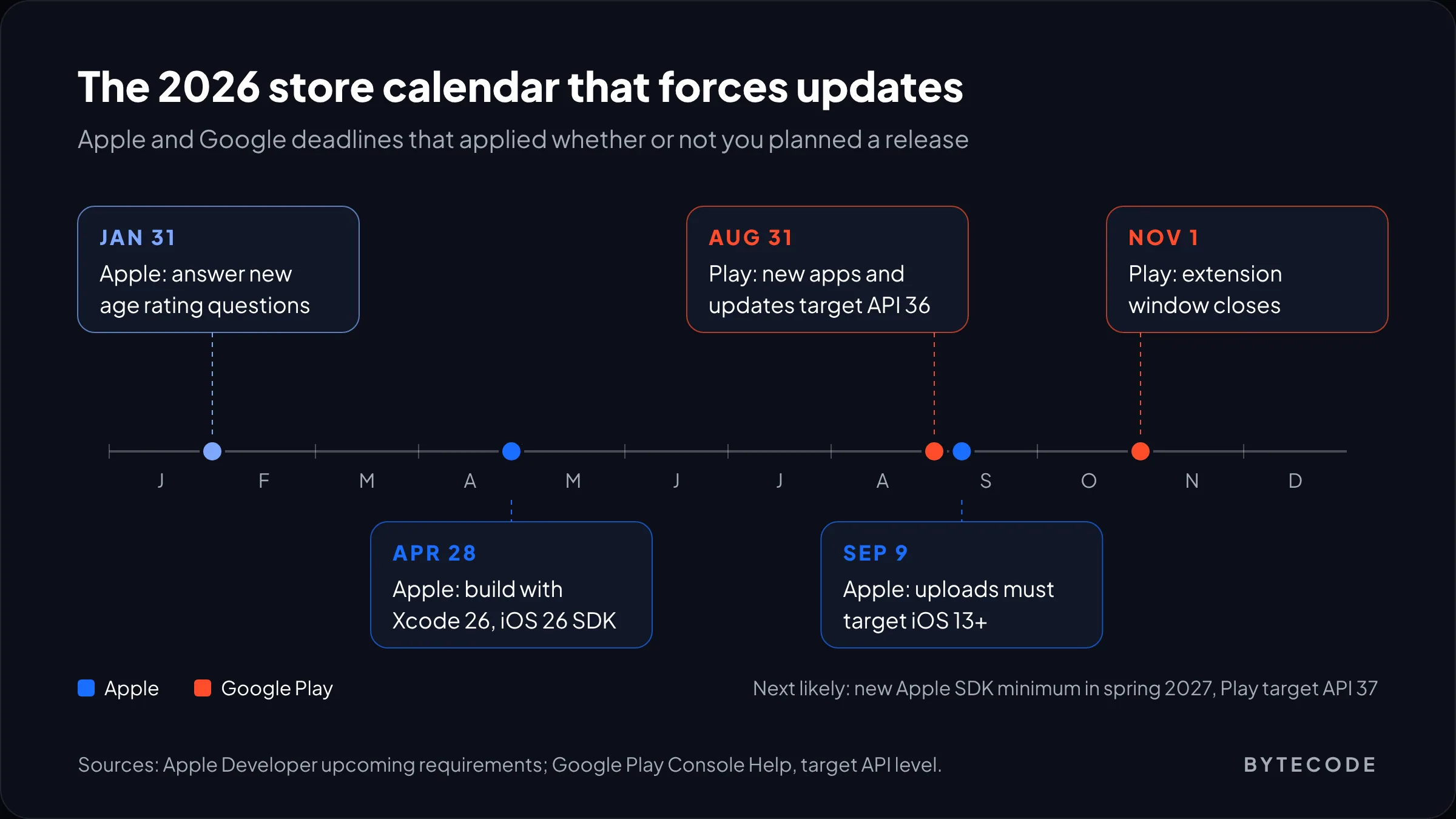
Both stores now run on a yearly clock, and each tick forces an update whether or not you planned one. Missing a date rarely pulls your app overnight. It stops you shipping updates, and on Android it can hide you from new users.
Google Play: the target API level
From August 31, 2026, new apps and app updates on Google Play must target Android 16, which is API level 36. Teams could request an extension to November 1, 2026, so that window has now closed. Those details are in the Play Console Help article on target API level.
The quieter rule is the one for existing apps. An app must target at least API 35 to stay available to new users on phones running a newer Android version. Below that, Play only offers it to devices on the same Android version or older. Existing users keep it, so nobody complains while installs slowly dry up.
Bumping targetSdkVersion in build.gradle takes thirty seconds. Testing is the job. Google’s list of Android 16 behavior changes for apps targeting 36 includes a few that break real apps:
- The edge-to-edge opt-out (
windowOptOutEdgeToEdgeEnforcement) is disabled, so headers and bottom bars can slide under the system bars. - Predictive back is on by default, and
onBackPressedis no longer called. Any custom back handling built on it stops firing. - On screens 600dp wide and up, orientation and aspect-ratio locks are ignored. A portrait-only app now fills a tablet or an unfolded foldable, and rotation recreates activities more often.
That last one has a temporary opt-out, but Google says it won’t apply once you target API 37. The Play deadlines have moved up one level every August (API 35 in 2025, API 36 in 2026), so API 37 is the likely next target. Fix the layouts properly now rather than paying for them twice.
Apple: SDK minimums and the September release
Since April 28, 2026, apps uploaded to App Store Connect must be built with Xcode 26 or later against the iOS 26 SDK (or the matching iPadOS, tvOS, visionOS or watchOS SDK). Since September 9, 2026, iOS and iPadOS uploads must also target iOS 13 or later. Both rules sit on Apple’s upcoming requirements page, which also shows the pattern: earlier SDK minimums landed in April 2023 and April 2024.
On top of the SDK rules, every September brings a new major iOS version. It rarely breaks a well-built app outright, but it reliably changes something, often a permission prompt or a layout on the newest screen size. We budget a regression pass on the summer betas so fixes are ready before release day, not after the one-star reviews.
Watch out: the real risk is a production bug that lands after a deadline. You can’t ship the fix until the app is compliant, so a one-hour patch waits behind a multi-week migration. Do the yearly bump in quiet months.
SDK and dependency updates
Every third-party SDK in your app is a small maintenance contract you signed without reading. Each ships breaking versions on its own schedule, and store rules apply to their code as well as yours.
Apple is explicit about this. According to the same requirements page, since May 1, 2024, uploads must declare approved reasons for certain APIs, including APIs called from third-party SDKs. An abandoned SDK without a privacy manifest becomes your problem to replace or fork.
Cross-platform apps add a layer. A React Native or Flutter app waits on the framework to support each new Xcode and Android SDK, and framework upgrades bring their own breaking changes. On the React Native apps we support, that yearly upgrade is usually the biggest compulsory task, bigger than the target API bump. We compare how each framework handles this churn in Flutter vs React Native.
What we’d skip: chasing every minor SDK release. We upgrade dependencies in two scheduled windows a year, plus immediately for security advisories. Continuous upgrading sounds disciplined, but on a small app it mostly generates regression testing.
Hosting, monitoring and other running costs
Under roughly 50,000 monthly active users, infrastructure is usually the smallest part of the cost to maintain an app, often a few hundred dollars a month. Developer hours dwarf it.
Firebase is a useful example because so many mobile backends start there. On Firebase’s Blaze pricing, Crashlytics and Cloud Messaging are free with no listed limits. Authentication is free up to 50,000 monthly active users. Cloud Functions include 2 million invocations a month, then cost $0.40 per million. A modest app can sit almost entirely inside those. When the bill grows, it is usually chatty screens re-reading the same documents, which is a code fix.
The recurring lines we put in every budget:
- Apple Developer Program: $99 per membership year, per Apple’s enrollment page. Let it lapse and your app comes off the store. Google Play’s registration fee is one-time, so it doesn’t recur.
- Monitoring: Crashlytics covers crashes for free. Paid tools earn their place once you need release health dashboards or session replay.
- Third-party APIs: SMS for phone login (Firebase bills per message), maps and email. These surprise people at scale.
- Test devices: at least one older, cheaper Android phone and one current iPhone. Most crash reports we triage come from the devices nobody on the team owns.
From our team: set a billing alert on day one, in Google Cloud Console under Billing > Budgets & alerts, or the equivalent on AWS. A runaway Cloud Function loop costs little if you catch it in an hour and a lot if you catch it on the monthly invoice.
Worked example: a yearly app maintenance budget
Here is a clearly hypothetical budget. Say you run a booking app for a group of physiotherapy clinics. It is built in React Native for iOS and Android, uses Firebase for auth, data, functions and push, takes card payments through Stripe, and has about 25,000 monthly active users. The build cost $120,000.
Hours for the year
- Yearly store compliance (Xcode SDK move, target API bump, OS beta testing): 40 hours
- Framework and SDK upgrades in two scheduled windows: 40 hours
- Bug fixes and crash triage, about 6 hours a month: 72 hours
- Backend upkeep and security patches: 20 hours
- Release management and monitoring, about 2 hours a month: 24 hours
- Small improvements (a booking filter, copy changes): 60 hours
That is 196 hours to keep the app healthy plus 60 for improvements, 256 in total. Here is the year under two staffing models:
| Line item | Basis | US agency ($150/h) | Hybrid team ($70/h) |
|---|---|---|---|
| Compulsory and running hours | 196 h | $29,400 | $13,720 |
| Improvements | 60 h | $9,000 | $4,200 |
| Apple Developer Program | $99 per year | $99 | $99 |
| Firebase usage beyond free allowances | Assumed $150/month at 25k MAU | $1,800 | $1,800 |
| Other services (SMS, email, paid monitoring) | Assumed $100/month | $1,200 | $1,200 |
| Test device refresh | Assumed, per year | $1,000 | $1,000 |
| Yearly total | $42,499 | $22,019 | |
| As a share of the $120,000 build | 35% | 18% |
Stripe fees are left out because they scale with revenue. The Firebase and services lines are assumptions; your usage dashboard will give you real ones within a month of launch.
The hybrid budget lands at 18%, right inside the 15% to 20% rule. The US agency budget is nearly double for identical work. So the rule of thumb quietly assumes a blended rate, and nobody mentions that when they quote it.
Also notice that non-labor costs are about $4,100, under 10% of the US budget. If you want to cut app maintenance cost, the hosting bill is the wrong place to start.
Want this budget built for your app?
Send us your stack, your monthly active users and your integrations, and we’ll return an hour-by-hour maintenance estimate with the next 12 months of store deadlines mapped in.
Mobile app support: in-house team or agency retainer?
For most apps, a retainer is cheaper than hiring. One in-house developer costs several times the US agency budget above, and still can’t cover both platforms plus the backend through holidays and sick days.
Here is the arithmetic. The median annual wage for US software developers was $135,980 in May 2025, according to the Bureau of Labor Statistics. Benefits made up 30.0% of employer compensation costs for private industry workers in June 2026, per the BLS employer cost data. That is an all-jobs average, not a developer figure, but it gives a fair loaded cost: $135,980 divided by 0.70 is roughly $194,000 a year before recruiting or equipment.
At $150 an hour, $194,000 buys about 1,290 agency hours. Our worked example needs 256. Hiring starts to make sense past roughly 1,000 hours a year of continuous work, and by then you are running a product team, not maintaining an app.
| In-house developer | Freelancer | Agency retainer | |
|---|---|---|---|
| Yearly cost for ~250 hours of work | ~$194,000 (full salary regardless) | Hours × rate | Hours × rate, usually as a monthly block |
| Covers iOS, Android and backend | Rarely, with one person | Depends on the person | Yes, with a team behind the account |
| Holiday and sick cover | No | No | Yes |
| Best fit | Apps that are the core product, 1,000+ hours a year | Simple apps, low-risk updates | Most apps between those extremes |
Chop Dawg’s guide says many US apps spend $2,500 to $5,000 a month on mobile app support, so $30,000 to $60,000 a year, which runs from the top of our mid-size row into the complex one. A good retainer states the monthly hour block, response times by severity and what happens to unused hours. Also insist the store accounts stay in your company’s name. A vendor holding your Apple Developer account is one of the slowest handover problems to untangle.
That hybrid model is how our mobile app development team runs support, with a lead in Alpharetta and the hours in Mohali. We cover its trade-offs in our guide to outsourcing software development to India.
What happens when you skip a year of app maintenance
Nothing happens on day one, which is why people skip it. Then the damage arrives in sequence.
- Updates get blocked. The next build fails App Store Connect or Play Console checks, so even a hotfix needs a full toolchain upgrade first.
- Discovery shrinks on Android. Once your target falls below the existing-app minimum, new users on newer phones can’t find or install you.
- Crash rates creep up. New OS versions expose bugs nobody tested. Reviews follow.
- Upgrade debt compounds. Skipping one framework version costs an afternoon. Skipping three can mean rewriting native modules that no longer compile.
In our experience, catch-up work on an app left alone for two years usually costs more than the upkeep it replaced. The yearly bump is boring, which is why it’s cheap.
From our team: put both store dates in your company calendar now. Run test builds against the newest Xcode in spring and the next Android target in June. Six weeks of slack covers almost every surprise we see.
How to lower the cost to maintain an app
The cheapest maintenance is work you design out at build time. After launch, these levers matter most.
- Audit your SDKs every year. Remove the analytics tool nobody opens. Each SDK you drop is one less upgrade and one less privacy declaration.
- Automate the regression pass. A small suite of end-to-end tests on login, booking and checkout turns a two-day manual test into an overnight run. Our overview of types of software testing covers which ones pay off first.
- Use CI for store builds. With builds and signing in a pipeline, a new Xcode version is a config change, not a laptop setup day.
- Keep one codebase if you can. Two native codebases mean two sets of SDK upgrades and two test passes every year.
If your app is already overdue, our mobile app maintenance and support service starts with a short audit of toolchain versions, target API and crash data, priced before any work begins.
Frequently asked questions
How much does it cost to maintain an app per year?
Most apps cost $6,000 to $120,000 a year to maintain, depending on complexity and who does the work. A mid-size app with payments and a few integrations typically needs 180 to 260 hours a year: about $13,000 to $18,000 at a blended offshore rate or $27,000 to $39,000 at US agency rates, plus hosting.
What percentage of development cost is app maintenance?
The common benchmark is 15% to 20% of the original build cost each year, rising to 30% to 40% for legacy or poorly built apps. In our experience the percentage depends heavily on hourly rates: our worked example comes to 18% with a hybrid team and 35% with a US agency for the same hours.
What does app maintenance include?
App maintenance includes compulsory store and OS updates, SDK and framework upgrades, bug fixes, crash monitoring, security patches and backend hosting, plus any small improvements. In 2026 that meant building iOS apps with Xcode 26 and targeting Android 16 on Google Play.
What happens if I stop updating my app?
Your app usually stays live, but you lose the ability to ship updates until it meets current store rules, so even urgent fixes wait behind a toolchain migration. On Google Play, apps targeting below API level 35 stop being shown to new users on newer Android versions. Crash rates also tend to rise with each new OS release.
Is it cheaper to maintain an app in-house or with an agency?
An agency retainer is cheaper for most apps. One US developer costs about $194,000 a year fully loaded at the median wage, while a mid-size app often needs only 200 to 300 hours of maintenance a year. In-house hiring makes sense once there is well over 1,000 hours of continuous product work a year.
How often should a mobile app be updated?
Plan at least two scheduled releases a year for platform and SDK upgrades, timed before Apple’s spring SDK deadline and Google’s late-August target API deadline, plus bug-fix releases as needed. On an active app we’d aim for a release every month or two. Security fixes should ship as soon as they are tested.
What we’d do first
Check two numbers today: the Xcode version behind your last iOS build and the targetSdkVersion in your Android build file. If either is behind the 2026 rules, fix that before you need to ship anything urgent.
Then build your app maintenance cost bottom-up: compulsory work first, then five to eight bug-fix hours a month for a mid-size app, then hosting from the real usage dashboard. Improvements come last. Use the 15% to 20% rule as a cross-check, and if your number lands far above it, look at the rate before you cut scope.
We’ve built for brands like EcoFlow, Delsey and Medcline. If you want a second opinion on your maintenance plan, or a team to take it over, talk to our mobile app development services team.