On this page
- Legacy application modernization: the short answer
- The 7 Rs of application modernization, in plain terms
- Refactor vs rewrite: why big rewrites go wrong
- The strangler fig pattern, step by step
- How we assess a legacy system before choosing
- Legacy system migration: getting the data across
- Worked example: modernizing a 10-year-old order portal
- Cost and timeline: what application modernization really takes
- When to leave a legacy system alone
- Frequently asked questions
- What we’d do first
The request usually arrives as a slide: “Phase 1: rewrite the platform.” The system behind it is twelve years old, one developer understands the stored procedures, and every pricing change takes three weeks. Everyone in the room agrees it has to go. The arguments start when someone asks how.
Our answer, for most teams: don’t rewrite it in one go. Good legacy application modernization picks a different move for each part of the system. Some modules get retired. Some get a runtime upgrade. A few get rebuilt behind a routing layer, and at least one stays exactly where it is. Below is how we make those calls, from the AWS “7 Rs” and the strangler fig pattern to data migration and a costed worked example you can adapt.
Key takeaways
- Legacy application modernization is a portfolio of decisions, not one project. Score each module, then choose its “R”.
- AWS calls refactoring its most complex and costly migration strategy and advises against it during a large migration. Move first, modernize second.
- Big-bang rewrites put all the risk in one cutover. The strangler fig pattern spreads it across small releases you can roll back.
- Data is where projects stall. Plan sync, reconciliation and a rollback point per domain before writing new code.
- Some systems should be left alone. Stable code on a supported runtime is often cheaper to keep than to replace.
Legacy application modernization: the short answer
Refactor incrementally when the system still does its job but has become slow and risky to change. Replatform when the code is fine but the runtime or hosting is the problem. Buy SaaS when the module does something generic. Rewrite only when the system is small, or when the process it encodes is being thrown away anyway.
This is the table we sketch on a whiteboard in the first workshop.
| Your main problem | Usual move | What you’d skip |
|---|---|---|
| Runtime or framework going out of support | Replatform (upgrade in place) | Re-architecting at the same time |
| Hosting cost or data-center exit | Rehost or relocate | Code changes until the move is done |
| Every change takes weeks and breaks something | Refactor module by module behind a facade | A feature-parity rewrite |
| The module is generic (CRM, ticketing, HR) | Repurchase a SaaS product | Rebuilding a commodity in-house |
| Nobody uses it | Retire | Migrating its data “just in case” |
| Stable, rarely changed, still supported | Retain | Modernizing it because it looks old |
“Rewrite” barely appears. That is deliberate.
The 7 Rs of application modernization, in plain terms
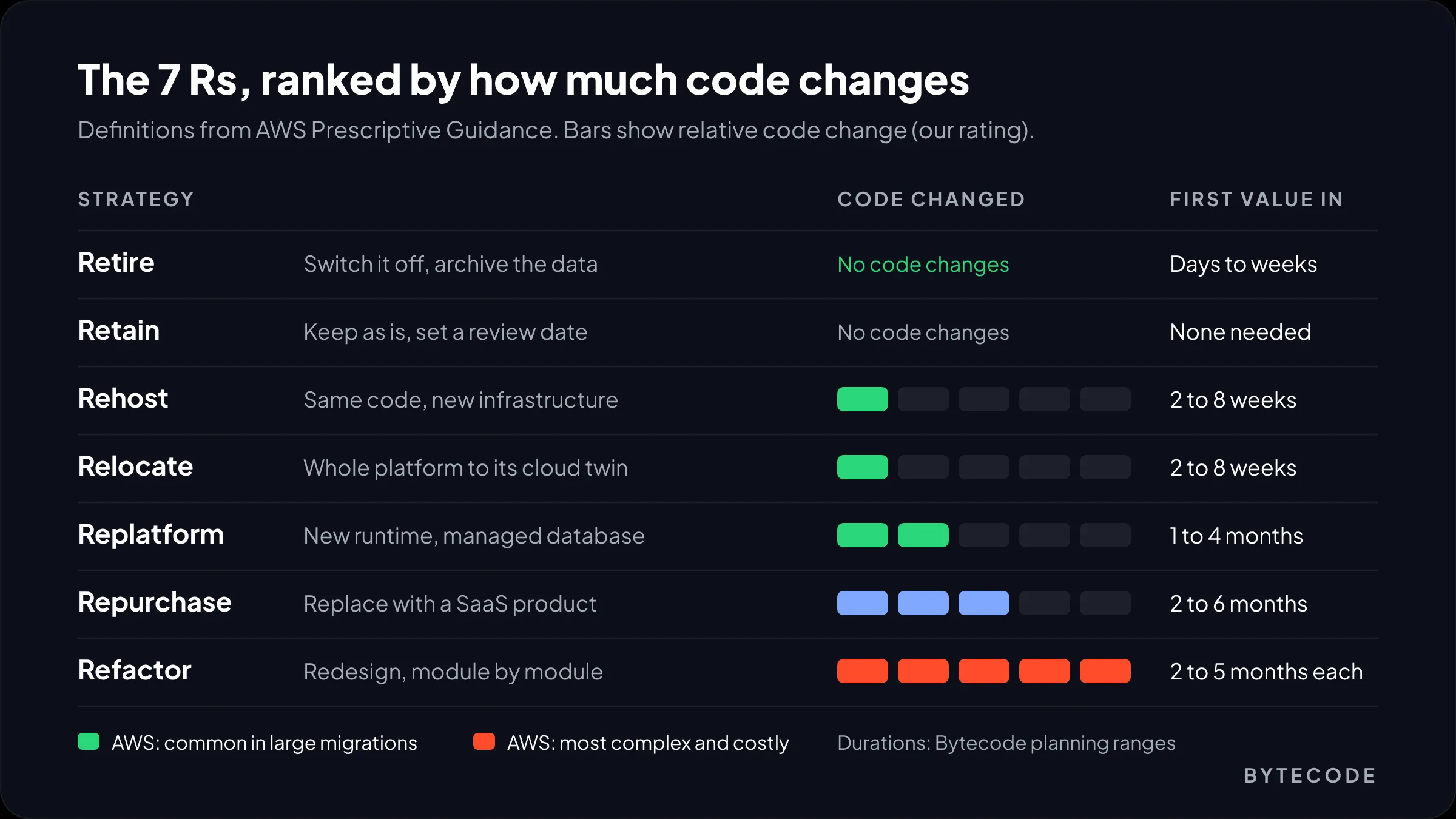
The 7 Rs are AWS’s names for what you can do with any application: retire, retain, rehost, relocate, repurchase, replatform or refactor. They were written for cloud migration, but they work as a vocabulary for application modernization generally, because they force a decision per application instead of one slogan for the whole estate.
Here is how AWS Prescriptive Guidance defines them, with our notes for a custom-built business app:
- Retire. Switch it off and archive it. AWS offers a handy signal: no inbound connections for 90 days. Old admin tools and report screens often qualify.
- Retain. Keep it where it is for now, for reasons like compliance, high risk or a recent upgrade. It is a decision with a review date, not neglect.
- Rehost (“lift and shift”). Move it to new infrastructure unchanged. Quick, and it does nothing for how hard the code is to change.
- Relocate. Move a whole platform, such as a VMware estate, to its cloud equivalent with no architecture change. AWS calls it the quickest route into the cloud.
- Repurchase (“drop and shop”). Replace it with a product, usually SaaS. Data migration and integration still cost real hours.
- Replatform (“lift, tinker and shift”). Keep the code, change what it runs on: a managed database, a newer runtime, containers.
- Refactor or re-architect. Redesign it, usually to break up a monolith. AWS says this is the most complex and costly option and recommends rehosting or replatforming first.
Vendor pitches skip that last point. If you are leaving a data center and also want microservices, do the move first.
Refactor vs rewrite: why big rewrites go wrong
Refactor in almost every case where the current system works. A rewrite throws away years of fixes for edge cases nobody wrote down, and it ships nothing until the end.
Joel Spolsky made the classic case in 2000 with Netscape, which rebuilt its browser from scratch and went almost three years between version 4.0 and the 6.0 beta. His essay Things You Should Never Do, Part I still holds up.
The project data agrees. McKinsey and the University of Oxford looked at more than 5,400 IT projects and found that large ones (over $15 million) ran 45% over budget and delivered 56% less value than predicted, on average, according to McKinsey’s 2012 study. It is old, and your project is smaller, but the mechanism scales down: a long build, a moving target, one big release.
Ian Cartwright, Rob Horn and James Lewis go further in Patterns of Legacy Displacement. Their critique of “feature parity” is the one we quote most. Agreeing what the old system actually does is a huge job by itself. It also pulls you toward a single release, and it rebuilds the processes you wanted to fix.
When a rewrite is the right call
- The system is small enough to rebuild in a quarter.
- The business process behind it is being replaced, so parity is not the goal.
- Nothing in front of or inside the system can be intercepted or extended.
Watch out: the riskiest phrase in a modernization brief is “same as today, but modern.” It sounds safe. In practice it means months of reverse-engineering before any new value reaches users.
The strangler fig pattern, step by step
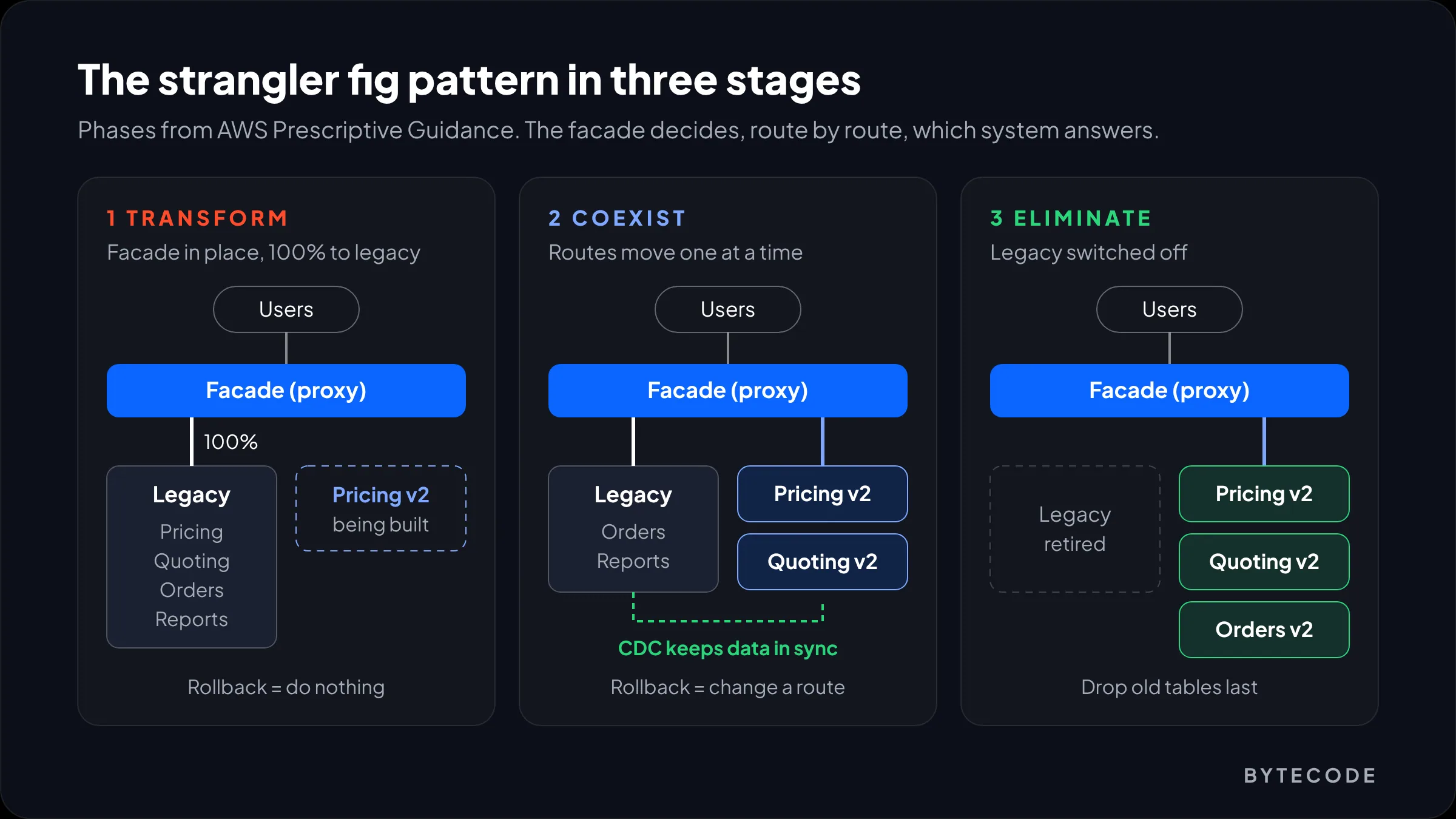
The strangler fig pattern replaces a legacy system one capability at a time. A routing layer sits in front of the old application, and as each new piece is ready, its traffic is diverted. The old system shrinks until you can switch it off.
Martin Fowler named it in 2004 after the strangler figs he saw in Queensland, which grow around a host tree until they replace it. His original note describes building the new system “around the edges of the old” and gives reduced risk as the main reason.
AWS’s guide to decomposing monoliths splits it into three phases. On a real project they look like this:
- Transform. Build the new component beside the old one. Pick the first slice by change frequency, not by how ugly the code is. The module the business wants changed every month goes first.
- Coexist. Put a proxy at the edge. For web apps we usually reach for NGINX, Microsoft’s YARP or a managed API gateway, with a rule per path (
/pricing/*to the new service, everything else to the monolith). Rollback becomes a config change. - Eliminate. Once the new piece has handled a full business cycle in production, including month-end, delete the old code and its tables.
Budget for the transitional pieces: the facade, plus an anti-corruption layer that stops the new service inheriting the old system’s odd field names and status codes.
Where it does not fit
AWS is clear about the limits. It is overkill for small, simple systems, it fails if requests to the back end cannot be intercepted, and a badly designed facade becomes a bottleneck. We would add batch-heavy systems, where the real traffic is a nightly job. There you strangle job by job, which is slower.
How we assess a legacy system before choosing
A useful assessment takes two to four weeks and ends with a decision per module, a sequence and a budget range.
- Write down the outcome. “Ship a pricing change in two days, not three weeks” is an outcome. “Move to microservices” is not.
- Inventory everything that runs. Apps, scheduled jobs, stored procedures, file drops, the Excel macro finance relies on. Cron tables and SQL Agent jobs always hold surprises.
- Map dependencies. Which modules share tables, and which outside systems call in? Database coupling decides your sequence.
- Measure change pain. Git history shows which folders change most and which changes cause incidents. Busy hotspots are refactor candidates. Cold code that works is a retain candidate.
- Check support dates. Runtime, framework, OS, database engine. A runtime leaving support is a hard deadline. Code smell is not.
- Price the status quo. Hosting, licences, upkeep hours and the specialist you cannot replace.
- Score and sequence. Assign an “R” to each module and order the work so the first release lands within a quarter.
Step 5 is live right now for a lot of teams. Microsoft has confirmed that .NET 8 and .NET 9 both reach end of support on November 10, 2026, with .NET 10 (supported to November 2028) as the target. Apps keep running after that, but without security fixes. A replatform with a date on it makes a good first project.
From our team: we score modules on one sheet with five columns: change frequency, incidents, support status, business value and coupling. Anything fancier becomes a debate about the model.
Legacy system migration: getting the data across
In a legacy system migration, the data is usually harder than the code. Plan it per domain: the new service uses the old tables first, then gets its own store kept in sync, then becomes the system of record once the numbers match.
Most legacy apps share one database across every module, so we go in stages:
- Stage 1, shared tables. The new service handles its domain but still reads and writes the legacy tables.
- Stage 2, sync. Create the domain database, backfill history with an ETL job, then keep it current with change data capture. Debezium, AWS DMS and SQL Server’s own CDC are the usual tools. Run reconciliation daily: row counts, totals, and a sample of records compared field by field.
- Stage 3, switch. When reconciliation has been clean for a full cycle, the new database becomes the system of record. Only then drop that domain’s legacy tables and procedures.
Teams forget the rollback point. While legacy tables and sync jobs exist, going back is cheap. Once they are dropped, it is not, so make that drop its own release with its own sign-off.
Watch out: skip “dual writes” from application code, where one request writes to both databases. Eventually one side fails and you have two versions of the truth. Write to one store and let CDC carry changes to the other.
Also decide what not to migrate: old test orders can live in an archive. Our guide to software testing types covers the test coverage this phase needs.
Worked example: modernizing a 10-year-old order portal
This one is hypothetical, built from patterns we see often. Say you are a building-supplies distributor with 200 staff. Sales quotes and orders through a custom portal built in 2015 on ASP.NET MVC and SQL Server. It has nine modules: quoting, orders, pricing, customers, inventory lookup, invoicing export, reporting, user admin, and a supplier API moved to .NET 8 in 2024.
Pricing logic lives in stored procedures and takes three weeks to change. The supplier API’s runtime leaves support this month. And the one engineer who knows the database is retiring next year.
Option A: full rewrite
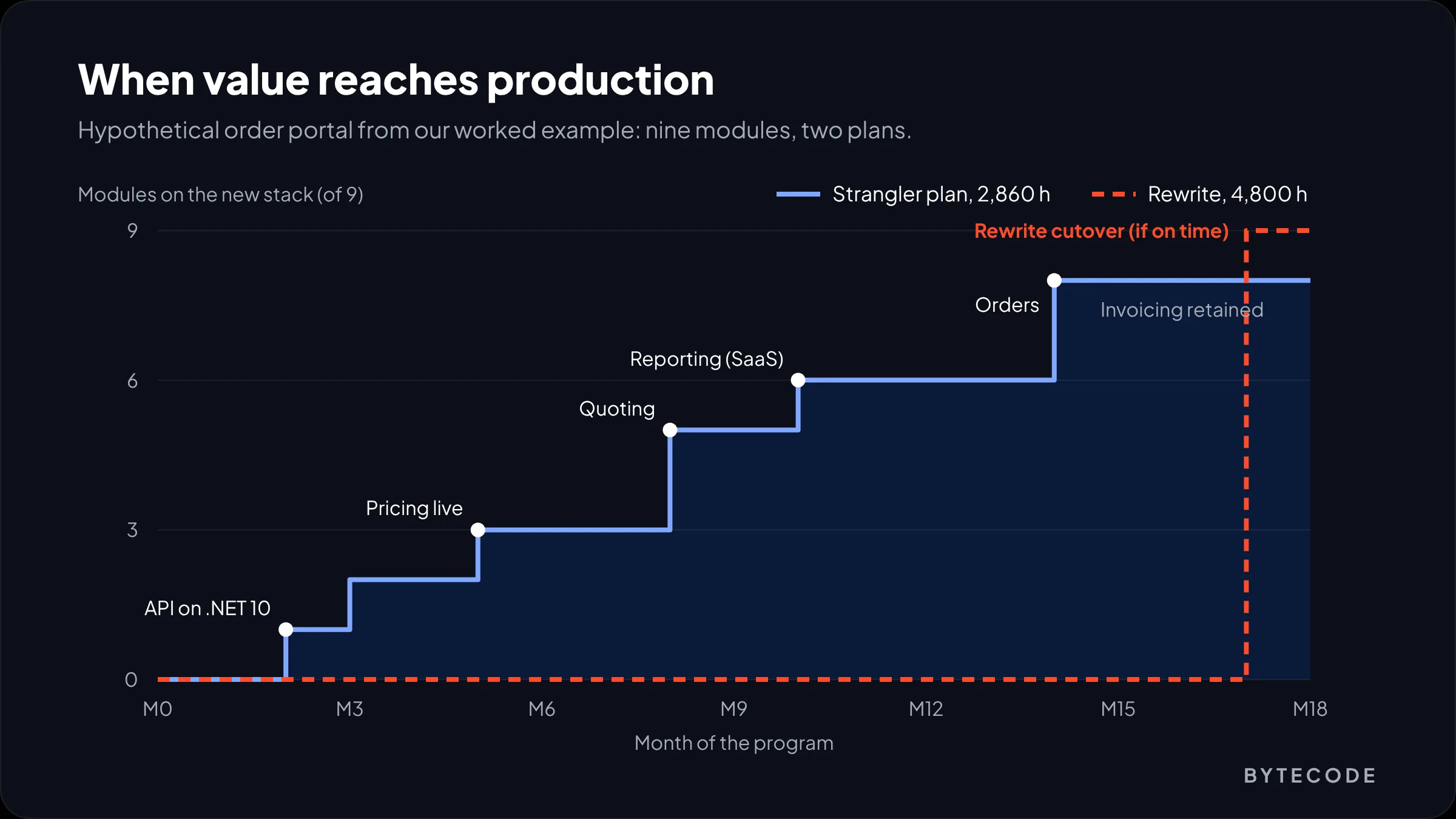
New stack, every module rebuilt to parity, one cutover. Call it 4,800 hours, with nothing in production until month 17 if it runs on time.
Option B: decide per module, then strangle
| Work item | The “R” | Hours | Live by |
|---|---|---|---|
| Assessment and module scoring | n/a | 80 | Month 1 |
| Supplier API, .NET 8 to .NET 10 | Replatform | 60 | Month 2 |
| Facade, new auth and user admin, CI/CD | Refactor | 160 | Month 3 |
| Pricing service (rules out of stored procedures) | Refactor | 520 | Month 5 |
| Quoting and customers | Refactor | 640 | Month 8 |
| Reporting moved to an off-the-shelf BI tool | Repurchase | 120 | Month 10 |
| Orders and inventory lookup | Refactor | 900 | Month 14 |
| Data sync, CDC and reconciliation | n/a | 300 | Ongoing |
| Legacy UI switched off, old data archived | Retire | 80 | Month 16 |
| Invoicing export | Retain | 0 | Review in 2027 |
| Total | 2,860 |
At an illustrative onshore rate of $150 an hour, Option A is about $720,000 and Option B about $429,000. With a hybrid team (20% of hours onshore at $150, 80% offshore at $40, so a blended $62), they come to roughly $297,600 and $177,320. Example figures for this scenario, not a quote.
The timing matters more than the cost gap. Under Option B the security deadline is handled in month 2 and the pricing problem everyone complained about is fixed in month 5. Under Option A, both wait for month 17.
Not sure which “R” each part of your system needs?
Send us a short description of your application and what hurts, and we will suggest a module-by-module plan with a first release you could ship within a quarter.
Cost and timeline: what application modernization really takes
Budget by move, not by system. A runtime upgrade can take a few weeks, refactoring one major module behind a facade usually takes two to five months, and a full rewrite of a mid-sized app runs a year or more. These planning ranges are ours, from scoping this work, not market data.
| Move | Hours (one app or module) | Duration | What pushes it up |
|---|---|---|---|
| Assessment | 40–120 | 2–4 weeks | Integrations, missing documentation |
| Rehost or relocate | 40–200 | 2–8 weeks | Network rules, hardware-tied licences |
| Replatform | 150–800 | 1–4 months | Deprecated libraries, near-zero tests |
| Repurchase (SaaS) | 200–1,000 plus licences | 2–6 months | Data mapping, custom workflows |
| Refactor one module | 300–1,000 | 2–5 months | Shared tables, logic in stored procedures |
| Full rewrite | 2,000–10,000+ | 9–24 months | Undocumented behavior, parity creep |
Rates turn those hours into money, and team location moves the total more than any line in the table. We compare onshore, offshore and hybrid models in our guide to outsourcing software development to India.
Do AI code tools change the math?
For mechanical work, yes. AWS Transform custom went generally available in December 2025 for jobs like Java 8 to 17 upgrades and Python or Node.js runtime bumps, and AWS claims it cuts execution time by over 80% in many cases. We use AI assistants for exactly that kind of work. They will not tell you which module to strangle first, or which strange discount rule a sales director depends on. Trim the replatform rows. Leave refactor and data where they are.
If you want one team to own sequencing and delivery, our enterprise solutions team runs these programs from assessment to final decommission.
When to leave a legacy system alone
Leave it alone when it is stable, rarely changes, runs on a supported platform and costs less to keep than to replace. Old is not a business problem. Unsupported, fragile or blocking is.
Retain candidates in our audits tend to look alike:
- A handful of commits a year, and few incidents.
- A runtime and OS with security support for at least another 18 months.
- Clear inputs and outputs, so it can sit behind an API later.
- No growth plans that depend on it.
Retaining still takes work: wrap it behind an interface, add characterization tests and set a review date. Our DevOps guide covers the monitoring basics that keep a retained system boring.
And leave it alone if the organization is not ready. Patterns of Legacy Displacement warns that if team structure and ways of working stay the same, you tend to rebuild the same legacy on a newer stack. Fowler put it more bluntly: we are writing “tomorrow’s legacy software today”.
Frequently asked questions
What is legacy application modernization?
Legacy application modernization is updating an older business application so it is cheaper and safer to run and change. It can mean upgrading the runtime, moving hosting, replacing a module with SaaS, refactoring code behind a facade or retiring parts entirely. Most successful programs combine several of these, decided module by module, rather than rewriting the whole system at once.
What are the 7 Rs of application modernization?
The 7 Rs are AWS’s seven strategies for any application: retire, retain, rehost, relocate, repurchase, replatform and refactor. They range from switching an app off to redesigning its architecture. AWS describes refactoring as the most complex and costly option and suggests moving workloads first with rehost, relocate or replatform, then modernizing afterwards.
Is it better to refactor or rewrite legacy code?
Refactoring is better in most cases, because it keeps years of working edge-case logic and lets you ship improvements in small, reversible releases. A rewrite delivers nothing until cutover and puts all the risk in one release. Rewrite only when the system is small, when its business process is being replaced, or when it cannot be intercepted or extended at all.
How does the strangler fig pattern work?
The strangler fig pattern puts a routing layer in front of the legacy system and moves one capability at a time to new code. Each route is switched to the new service when it is ready, while the old path stays available for rollback. Once a capability has run cleanly in production, its old code and tables are removed, until the legacy system can be switched off.
How long does legacy system modernization take?
A runtime upgrade or rehost often takes two to eight weeks, refactoring a major module takes two to five months, and modernizing a whole mid-sized application incrementally usually takes 12 to 18 months. The difference from a rewrite is that incremental work puts the first improvements into production within the first quarter instead of at the very end.
How much does it cost to modernize a legacy application?
Costs range from a few thousand dollars for a rehost to several hundred thousand for a full program. In our planning ranges, refactoring one major module takes 300 to 1,000 hours and a full rewrite 2,000 to 10,000 or more. Multiply by your team’s hourly rate. Team location and how much data must move are the biggest cost drivers.
What we’d do first
Make two lists before you talk to any vendor. One: every runtime, framework and database in the system, with its end-of-support date. Two: the changes the business asked for last year that took far too long. The first list gives you a deadline. The second tells you which module to rebuild first.
Then fund the smallest first release you can: usually a replatform with a hard date, plus the facade every later step needs. If it ships within a quarter, you have earned the next phase. If it does not, you found out cheaply, not in month 17 of a rewrite.
We have built for brands like Delsey, EcoFlow and Medcline. If you are weighing a rebuild, our notes on custom web application development cover the build side, and our legacy application modernization services cover the rest. Tell us what your system does today, and we will tell you honestly which parts we would leave alone.