On this page
- What llms.txt is, and what it is not
- Does anything read an llms.txt file? The 2026 evidence
- AI crawlers robots.txt: the user agents that matter
- Training vs search crawlers: the split that decides your policy
- Should you block GPTBot? A policy by business type
- Cloudflare AI crawl controls: check what is already blocked
- Sample robots.txt and llms.txt files you can copy
- How to block AI crawlers that ignore robots.txt
- Frequently asked questions
- What we’d do first
One request keeps landing in our inbox this year: “Can you add llms.txt? Our SEO plugin offers it in one click.” Fair enough. But on the sites we audit, the thing hurting AI visibility is rarely a missing file. It is a firewall rule or CDN toggle, switched on months ago, that turns AI search crawlers away while everyone assumes the door is open.
That is where llms.txt sits in 2026. The file is cheap and mostly harmless, but in the data we can find, almost nothing that sends traffic reads it. Whether ChatGPT, Claude, Perplexity or Google’s AI features can see and cite you is decided in robots.txt and your CDN’s bot settings. Below: how each crawler works, what Google has said, a policy by business type, and sample files to copy.
Key takeaways
- llms.txt is a Markdown index of your site for language models, proposed in September 2024. It is not a standard, and no major AI search product says it uses the file to choose sources.
- Ahrefs found that 97% of llms.txt files on the sites it tracked got zero requests in May 2026. Build one if you publish developer docs. For a store, it is a low priority.
- AI bots do three different jobs: training, search indexing and fetching a page for a user. Block training if you want, but keep the search crawlers open if you want to be cited.
- Blocking GPTBot does not remove you from ChatGPT search. OAI-SearchBot handles that. Google-Extended does not affect Google Search or rankings.
- Check Cloudflare before you edit anything. Its managed robots.txt can add AI blocks to your file on top of your own rules.
What llms.txt is, and what it is not
An llms.txt file is a plain Markdown file, usually at /llms.txt, that gives a language model a short, curated map of your site: a name, a one-paragraph summary and lists of the links worth reading. Jeremy Howard published the proposal on llmstxt.org on September 3, 2024, and a revised “v2” of the page was last modified on August 10, 2026.
The format is loose by design. Only one element is required, an H1 with the site or project name. After that come, in order, an optional blockquote summary, optional free text, and any number of H2 sections that each hold a list of Markdown links with short notes. A section titled “Optional” marks links an agent can drop when its context window is tight.
Version 2 adds Markdown twins of pages (a clean page.md copy, linked with rel="alternate" and type="text/markdown") and scoped files: an llms.txt at /docs/llms.txt covers only the URLs beneath it.
What the one-click plugins skip: an llms.txt file grants no permissions and blocks nothing. It is a reading list, not an access rule. Access is robots.txt and your firewall.
Does anything read an llms.txt file? The 2026 evidence
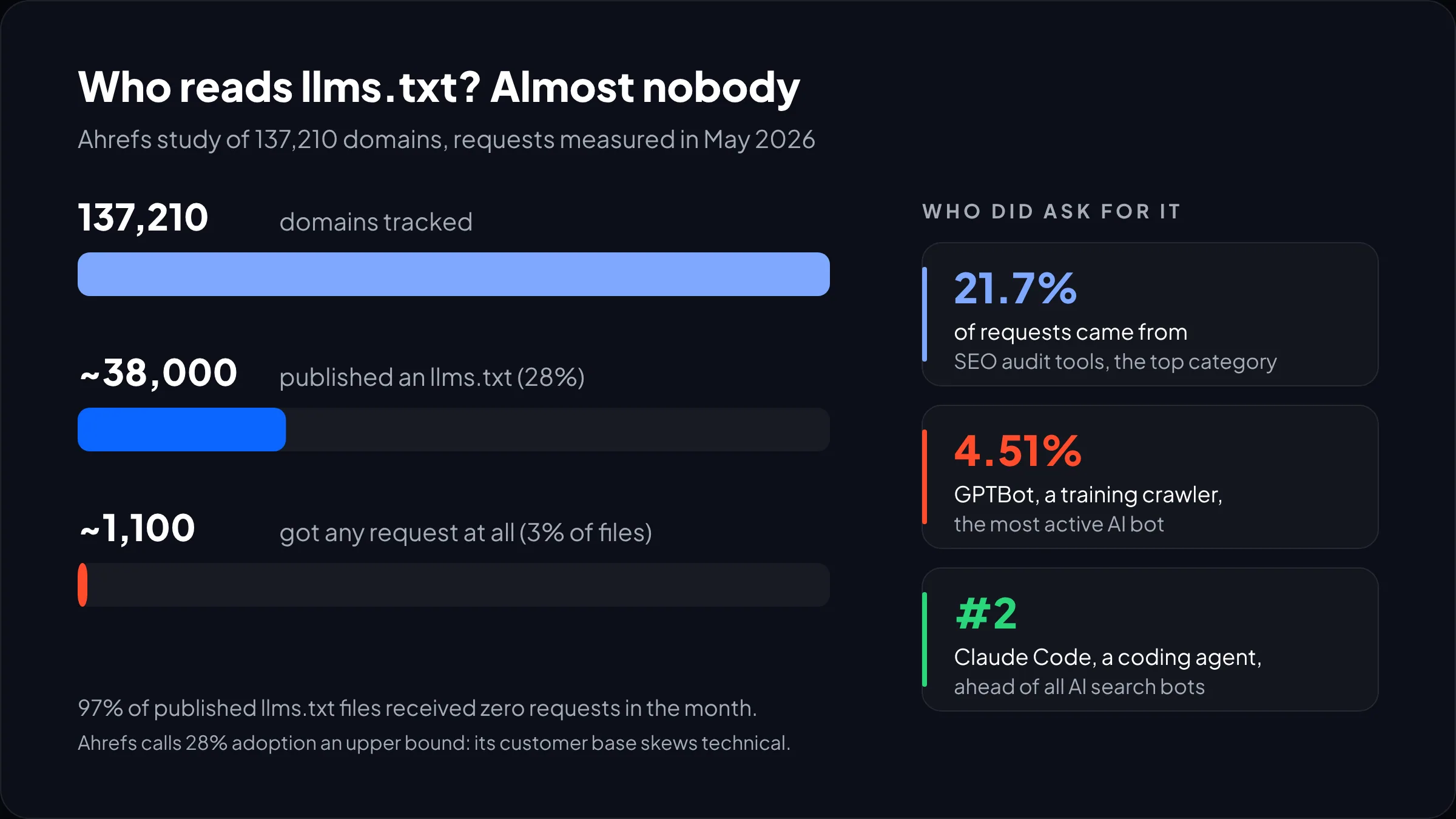
Barely. The largest log-based study we have seen is Ahrefs’ June 2026 analysis of 137,210 domains in its web analytics product. About 28% of them, roughly 38,000 sites, published an llms.txt. In May 2026, 97% of those files received no requests at all. The few requests that did arrive went to about 1,100 domains.
Who did fetch them is telling. SEO audit tools made up the biggest single slice, 21.7% of requests. GPTBot, OpenAI’s training crawler, was the most active AI bot at 4.51%, and Claude Code, Anthropic’s coding agent, came second among AI bots, ahead of every AI search and assistant bot. Ahrefs calls the 28% adoption figure an upper bound, since its customers skew technical.
Google’s position is plain. Its guide to AI features and your website says there are no extra requirements to appear in AI Overviews or AI Mode, and that you do not need new machine-readable files, AI text files or special markup. A page has to be indexed and eligible for a normal snippet. That is the whole entry ticket.
So who should build one? If you publish API references or SDK docs, a good llms.txt plus Markdown versions of those pages is worth an afternoon, because coding agents are the one group visibly fetching these files. For a store, a local business or a B2B marketing site, add one if your platform makes it free, or skip it. We would not put it ahead of anything below.
From our team: if a vendor sells llms.txt as a way to get recommended by ChatGPT, ask which AI product has said it reads the file to choose sources. We have not found one. The work that does move AI visibility is covered in our guide to generative engine optimization.
AI crawlers robots.txt: the user agents that matter
Seven tokens cover most decisions: GPTBot, OAI-SearchBot and ChatGPT-User from OpenAI, ClaudeBot from Anthropic, Google-Extended, PerplexityBot, and Common Crawl’s CCBot. Add Anthropic’s Claude-SearchBot and Claude-User, and Perplexity-User, and you have the full set.
| Token | Operator | Job | Follows robots.txt? | What blocking it costs you |
|---|---|---|---|---|
GPTBot |
OpenAI | Collects content that may train OpenAI’s foundation models | Yes | Nothing in ChatGPT search. You opt out of future training. |
OAI-SearchBot |
OpenAI | Surfaces sites in ChatGPT search results | Yes | Your pages stop appearing as ChatGPT search results (navigational links can still show) |
ChatGPT-User |
OpenAI | Visits a page when a user or a Custom GPT asks for it | “May not apply,” per OpenAI | Live lookups of your page inside ChatGPT, if honored |
ClaudeBot |
Anthropic | Collects content that could be used for training | Yes, plus Crawl-delay | You opt out of future training |
Claude-SearchBot |
Anthropic | Indexes pages to improve Claude’s search results | Yes | Visibility in Claude’s search answers |
Claude-User |
Anthropic | Fetches a page when a Claude user asks a question | Yes | Claude reading your page live for a user |
Google-Extended |
A control token for Gemini training and grounding, not a separate crawler | Yes | Nothing in Google Search, ranking or AI Overviews | |
PerplexityBot |
Perplexity | Indexes and links sites in Perplexity search; not used for model training | Yes | Visibility as a Perplexity source |
Perplexity-User |
Perplexity | Fetches a page a user asked about | “Generally ignores” it, per Perplexity | Little, since the block may not hold |
CCBot |
Common Crawl | Builds Common Crawl’s open web archive; Cloudflare classes it as an AI training crawler | Confirm in your logs | A training-side opt-out |
The rows come from OpenAI’s crawler overview, Anthropic’s crawler help article, Google’s list of common crawlers and Perplexity’s crawler docs.
Three details that save debugging time. OpenAI and Perplexity both say a robots.txt change takes about 24 hours to register. Anthropic wants rules on every subdomain, and warns that blocking its IPs may not reliably opt you out. And all three publish IP lists as JSON (gptbot.json, bots.json, perplexitybot.json and others), which is how you tell the real bot from a spoofed user agent.
Training vs search crawlers: the split that decides your policy
Every AI bot falls into one of three lanes, so set policy per lane, not per company. Training crawlers collect content for future models. Search crawlers build the index an assistant cites from. User fetchers grab one page because a person just asked about it.
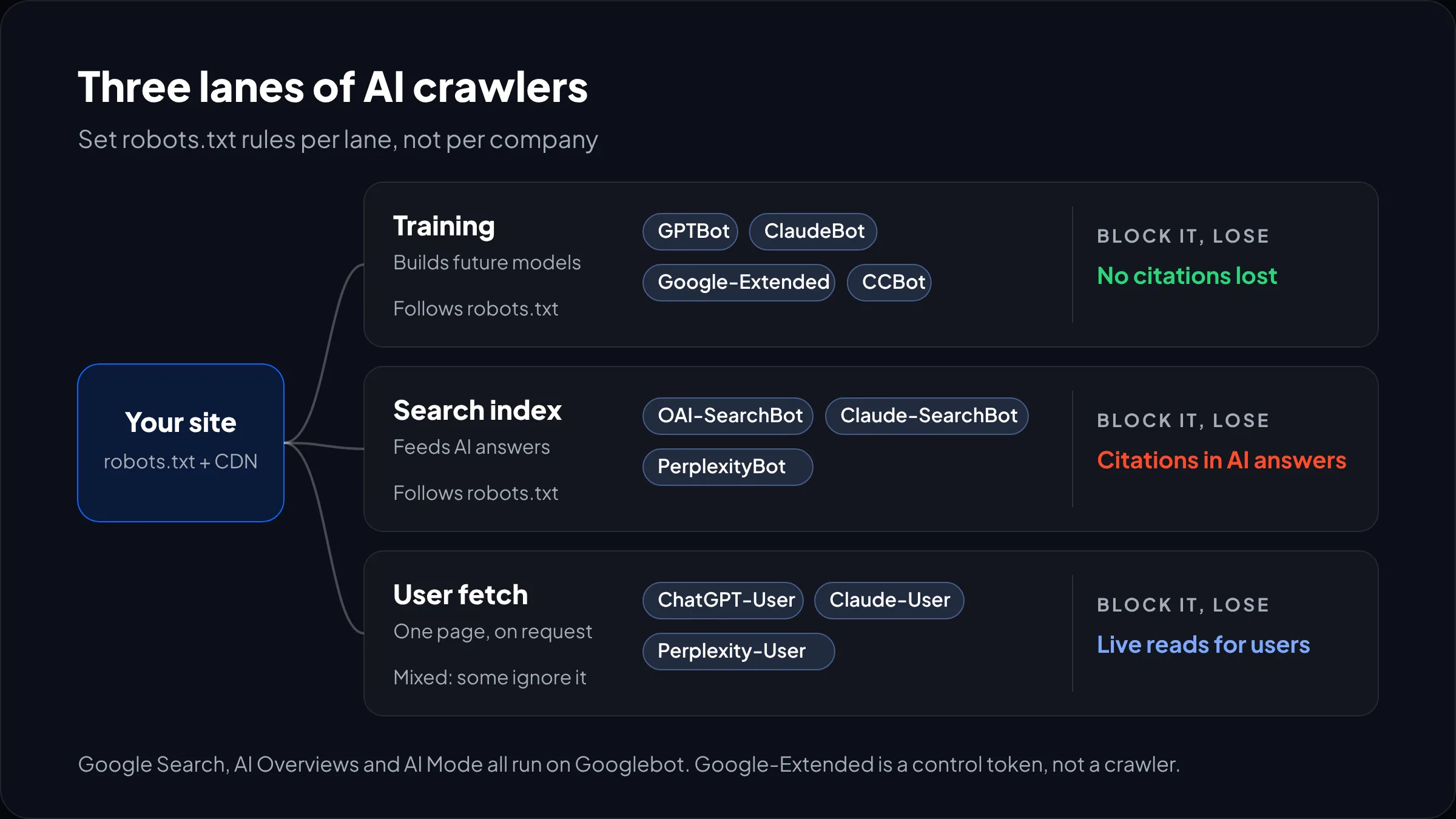
The lanes matter because the costs are lopsided. Blocking the training lane is close to free in visibility terms. Anthropic’s wording is that disallowing ClaudeBot signals your future material should be left out of training datasets. OpenAI says disallowing GPTBot indicates your content should not be used to train its models. Neither says the block undoes past training, so treat it as a decision about what comes next.
Blocking the search lane is expensive. If OAI-SearchBot, Claude-SearchBot or PerplexityBot cannot fetch you, those assistants have far less of your content to cite, and a competitor’s page fills the gap.
The user-fetch lane is the awkward one. OpenAI says robots.txt rules “may not apply” to ChatGPT-User, and Perplexity says its user fetcher generally ignores them, on the reasoning that a human asked for the page. Anthropic says Claude-User does follow robots.txt. If you truly need these out, robots.txt alone will not do it.
Where Google fits
Google breaks the lane model, because Googlebot does everything. AI Overviews and AI Mode are part of Search and run on Googlebot’s crawl. Google’s AI features guide names Googlebot rules as the Search control, with nosnippet, max-snippet or noindex to limit what shows. You cannot keep blue links and drop out of AI Overviews alone.
Google-Extended is narrower than people assume. Google’s crawler docs describe it as a token controlling whether already-crawled content may train future Gemini models or ground answers in Gemini Apps and Vertex AI. It does not affect inclusion in Google Search and is not a ranking signal. The page, updated October 30, 2026, also says Google plans to support the shared AIPREF training-preference signal in early 2027. Expect another round of robots.txt edits then.
Should you block GPTBot? A policy by business type
For most commercial sites: allow the search lane, decide training on purpose, leave user fetchers alone. Blocking GPTBot is reasonable if you sell expertise or data, and costs nothing in ChatGPT search. What we push back on is the blanket “block all AI” toggle, which usually catches search crawlers too.
| Business type | Training bots (GPTBot, ClaudeBot, Google-Extended, CCBot) | Search bots (OAI-SearchBot, Claude-SearchBot, PerplexityBot) | User fetchers | llms.txt |
|---|---|---|---|---|
| DTC or Shopify store | Allow, or block if you care; low stakes either way | Allow | Allow | Optional |
| B2B SaaS with public docs | Allow. You want models to know your API. | Allow | Allow | Yes, scoped to /docs/ |
| Local service business | Allow | Allow | Allow | Skip |
| Ad-funded publisher | Block, or license | Case by case: citations vs lost pageviews | Watch logs | Skip |
| Paid research, data or courses | Block | Allow marketing pages only | Block at the firewall on paid paths | Marketing pages only |

A worked example
Take a hypothetical Shopify store selling cast-iron cookware: about 400 product pages and an ad-free recipe blog. The owner wants every AI bot blocked.
Blocking ClaudeBot and GPTBot costs the store very little, since cast-iron care guides are everywhere already. Blocking OAI-SearchBot and PerplexityBot makes it vanish as a citable source when someone asks an assistant for the best pan for searing steak. That is the query that sells pans. So: allow search, block training if the owner prefers, and keep /cart, /checkout and /account disallowed for everyone. If you want this mapped against your own traffic and logs, that is a normal first step in our AI search optimization service.
Not sure what your site is blocking right now?
Send us your domain and we will check your robots.txt, CDN bot settings and server logs, then tell you which AI crawlers are actually getting through.
Cloudflare AI crawl controls: check what is already blocked
If your site sits behind Cloudflare, your live robots.txt may not be the file you wrote. Cloudflare’s managed robots.txt prepends its own block of AI rules ahead of your existing rules when Bot Preference Sync is on and any of your Search, Agent or Training policies is set to block. If you had no robots.txt at all, it creates one.
The documented example says yes to search and no to training in a Content-Signal line (search=yes, ai-train=no), then disallows Amazonbot, Applebot-Extended, Bytespider, CCBot, ClaudeBot, Google-Extended, GPTBot and meta-externalagent. It works on all plans. That default is sensible. Trouble starts when someone also sets Search or Agent to block, or writes a WAF rule matching anything with “bot” in it.
The check we run on every Cloudflare site:
- Open the real file at
/robots.txtin a private window. A block you did not write means Cloudflare manages it. - Review the policies under Security Settings, filtered by Bot traffic, in AI Crawler and Agent access policies. Note Search, Agent and Training, including any “Block on pages with ads” setting.
- Read the Directives tab in AI Crawl Control. It lists robots.txt violations, scored against your current rules, so a new Disallow flags older requests too.
- Search your WAF rules for AI user-agent matches that catch OAI-SearchBot, Claude-SearchBot or PerplexityBot.
Watch out: Cloudflare’s own docs say robots.txt compliance is voluntary and recommend pairing the managed file with AI Crawl Control to enforce blocks. Read that the other way round too. If a firewall rule blocks a search crawler, your robots.txt can say “Allow” all day and the bot still gets a 403.
Sample robots.txt and llms.txt files you can copy
Two robots.txt policies and one llms.txt file. Replace the domain and test before you ship.
Policy 1: cited in AI answers, out of training
# AI training: opt out
User-agent: GPTBot
User-agent: ClaudeBot
User-agent: Google-Extended
User-agent: CCBot
Disallow: /

# AI search and user fetchers: welcome, minus private paths
User-agent: OAI-SearchBot
User-agent: ChatGPT-User
User-agent: Claude-SearchBot
User-agent: Claude-User
User-agent: PerplexityBot
Disallow: /cart
Disallow: /checkout
Disallow: /account

# Everyone else (your existing rules)
User-agent: *
Disallow: /cart
Disallow: /checkout
Disallow: /account

Sitemap: https://example.com/sitemap.xml
Note the repeated Disallow lines. A crawler that matches a named group follows only that group and ignores User-agent: *, so private paths must be restated. It is the most common mistake we see in hand-written AI rules: a bot gets its own Allow: / group and suddenly reaches cart and account URLs.
For a fully open policy (docs sites, SaaS, local businesses) you need no AI groups at all. Your normal User-agent: * group already covers them, and naming bots only adds ways to get it wrong.
Policy 2: locked down (paid content and proprietary data)
User-agent: GPTBot
User-agent: ClaudeBot
User-agent: Google-Extended
User-agent: CCBot
User-agent: ChatGPT-User
User-agent: Claude-User
User-agent: Perplexity-User
Disallow: /

User-agent: OAI-SearchBot
User-agent: Claude-SearchBot
User-agent: PerplexityBot
Disallow: /research/
Disallow: /members/
Disallow: /account
Search crawlers can still cite your marketing pages, but not the paid paths. Add a firewall rule on those paths, since two of the user fetchers may not honor the file.
A sample llms.txt file
A hypothetical cookware store, written to the llmstxt.org format:
# Example Cookware

> Cast-iron and carbon-steel cookware. Ships to the US and Canada. Prices in USD.

All pans are pre-seasoned. Returns accepted within 60 days. Warranty covers manufacturing defects.

## Products
- [Cast-iron skillets](https://example.com/collections/cast-iron): 8, 10 and 12 inch
- [Carbon-steel pans](https://example.com/collections/carbon-steel): lighter, faster to heat

## Policies
- [Shipping](https://example.com/policies/shipping-policy): rates and delivery times
- [Returns](https://example.com/policies/refund-policy): 60-day returns

## Optional
- [Care guides](https://example.com/blogs/care): seasoning, cleaning, restoring rust
Keep it short and factual. A list of 400 product URLs is a sitemap, and you already have one of those.
On Shopify, robots.txt is edited through a robots.txt.liquid theme template (Online Store > Themes > Edit code > Add a new template), not a file upload, and you should build on Shopify’s default groups instead of replacing them. Our Shopify SEO guide covers the other crawl settings on the platform.
How to block AI crawlers that ignore robots.txt
To actually block AI crawlers, you need enforcement at the edge: a CDN or WAF rule that matches the user agent and checks the operator’s published IP ranges. Robots.txt is a request. The big operators honor it for training and search, but user fetchers are a grey area, and small scrapers ignore it or fake a known user agent.
- Verify, then block. User agent alone stops honest bots and lets liars through. Add the IP list.
- Return 403, not a soft page. A 200 with a “no access” message may get stored as your content.
- Rate-limit before you ban. Anthropic supports
Crawl-delayfor ClaudeBot. If the issue is server load, slowing it down is often enough. - Allow time. OpenAI and Perplexity quote about a day. Google says snippet control changes can take days to months.
Logs are the only honest test: grep for each token and check the status codes. If you sell through AI assistants, this matters more, because the buying agents use these same fetchers. We cover that side in agentic commerce on Shopify.
Frequently asked questions
Is llms.txt a ranking factor for Google?
No. Google’s AI features guidance says you do not need AI text files or special markup to appear in AI Overviews or AI Mode, and an llms.txt file has no effect on Google rankings. Pages qualify for Google’s AI features the same way they qualify for regular results: they must be indexed and eligible to show a snippet.
Will blocking GPTBot stop ChatGPT from citing my site?
No. GPTBot only collects content that may be used to train OpenAI’s models. ChatGPT search results rely on a separate crawler, OAI-SearchBot, so you can disallow GPTBot and still appear in ChatGPT answers. Only blocking OAI-SearchBot removes your pages from ChatGPT search, and OpenAI says navigational links can still show.
What is the difference between llms.txt and robots.txt?
Robots.txt tells crawlers which URLs they may fetch, and the major AI companies honor it for their training and search bots. An llms.txt file is a Markdown reading list that points language models to your most useful pages. It grants or blocks nothing, and few AI systems request it today.
Does Google-Extended block AI Overviews?
No. Google-Extended controls whether your content is used to train Gemini models and to ground answers in Gemini Apps and Vertex AI. AI Overviews are part of Google Search and run on Googlebot’s crawl. To limit what appears there, use snippet controls such as nosnippet, data-nosnippet or max-snippet, which also affect regular results.
Do AI crawlers respect robots.txt?
The main training and search crawlers from OpenAI, Anthropic, Google and Perplexity follow robots.txt, according to each company’s documentation. User-triggered fetchers are less consistent: OpenAI says rules may not apply to ChatGPT-User, and Perplexity says Perplexity-User generally ignores them. For anything sensitive, enforce blocks with a firewall rule as well.
Should a small business block AI crawlers?
Usually not the search ones. A small business gains far more from being cited in ChatGPT, Claude or Perplexity answers than it protects by hiding its service pages. Blocking training crawlers like GPTBot and ClaudeBot is a reasonable personal choice with little downside, but keep OAI-SearchBot, Claude-SearchBot and PerplexityBot allowed.
What we’d do first
Open your live robots.txt and your CDN’s bot settings before anyone writes an llms.txt. A search crawler turned away by a forgotten rule costs you far more than any missing file.
Then make one decision per lane: training (allow or block, your call), search (allow, unless you are a paywalled publisher), user fetchers (allow, or firewall the paid paths). Write it into robots.txt using the sample that fits, check your logs a day later, and only then spend 20 minutes on an llms.txt if your platform makes it easy. If you publish developer docs, move that last step up the list.
We have built for brands like EcoFlow, Delsey and Kerbholz. If you want a second pair of eyes on your crawler rules, or the full picture of how your brand shows up in AI answers, our AI search optimization team can map it for you.