On this page
- Why brands are leaving Adobe Commerce for Shopify in 2026
- Magento to Shopify migration cost and timeline at a glance
- Magento 2 to Shopify: how the concepts map
- Replatform to Shopify Plus, or a standard plan?
- The Magento to Shopify migration plan, phase by phase
- What data moves, and what does not
- Protecting SEO in a Magento to Shopify migration
- Worked example: a 6,000-SKU Adobe Commerce to Shopify move
- Pitfalls we see on Magento migrations
- Frequently asked questions
- What we’d do first
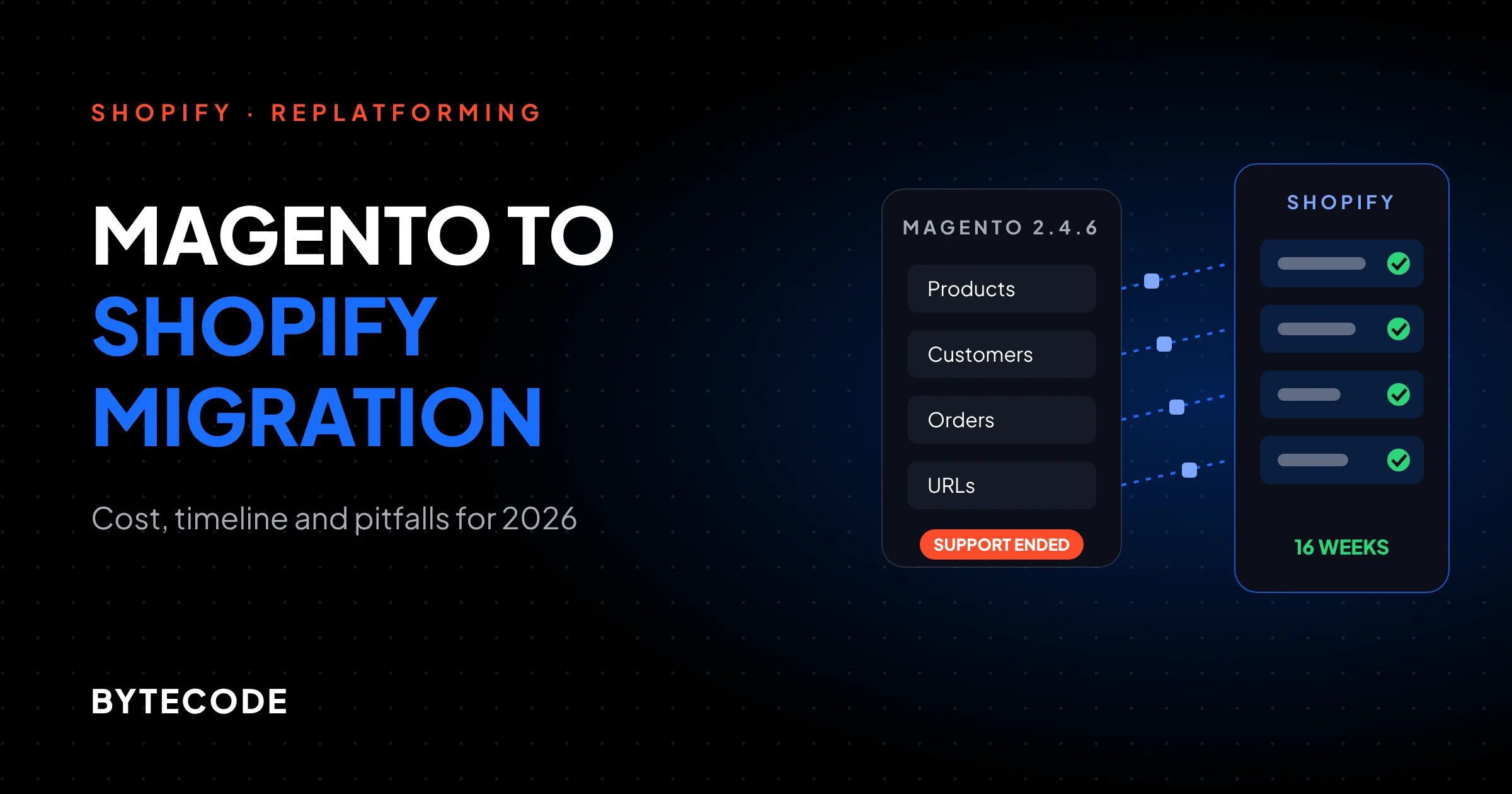
Most Magento stores we are asked to move are not broken. They are expensive to keep running: a patch cycle every quarter, an extension that conflicts with it, a hosting bill that only goes up. Then a version reaches end of support, and the team pays for an upgrade customers never see.
That is when a Magento to Shopify migration lands on the roadmap. For a mid-sized Magento 2 store with a few thousand SKUs, an ERP and two or three store views, plan on 12 to 20 weeks and roughly 400 to 800 hours of work. What that costs depends mostly on who does the hours. This guide covers the support deadlines driving the move, how Magento concepts map onto Shopify, what data does and does not transfer, how to protect search traffic, and a worked example with hours by workstream.
Key takeaways
- Adobe Commerce 2.4.6 left standard support on August 11, 2026, and 2.4.7 follows on May 31, 2027. If you are on either, an upgrade or a replatform is already on your calendar.
- A mid-sized Magento to Shopify migration is typically 12 to 20 weeks. The theme rebuild and integrations take the most hours; data import takes the most care.
- Customer passwords never transfer. Plan an account activation campaign, or move to Shopify’s passwordless customer accounts.
- Shopify now allows 2,048 variants per product, which removes the old blocker for big configurable catalogs.
- You do not automatically need Shopify Plus. B2B basics now exist on every plan; Plus earns its fee with unlimited B2B catalogs, expansion stores and custom checkout logic.
Why brands are leaving Adobe Commerce for Shopify in 2026
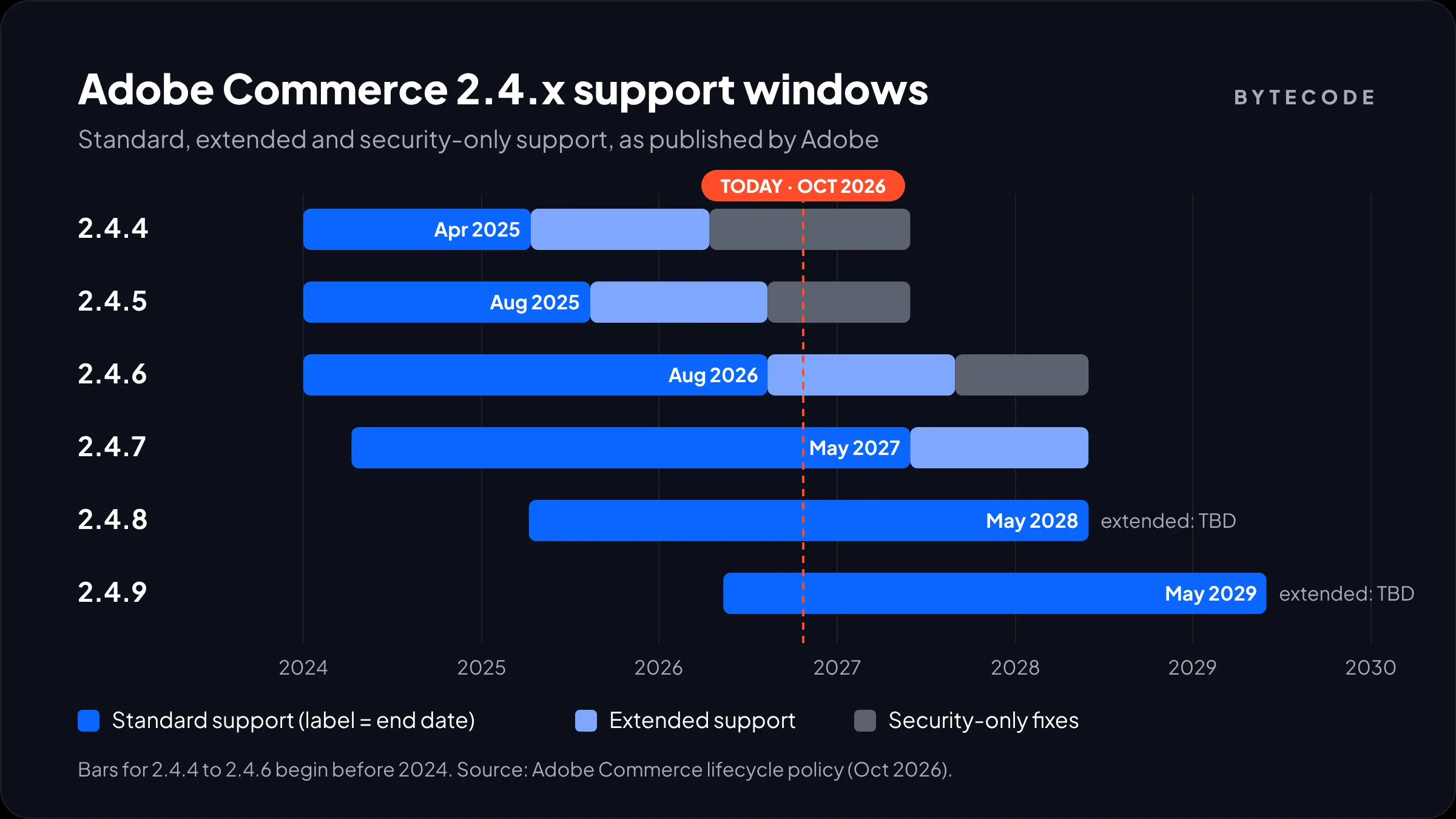
The short answer is cost of ownership and a fixed support clock. Adobe publishes end-of-support dates for every 2.4.x release, and in 2026 several of them have arrived. According to Adobe’s lifecycle policy, these are the current dates:
| Version | Released | End of standard support | End of extended support | Security-only fixes until |
|---|---|---|---|---|
| 2.4.4 | Apr 2022 | Apr 12, 2025 | Apr 14, 2026 | May 31, 2027 |
| 2.4.5 | Aug 2022 | Aug 12, 2025 | Aug 11, 2026 | May 31, 2027 |
| 2.4.6 | Mar 2023 | Aug 11, 2026 | Aug 31, 2027 | May 31, 2028 |
| 2.4.7 | Apr 2024 | May 31, 2027 | May 31, 2028 | n/a |
| 2.4.8 | Apr 2025 | May 31, 2028 | TBD | n/a |
| 2.4.9 | May 2026 | May 31, 2029 | TBD | n/a |
Two details matter more than the table. The security-only window for 2.4.4 to 2.4.6 is one-time and will not be extended. And on Adobe Commerce on Cloud, Adobe says it will stop maintaining environments that run unsupported versions from June 1, 2027, and that such storefronts may be taken offline. That turns “we’ll upgrade next year” into a hard deadline.
An upgrade from 2.4.6 to 2.4.8 is a project in its own right: PHP and service version bumps, extension compatibility checks, regression testing. Many teams see that quote and ask whether the money should fund a move. For most direct-to-consumer brands, a hosted platform that never needs a version upgrade is the better long-term trade.
Magento to Shopify migration cost and timeline at a glance
A Magento to Shopify migration usually takes 6 to 10 weeks for a small store, 12 to 20 weeks for a mid-sized one, and 5 to 9 months for a complex B2B or multi-site build. Cost follows hours, and hours follow how much custom logic your Magento store has accumulated, not how many products it sells.
These are our own planning ranges. The money columns multiply hours by the agency rate bands we sourced in our Shopify development cost breakdown, so read that for where the rates come from.
| Store profile | Typical Magento setup | Hours | Timeline | India agency ($25–$50/h) | US agency ($120–$200/h) |
|---|---|---|---|---|---|
| Small | Under 1,000 SKUs, one store view, a handful of extensions, no ERP | 120–250 | 6–10 weeks | $3,000–$12,500 | $14,400–$50,000 |
| Mid-sized | 1,000–20,000 SKUs, 2–4 store views, ERP or 3PL sync, custom promo rules | 400–800 | 12–20 weeks | $10,000–$40,000 | $48,000–$160,000 |
| Complex | B2B customer groups, multiple websites, custom modules, millions of orders | 900–2,000+ | 5–9 months | $22,500–$100,000+ | $108,000–$400,000+ |
Add the Shopify subscription on top. Shopify Plus starts at $2,300 a month on a 3-year term or $2,500 on a 1-year term, per the Shopify Plus plan page, with a variable fee for higher-volume businesses.
From our team: the single best predictor of a Magento migration budget is the number of custom modules in app/code. Each one is a business rule somebody once paid for. Each needs a decision: replace with an app, rebuild as a Shopify Function or custom app, or retire it.
Magento 2 to Shopify: how the concepts map
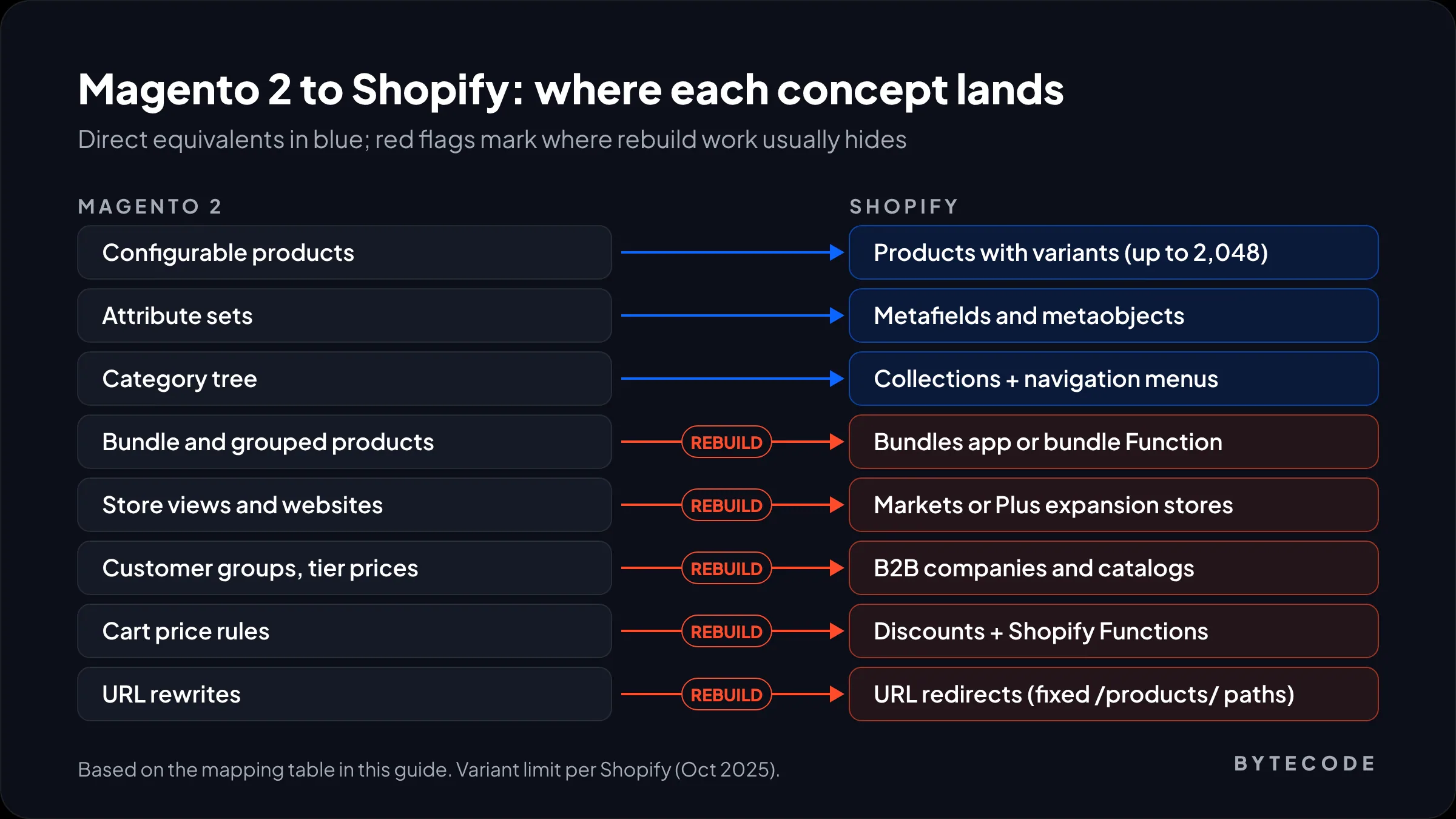
Most Magento 2 to Shopify work is translation. Almost every Magento concept has a Shopify equivalent, but the equivalents are shaped differently, and the data model decisions you make in week two decide how much the build costs.
| Magento 2 | Shopify | What to watch |
|---|---|---|
| Configurable products | Products with variants | The limit is now 2,048 variants per product, up from 100 |
| Attribute sets and custom attributes | Metafields and metaobjects | Define metafield definitions before import so filters work |
| Categories (nested tree) | Collections plus navigation menus | Shopify collections are flat; hierarchy lives in menus |
| Bundle and grouped products | Bundles app or a bundle Function | Pricing and inventory logic must be rebuilt |
| Store views and websites | Markets, or Plus expansion stores | Separate catalogs or legal entities usually mean expansion stores |
| Customer groups and tier prices | B2B companies, catalogs and price breaks | Basic to Advanced plans allow 3 B2B catalogs; Plus is unlimited |
| Cart price rules | Discounts, plus Shopify Functions for custom logic | Stacking rules behave differently; test every combination |
| CMS pages and blocks | Pages, theme sections and metaobjects | Widgets do not migrate; content is rebuilt in sections |
| URL rewrites | URL redirects | Fixed URL prefixes such as /products/ change every product URL |
The variant limit used to be the big objection from Magento merchants with large configurable products. In October 2025 Shopify raised the per-product limit from 100 to 2,048 variants, which covers most apparel, furniture and parts catalogs we see without splitting products.
Replatform to Shopify Plus, or a standard plan?
Replatform to Shopify Plus if you need unlimited B2B catalogs, company-specific pricing, several storefronts under one organization, or custom checkout and discount logic. If you are a single-brand, single-region DTC store, a standard plan often covers what your Magento store did.
This decision changed in the last two years because Shopify pushed B2B features down to every plan. According to Shopify’s B2B features-by-plan table, Basic, Grow and Advanced now include companies and locations, quantity rules and price breaks, net payment terms, vaulted cards and a quick order list. What stays Plus-only:
- Unlimited B2B catalogs (other plans are capped at 3 active B2B catalogs across all markets)
- Catalogs assigned directly to specific companies or locations, which is how Magento tier pricing per customer usually maps
- Deposits, partial payments and payment requests per fulfillment
- Up to 9 expansion stores, up to 200 locations and unlimited staff accounts, per the Plus plan page linked above
Dozens of customer groups, each with its own price list, means Plus. One wholesale group with a percentage discount probably does not. We go through the full comparison in Shopify Plus vs Advanced.
Watch out: do not size the plan from your Magento feature list. Size it from the features customers actually use. On many Adobe Commerce stores we audit, half the installed extensions are disabled or serve one internal report.
The Magento to Shopify migration plan, phase by phase
A Magento to Shopify migration runs in six phases: audit, data model, build, trial migrations, SEO and QA, then cutover. The build and the data work run in parallel, which is why a mid-sized project fits into roughly 16 weeks rather than 30.
1. Audit (weeks 1–2)
Inventory extensions, custom modules, cron jobs, integrations, store views, customer groups, cart rules, and every URL that earns organic traffic. This is the phase most often skipped, and the one that later costs the most.
2. Data model (weeks 2–5)
Map attribute sets to metafield definitions, categories to collections and menus, and customer groups to B2B companies or tags. Decide what you will leave behind.
3. Build (weeks 3–12)
Theme work, app selection, replacing custom Magento logic, and ERP, PIM or 3PL integrations. Integrations are the most common reason a timeline slips.
4. Trial migrations (weeks 6, 10 and 13)
Run the full import into a development store at least three times. Each run surfaces new data problems. The third should be boring.
5. SEO, QA and UAT (weeks 9–15)
Test the redirect map, place real orders across every payment method, check tax and shipping per market, and get sign-off from the people who run the store.
6. Cutover and hypercare (weeks 16–18)
Freeze Magento, run a delta import, load redirects, switch DNS, then watch errors and Search Console closely.
If your team has done a WooCommerce move before, the order of operations is similar. Our WooCommerce to Shopify migration checklist covers the shared steps in more detail.
What data moves, and what does not
Products, collections, customers, historical orders, redirects, pages and blog posts can all move from Magento to Shopify. Customer passwords cannot, and custom module data only moves if someone writes the mapping.
The tools
Shopify’s own free Store Migration app does not list Magento as a source, so Magento moves go through third-party apps, CSV work or custom scripts. On most projects we use Matrixify for the bulk of the data. Its Magento migration guide converts standard Magento 1 and 2 exports, turns custom product fields into metafields, generates redirects from old product URLs, and supports delta imports for a near-zero-downtime cutover. Order history needs direct database access, because Magento’s admin does not export it in a usable form.
Import order matters
- Products and collections (orders link to products by SKU)
- Customers
- Historical orders, at least as far back as your returns window
- Discounts, pages, blog posts and redirects
- Gift card balances, last, right before launch
Passwords and customer accounts
Passwords are stored as one-way hashes, so no tool can carry them across, and imported customers arrive inactive. You have two options: send account activation emails after launch, or use Shopify’s newer customer accounts, where customers sign in with a one-time 6-digit code sent to their email, so no password is needed at all. We recommend the second for almost every migration. It removes the reset-password support spike in launch week.
Watch out: Shopify validates data more strictly than Magento. Expect the first trial import to reject customers with malformed emails or phones and orders that reference deleted products. Budget time to clean source data, not just to move it.
Planning a move off Magento before your support window closes?
Send us your Magento version, extension list and integrations, and we will return an hours-by-workstream migration plan you can take to your board.
Protecting SEO in a Magento to Shopify migration
Your rankings survive a Magento to Shopify migration if every old URL with traffic or links gets a permanent redirect to its closest new equivalent, and those redirects stay in place for at least a year. Most traffic losses we are asked to diagnose come from missing redirects, not from Shopify itself.
The job is bigger than on most platforms because Shopify’s URL structure is fixed. Products live under /products/ and collections under /collections/, so almost every Magento URL changes.
- Build the map from four sources: the Magento URL rewrite table, XML sitemaps, Search Console pages with clicks, and pages with backlinks. Google’s site move guidance recommends exactly this kind of old-to-new list.
- Redirect one to one. Google advises against sending many old pages to one unrelated page such as the homepage. Map discontinued products to their closest collection instead.
- Know Shopify’s limits. Per Shopify’s redirect documentation, stores can hold up to 100,000 redirects, and Plus stores up to 20 million. Redirects only fire when the old URL no longer loads a page, and URLs with query strings may not redirect as expected.
- Keep redirects for at least a year, which is Google’s own recommendation, and avoid chains longer than a hop or two.
- Expect some movement. Google says temporary ranking fluctuation is normal during a move, and that for medium-sized sites the switch can take a few weeks or more.
Layered navigation URLs (?color=red&size=m) are rarely worth redirecting one by one. Redirect the base category.
Worked example: a 6,000-SKU Adobe Commerce to Shopify move
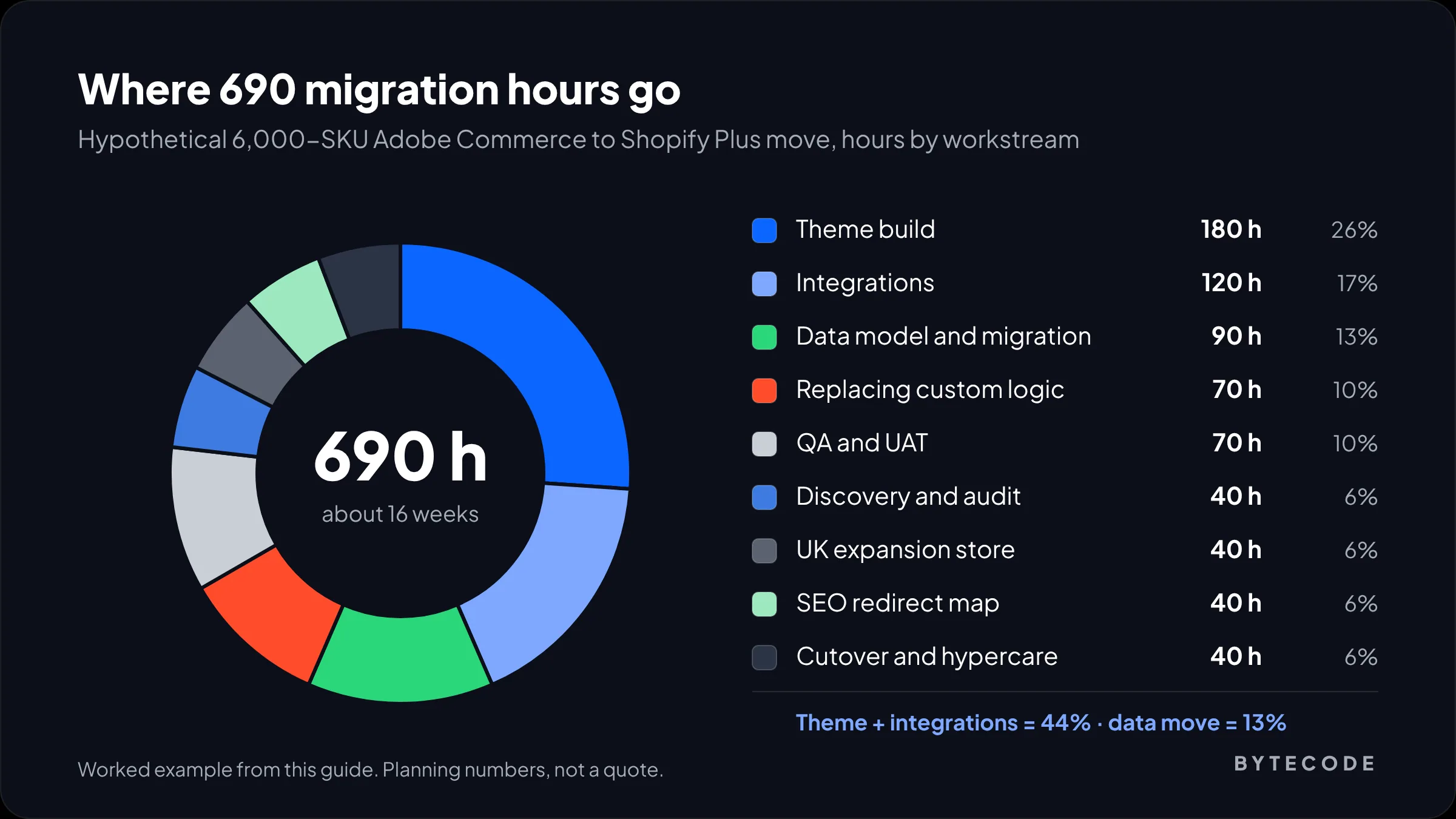
Here is a clearly hypothetical project, priced the way we would scope it. Say you run a home goods brand on Adobe Commerce 2.4.6, now past standard support. You have about 6,000 SKUs (many as configurable products), a US and a UK store view, a NetSuite integration, 80,000 customers, 210,000 historical orders, and one wholesale customer group with its own price list. You choose Shopify Plus because the UK store has a separate legal entity and you plan to add per-company wholesale pricing.
| Workstream | Hours | What is in it |
|---|---|---|
| Discovery and audit | 40 | Extension and module review, URL and traffic export, scope document |
| Data model and migration scripting | 90 | Metafield definitions, mapping, three trial imports, delta import |
| Theme build | 180 | Premium theme reworked into 8 templates, product finder, mega menu |
| Integrations | 120 | NetSuite connector setup and field mapping, 3PL, review and search apps |
| Replacing custom logic | 70 | Wholesale catalog, promo rules as discounts, one shipping Function |
| UK expansion store | 40 | Clone and localize theme, VAT and shipping set-up |
| SEO redirect map | 40 | About 12,000 mapped URLs across both store views |
| QA and UAT | 70 | Test orders, payments, tax, accessibility and speed pass |
| Cutover and hypercare | 40 | Freeze, delta, DNS, two weeks of monitoring |
| Total | 690 | About 16 weeks plus two weeks of hypercare |
At a single US agency rate of $150 an hour, 690 hours is $103,500. With a hybrid team, where 140 hours of strategy, UX and project lead work sit at $150 and the other 550 build hours at $40, it is $21,000 plus $22,000, or $43,000. Add Shopify Plus at $2,300 a month on a 3-year term, which is $27,600 a year. Apps and the NetSuite connector come on top and vary widely, so price those separately.
Notice where the hours go: theme and integrations are 44% of the total, data migration only 13%. A quote that says “migration: 20 hours” is not describing the whole job.
Pitfalls we see on Magento migrations
The expensive mistakes are almost never technical surprises. They are scope decisions made too late:
- Rebuilding every extension. Start from what customers use and what the business reports on; drop the rest.
- Underestimating ERP sync. A NetSuite or Microsoft Dynamics connector that “just works” on Magento was usually customized years ago. Find out how before you assume the Shopify connector will match it.
- Forgetting promotions. Magento cart price rules can stack in ways Shopify discounts do not. Custom discount logic on Shopify now means Shopify Functions, since Scripts have been retired; our Scripts to Functions guide covers what that involves.
- Treating store views as translations. If your store views have different catalogs, prices or legal entities, they are separate stores, not languages.
- Launching in peak season. For most retail brands we would not cut over between late October and early January.
- No rollback plan. Keep Magento running read-only for a few weeks, with old DNS records documented.
If you want someone to own those decisions with you, our Shopify store migration team runs this process for Magento, WooCommerce and custom platforms.
Frequently asked questions
How long does a Magento to Shopify migration take?
A small store with under 1,000 SKUs usually takes 6 to 10 weeks. A mid-sized Magento 2 store with an ERP and several store views takes 12 to 20 weeks, and complex B2B or multi-site builds take 5 to 9 months. The timeline is set by integrations and custom logic far more than by product count.
How much does it cost to migrate from Magento to Shopify?
Expect roughly 120 to 250 hours for a small store and 400 to 800 hours for a mid-sized one. At agency rates that is about $3,000 to $50,000 for small stores and $10,000 to $160,000 for mid-sized ones, depending on where the team is based. Shopify fees and apps are extra.
Can I migrate customer passwords from Magento to Shopify?
No. Magento stores passwords as one-way hashes, and no migration tool can transfer them. Imported customers arrive inactive, so you either send account activation emails after launch or use Shopify’s customer accounts, where customers sign in with a one-time code sent to their email and never need a password.
Will I lose SEO rankings when moving from Magento to Shopify?
Not permanently, if you redirect properly. Map every old URL with traffic or backlinks to its closest new page using 301 redirects and keep them for at least a year. Google says some temporary ranking fluctuation is normal during a site move, and that medium-sized sites can take a few weeks or more to settle.
Do I need Shopify Plus to replace Adobe Commerce?
Not always. Every Shopify plan now includes core B2B features such as companies, price breaks and net terms. You need Plus for unlimited B2B catalogs, company-specific price lists, expansion stores for separate regions or brands, and custom checkout logic with Shopify Functions. Plus starts at $2,300 a month on a 3-year term.
When does Magento 2.4.6 support end?
Adobe Commerce 2.4.6 reached the end of standard support on August 11, 2026. Extended support with quality and security patches runs until August 31, 2027, followed by a security-only period until May 31, 2028, according to Adobe’s published lifecycle policy. Version 2.4.7 leaves standard support on May 31, 2027.
What we’d do first
Before you ask anyone for a quote, pull three lists from your Magento store: every enabled extension and custom module, every integration that reads or writes data, and the 500 URLs that earn the most organic traffic. Those three lists decide 80% of the scope. With them, two vendors can quote the same project; without them, you are comparing guesses.
Then work backwards from your support date. If you are on 2.4.6 or 2.4.7, a 16-week migration started in the next quarter still lands well before the 2027 deadlines and avoids peak season. Waiting means paying for an upgrade you are planning to throw away.
We have migrated and built Shopify stores for brands like Delsey, EcoFlow, Kerbholz and Maker & Moss. If you want a scoped plan for your own Magento to Shopify migration, see how our Magento to Shopify migration service works and send us your extension list.