On this page
- Shopify Plus vs Advanced: the short answer
- Shopify Plus pricing compared with Advanced
- Shopify Plus features Advanced does not have
- Checkout: the biggest practical gap
- Shopify Functions after the Scripts sunset
- B2B after April 2026: does wholesale still need Plus?
- Expansion stores, markets and multiple brands
- Is Shopify Plus worth it? A worked example
- The decision criteria we use with clients
- What upgrading from Advanced to Plus involves
- Frequently asked questions
- What we’d do first
Most brands we talk to about upgrading to Plus are asking the wrong question. They ask “are we big enough for Plus?” when the useful question is “which specific thing is Advanced stopping us from doing, and what does that cost us each month?” If you can’t name the blocker, you probably don’t need the upgrade yet.
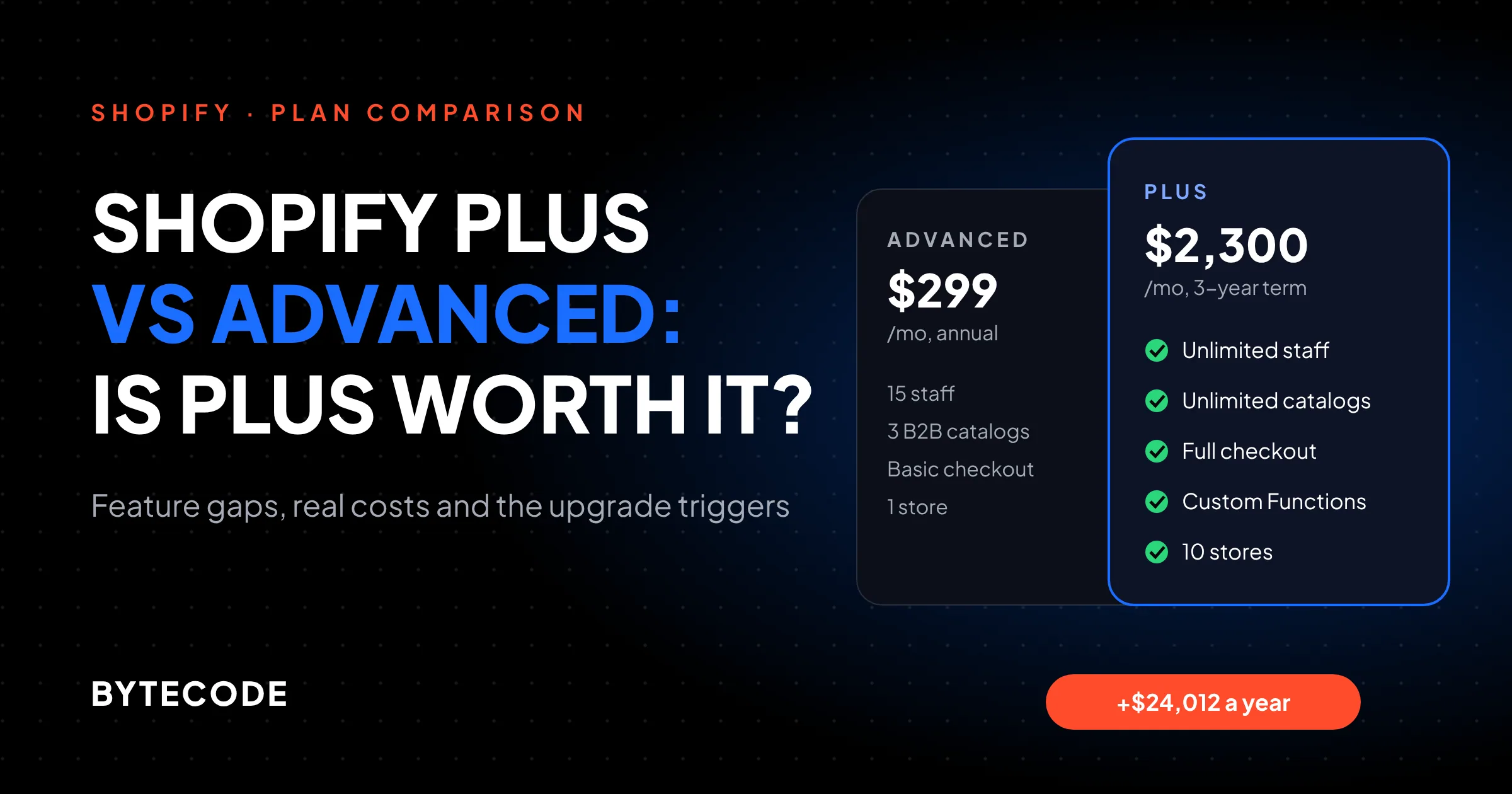
Here is the short version of Shopify Plus vs Advanced in October 2026. Advanced costs $299 a month on annual billing. Plus starts at $2,300 a month on a 3-year term. The roughly $24,000 a year between them buys you full checkout customization, custom apps that run Shopify Functions, unlimited B2B catalogs, nine expansion stores, much higher API limits and Plus-only tools like Launchpad. Since April 2026, basic B2B is on every plan, and since June 30, 2026, Shopify Scripts no longer run at all. Both changes shift the decision. Below: each real difference, the math beyond card fees, and our client scorecard.
Key takeaways
- Advanced is the right plan for most brands under a few million in revenue. Upgrade when a specific Plus feature removes a cost or a revenue ceiling you can measure.
- The biggest functional gaps are checkout (apps on the information, shipping and payment steps are Plus-only) and custom apps containing Shopify Functions, which only Plus stores can run.
- Basic B2B moved to all plans in April 2026, with a limit of 3 active catalogs. Deposits, partial payments and unlimited customer-specific catalogs stay on Plus.
- Card-fee savings alone rarely justify Plus. Add third-party gateway fees, POS Pro locations and app or dev workarounds before you decide.
- In our hypothetical worked example, a $5M brand with 4 retail stores narrows the annual gap from $24,012 to about $8,500. The features have to earn the rest.
Shopify Plus vs Advanced: the short answer
Choose Advanced if standard checkout branding and public apps are enough, wholesale pricing fits in three catalogs, and you run one storefront. Choose Plus if you need custom checkout logic, a custom Functions app, more than three B2B price lists, several storefronts, or more API throughput.
The plans share more than most comparisons suggest. Both include Shopify Markets for international selling, Shopify Flow for automation, custom reports, and the same core admin. On Shopify’s pricing page, Advanced already lists 15 staff accounts, 10 inventory locations, one headless storefront, third-party calculated shipping rates and up to 3 B2B catalogs.
Our rough rule: under about $1M a year with no B2B or multi-store plan, stay on Advanced (or Grow). Between $1M and $10M, it depends entirely on your feature list. Above $10M, the card-fee math starts to favor Plus on its own.
Shopify Plus pricing compared with Advanced
Shopify Plus pricing starts at $2,500 a month on a 1-year term or $2,300 a month on a 3-year term, against $299 a month for Advanced on annual billing ($399 billed monthly). Higher-volume or more complex businesses can be moved to a variable platform fee based on revenue and business model, which Shopify quotes through sales rather than publishing.
| Cost line (US pricing) | Advanced | Plus |
|---|---|---|
| Subscription | $299/mo annual, $399/mo monthly | $2,300/mo (3-year) or $2,500/mo (1-year), or a variable fee |
| Online card rate, Shopify Payments | 2.5% + 30¢ | 2.25% + 30¢ |
| In-person card rate | 2.4% + 10¢ | 2.3% + 10¢ |
| Fee on third-party gateways | 0.6% | 0.2% |
| POS Pro | $89/mo per location | 20 locations included, up to 200 with Shopify Payments |
| Extra stores | Each store needs its own plan | 9 expansion stores included, then $300/mo each |
Subscription, card and POS figures are from Shopify’s pricing page. Term pricing, the variable fee and extra-store pricing are from the Shopify Plus pricing page, which also confirms the 0.20% fee on third-party processors and notes that Plus covers one brand per contract. Local-currency Plus prices (£1,800, €2,100, A$3,700 or ₹175,000 a month on a 3-year term) are listed in the Shopify Plus plan article in the Help Center.
The card-fee-only break-even (about $9.6M a year in online card sales on a 3-year term) is in our Shopify development cost breakdown. Treat it as the worst case: gateway fees and POS locations pull it lower, as the worked example below shows.
Watch out: the variable platform fee is the line people forget to ask about. Shopify doesn’t publish the formula, and it differs for B2B and DTC orders according to the Help Center. If your revenue is in eight figures, get the formula in writing before you compare plans, because it can matter more than the base subscription.
Shopify Plus features Advanced does not have
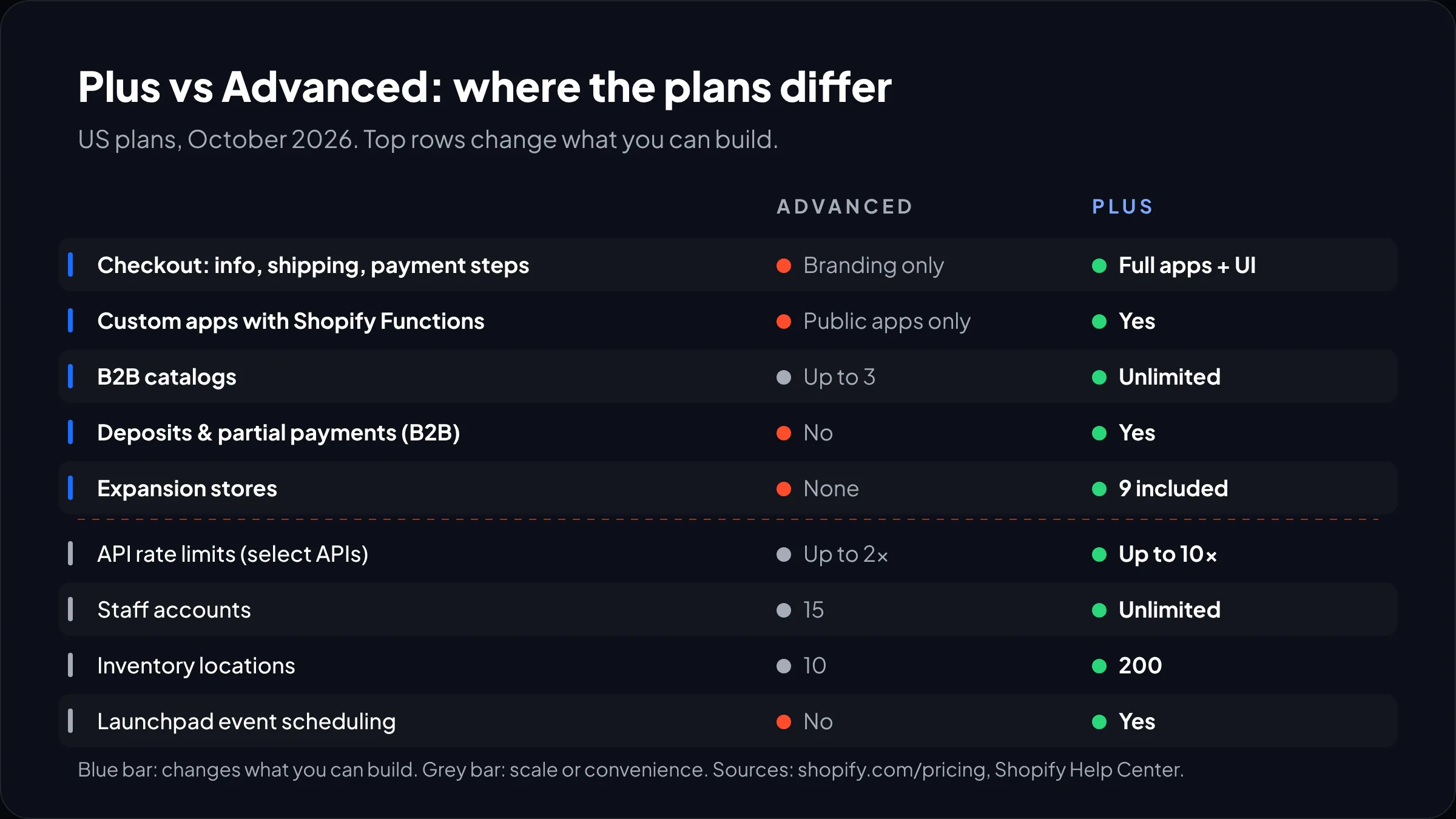
The Shopify Plus features that change what you can build are full checkout customization, custom Functions apps, unlimited B2B catalogs with payment controls, expansion stores, higher API limits, and Plus-only APIs such as Multipass. The rest are scale limits or conveniences.
| Capability | Advanced | Plus | Who should care |
|---|---|---|---|
| Staff accounts | 15 | Unlimited, plus custom user groups | Large ops or agency teams |
| Inventory locations | 10 | 200 | Retail chains, multi-warehouse |
| Checkout customization | Limited (branding, thank you and order status apps) | Full, including information, shipping and payment steps | Anyone with checkout logic |
| Custom apps with Shopify Functions | No (public apps only) | Yes | Brands with unique pricing or shipping rules |
| B2B catalogs | Up to 3 | Unlimited, assignable per company location | Wholesale with customer-specific pricing |
| Expansion stores | None | 9 included | Multi-region or wholesale-only storefronts |
| Headless storefronts | 1 | 25 | Hydrogen or custom front ends |
| API rate limits | Up to 2x on select APIs | Up to 10x on select APIs | Heavy ERP, PIM or OMS syncs |
| Launchpad scheduling | No | Yes | Drops and big sale events |
| Support | Enhanced 24/7 chat | 24/7 priority phone and chat | Teams without an agency on call |
Most rows come from the pricing page. The location, expansion store, user group, Launchpad and support details come from the Plus plan Help Center article, which also lists Plus-only extras that rarely appear in comparisons: suppressing specific notification emails, payment authorization extended up to 30 days for Visa, Mastercard and Amex (useful for pre-orders), and the Multipass API for single sign-on.
Checkout: the biggest practical gap
Checkout is where the plans differ most in day-to-day impact. On Advanced, you get standard branding settings and apps on the thank you and order status pages. On Plus, you can add apps and custom UI to the information, shipping and payment steps, use the Checkout Branding API for detailed styling, and run separate B2B and DTC checkout flows in one store.
The checkout extensibility article lays out the split plainly. Standard customizations work on all pages from the Basic plan up. Apps that customize the information, shipping and payment pages, and access to the Checkout Branding API, are marked Plus-only.
The requests that push stores to Plus:
- A delivery date picker or gift message field on the shipping step
- A required tax ID, PO number or VAT field for business buyers
- Trust badges, upsells or loyalty point redemption inside checkout, not after it
- Hiding or reordering payment methods based on cart contents or customer tags
- Checkout styling that matches the brand beyond the logo, colors and fonts in the editor
If none of those are on your roadmap, Advanced checkout is fine as it is. On most stores we audit, conversion problems sit on the product page and cart, not in checkout.
Watch out: non-Plus stores that still rely on script tags or additional scripts on the thank you and order status pages are on a deadline. Shopify’s checkout developer docs give August 26, 2026 as the sunset for non-Plus stores (Plus stores passed theirs on August 28, 2025). If your conversion tracking lived there, check it now.
Shopify Functions after the Scripts sunset
Shopify Functions are now the only way to customize discounts, shipping and payment logic on the server, and custom apps that contain Functions run only on Plus. Stores on any plan can install public App Store apps that use Functions, so Advanced still gets a lot of this capability through off-the-shelf apps.
That line comes straight from Shopify’s Functions documentation: “Only stores on a Shopify Plus plan can use custom apps” containing Function APIs. The available APIs cover discounts, delivery customization, payment customization, cart and checkout validation, cart transforms (bundles), fulfillment constraints and order routing rules.
The Scripts story is finished. Per the Shopify developer changelog, Scripts could no longer be edited or published after April 15, 2026, and all Scripts stopped running on June 30, 2026. If you are on Plus and still missing logic you used to have in Scripts, our guide to moving from Shopify Scripts to Functions covers the rebuild.
Public app or custom Function?
This is the question that decides whether Functions are a Plus reason for you. Public apps cover common patterns: tiered discounts, free gifts, hiding a shipping method for PO boxes. A custom Function makes sense when the rule depends on your own data (a metafield on the customer, a margin floor per SKU, a warehouse rule) and no app models it. Functions also have hard limits (an 11 million instruction budget for carts up to 200 lines, a 256 kB binary), so complex rules need careful engineering either way.
From our team: before upgrading for Functions alone, list every rule you need and check whether a public app already does it. We often find one or two rules that truly need custom code. If that’s all, Plus may still be right, but you’ll know exactly what you’re paying for.
B2B after April 2026: does wholesale still need Plus?
Simple wholesale no longer needs Plus. On April 2, 2026, Shopify opened native B2B to Basic, Grow and Advanced at no extra cost, with company profiles, payment terms, volume pricing, vaulted cards and up to 3 active B2B catalogs. Customer-specific pricing at scale, deposits and partial payments still require Plus.
Per the Shopify changelog announcement, non-Plus catalogs are assigned through Markets. On Plus, you assign unlimited catalogs directly to companies and company locations.
| Your wholesale setup | Advanced is enough? | Why |
|---|---|---|
| One wholesale price list, net 30 terms | Yes | One catalog plus payment terms covers it |
| Three tiers (e.g. small, mid, distributor) | Yes, at the limit | Exactly 3 catalogs, no headroom |
| Negotiated pricing per key account | No | Needs per-company catalogs, which are Plus-only |
| Large orders paid by deposit | No | Deposits and partial payments are Plus-only |
| Separate B2B checkout rules (PO field, hidden card payments) | No | Needs Plus checkout customization |
The trap is the middle row: three tiers work until sales agrees a special price for one big account. Count price lists for the next two years.
Expansion stores, markets and multiple brands
Plus includes 9 expansion stores on top of your main store, and each extra store beyond that is $300 a month. Advanced has no equivalent, so every additional storefront needs its own paid plan. For most international brands, though, Shopify Markets on a single store is the better setup and works on both plans.
We’d use expansion stores for a wholesale-only storefront or a region with a very different catalog, legal entity or fulfillment model. We would not split stores just to translate content or show local prices. Markets handles that in one admin, and every extra store multiplies apps, theme updates and product syncs.
One limit catches multi-brand groups: the Plus pricing page says a contract covers one brand. Two distinct brands mean two contracts. Each live expansion store also needs a theme licence.
Replatforming several regional sites from Adobe Commerce? Expansion stores often map more cleanly to the old multi-site setup; see our Magento to Shopify migration guide.
Not sure Plus will pay for itself?
Send us your revenue split, POS footprint, B2B price lists and checkout wish list, and we’ll run this model for your store.
Is Shopify Plus worth it? A worked example
Shopify Plus is worth it when its fee savings plus the costs it removes come close to the extra subscription, and the remaining gap buys a feature that earns more than it costs. Card fees are only one of those savings. Here is a fuller model, using clearly hypothetical numbers.
Say you run a US home goods brand doing $5M a year online, with $4.25M of that paid by card through Shopify Payments. You also run 4 retail stores on POS Pro with $600,000 a year in in-person card sales, and you want per-account wholesale pricing for about 12 trade customers. You’d sign a 3-year Plus term.
- Extra subscription: ($2,300 − $299) × 12 = $24,012 a year.
- Online card saving: 0.25 points on $4.25M = $10,625.
- POS Pro saving: 4 locations × $89 × 12 = $4,272, since Plus includes 20.
- In-person card saving: 0.1 points on $600,000 = $600.
- Remaining gap: $24,012 − $10,625 − $4,272 − $600 = $8,515 a year, about $710 a month.
So the real question for this brand is whether per-account wholesale catalogs and full checkout control are worth about $710 a month. If the alternative is a wholesale app plus staff maintaining price lists by hand, often yes. If the wholesale plan is speculative, no.

If you use a third-party payment gateway
The math moves faster here. Advanced charges 0.6% on top of your gateway’s own fees and Plus charges 0.2%, so the saving is 0.4 points. On its own, that covers the $24,012 gap at about $6.0M a year in gateway volume. Brands that need a specific gateway for a market, or for buy-now-pay-later terms, hit that point much sooner than card-only stores.
What the model leaves out
- Development: checkout extensions and custom Functions are build projects, not settings.
- The variable fee: if Shopify moves you to it, rerun the model with the quoted formula.
The decision criteria we use with clients
We recommend Plus when a brand hits at least one hard trigger and the cost model leaves a manageable gap. If the only reasons are “priority support” and “it feels like the next step,” stay on Advanced and put the $24,000 into CRO or development.
Hard triggers (any one can justify Plus)
- You need custom UI or validation on the information, shipping or payment steps of checkout.
- You need a Shopify Function no public app provides.
- You need more than 3 B2B catalogs, per-company pricing, deposits or partial payments.
- You need more than one storefront that can’t be handled by Markets.
- Your ERP, PIM or OMS integration is throttled by Advanced API limits during peak periods.
- You run more than 10 inventory locations or a growing POS Pro estate.
Soft signals (useful, not enough alone)
- Big launches or drops where Launchpad’s scheduled price, inventory and theme changes save a midnight shift.
- More than 15 people need admin access.
- You want single sign-on with another site via Multipass.
- You use a third-party gateway for a large share of sales.

Shopify’s pricing page also shows a “Try for $399” option on Plus. If you’re borderline, ask about it and use the time to prototype the feature you’re upgrading for.
What upgrading from Advanced to Plus involves
Moving from Advanced to Plus is a plan change on the same store, not a migration. Products, customers, orders, theme and apps stay put. The budget goes on building the features you upgraded for.
- Contract: agree term length, and the variable fee formula if it applies.
- Scope the features: list each checkout extension, Function, B2B catalog and expansion store with its owner.
- Build and test on a staging store: Plus gives unlimited staging stores, so use one.
- Replace workaround apps: remove the apps the new features make redundant, or you pay twice.
- Train the team: give B2B companies, catalogs and Launchpad events a clear owner.
Our Shopify Plus development team scopes this as a short feature list, not a rebuild. Longer than five items? Phase it.
Frequently asked questions
What is the difference between Shopify Plus and Advanced?
Plus adds full checkout customization, custom apps that use Shopify Functions, unlimited B2B catalogs with deposits and partial payments, 9 expansion stores, up to 10x API limits, 200 locations and unlimited staff. Advanced costs $299 a month on annual billing against $2,300 or more for Plus, and already includes Markets, Flow, custom reports and up to 3 B2B catalogs.
How much does Shopify Plus cost per month?
Shopify Plus starts at $2,300 a month on a 3-year term or $2,500 a month on a 1-year term in the US. Higher-volume or complex businesses may pay a variable platform fee based on revenue, quoted by Shopify’s sales team. Nine expansion stores are included, and each additional store costs $300 a month.
At what revenue should you upgrade to Shopify Plus?
There is no fixed revenue threshold. On card fees alone, Plus breaks even at about $9.6M a year in online card sales, but most brands upgrade earlier because they need a Plus-only feature. Below about $1M a year with no B2B or multi-store needs, Advanced or Grow is almost always the better choice.
Can you use B2B on Shopify without Plus?
Yes. Since April 2026, Basic, Grow and Advanced include native B2B with company profiles, payment terms, volume pricing, vaulted cards and up to 3 active catalogs. Unlimited catalogs, direct catalog assignment to company locations, deposits and partial payments still require Shopify Plus.
Can Shopify Advanced use Shopify Functions?
Partly. Stores on Advanced can install public App Store apps that contain Functions, so common discount, shipping and payment rules are available. Only Plus stores can run custom apps containing Function APIs, which is what you need for rules built around your own data or logic that no public app covers.
Can you downgrade from Shopify Plus to Advanced?
Possibly, but Plus is sold on 1-year or 3-year terms, so check your contract and confirm the terms with Shopify before planning a move back. You would also lose Plus-only features such as checkout step customizations, custom Function apps, extra B2B catalogs and expansion stores, so map what breaks before downgrading.
What we’d do first
Write down every feature you think needs Plus, then mark each one as a hard trigger, a soft signal or a nice-to-have, using the lists above. If nothing lands in the hard column, stay on Advanced and spend the difference on the store itself. If something does, run the worked example with your own card volume, POS locations and gateway share, and see what monthly gap is left for that feature to justify.
That turns the Shopify Plus vs Advanced decision from a status question into a short business case with a number at the bottom, and a build list for the upgrade.
We’ve built on Shopify and Shopify Plus for brands like Delsey, EcoFlow, Kerbholz and MyHarry. If you’d like a second opinion on whether the upgrade pays off for you, our Shopify Plus development services team will go through your numbers with you.