On this page
- What multi-agent systems are, in practice
- Agentic workflows vs autonomous agents: who picks the next step
- AI agent orchestration patterns that hold up
- Multi agent framework options in November 2026
- Human-in-the-loop: where the approval gates go
- Why multi-agent systems fail
- A real business process: warranty claims for a Shopify brand
- What multi-agent systems cost to run
- When a single agent is the better choice
- Frequently asked questions
- What we’d do first
A brand’s ops lead sends us a diagram with six agents on it: an intake agent, a sentiment agent, a policy agent, a refund agent, a QA agent, and a manager agent above them all. The process it describes is warranty claims. About 3,000 a month. When we redraw it, we end up with two agents and a lot of plain code.
That is how most multi-agent systems projects should start. A multi-agent system splits one job across several LLM-driven agents, each with its own prompt, tools and context, coordinated by code or by another agent. It can beat a single agent by a wide margin on the right task. On the wrong task it burns tokens and loops. Below: the patterns that hold up, four frameworks worth shortlisting in November 2026, where humans stay in the loop, why these systems fail, a cost model, and one process built end to end.
Key takeaways
- A multi-agent system earns its cost on wide, parallel, mostly read-only work. Research, triage and review fit. Tightly coupled writing work usually does not.
- Anthropic measured multi-agent runs at roughly 15 times the tokens of a chat interaction. Budget for that before you design for it.
- Researchers who studied 1,642 traces across seven frameworks found failure rates between 41% and 86.7%. Most failures were design and verification problems, not model problems.
- Keep writes single-threaded. Let agents read, reason and draft in parallel, then have one component (often plain code) take the action.
- Put human approval on anything irreversible: refunds, customer-facing sends, deletes. Every framework on our shortlist supports pausing for it.
What multi-agent systems are, in practice
A multi-agent system is a setup where two or more agents, each an LLM with its own instructions and tools, work on parts of one task and pass results between them. Something has to decide who runs next. That something is either your code or another agent, and the choice matters more than the number of agents.
If you need the basics of a single agent first (goal, tools, memory, loop), our explainer on what AI agents are covers it.
Why split at all? Three honest reasons hold up:
- Context limits. A subagent reads 40 pages of policy and returns 200 words. The parent never carries the 40 pages.
- Parallelism. Independent lookups run at once.
- Fresh eyes. A reviewer that never saw the drafter’s reasoning catches mistakes the drafter talked itself into.
“Each agent should have one job” is not on that list. It sounds tidy. It is also how you get six agents for a warranty process.
Agentic workflows vs autonomous agents: who picks the next step
The useful split is not single versus multi. It is whether code or a model decides the next step. OpenAI’s Agents SDK documentation names these LLM orchestration and code orchestration, and says plainly that code orchestration makes speed, cost and performance more predictable.
We call the code-led version agentic workflows. The flow is a graph you wrote: classify, then fetch, then draft, then check. Agents fill specific steps, and conditional edges route between them based on structured outputs. The model-led version gives a planner agent tools and other agents, and lets it decide.
Our position is simple. Default to agentic workflows, and hand control to a model only at the steps where you genuinely cannot write the routing rule. Paying a model to rediscover a known path on every run is waste, and it is where loops come from.
From our team: when a client asks for “autonomous agents,” we ask them to describe the process to a new hire. If they can, the steps they list become graph nodes. The parts where they say “it depends” are where an agent goes.
AI agent orchestration patterns that hold up
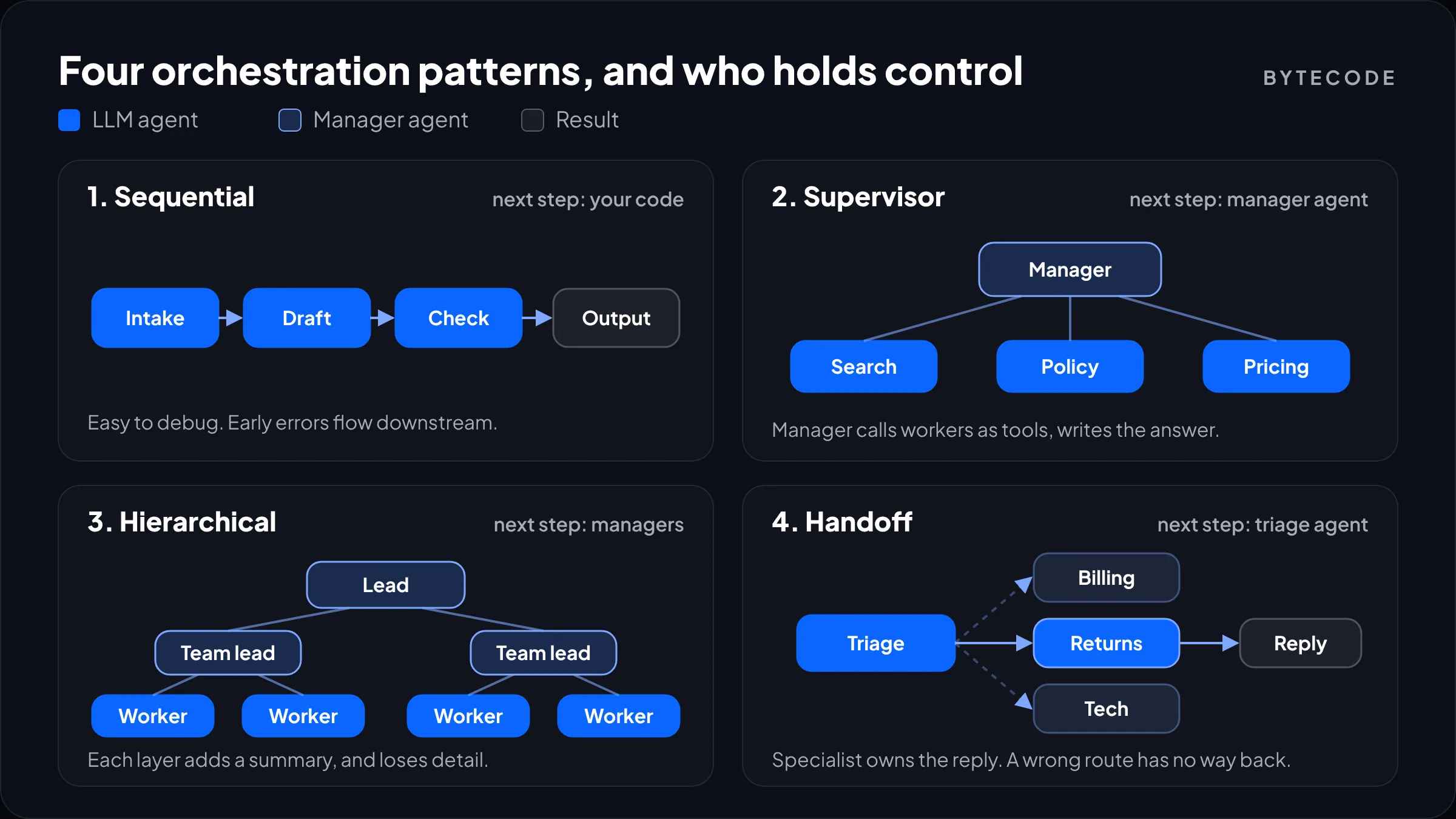
Most production systems use one of five shapes, or a mix: sequential, supervisor, hierarchical, handoff and parallel fan-out. They differ in who holds control and in how much context each agent sees.
Sequential (pipeline)
Agent A’s output becomes agent B’s input. The OpenAI docs give a research, outline, draft, critique, revise chain as the example. It is the easiest to debug, since every handoff is a readable log line. Its weakness is that an early mistake flows downstream untouched unless you add a check.
Supervisor (manager with workers)
One agent keeps the conversation and calls specialists as if they were tools, then writes the final answer. In the OpenAI SDK this is Agent.as_tool(). Anthropic’s Research feature uses a version of it: a lead agent plans and runs 3 to 5 subagents in parallel, according to Anthropic’s engineering write-up. This is our default when an agent must be in charge.
Hierarchical
Supervisors with their own sub-teams. CrewAI ships it as a process type: you set process=Process.hierarchical and give it a manager_llm or a custom manager_agent, and the manager plans, delegates and validates, per CrewAI’s hierarchical process docs. We rarely need a third layer, because every level adds a summary, and summaries lose detail.
Handoff and parallel fan-out
Handoff means a triage agent routes the conversation to a specialist, which then owns the reply. Parallel fan-out is plain concurrency, with code merging the results.
| Pattern | Who decides the next step | Good fit | Main risk |
|---|---|---|---|
| Sequential | Your code | Document processing, content pipelines | Errors pass downstream unchecked |
| Supervisor | Manager agent | Research, triage, multi-source answers | Manager over-delegates or loops |
| Hierarchical | Managers at each level | Large, separable workloads | Detail lost in each summary |
| Handoff | Triage agent, then specialist | Support with distinct departments | Wrong route, no way back |
| Parallel fan-out | Your code | Independent lookups, batch scoring | Conflicting outputs to merge |
Multi agent framework options in November 2026
Four frameworks cover nearly every build we scope: LangGraph, CrewAI, the OpenAI Agents SDK and Microsoft Agent Framework. Pick on control model and your team’s stack, not feature lists.
| Framework | Languages | Control model | Human-in-the-loop | We reach for it when |
|---|---|---|---|---|
| LangGraph | Python, JavaScript | Explicit graph of nodes and edges | interrupt() with a checkpointer |
The process has branches, retries and approvals |
| CrewAI | Python | Role-based crews, sequential or hierarchical | Possible; we usually gate outside the crew | A fast prototype of a role-based team |
| OpenAI Agents SDK | Python, TypeScript | Agents as tools, handoffs, plain code | Guardrails, plus approval steps in your code | You are on OpenAI models and want a thin layer |
| Microsoft Agent Framework | .NET, Python | Workflows with built-in orchestrations | Checkpointing and approval steps | A .NET or Azure shop, or migrating off Semantic Kernel |
LangGraph
LangGraph is the one we use most for client work, because it makes you draw the graph. State is explicit, each node is a function, and persistence comes from a checkpointer keyed by thread_id. That makes pausing for approval and resuming after a crash ordinary features rather than custom work. The current docs reference langgraph>=1.2.12 for typed interrupt schemas, so the 1.x line is stable ground. The cost is verbosity: a two-step flow is more code than it deserves.
CrewAI
CrewAI gets a role-based team running quickly: agents with a role, goal and backstory, tasks, and a process. Sequential is the default. For production, we find the role framing pushes teams toward more agents than they need, so we often port a proven design to a graph.
OpenAI Agents SDK
The thinnest of the four. Agents, tools, handoffs, guardrails and tracing, with ordinary Python or TypeScript for everything else. If your stack is already OpenAI models, start here and add structure only when it hurts.
Microsoft Agent Framework
Microsoft shipped Agent Framework 1.0 as generally available on April 3, 2026, for .NET and Python, with sequential, group chat and Magentic-One orchestrations plus checkpointing and human-in-the-loop support. Microsoft describes it as the successor to Semantic Kernel and AutoGen and publishes migration guides for both. Start nothing new on AutoGen.
Whichever you pick, connect tools through the Model Context Protocol so connectors stay portable. Our MCP guide explains how.
Human-in-the-loop: where the approval gates go
Put a human approval step in front of every action that is expensive or irreversible, or that a customer will see, and nowhere else. Gates everywhere train reviewers to approve without reading.
Our standing rules for where gates go:
- Money moves. Refunds, credits, discounts and purchase orders above a threshold you set.
- Customer-facing sends, until you know the error rate on a sample.
- Destructive writes such as deletes and bulk updates.
- Low confidence. Any case where the classifier or verifier scores below your cut-off.
In LangGraph a gate is one call. The node calls interrupt() with a payload for the reviewer, the graph saves its state, and your app resumes it with Command(resume=...), per the LangGraph interrupts docs:
from langgraph.types import interrupt, Command

def approve_refund(state):
    decision = interrupt({
        "order": state["order_id"],
        "amount": state["refund_amount"],
        "reason": state["summary"],
    })
    return {"approved": decision["approved"]}

# later, from your review UI:
graph.invoke(Command(resume={"approved": True}),
             config={"configurable": {"thread_id": claim_id}})
Watch out: when a LangGraph node resumes, it reruns from the top, so any code before interrupt() runs twice. Put the refund call in a separate node after approval, never above the interrupt. The docs also warn against wrapping interrupt() in a bare try/except, because it works by raising.
Microsoft’s workflows do the same with checkpointing and approval steps, and with the OpenAI SDK we usually run the agent up to a proposed action and gate it in our own code. Either way, store pending state in a real database. Reviewers take lunch breaks.
Why multi-agent systems fail
Most multi-agent failures come from the design, not the model: vague task specs, agents that ignore each other, and nobody checking the final output. That is the main finding of “Why Do Multi-Agent LLM Systems Fail?”, which annotated 1,642 execution traces across seven open-source frameworks and recorded failure rates from 41% to 86.7%.
The authors sorted 14 failure modes, a taxonomy they call MAST, into three groups: system design and specification, inter-agent misalignment, and task verification. Five modes account for the biggest shares:
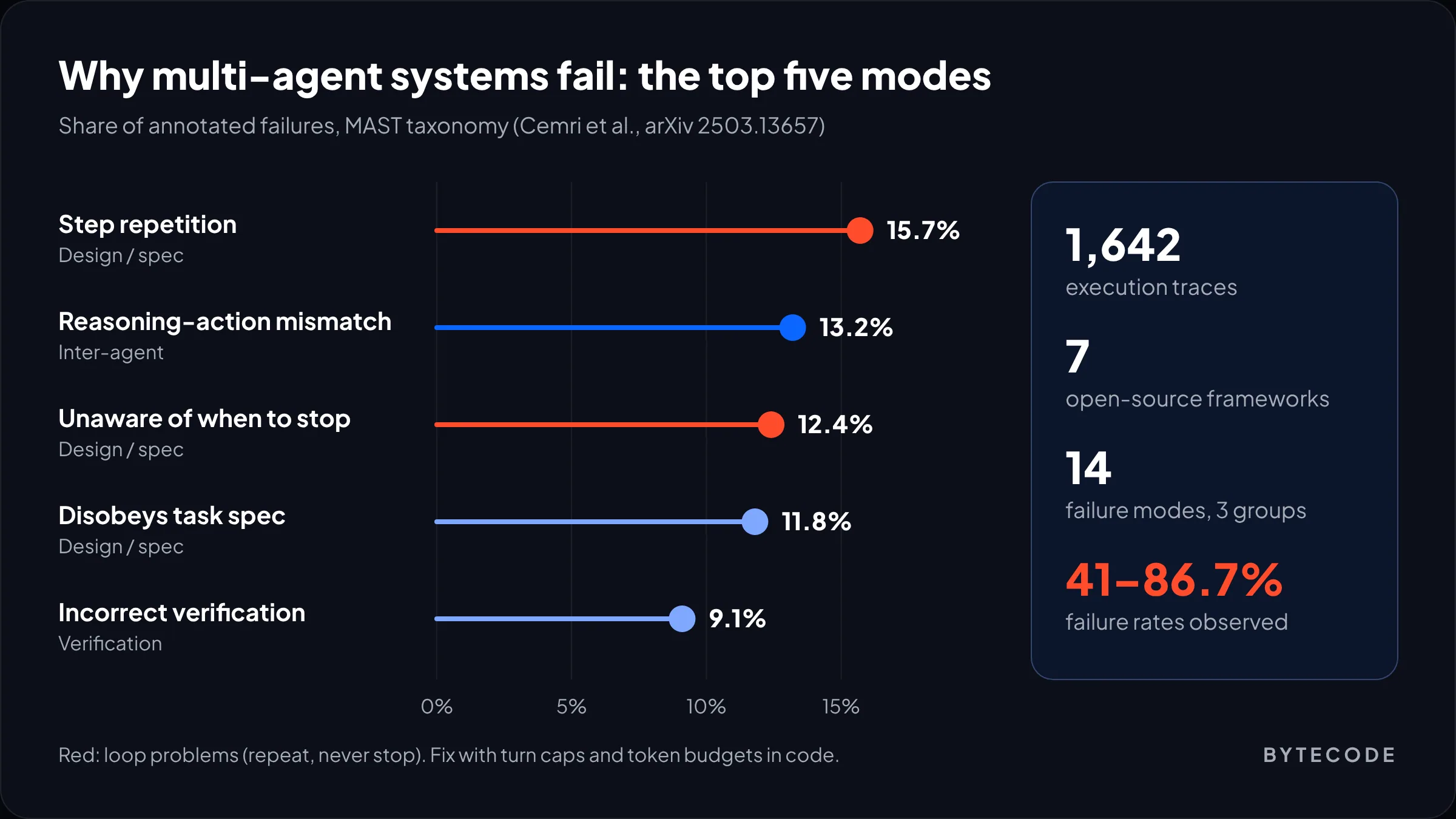
Step repetition (15.7%) and not knowing when to stop (12.4%) together are the loop problem. Anthropic hit the same thing: early versions of its research system spawned 50 subagents for simple queries and kept searching for sources that did not exist. Reasoning-action mismatch (13.2%) means saying one thing and doing another.
The fixes we build into every system follow from that list:
- Hard limits in code. A maximum number of turns per agent and a token budget per run. When either trips, stop and route to a human.
- Typed handoffs. Agents pass structured objects with required fields, not free text. A missing field fails loudly at the boundary.
- Explicit done criteria. Every task prompt states what “finished” looks like and what format to return.
- A verifier with its own context. In the study, adding a high-level verification step improved ChatDev’s results by 15.6% on one task set.
- One writer. Cognition, which argued against multi-agent designs in 2025, wrote in April 2026 that these systems work best when only one agent writes and the rest stay read-only or advisory. We design around exactly that.
A real business process: warranty claims for a Shopify brand
Here is the warranty process from the opening, redrawn the way we would build it. The design is hypothetical; each component is one we build regularly. The brand sells on Shopify, receives about 3,000 warranty and return claims a month by email and form, and has a policy document of around 30 pages.
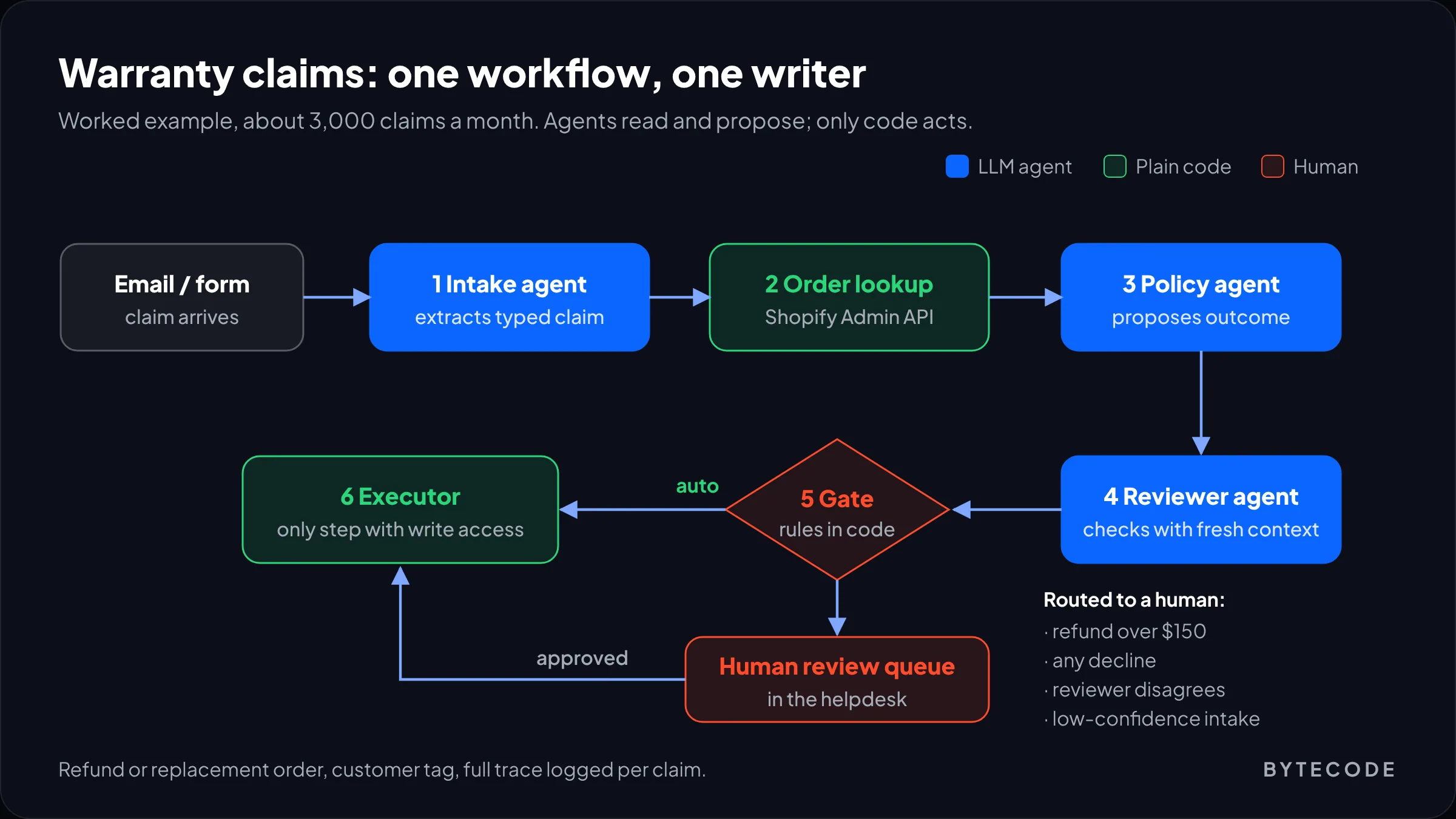
- Intake agent. Reads the email or form, extracts the order number, product, fault description and photos, and returns a typed object. A missing order number triggers a template reply, not an improvised one.
- Order lookup (code). Pulls the order, fulfilment date and line items from the Shopify Admin API. Facts come from systems, not inference.
- Policy agent. Gets the claim, the order facts and the relevant policy sections (retrieved, not the whole document), and proposes an outcome: repair, replace, refund, or decline, with cited clauses.
- Reviewer agent. Sees the claim, the order and the proposal, but not the policy agent’s reasoning. It flags any outcome that contradicts policy.
- Human gate. Refunds above $150, any decline, any reviewer disagreement and any low-confidence intake go to a queue in the helpdesk.
- Executor (code). The only step with write access. It issues the refund or creates the replacement order, tags the customer, and logs the full trace against the claim.
Is that a multi-agent system? Yes, by any definition: three LLM agents with separate contexts. But control sits in the graph, writes sit in one code path, and the agents only read and propose. That is what our agentic workflow orchestration builds tend to look like once the whiteboard version meets real volume.
Have a process with too many boxes on the diagram?
Send us the process and the monthly volume, and we will sketch the smallest agent design that can handle it, with a token cost estimate.
What multi-agent systems cost to run
Expect a multi-agent design to use several times the tokens of a single agent on the same task. Anthropic measured agents at about 4 times the tokens of a chat interaction and multi-agent systems at about 15 times. It also found token usage alone explained 80% of the performance variance on the BrowseComp benchmark. Much of the quality gain is the extra spend.
That is fine when the task is valuable. Anthropic’s multi-agent setup beat a single agent by 90.2% on its internal research eval. It is not fine for a $40 warranty claim. Here is the token math for the example above, using hypothetical rates of $2 per million input tokens and $10 per million output tokens (swap in your model’s current price):
| Design (per claim) | Model calls | Input tokens | Output tokens | Cost per claim | 3,000 claims/month |
|---|---|---|---|---|---|
| Single agent with tools | 6 | 48,000 | 3,000 | $0.13 | $378 |
| Our workflow (3 agents, code routing) | 5 | 36,000 | 3,500 | $0.11 | $321 |
| Supervisor + 3 workers (model routing) | 17 | 158,000 | 11,400 | $0.43 | $1,290 |
Look at where the money goes. The code-routed workflow costs about the same as one agent, because each agent sees a small, targeted context and nothing re-reads the whole history. The model-routed supervisor costs 3.4 times as much as the single agent because the manager re-reads everything on every turn.
Tokens are usually not the biggest line, either. Say 20% of claims go to review at 4 minutes each and a reviewer costs $25 an hour. That is 40 hours, or $1,000 a month, more than either token bill. Our breakdown of AI agent development cost covers build budgets, and our guide to reducing LLM costs covers caching, routing and batching for the run bill.
When a single agent is the better choice
A single agent with good tools is the better choice whenever the steps depend tightly on each other, the context fits in one window, or the task is worth less than the extra tokens. That covers most business processes we are asked about.
| Question | If yes | If no |
|---|---|---|
| Can the work split into parts that do not need each other’s results? | Multi-agent may help | Single agent |
| Does one agent’s context overflow, even after retrieval? | Split it with subagents | Single agent |
| Would a reviewer with fresh context catch real errors? | Add one reviewer agent | Skip it |
| Do several parts need to write to the same system? | Keep one writer, others propose | Parallel is safer |
| Is each run worth more than a few dollars? | The token premium is affordable | Keep it lean |
Anthropic’s own write-up says most coding tasks are a poor fit for this reason: too few parts can run in parallel, and agents are not yet good at coordinating in real time. Order edits and invoice matching behave the same way. One agent, or a workflow with one agent step, is usually enough.
From our team: we build the single-agent version first, even when we expect to need more. It gives us a baseline score on the eval set. If the multi-agent version cannot beat it by a clear margin, it does not ship.
Frequently asked questions
What is an example of a multi-agent system?
A common example is a research assistant where a lead agent breaks a question into parts, runs several subagents to search in parallel, and combines their findings. Anthropic’s Research feature works this way. A claims workflow with separate intake, policy and reviewer agents is a typical business example.
What is the difference between a single agent and a multi-agent system?
A single agent is one model calling tools in a loop with one shared context. A multi-agent system splits the task across several agents with separate prompts and contexts, coordinated by code or by a manager agent. Multi-agent designs help with parallel and context-heavy work, but they use far more tokens and add coordination failures.
Which framework is best for multi-agent systems?
There is no single best framework. LangGraph suits processes with branches, retries and human approvals because the graph and state are explicit. The OpenAI Agents SDK is the lightest option on OpenAI models. CrewAI is quick for role-based prototypes, and Microsoft Agent Framework fits .NET and Azure teams moving off Semantic Kernel or AutoGen.
Is LangGraph a multi-agent framework?
Yes. LangGraph lets you build multi-agent systems as a graph where each node can be an agent or plain code, with shared state passed between them. It also handles persistence through checkpointers, which makes pausing for human approval and resuming after failures straightforward.
How much more do multi-agent systems cost than a single agent?
Anthropic measured multi-agent systems at about 15 times the tokens of a chat interaction, against about 4 times for a single agent. In practice, the gap depends on design. A workflow where code routes between small, focused agents can cost about the same as one agent, while a manager agent that re-reads everything each turn can cost several times more.
Why do multi-agent systems fail?
Most fail because of design issues rather than weak models. A study of 1,642 traces across seven frameworks found failure rates of 41% to 86.7%, with step repetition, unclear stopping conditions, agents ignoring instructions and weak verification as leading causes. Turn limits, typed handoffs, explicit done criteria and an independent verifier fix many of them.
What we’d do first
Pick one process with real volume and a clear right answer, and collect 50 past cases with their outcomes. Build the plainest version that could work: a workflow with one agent step. Score it, and only add a second agent where the scores show a real gap.
Most teams find they need fewer agents than the first diagram showed, and a lot more attention on handoffs, limits and the one component allowed to write. If you want a second pair of eyes on a design, or a team to build and run it, that is what our agentic workflow orchestration service does. We have built for brands like EcoFlow, Delsey and Medcline, and every agent project starts with the eval set.