On this page
- Shopify POS Lite vs POS Pro in 2026
- Shopify POS hardware by region
- How Shopify POS inventory sync and transfers work
- BOPIS and ship-from-store with Shopify POS Pro
- Staff permissions and roles
- Shopify POS offline mode: what works when the internet drops
- What Shopify POS really costs: a worked model
- Shopify POS setup: the order we do it in
- When Shopify POS fits, and when it doesn’t
- Frequently asked questions
- What we’d do first
A brand that sells well online opens its first shop, plugs in a card reader, and spends the next three weeks discovering that the stock count on the shelf and the stock count in the admin are two different numbers. The software was fine. The setup was never planned.
Shopify POS is the in-store side of the same Shopify account you already run online: one product catalog, one customer list, one inventory pool split by location. In November 2026 every paid plan includes basic in-person selling, and POS Pro costs $89 a month per location in the US, with the first 20 locations included on Shopify Plus. Below is how we set it up on retail rollouts: the tier you need, hardware by country (the POS Go is gone), inventory and transfers, pickup and ship-from-store, staff roles, offline mode, and when we’d tell you not to use it.
Key takeaways
- The free tier is for pop-ups and markets. Any permanent shop that needs stock transfers, in-store pickup, staff roles or exchanges needs POS Pro at that location.
- POS Go is no longer sold. Existing units keep mobile mode until May 26, 2027, then become countertop terminals only. Plan replacements now, not in April.
- Hardware depends on your country. The US gets the Tap & Chip reader, most of Europe, the UK and Australia get the WisePad 3, and one store can only take Shopify Payments in person in one country.
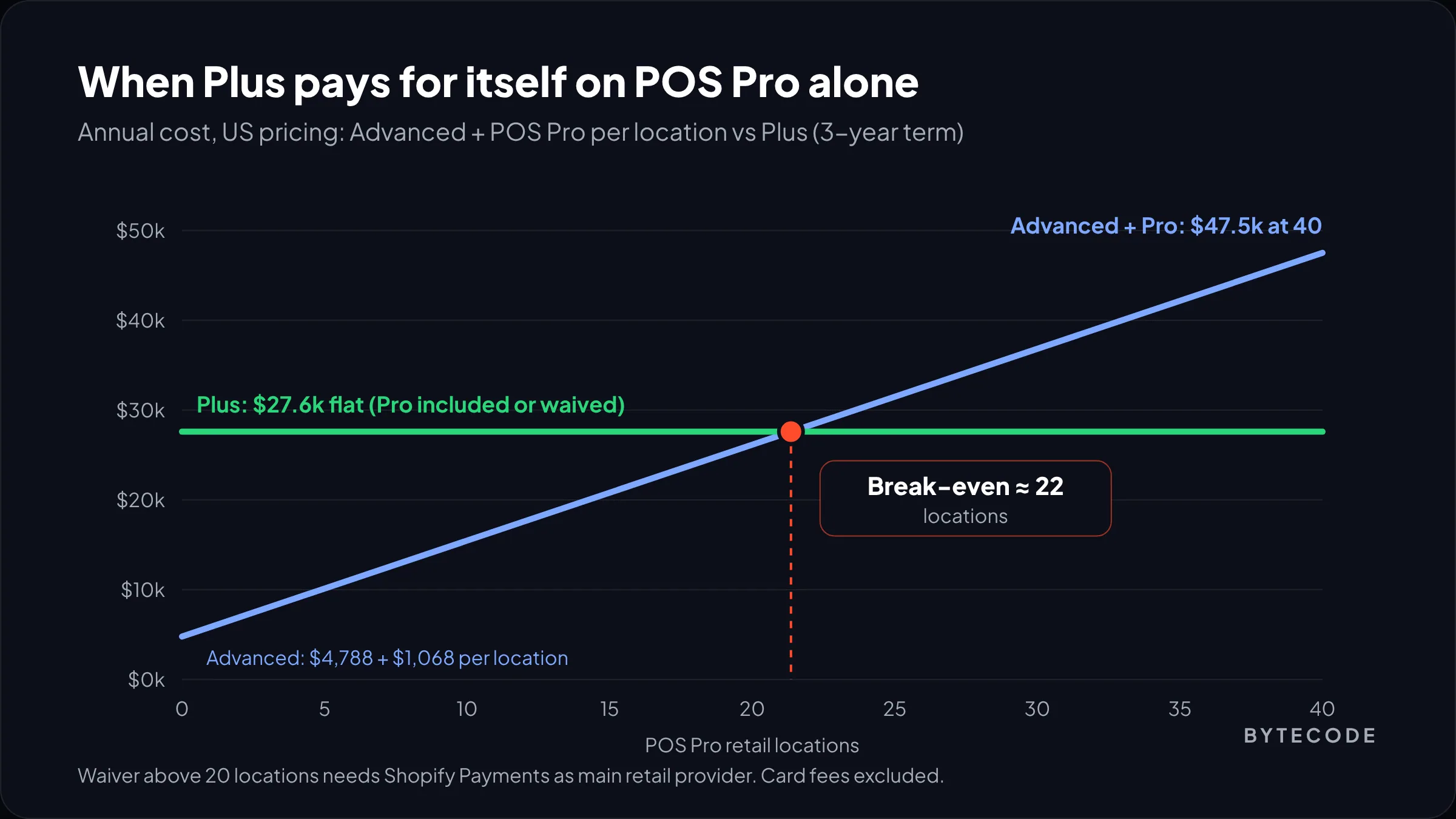
- On our numbers, Plus pays for itself on waived POS Pro fees alone at about 22 retail locations, before you count any other Plus feature.
- Offline card payments are off by default and you carry the risk on declines. Turn them on deliberately, with caps, and back them with a cellular hotspot.
Shopify POS Lite vs POS Pro in 2026
Every paid plan includes in-person selling; POS Pro is a per-location add-on. Shopify’s POS pricing page lists Pro at $89 USD a month for each location, billed yearly. Many guides still call the free tier POS Lite, a name Shopify’s pricing page has dropped.
The split is closer to “selling things” vs “running a shop.” Shopify’s help article on choosing your POS subscription lists exactly what sits behind Pro:
| Need | Included tier | POS Pro |
|---|---|---|
| Ring up sales, cash, gift cards, manual discounts | Yes | Yes |
| Change inventory quantities | Yes | Yes |
| Track, adjust and receive stock transfers in POS | No | Yes |
| Pickup in store, ship to home, local delivery fulfillment | No | Yes |
| Exchanges, order cancellations, returns at any location | No | Yes |
| Automatic discounts, saved and emailed carts | No | Yes |
| Retail staff roles and permissions, unlimited POS-only staff | No | Yes |
| Daily sales reports and in-app store analytics | No | Yes |
| Hardware warranty | 1 year | 2 years |
Read rows three and four twice. Without Pro, a store can’t receive a transfer in the app or fulfill a pickup order, which is most of what omnichannel means. Automatic discounts are the other surprise: your “spend $100, get 15% off” won’t apply at a free-tier till.
Outside the US, eSEOspace’s October 2026 POS pricing roundup puts Pro at £69 per location in the UK, CA$119 in Canada and A$129 in Australia. We couldn’t confirm those on Shopify’s regional pages, so check your admin before budgeting.
When the free tier really is enough
Markets, trade shows, a launch event, a one-person counter. If nobody needs a limited staff login and you never move stock, stay on the included tier.
Billing details that catch people out
- Pro is per location, not per register. Five iPads in one shop is one Pro subscription.
- You can’t move a Pro subscription yourself. Moving Pro to another location needs Support, or you pay for both.
- Annual means annual. No downgrade until the annual cycle ends.
Shopify POS hardware by region
Buy a countertop setup from the Shopify Hardware Store in your country, add a handheld only if staff sell on the floor, and buy nothing secondhand that Shopify has scheduled for retirement.
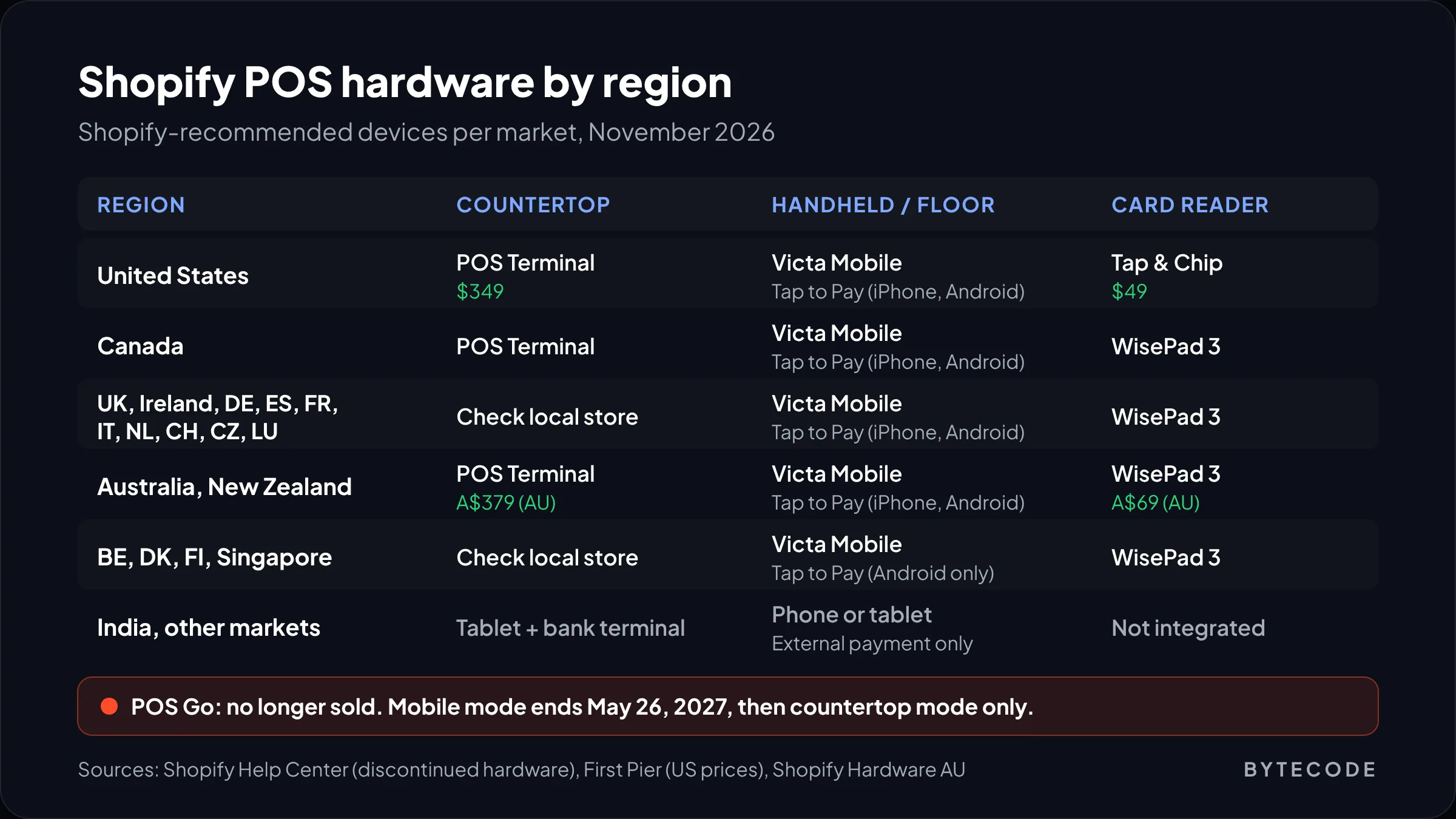
The biggest change this year is that Shopify’s discontinued hardware page now lists the POS Go with an end-of-support date of May 26, 2027. Until then existing units work as handhelds; after it, they switch permanently to countertop terminal mode. First Pier’s 2026 hardware guide adds that there is no trade-in program.
The POS Terminal on sale now is that same reader in a dock, paired to your iPad over Wi-Fi as a customer-facing counter display. Good at the counter. Not a handheld.
| Region | Countertop | Handheld or floor | Card reader | Retiring |
|---|---|---|---|---|
| United States | POS Terminal ($349) | Verifone Victa Mobile ($399), Tap to Pay on iPhone or Android | Tap & Chip ($49) | POS Go (May 2027), Chip & Swipe (ended Sep 2025) |
| Canada | POS Terminal | Victa Mobile, Tap to Pay on iPhone or Android | WisePad 3 | POS Go (May 2027) |
| UK, Ireland, Germany, Spain, France, Italy, Netherlands, Switzerland | Check local store | Victa Mobile, Tap to Pay on iPhone or Android | WisePad 3 | POS Go (May 2027) |
| Australia, New Zealand | POS Terminal (A$379 in Australia) | Victa Mobile, Tap to Pay on iPhone or Android | WisePad 3 (A$69 in Australia) | POS Go (May 2027) |
| Belgium, Denmark, Finland, Singapore | Check local store | Victa Mobile, Tap to Pay on Android only | WisePad 3 | POS Go (May 2027) |
| India and other markets | Tablet plus a third-party bank terminal | Phone or tablet | Not integrated | n/a |
Devices by region come from Shopify’s discontinued hardware page, US prices from First Pier, and Australian prices from Shopify’s Australian hardware store. Elsewhere, including India, Shopify’s pricing page says POS works but Shopify Payments and integrated hardware don’t, so you take cards on your bank’s terminal, record them as an external payment, and reconcile by hand at close.
What we’d buy for a single shop
In the US: an iPad, a POS Terminal, a stand, a receipt printer and drawer, and a Tap & Chip reader as backup. First Pier prices that at roughly $800 to $900 before the iPad.
We’d skip Android tablets for counters; peripheral pairing is where we lose the most setup time. Check your devices against the operating system floor, too: eSEOspace reports that Shopify will require iOS and iPadOS 18 or later, and Android 13 or later, with older devices needing an update by June 6, 2027.
Watch out: Tap to Pay on a staff phone looks free, and for a market stall it is. It takes contactless only, and First Pier notes it does not work offline. Never make it the only way a permanent shop can take a card.
One store, one country
Shopify’s country and currency rules for POS payments are strict: every physical location taking Shopify Payments must be in the same country as the store, the store currency must match the local currency, and it must match the payout bank account. A UK brand opening a shop in Dublin needs either a second store or Plus with multi-entity. Our guide to Shopify Markets covers the online side.
How Shopify POS inventory sync and transfers work
Inventory is shared, not synced. There is one quantity per product per location, and in-store and online sales reduce the same number. No separate till database has to agree with Shopify.
The work is in how you set up locations. Every shop, warehouse and pop-up is its own location under Settings > Locations, and a product only shows on a register if it is stocked there. Two mistakes we see constantly:
- One location for everything. Stock never gets split, so the website sells the last unit on a shelf 300 miles away. Split stock by location on day one.
- Every location fulfills online orders. If the tick box “Fulfill online orders from this location” is on for a shop, Shopify will route web orders there. Right for ship-from-store, wrong for a shop with no packing station.
Transfers live under Products > Transfers. The warehouse creates and ships one; the store scans it in against the transfer in POS. Receiving in the app is Pro only, so free-tier stores end up editing quantities by hand with no audit trail. If stock lives in an ERP or WMS, decide which system owns the number. Two systems both “correcting” it is how you get -4 units.
From our team: on rollouts we run, we do a full count at each store the evening before go-live, import it as the opening balance for that location, and freeze transfers for 48 hours. Boring, and it prevents more first-month tickets than anything else.
BOPIS and ship-from-store with Shopify POS Pro
Buy online, pick up in store (BOPIS) and ship-from-store both run on the same inventory pool, and both need POS Pro at the store doing the work. The customer picks a channel; the order goes to whichever location has stock.
Pickup in store
Enable it per location under Settings > Shipping and delivery > Local pickup, with a “usually ready in” time you can hit on your worst Saturday. Orders land in the POS orders list and staff mark them ready, which notifies the customer. Shopify’s October 2026 retail roundup notes that Pickup tiles on the smart grid now open straight to the orders list.
Ship from store
Ship-from-store is just a retail location that fulfills online orders. Turn on online fulfillment for that location, then set your rules under Settings > Shipping and delivery > Order routing, typically “closest location” or a ranked list that keeps the warehouse first. It pays off by clearing slow store stock and rescuing orders the warehouse can’t fill.
It goes wrong on labor: a shop handed 40 web orders on a Monday can’t serve the people standing in it. Start warehouse first, stores as fallback, and widen once teams have a packing routine.
Endless aisle
The reverse case: the customer is in the shop, their size isn’t, so staff sell it in POS and ship it from another location. It turns a “sorry” into a sale.

Staff permissions and roles
Every staff member gets a PIN on any plan, so sales are attributed to a person. Roles and permissions, which stop a Saturday temp issuing a $400 refund, are Pro only.
We set up three roles on most rollouts, in the Point of Sale channel’s staff settings in admin:
- Associate: sell, look up stock, create customers, process exchanges. No large refunds, price overrides or drawer adjustments.
- Supervisor: refunds, discounts above the standard ones, voids, opening and closing the register.
- Manager: everything in POS plus reports. Admin access only if truly needed.
Remove a leaver’s POS access the same day; a working PIN is a refund waiting to happen. And watch analytics: the October roundup says the new Analytics shortcut needs POS Pro plus the matching permission, so a role set too narrow hides reports from managers.
Shopify POS offline mode: what works when the internet drops
Cash and custom payment types work offline. Cards on a physical reader can too, if you switched it on beforehand: First Pier’s hardware guide says offline card payments are off by default, need caps per transaction and per device, and leave the merchant carrying the loss if a stored payment declines once it uploads. Tap to Pay does not work offline at all.
An offline card payment is a promise the bank hasn’t checked yet. Fine for a $30 sale. Not for a $2,000 jacket, so set the cap low.
Our offline checklist for any permanent shop:
- Turn on offline card payments in the POS channel settings, with a per-transaction cap and a per-device total cap.
- Keep a 4G or 5G hotspot (or a router with cellular failover) in the stockroom.
- Put the receipt printer on wired LAN if you can.
- After an outage, check that queued payments uploaded before you close the register.
Opening a store, or fixing one that never quite synced?
Tell us your locations, hardware and stock systems, and we will map out a POS rollout plan with the inventory and routing settings for each site.
What Shopify POS really costs: a worked model
For a small chain, card fees dwarf everything else; POS Pro and hardware are rounding errors by comparison. A clearly hypothetical example in US prices:
Say you run three shops on the Grow plan, each with two counters, plus two Victa Mobile units for busy periods. You do $1.8M a year in store sales at a $60 average ticket, so about 30,000 transactions.
| Line | Basis | Year one |
|---|---|---|
| POS Pro | 3 locations × $89 × 12 | $3,204 |
| Counter hardware | 6 × (POS Terminal $349 + stand $149 + printer $289) | $4,722 |
| Floor devices | 2 × Victa Mobile $399 | $798 |
| In-person card fees | 2.5% + 10¢ on $1.8M, 30,000 sales | $48,000 |
| Total, excluding plan, iPads and drawers | $56,724 |
Rates are from Shopify’s pricing page (Grow at 2.5% + 10¢ in person, Advanced at 2.4% + 10¢) and hardware prices from First Pier. Would Advanced pay off here? Its 0.1-point lower rate saves $1,800 a year, while the plan costs $294 a month more on monthly billing ($399 vs $105), or $3,528 a year. At this volume, stay on Grow.
The Plus question for retail chains
Plus changes the math for chains. Shopify includes the first 20 POS Pro locations on every Plus plan, and if you have more than 20 and use Shopify Payments as your main retail provider, Pro is waived for your first 200 locations. On Advanced, each Pro location is $1,068 a year. Plus on a 3-year term costs $27,600 a year against $4,788 for Advanced on monthly billing, a gap of $22,812.
Divide one by the other: at about 22 Pro locations, the waived fees alone cover the extra cost of Plus. Below that, Plus is a decision about features like multi-entity, B2B or checkout control, which we cover in Shopify Plus vs Advanced.
Shopify POS setup: the order we do it in
Data first, hardware last. Most painful launches we get called into did it the other way round.
- Locations. Check country and currency rules, then create each location with its fulfillment setting decided, not defaulted.
- Product data. Barcodes on every variant, SKUs that match the warehouse, products published to Point of Sale.
- Opening stock per location. Count, import, check a sample by hand.
- Subscription per location. Pro where the shop needs it; start the Pro trial close to launch, not a month before.
- Staff and roles. Roles first, then people, then PINs.
- Hardware. Pair everything at its own counter. Test a refund, an exchange and the drawer.
- Pickup, routing and offline. Configure, then run a real test order through each path.
- Soft open. A day of friends paying real money.
Timing matters this year. Shopify’s October roundup says major POS feature releases are paused for the rest of 2026. That makes December a stable window to go live.
If your stores need a custom POS UI extension (loyalty lookup, a warranty registration screen, an ERP stock check at the till), that is app work. Our Shopify app development guide explains what that takes, and our Shopify development team builds and maintains these for retailers.
When Shopify POS fits, and when it doesn’t
Shopify POS fits best when online is already your main channel and stores extend it: fashion, beauty, homeware and specialty retail, from one shop to a few dozen.
We’d think hard before using it for:
- Restaurants and table service. No table management, no kitchen display. Use a hospitality POS.
- Stores in several countries on a non-Plus plan. One store takes in-person Shopify Payments in one country only.
- Heavy weight-based or serialized retail. Butchers, grocers, electronics with serial and IMEI tracking. Possible with apps, rarely pleasant.
- An ERP that must own every till transaction. Scope the integration first.
Most POS complaints retailers bring us are about hardware pairing and flaky store Wi-Fi, not the software. Buy current hardware and wire what you can.
Frequently asked questions
How much does Shopify POS cost?
Basic in-person selling is included with every paid Shopify plan at no extra cost. POS Pro costs $89 USD a month per location, billed yearly, according to Shopify’s US pricing page. On top of that you pay in-person card fees of 2.4% to 2.6% + 10¢ in the US depending on plan, plus one-off hardware such as a $49 Tap & Chip reader or a $349 POS Terminal.
What is the difference between Shopify POS Lite and Pro?
POS Lite, now usually called the included tier, covers basic selling, cash, gift cards and inventory quantity changes. POS Pro adds the features a permanent shop needs: receiving stock transfers, pickup in store, ship to home, exchanges, returns at any location, automatic discounts, staff roles and permissions, and retail reports. Pro is billed per location, not per device.
Is Shopify POS Go discontinued?
Yes. POS Go is no longer sold. Units bought before the 2024 cutoff dates keep working in mobile mode until May 26, 2027, then switch to countertop terminal mode only. Shopify recommends the Verifone Victa Mobile, Tap to Pay on iPhone or Android, and the Tap & Chip or WisePad 3 reader, depending on your country, as replacements.
Does Shopify POS work offline?
Partly. Cash and custom payment types work offline, and card payments on a physical reader can work offline if you enabled offline payments beforehand with per-transaction and per-device limits. If an offline card payment declines when it uploads, the merchant carries the loss. Tap to Pay on a phone does not work offline.
Does Shopify POS sync inventory with my online store?
Yes, because it is the same inventory. Each location has its own stock count, and in-store sales and online orders reduce the same number in real time. To get accurate stock you need each shop set up as its own location with its own opening count, and only the locations you choose set to fulfill online orders.
Is POS Pro included with Shopify Plus?
Yes. The first 20 POS Pro locations are included on every Shopify Plus plan. If you have more than 20 Pro locations and use Shopify Payments as your main retail payment provider, POS Pro is waived for your first 200 retail locations. Plus also allows multi-entity setups for selling in person in more than one country.
What we’d do first
Before you buy a single reader, write down every place stock lives and every way an order can reach a customer. That list tells you which locations need Pro, which should fulfill online orders, and whether Plus is close to paying for itself.
Then fix the data: barcodes, SKUs, opening counts per location. If you own POS Go units, budget replacements now, not in May 2027.
We’ve built Shopify stores for brands like Delsey, EcoFlow, Kerbholz and Maker & Moss. If you want help planning a POS rollout talk to our Shopify development services team, and see our store maintenance guide for keeping it healthy after launch.