On this page
- What intelligent document processing actually does
- OCR vs IDP vs LLM extraction
- IDP software compared: Azure, Google and AWS prices in 2026
- Invoice OCR automation that saves real hours
- Accuracy and human review loops
- Cost and ROI: a worked example
- AI contract analysis: where LLMs earn their keep
- Document automation into your ERP or accounting system
- Compliance, security and audit trail
- Frequently asked questions
- What we’d do first
An accounts payable team keying 4,000 supplier invoices a month spends around 400 hours doing it. The cloud API that could read those invoices costs about $60 a month at list price. That gap is why every finance lead we talk to wants intelligent document processing, and why so many projects still stall. Reading the page is cheap and mostly solved. The work is in deciding what to trust, getting doubtful values in front of a person, then posting clean data to the ledger.
Below is how we scope IDP builds for invoices, contracts and forms in late 2026, with current Azure, Google and AWS prices and a worked ROI model that also tells you when not to build.
Key takeaways
- Extraction is the cheap part. At list price, pulling invoice fields costs roughly $10 per 1,000 pages on AWS Textract or Azure prebuilt models. Review labor and integration cost far more.
- Google’s invoice parser bills per document of up to 10 pages, not per page. For single-page invoices that works out to about ten times the per-page APIs.
- Use prebuilt models for invoices and receipts, and put an LLM on contracts and the long tail of odd forms. One tool rarely does both well.
- Set confidence thresholds per field, and audit a slice of the invoices that skipped review. A confidence score is not an accuracy score.
- In our worked example, 4,000 invoices a month pays back a custom build in about two months. At 300 a month it never does, so use the capture feature in your accounting software instead.
What intelligent document processing actually does
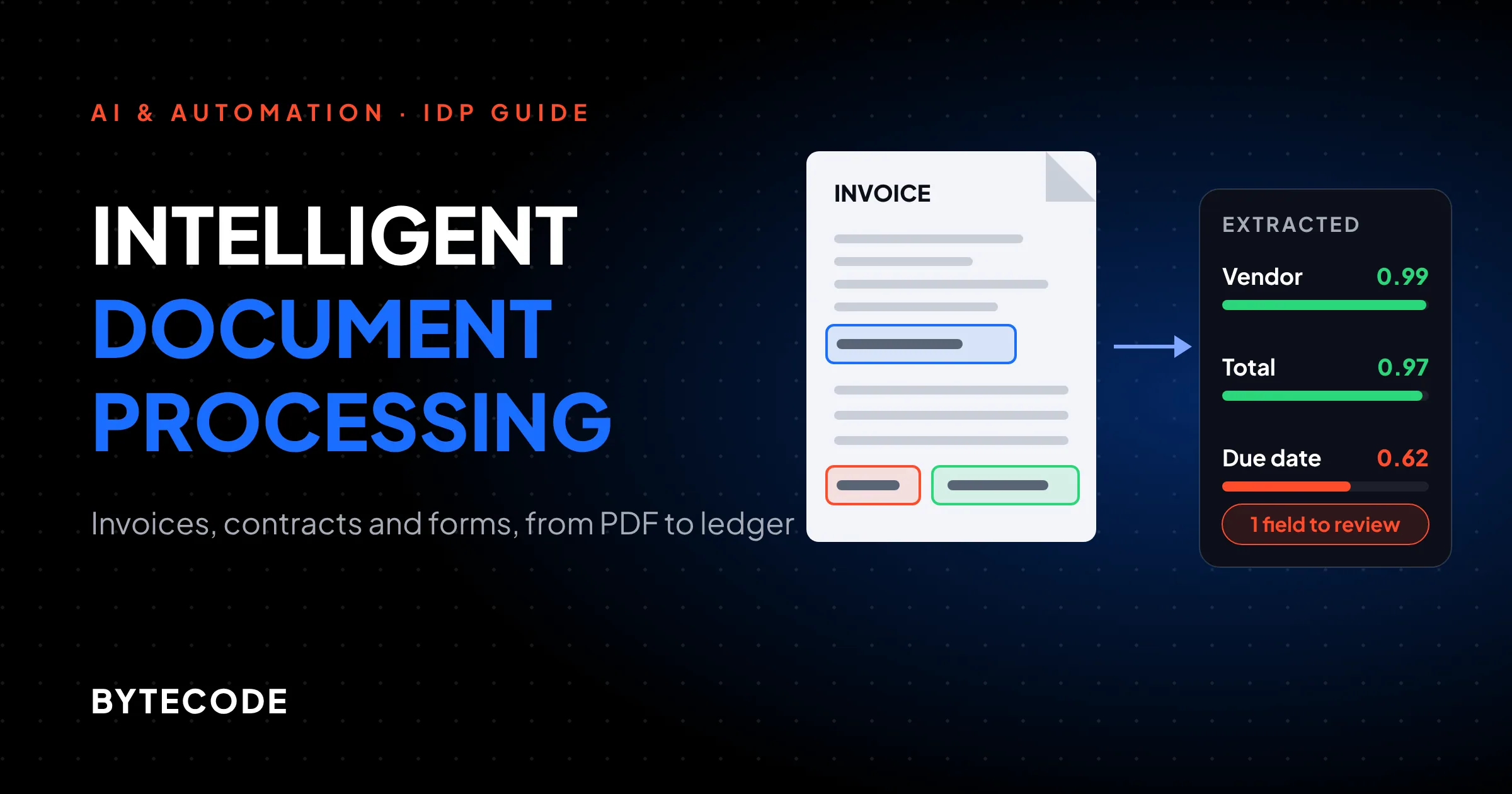
Intelligent document processing turns a PDF, scan or photo into validated, structured data that lands in another system without anyone retyping it. OCR is one step inside it. AWS’s own explainer on what IDP is describes the same broad chain we build: classify the document, extract and validate the data, route it to the ERP or CRM, then learn from mistakes and report on throughput.
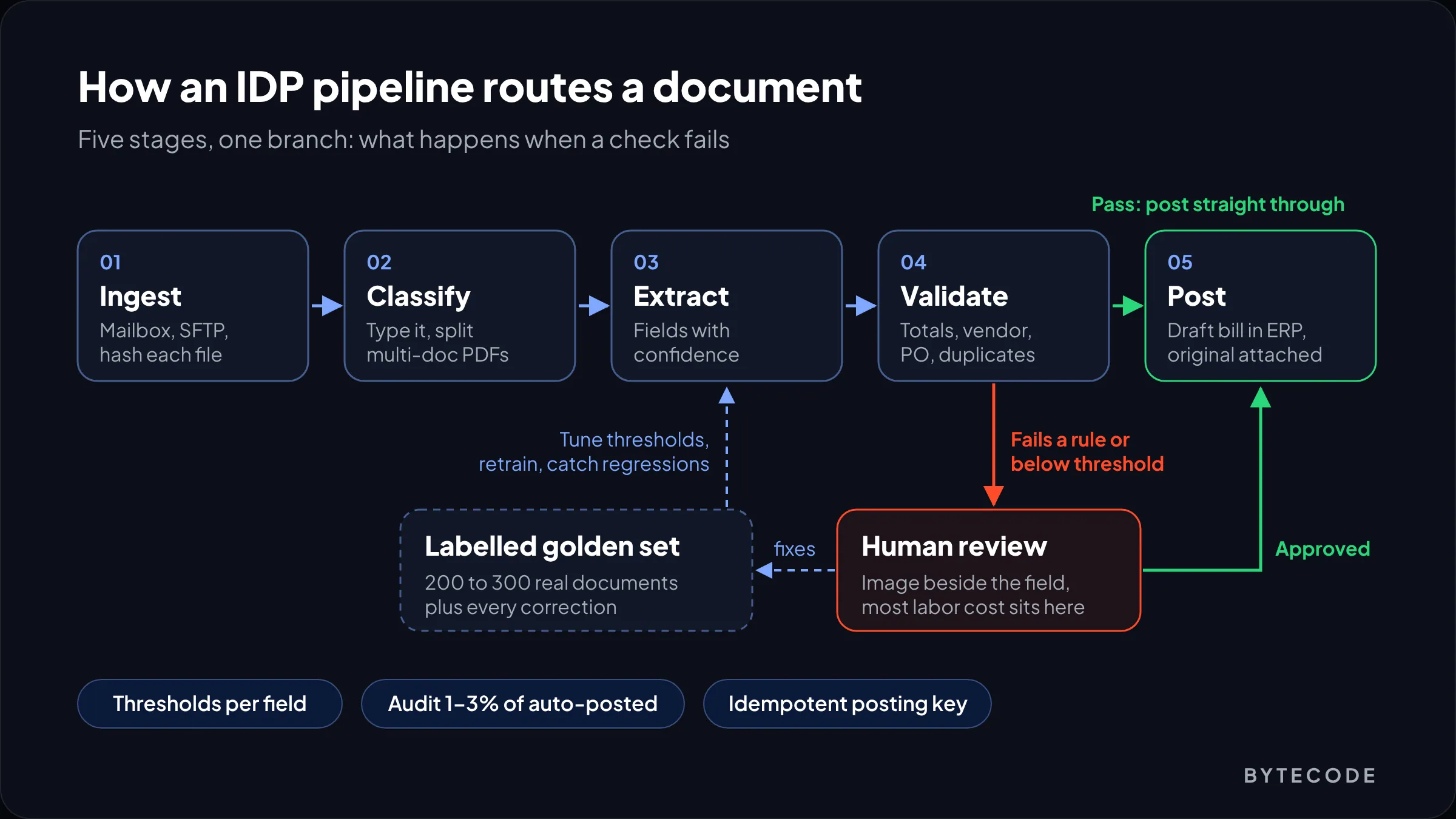
In practice we split a pipeline into six stages, because each one fails in its own way:
- Ingest. A shared mailbox such as
ap@yourcompany.com, an SFTP drop, a scanner folder or an upload form. Hash every file on arrival so you can spot duplicates later. - Classify. Invoice, credit note, statement, contract, delivery note, or “something else.” Split multi-document PDFs here, because suppliers love sending five invoices in one file.
- Extract. Header fields, line items, tables, signatures, with a confidence score per field.
- Validate. Business rules: totals add up, vendor exists, PO matches, invoice number not seen before.
- Review. Anything that fails a rule or falls under a threshold goes to a person, with the source image next to the field.
- Post. Write to the accounting system or ERP, attach the original, log who approved what.
Vendor demos show stage 3. Stages 4 to 6 decide whether your team still trusts the system in month two.
OCR vs IDP vs LLM extraction
OCR gives you text, IDP gives you named fields with rules around them, and LLM extraction gives you fields from documents nobody trained a model for. They are layers, not rivals, and the right build usually uses two of them.
| Plain OCR | Prebuilt IDP models | LLM extraction | |
|---|---|---|---|
| Output | Lines and words with positions | Typed fields (vendor, total, due date, line items) with confidence | Whatever schema you ask for, as JSON |
| Best on | Search, archiving, feeding other models | Invoices, receipts, IDs, tax forms | Contracts, letters, one-off forms, mixed layouts |
| Setup | None | None for prebuilt, labelling for custom | Prompt and schema design, test set |
| Typical list price | About $1.50 per 1,000 pages | About $10 per 1,000 pages | Token based, varies with page density and model |
| Main risk | No structure at all | Weak on unusual layouts | Confident, plausible, wrong values |
Our position: for invoices, start with a prebuilt model and add an LLM only for suppliers it fails on. Prebuilt models return per-field confidence and positions, which your review screen needs. LLMs earn their place on contracts, where the answer depends on reading a paragraph, not finding a box.
The two are converging. Microsoft’s Content Understanding service runs layout extraction, then hands fields to a generative model billed in tokens, per its pricing explainer. Databricks offers the same split, ai_parse_document then ai_extract against your schema, in its IDP documentation. Parse first, then extract. Copy that pattern whichever vendor you pick.
IDP software compared: Azure, Google and AWS prices in 2026
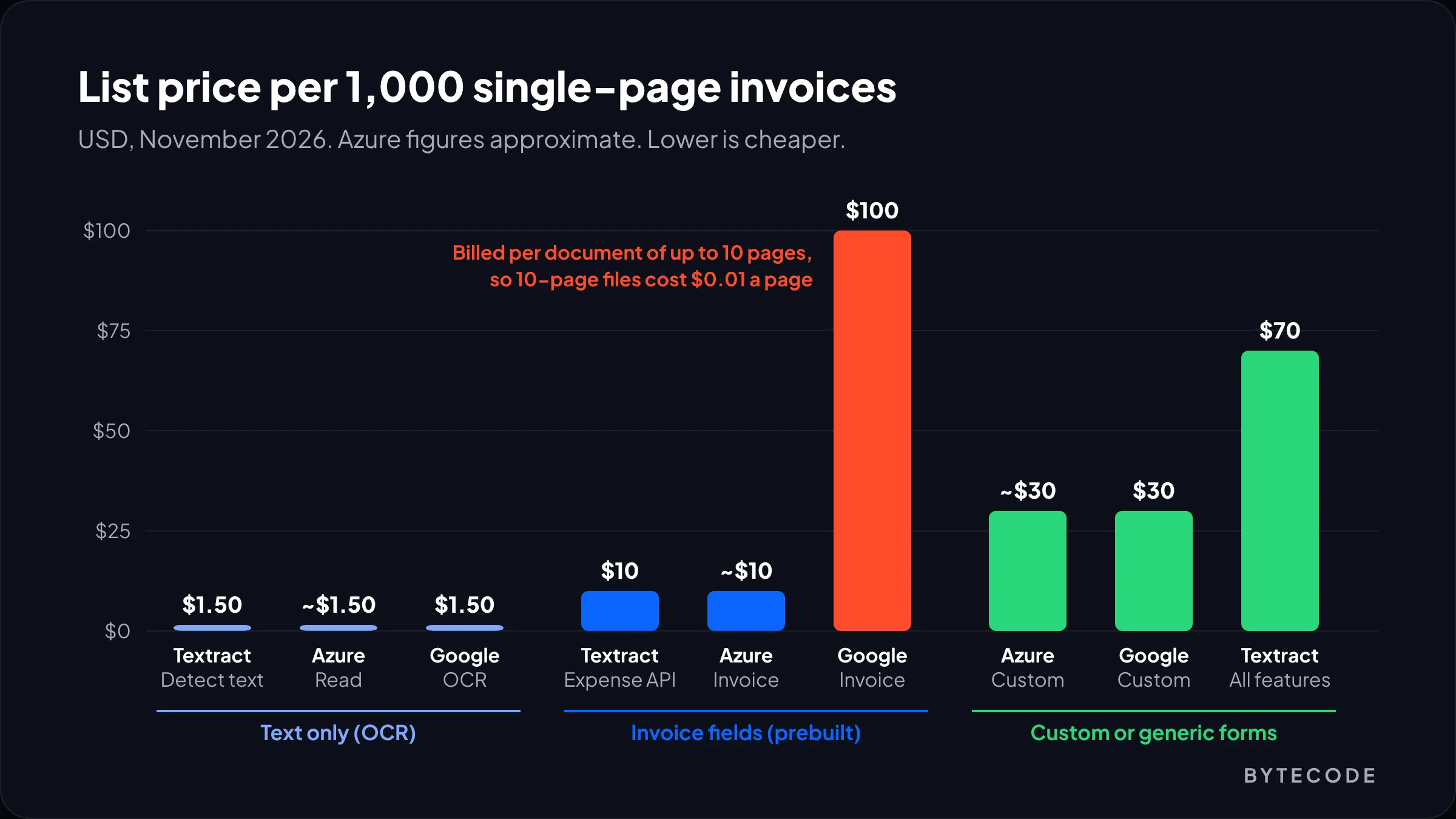
At list price, field extraction from invoices costs about $10 per 1,000 pages on AWS Textract and Azure Document Intelligence, and $0.10 per document on Google Document AI’s invoice parser. Plain OCR costs about $1.50 per 1,000 pages on all three. Here is what each currently charges, from the pages we checked in November 2026.
| Service and model | List price | Notes |
|---|---|---|
| AWS Textract DetectDocumentText (OCR) | $0.0015 per page | $0.0006 after 1M pages a month |
| AWS Textract AnalyzeExpense (invoices, receipts) | $0.01 per page | $0.008 after 1M pages |
| AWS Textract AnalyzeDocument, Forms + Tables + Queries | $0.07 per page | Costly if you switch everything on |
| Azure Document Intelligence Read | About $1.50 per 1,000 pages | Approximate, see below |
| Azure prebuilt models (invoice, receipt, layout) | About $10 per 1,000 pages | Approximate |
| Azure custom extraction | About $30 per 1,000 pages | Training billed separately |
| Google Enterprise Document OCR | $1.50 per 1,000 pages | First 1,000 pages free each cycle |
| Google Form Parser or Custom Extractor | $30 per 1,000 pages | Same price for generative and custom versions |
| Google invoice parser | $0.10 per document (up to 10 pages) | Expense parser priced the same |
The Textract figures are the US West (Oregon) rates on the Amazon Textract pricing page, which also lists a three-month free tier of 100 AnalyzeExpense pages a month. Google’s come from the Document AI pricing page, where a footnote defines one billing count for pretrained processors as up to 10 pages of a single document.
Azure is the awkward one. Its public pricing page loads the numbers per region in the browser, and we could not read them directly. The figures above come from an accepted answer by Microsoft support staff on Microsoft Q&A from December 2025, which itself gives them as approximate. Check the Azure pricing calculator for your region before you commit.
Watch out: Google’s per-document billing flips the usual math. Ten-page contracts cost $0.01 a page. One-page invoices cost $0.10 a page, which comes to $100 per 1,000 invoices against about $10 on Textract or Azure. Model your real page-per-document mix before you choose.
What about specialist IDP platforms?
Dedicated IDP software and AP automation suites sell the whole pipeline, review screen and accounting connectors included. You pay well above raw API cost and skip months of build work. At a few hundred standard invoices a month, buy one. Build on the cloud APIs when volume is high, documents are unusual, or the data must land somewhere the suites do not reach.
Invoice OCR automation that saves real hours
Invoice OCR automation saves time only when the validation rules are good enough that most invoices never need a person. Extraction quality is table stakes. The rules are where you win.
These are the checks we put in front of every posting step:
- Arithmetic. Line items plus tax equal the total, within a cent or two for rounding.
- Vendor match. Name and tax ID resolve to exactly one vendor. Fuzzy matching on names alone causes most mis-postings we see.
- Duplicates. Same vendor, invoice number and amount already posted, or the same file hash already received.
- PO match. Two-way against the purchase order, three-way against goods received if your ERP tracks receipts.
- Bank details. If the remittance account on the invoice differs from the one on file, stop. Always a human, never auto-approved.
- Dates. Not in the future, and the accounting period still open.
In code, this layer is boring on purpose:
def validate(inv, vendor, po=None):
    issues = []
    if abs(sum(l.amount for l in inv.lines) + inv.tax - inv.total) > 0.02:
        issues.append("totals_mismatch")
    if already_posted(vendor.id, inv.number, inv.total):
        issues.append("possible_duplicate")
    if inv.bank_account and inv.bank_account != vendor.bank_account:
        issues.append("bank_details_changed")   # never auto-approve
    if po and abs(inv.total - po.received_value) > po.tolerance:
        issues.append("po_mismatch")
    return issues
Decide on line items deliberately. Many teams only need the header to post a bill against a PO, and line tables are where models make the most small mistakes. Capture lines only for suppliers you code to several GL accounts.
From our team: before writing any extraction code, pull your top 20 suppliers by invoice count. On most AP teams we look at, they make up the large majority of volume. Get those 20 right and the long tail can sit in review for a few months without hurting the business case.
Accuracy and human review loops
Accuracy is whatever you measure on your own documents, so build a labelled test set before you choose a vendor. Then route by per-field confidence and business rules, and keep checking a sample of the invoices that went straight through.
Build a golden set first
Take 200 to 300 real documents across your main suppliers and have someone key the correct values once. That set is how you compare vendors, tune thresholds and catch regressions when a provider ships a new model. Without it, “accuracy” is a feeling.
Thresholds per field, not per document
A document-level score hides the one field that matters. We set strict thresholds on totals, tax, invoice number and bank details, and looser ones on descriptive fields like the delivery address. Start strict and relax a field only when the golden set proves it. Confidence is a model’s opinion of itself, on a different scale per vendor, so calibrate it against your labelled data.
Design the review screen for speed
- Show the page image beside the form, with the value highlighted, and jump the cursor to the flagged field.
- Save every correction as a labelled example. Those corrections are your training data for custom models later.
- Track straight-through rate per supplier weekly. A changed template shows up as a sudden drop.
Audit what skipped review
Check 1 to 3% of auto-posted invoices at random each week. It is the only way to catch a model that is confidently wrong. If audit errors climb, tighten thresholds.
Watch out: never let an LLM “fix” a low-confidence total. It will produce a tidy number that matches nothing on the page. Unreadable values go to a human.
Cost and ROI: a worked example
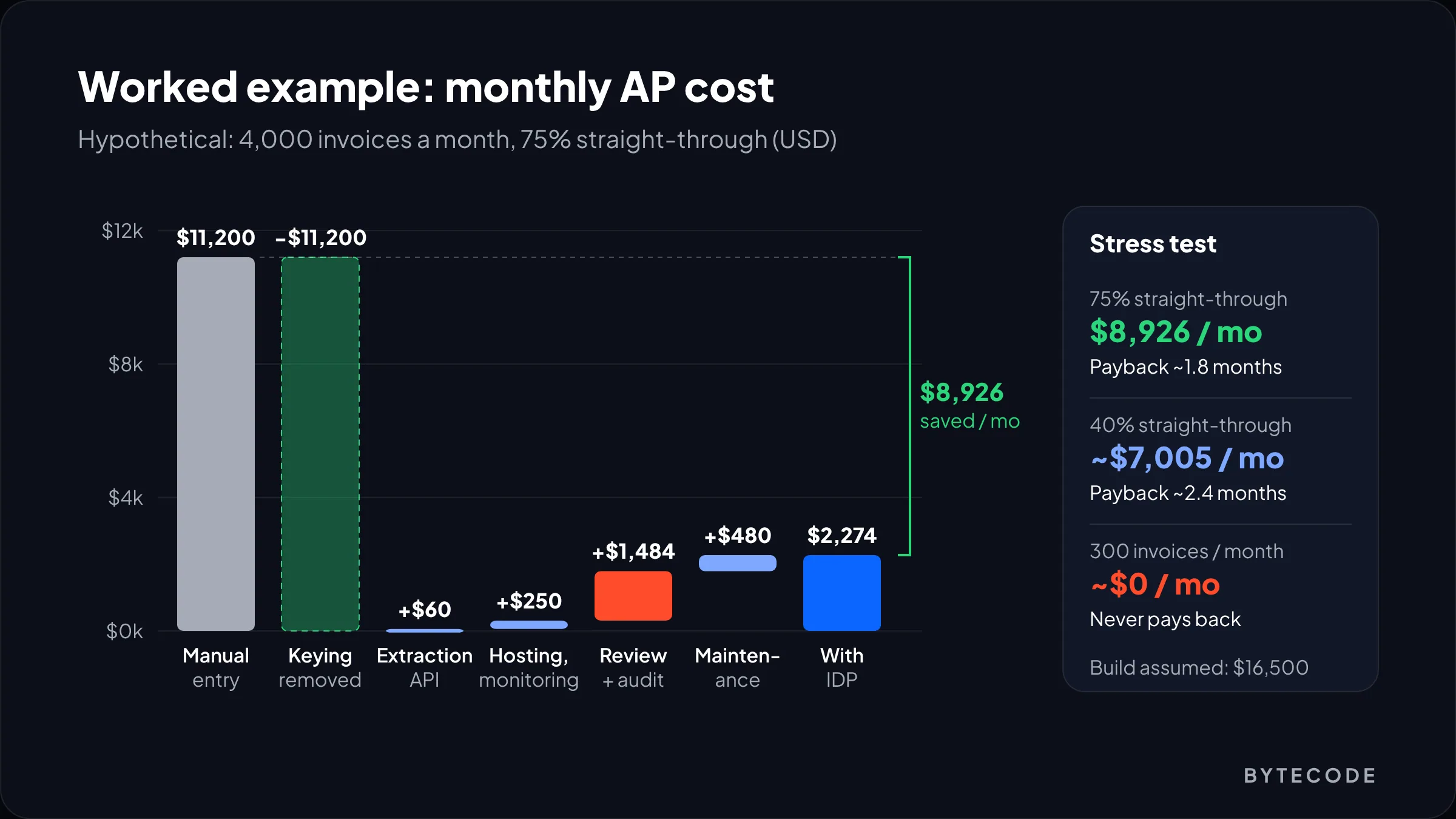
In this hypothetical, a custom IDP pipeline cuts monthly AP processing cost from $11,200 to about $2,300 and pays back its build in about two months. Every input below is an assumption, labelled as one, so swap in your own.
Say a distributor receives 4,000 supplier invoices a month, averaging 1.5 pages (6,000 pages). Keying, checking and coding each one by hand takes 6 minutes, and an AP clerk costs $28 an hour fully loaded. After launch, 75% of invoices pass every check and post without review. Flagged invoices take 3 minutes each, and 2% of auto-posted ones are audited at 3 minutes.
| Monthly line | Basis | Manual today | With IDP |
|---|---|---|---|
| Data entry labor | 4,000 × 6 min at $28/h | $11,200 | |
| Extraction API | 6,000 pages at $0.01 (Textract AnalyzeExpense) | $60 | |
| Hosting, queue, storage, monitoring | Assumed allowance | $250 | |
| Review and audit labor | 1,000 reviews + 60 audits at 3 min, $28/h | $1,484 | |
| Maintenance engineering | 8 h at $60/h | $480 | |
| Total per month | $11,200 | $2,274 |
That frees $8,926 a month. Against an assumed build of 300 hours at a $55 blended rate ($16,500), payback lands just under two months. Google’s invoice parser would make the API line $400, which barely moves the result.
Now stress it. At 40% straight-through, total cost rises to about $4,200 a month and the saving falls to roughly $7,000. Payback still comes inside a quarter.
Then shrink the business. At 300 invoices a month, manual entry costs $840 and the pipeline about $846, mostly fixed hosting and maintenance. No saving, plus a $16,500 build. At that size, use your accounting software’s bill capture or a packaged AP tool. Our guide to AI automation for small business lists better first projects at that size.
One caveat. Freed hours only become cash if you avoid a hire or move people to other work, so present it to your CFO as capacity.
Want this model run on your own document volumes?
Send us a month of invoice counts, a sample of supplier PDFs and your ERP name, and we will return a cost and payback estimate with a vendor recommendation.
AI contract analysis: where LLMs earn their keep
AI contract analysis works well for finding and summarizing clauses (renewal dates, notice periods, liability caps, governing law) across a pile of agreements, and badly as a replacement for a lawyer’s judgment. Treat it as a very fast first read that always shows its sources.
Contracts are long, so parse layout first and send the model sections, not the whole PDF. The schema is about meaning (“Does this auto-renew?”), which suits an LLM far better than a form model. And every answer must cite its page and paragraph so a reviewer can check it in seconds. That last requirement is the same retrieval discipline we describe in our explainer on RAG.
What we would extract on a first pass:
- Parties, effective date, term and renewal mechanics
- Notice period and the address or method for notices
- Liability cap, indemnities and any uncapped carve-outs
- Termination for convenience and change of control
Push renewal dates into a contract register with an owner per agreement. That output alone often justifies the project. Measure token costs on a sample first. Our notes on reducing LLM costs cover caching and model routing for exactly this kind of batch work.
Document automation into your ERP or accounting system
Document automation pays off when extracted data lands in the ledger as a draft the right person approves, with the original attached and no chance of posting twice. The integration layer is usually a third of our build hours.
Post drafts, not final entries
Create bills in whatever draft or unapproved state your system supports, in QuickBooks Online, Xero, NetSuite or Odoo alike. Approval then stays inside the system finance already trusts.
Make every write idempotent
Key each document (file hash, vendor, invoice number) and check the key before writing. One team on Microsoft Q&A traced a bill that looked like $10 per 1,000 pages instead of $1.50 to their own code: a timing-out Kafka consumer re-sending large PDFs, so the same documents were processed several times. The same bug on the posting side creates duplicate payments.
Map before you post
Keep vendor, GL, tax code and cost centre mappings in tables finance can edit, not in code.
Choose the orchestration honestly
At a few hundred documents a day, a workflow tool can drive the whole flow. We compare options in n8n vs Zapier vs Make. Once you need a custom review UI and real retry queues, it is an application, the kind of build our AI software development team does.
Compliance, security and audit trail
Compliance for IDP comes down to where documents are processed, who sees them, how long you keep them, and proof of who changed each value. Settle those before the first invoice runs.
- Data residency. Pick a region your contracts and privacy policy allow, and check that every stage, including LLM calls and logs, stays there.
- Personal data. Redact what you do not need before it reaches an LLM. AWS names Amazon Comprehend for PII redaction in its IDP overview.
- Processor terms. Check retention and training use, and sign a data processing agreement under GDPR or UK GDPR. For health records, confirm the services fall under your business associate agreement.
- Audit trail. Store the original, the raw extraction, each correction with user and timestamp, and the posted values.
- Retention. Keep source files as long as your tax authority requires, then delete on schedule.
- Structured e-invoices. If suppliers send XML e-invoices (UBL or Peppol formats), parse the XML directly. OCR on a PDF copy throws away exact data.
And treat changed bank details as a fraud signal, which is why that rule never auto-approves.
Frequently asked questions
What is the difference between OCR and intelligent document processing?
OCR converts an image of text into machine-readable text, with no idea what the text means. Intelligent document processing uses OCR as one step, then classifies the document, extracts named fields such as vendor and total, validates them against business rules, routes doubtful values to a person and sends clean data to systems like an ERP.
How much does intelligent document processing cost per page?
At list price, plain OCR costs about $1.50 per 1,000 pages on AWS, Azure and Google, and invoice field extraction about $10 per 1,000 pages on AWS Textract and Azure. Google’s invoice parser charges $0.10 per document of up to 10 pages. Review labor, hosting and integration usually cost far more than the API itself.
How accurate is AI invoice extraction?
It depends on your suppliers and scan quality, so measure it yourself. Label 200 to 300 of your own invoices, run each candidate service over them, and compare field by field. Accuracy on totals and invoice numbers matters more than on addresses. Then set per-field confidence thresholds and audit a sample of auto-approved invoices every week.
Can ChatGPT or other LLMs extract data from invoices?
Yes, LLMs can return invoice fields as JSON, and they handle unusual layouts well. For standard invoices, though, prebuilt models are cheaper per page and return confidence scores and field positions that a review screen needs. We use LLMs for contracts and odd documents, and never let them guess a value they cannot read.
What is the best IDP software for invoices?
For high volume, AWS Textract AnalyzeExpense and Azure Document Intelligence’s prebuilt invoice model are both about $10 per 1,000 pages and work well on standard invoices. Google’s invoice parser suits multi-page documents. Under a few hundred invoices a month, a packaged AP tool or your accounting software’s own capture feature usually beats a custom build.
Is AI document processing GDPR compliant?
It can be, but compliance depends on how you set it up, not on the tool. Process documents in a region that matches your obligations, sign a data processing agreement with the provider, redact personal data you do not need, limit access, keep an audit trail of every change, and delete source files on a set retention schedule.
What we’d do first
Count before you build: last quarter’s volumes, pages per document, top 20 suppliers. Under a few hundred invoices a month, stop there and switch on the capture feature your accounting software already has.
If the volume is there, label 200 to 300 real documents and run two vendors over them for a week. Pick on measured accuracy and your page mix. Then spend the build on what nobody demos: validation rules, a fast review screen, idempotent posting. Intelligent document processing succeeds or fails there. The API is the easy decision.
We’ve built for brands like Delsey, EcoFlow and Medcline. If you want a second opinion on an IDP plan or a vendor quote, our AI software services team will scope it with you, starting from your own documents.