On this page
- What a Shopify ERP integration actually has to do
- What syncs, and in which direction
- Source-of-truth rules: settle these before you buy anything
- Connector vs iPaaS vs custom: three ways to do ERP ecommerce integration
- NetSuite, SAP and Odoo: what each one needs
- Sync frequency: how fresh does each record need to be?
- Failure handling: what breaks and how to catch it
- What a Shopify ERP integration costs: a worked example
- Frequently asked questions
- What we’d do first
The first sign is usually small. A customer orders the last two units of a bestseller, the warehouse has already sold them to a wholesale account, and nobody finds out until the pick ticket comes back short. Then finance notices that Shopify shows one refund total for the month and the ERP shows another, and nobody can explain the gap.
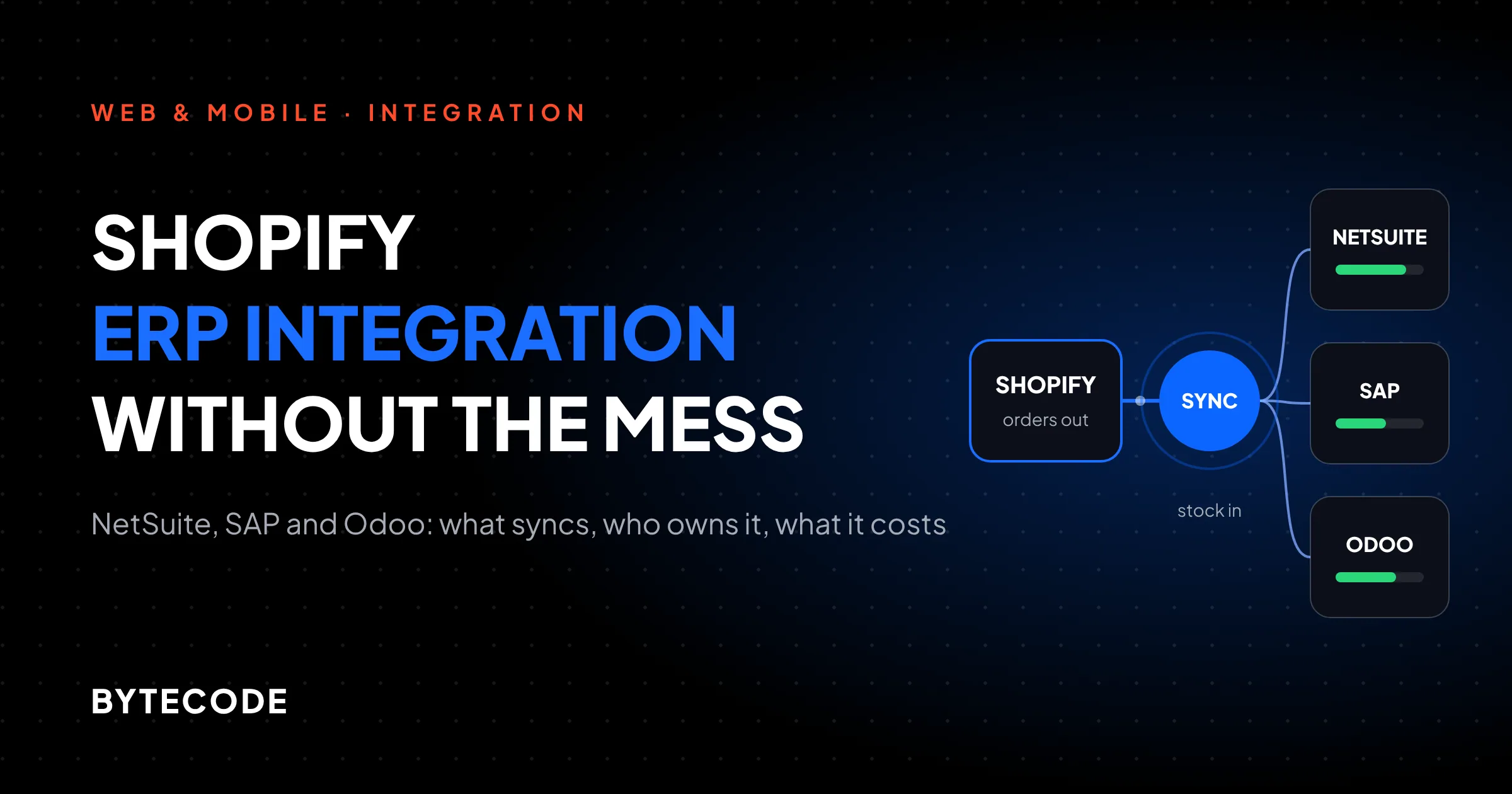
A Shopify ERP integration exists to stop exactly that. Done properly, it moves orders, inventory, products, customers, fulfillments and refunds between Shopify and NetSuite, SAP, Odoo or Business Central on rules everyone agreed in advance. Done badly, it moves the same records twice, overwrites good data with stale data and fails quietly. Below is what we actually configure on these projects: field ownership, sync timing, connector choice, failure handling and a year-one cost model.
Key takeaways
- Write a source-of-truth rule for every data type before you pick a tool. Most “sync bugs” we get called in to fix are really ownership disputes between two systems.
- Inventory and order import need near real-time sync. Product content, customer records and payouts usually don’t, and syncing them every minute just burns API calls.
- For a standard Shopify and NetSuite setup, Oracle’s NetSuite Connector is listed from $199.92 a month. Celigo’s packaged NetSuite integration starts at $7,800 a year. Custom middleware costs far more up front and roughly the same to run.
- Shopify retries a failed webhook 8 times over 4 hours and then gives up. An integration that relies on webhooks alone will lose data during a long outage, so plan a reconciliation job from day one.
- Pick the boring option that covers 90% of your flows. Build custom only for what the connector genuinely can’t express.
What a Shopify ERP integration actually has to do
A Shopify ERP integration has one job: keep both systems agreeing about stock, orders and money, closely enough that nobody fixes things by hand. Shopify is where customers buy; the ERP is where the books, purchasing and fulfillment planning live.
Shopify’s own ERP integration page describes four ways to wire this up: native vendor connectors, iPaaS platforms, custom builds, and older ESB or ETL tooling. Its Global ERP Program lists five certified partners: Microsoft Dynamics 365 Business Central, Oracle NetSuite, Infor, Acumatica and Brightpearl by Sage. SAP is not on that list, which matters later.
Every approach uses the same two mechanisms: the Admin API to read and write records, and webhooks such as orders/create and inventory_levels/update to push events. A connector is mostly a set of opinions about using those two. When the opinions match your business, connectors are cheap and dull. That’s what you want.
What syncs, and in which direction
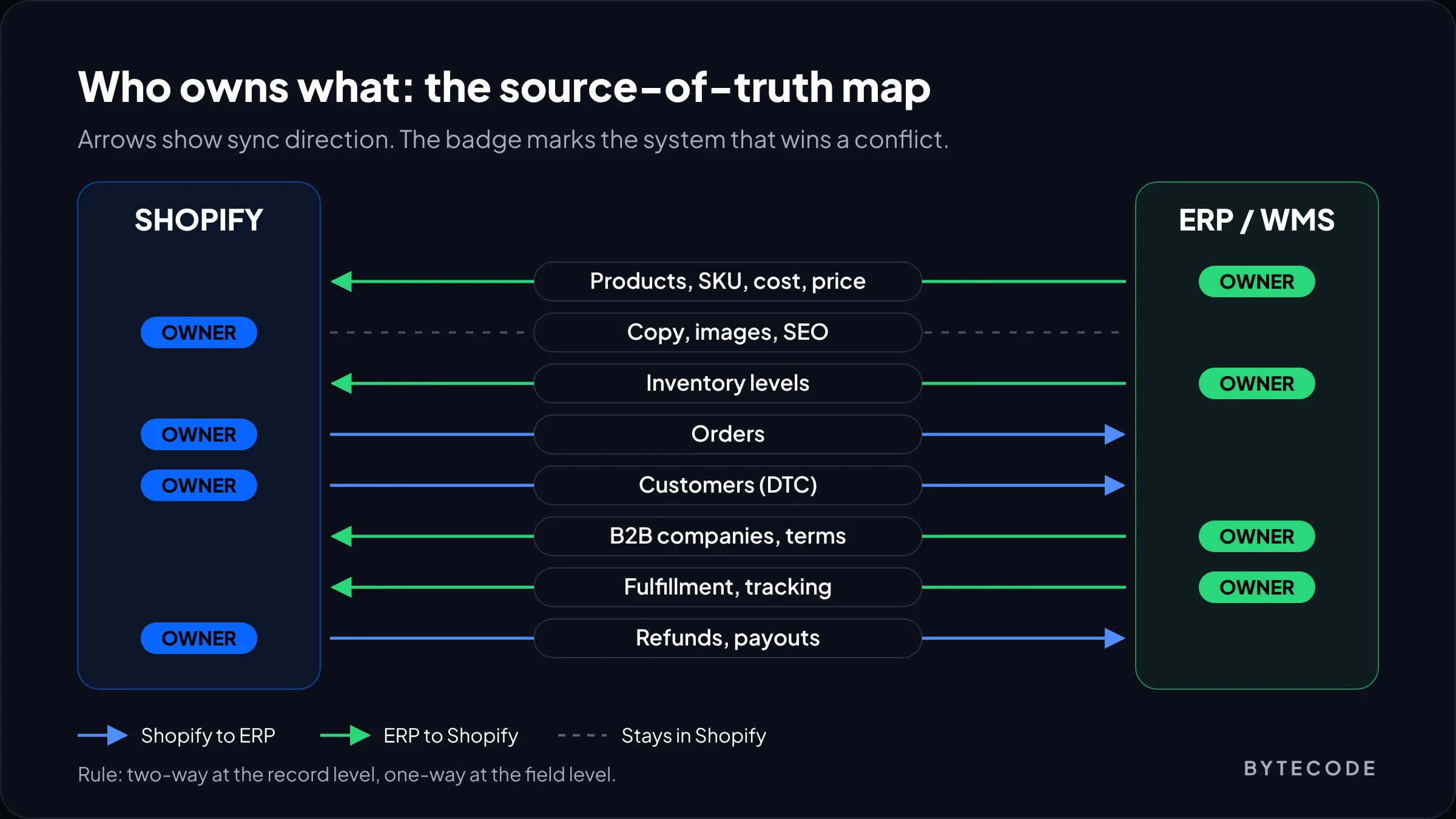
Six record types carry almost every integration: products, inventory, orders, customers, fulfillments and refunds. Payouts are a quiet seventh that finance cares about. This is our starting default for direct-to-consumer stores.
| Record | Usual direction | Who owns it | How fresh it needs to be |
|---|---|---|---|
| Products, SKUs, cost, base price | ERP to Shopify | ERP for SKU, cost and price. Shopify for copy and images | Hourly or on change |
| Inventory levels | ERP (or WMS) to Shopify | ERP | Minutes. Real-time for low-stock SKUs |
| Orders | Shopify to ERP | Shopify until the ERP accepts it | Minutes |
| Customers (DTC) | Shopify to ERP | Shopify | With the order |
| B2B companies, terms, price lists | ERP to Shopify | ERP | Daily or on change |
| Fulfillments and tracking | ERP or 3PL to Shopify | Whoever ships | Within the hour |
| Refunds and returns | Shopify to ERP | Shopify moves the money, ERP books the credit memo | Same day |
| Payouts and fees | Shopify to ERP | Shopify | Daily |
Two rows cause most of the trouble. Refunds, because they arrive days after the order, often partial, sometimes as an exchange. And B2B, because company records, payment terms and price lists live in the ERP and have to land in Shopify’s B2B objects in a shape Shopify accepts. If wholesale is in your plan, read our guide to Shopify B2B store development before you map anything.
Source-of-truth rules: settle these before you buy anything
Every field needs exactly one owner, and the other system must never overwrite it. Obvious on paper. It usually breaks in week two, when a merchandiser fixes a price in Shopify admin and the next product sync from the ERP quietly puts the old price back.
We write the rules as a one-page table and get ops, finance and ecommerce to sign it. The ones we reach for most:
- The ERP owns anything with a cost attached. SKU codes, unit cost, base price, tax class, weight and stock. Shopify displays them and never edits them.
- Shopify owns anything a shopper reads. Titles, descriptions, images, SEO fields and most metafields. ERP text fields will mangle your product copy. Our metafields guide covers how to structure the fields that stay on the Shopify side.
- Orders are immutable once accepted. After the ERP creates a sales order, edits in Shopify become flagged exceptions, not silent updates.
- The SKU is the join key. Not the title, not the Shopify ID. If your SKUs aren’t unique and stable, fix that first. No connector will.
Microsoft’s connector shows the immutable-order rule in action. Its order sync documentation says that when an order changes in Shopify after Business Central has processed it, the connector flags a conflict instead of pushing the change through. That’s the right default for any ERP, and we build it into custom work too.
Watch out: “two-way product sync” is a sales phrase, not a design. If both systems can edit the same field, the last write wins, and the last write is usually a scheduled job running on stale data. Make sync two-way at the record level and one-way at the field level.
Connector vs iPaaS vs custom: three ways to do ERP ecommerce integration
Use a vendor connector if your flows look like everyone else’s. Use an iPaaS if you need to bend the flows or add more systems. Write custom code only for the parts neither can express. Most ERP ecommerce integration projects we see would have been fine with the first option, and a fair number were sold the third.
| Vendor connector | iPaaS (Celigo and similar) | Custom middleware | |
|---|---|---|---|
| Examples | Oracle NetSuite Connector, Business Central’s Shopify connector, Odoo app store modules | Celigo, Boomi, MuleSoft, Patchworks | A small service on your own cloud reading webhooks and calling both APIs |
| Field mapping | Fixed, some custom fields | Configurable, with scripting hooks | Anything you can code |
| Error handling | Vendor’s dashboard and logs | Retry queues and an error dashboard | Whatever you build and remember to monitor |
| Who fixes it at 2am | The vendor, eventually | Your partner, with good tooling | Whoever wrote it, if they still work for you |
| Best fit | One store, one ERP, standard DTC flows | Several stores, channels or warehouses | Odd legacy ERPs or one genuinely unusual flow |
Custom middleware is right when your ERP has no maintained connector, or when one flow (say, a made-to-order bundle that explodes into twelve component lines) can’t be modelled anywhere else. It’s wrong when the reason is “we want control.” You’ll get control. You’ll also get on-call duty.
NetSuite, SAP and Odoo: what each one needs
The ERP you run shapes the plan more than the tool does. NetSuite has two mature packaged options, SAP depends on which SAP you mean, and Odoo modules vary wildly.
NetSuite Shopify integration
For a NetSuite Shopify integration, start with Oracle’s own connector and move to Celigo only if you outgrow it. The NetSuite ERP Connector listing shows four tiers: B2C Standard at $199.92 a month, POS and B2C Premium at $249.92, and B2B at $916.58. Orders, price and quantity sync, full product sync and coupons are in every tier. B2B customer sync appears only on the B2B tier, so price that in if you sell wholesale.
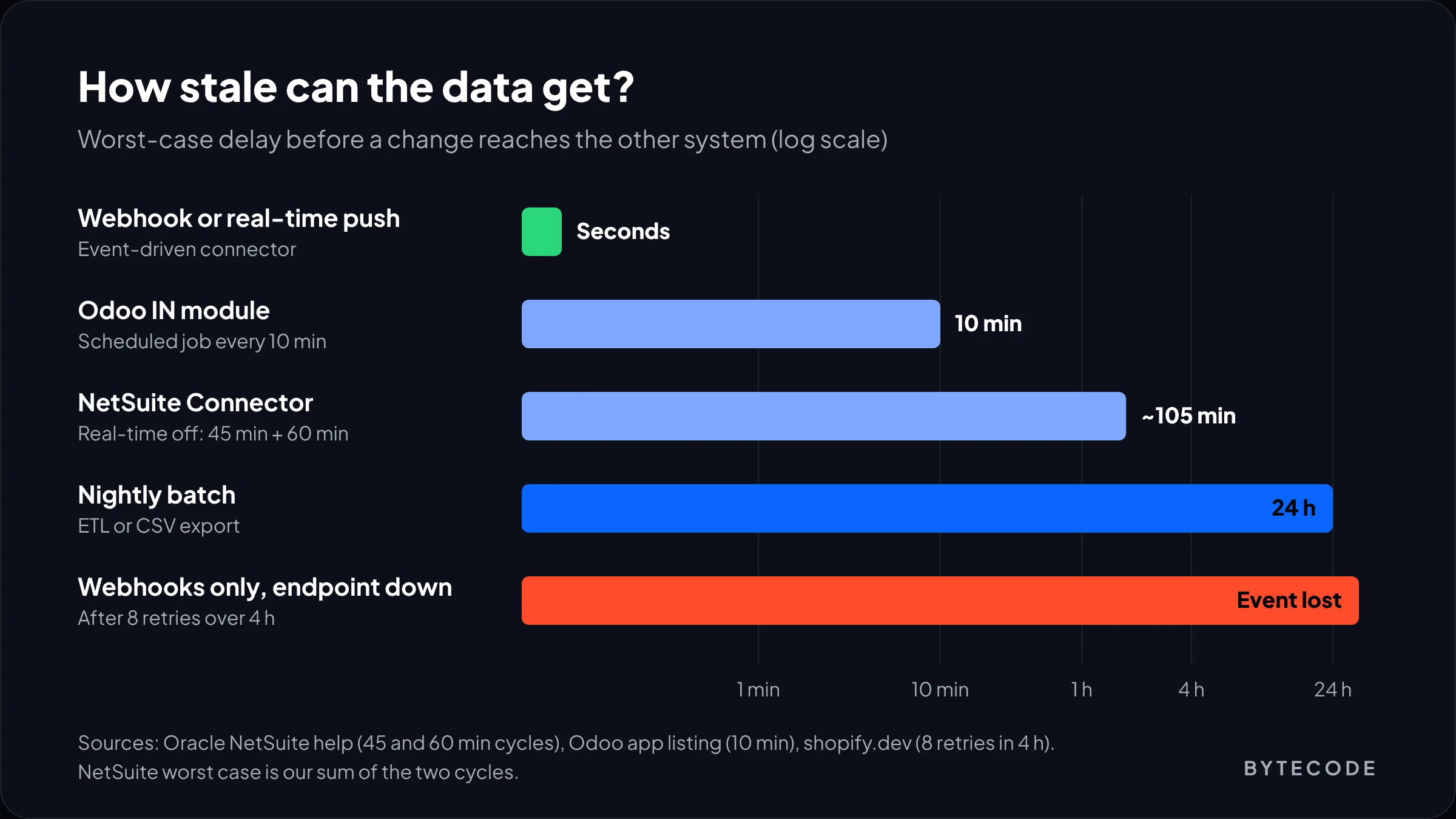
The connector still runs on what used to be FarApp, and you’ll see that name in the settings. Real-time price and quantity sync is on by default; you switch it off in NetSuite under Setup > Company > General Preferences > Custom Preferences, in the FarApp group. Oracle’s help page on that preference says that with real-time off, item changes are picked up on a cycle that typically runs every 45 minutes, and a separate push to the storefront runs every 60 minutes by default. Leave real-time on unless you have a specific reason not to.
Celigo is the step up. Its App Store listing shows a Starting package at $7,800 a year with 2 endpoints and 10 integration flows, and a Standard edition at $18,900 a year with 3 endpoints, 20 flows and 24/7 support. Count your flows before choosing. Orders, fulfillments, inventory, products, customers, refunds, cancellations and payouts make eight, which fits the Starting package. Add a 3PL as a third endpoint and you’re on Standard.
SAP Shopify integration
SAP Shopify integration splits in two. For SAP Business One there are packaged apps: eShopSync’s SAP Business One Integration lists a Standard plan at $99 a month or $1,070 a year, syncing B1 items to Shopify products and item groups to categories. It has two reviews, so pilot it with your own order types before trusting it with live volume.
S/4HANA and older ECC systems we treat as iPaaS or custom projects from day one. With SAP outside Shopify’s Global ERP Program there’s no certified one-click app, and large SAP shops usually have middleware they’ll want you to use anyway. The hard part is rarely the Shopify side. It’s getting a test client, a change window and one named owner for the sales order interface.
Odoo Shopify connector
Choosing an Odoo Shopify connector mostly means reading module pages carefully. As one example, the eCommerce Shopify module by Odoo IN for Odoo 19 is listed at $198.63 and says plainly that it uses no webhooks. Orders and fulfillments sync on a 10-minute scheduled job. Products come across from Shopify only on demand, each variant becomes a standalone product, and metafields aren’t mapped. Refunds arrive as credit notes linked to the original invoice.
Fine for simple variants, poor for a fashion brand with 40 size and colour combinations per style. The listing also notes that stores created on or after 1 January 2026 must connect through OAuth rather than a custom-app token, which ties into the changes in our explainer on expiring offline access tokens. Ask every connector vendor how they handle that.
From our team: before buying any connector, export 200 real orders covering discounts, gift cards, partial refunds, exchanges and split shipments, and run them through the vendor’s trial. A demo store with tidy orders tells you nothing. Your strangest orders are where the support hours go.
Sync frequency: how fresh does each record need to be?
Inventory and orders need minutes or less. Almost everything else can wait an hour or a day. We often find every flow set to the fastest schedule “to be safe,” so product updates fight order imports for API capacity during a sale.
Ask what the worst gap is that you can live with. For stock, that depends on how fast a SKU sells against the buffer you hold. A hero product selling 30 units an hour can’t sit on a sync that might be 105 minutes stale (our worst case from adding the 45-minute check and the 60-minute push above). A slow-moving accessory can.
Our rules of thumb:
- Orders: event-driven, from the
orders/createwebhook or the connector’s real-time option, with a 15-minute sweep to catch anything missed. - Inventory: on change from the ERP, plus a full reconcile nightly. Hold a safety buffer on fast sellers instead of chasing instant sync.
- Fulfillments: every 15 to 30 minutes. Late tracking emails get noticed.
- Products and prices: on change, or hourly. Big catalog loads go through Shopify’s bulk operations, never a loop of single calls.
- Payouts: once a day, after Shopify settles.
Not sure which flows your connector actually covers?
Send us your ERP, order volume and your trickiest order types, and we’ll map the gaps before you sign anything.
Book an integration review
Failure handling: what breaks and how to catch it
Every Shopify ERP integration fails sometimes. The good ones make a failure visible within minutes and fixable without a developer. That needs retries that can’t create duplicates, a place where failed records wait, and a reconciliation job that trusts none of it.
Know the platform limits. Shopify’s webhook troubleshooting docs say your endpoint must respond within five seconds, failed deliveries are retried up to eight times over four hours with growing gaps, and if failures persist the subscription is removed. A deploy that breaks the endpoint over a weekend means events you will never receive. Shopify’s advice is to backfill the gap from the API afterwards.
What we put in place on every build:
- Acknowledge, then process. Return 200 straight away, queue the payload and process it from there. Slow ERP calls inside the webhook handler are the usual cause of timeouts.
- Idempotency on the Shopify order ID. Webhooks can arrive twice. The ERP should refuse a second sales order for an order ID it already has.
- A dead-letter queue with a human owner. Records that fail mapping (an unknown SKU, a missing tax code) go to a list someone in ops checks every morning. Not a shared inbox. A named person.
- A nightly count check. Orders, refunds and units shipped per day in Shopify against the ERP. If the numbers differ, alert. On the integrations we support, this is the check that catches problems first.
- Subscription health checks. A daily job confirms the expected webhook subscriptions still exist and recreates any Shopify removed.
Read your connector’s failure states before go-live. Business Central, for instance, marks a failed shipment sync with a Fulfillment ID of -1 and retries only when someone resets it to 0, per the Microsoft page above. Every connector has quirks like that. Get the list in writing and decide who handles each case by hand.
Watch out: an error dashboard nobody opens is the same as no error handling. Route failures to the team that can fix the data (usually ops or finance), with the order number and the reason in the alert itself.
What a Shopify ERP integration costs: a worked example
For one store on a mainstream ERP, expect year one somewhere between roughly $10,000 with a well-fitting connector and $40,000 or more with custom middleware, once implementation and support hours are counted. Hours, not licences, drive the total.
A clearly hypothetical example: say you run a homeware brand on NetSuite doing about 3,000 Shopify orders a month from two warehouses, with 900 SKUs and no B2B. We price three approaches at a blended partner rate of $90 an hour. Licence prices come from the listings above; the hours are our planning estimates, not quotes.
| Line item | NetSuite Connector (B2C Standard) | Celigo (Starting package) | Custom middleware |
|---|---|---|---|
| Licence or hosting, year one | $199.92 × 12 = $2,399 | $7,800 | $150/mo hosting and monitoring = $1,800 |
| Setup, mapping and testing | 60 h = $5,400 | 100 h = $9,000 | 320 h = $28,800 |
| Support and fixes | 4 h/mo = $4,320 | 5 h/mo = $5,400 | 10 h/mo = $10,800 |
| Year one | $12,119 | $22,200 | $41,400 |
| Year two onward | $6,719 | $13,200 | $12,600 |
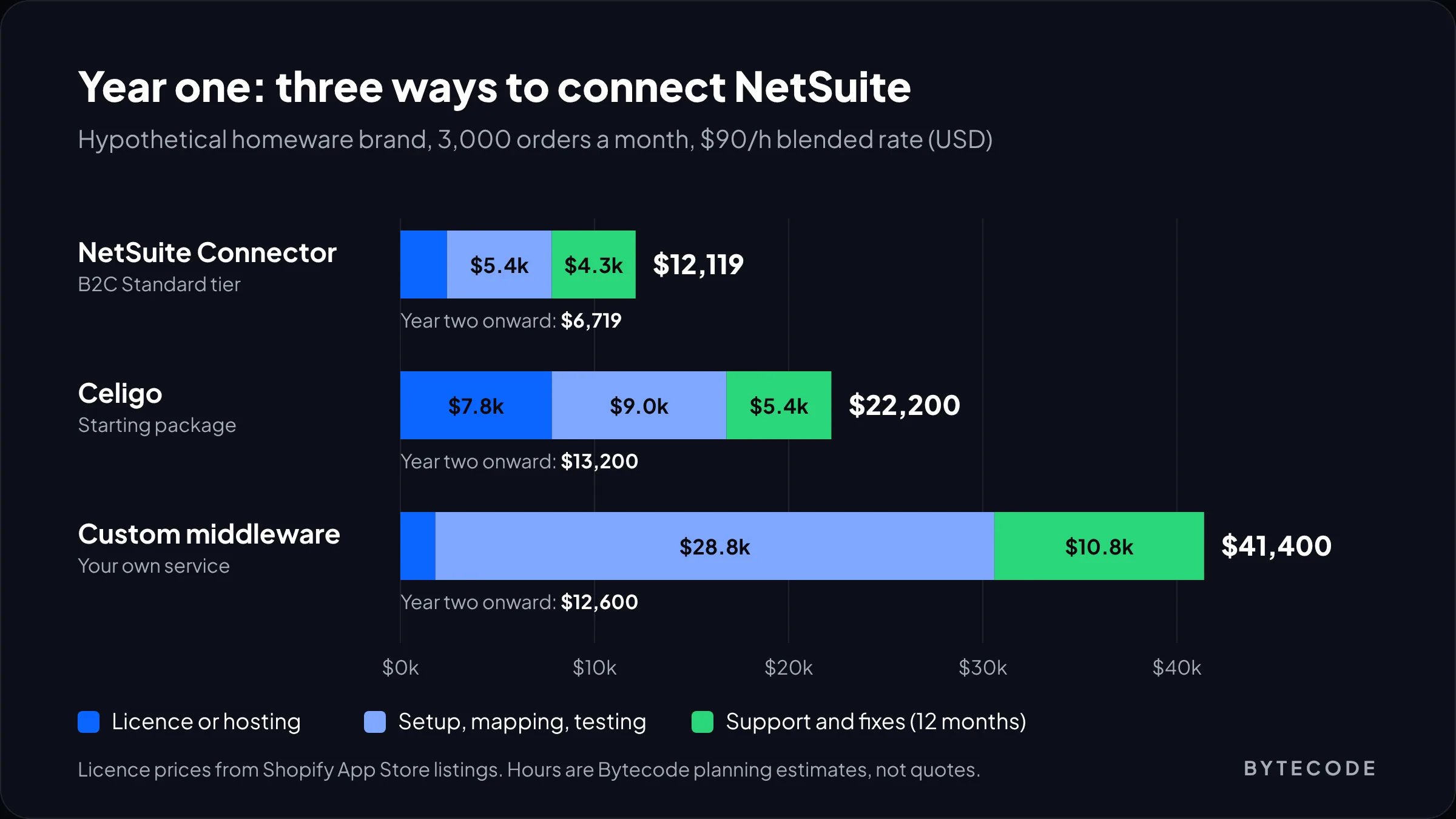
Note the year-two row. Custom middleware is barely cheaper to run than Celigo, because the licence saving goes into support hours, so the case for custom is fit, not savings. And the connector stays cheap only while your flows fit its model. Spend 30 hours a quarter on workarounds and Celigo looks cheap.
ERP licensing, 3PL connectors and pre-launch data cleanup sit outside this table. Cleanup is the line people forget: duplicate SKUs, inactive items with stock, customers with three “primary” addresses. If you want this model run on your own numbers, our enterprise integration team does that as the first step of a project.
Frequently asked questions
Does Shopify integrate with ERP systems?
Yes. Shopify connects to ERPs through vendor apps, iPaaS platforms or custom code built on its Admin API and webhooks. Its Global ERP Program lists certified apps for Microsoft Dynamics 365 Business Central, Oracle NetSuite, Infor, Acumatica and Brightpearl by Sage. Other ERPs, including SAP and Odoo, connect through third-party apps, middleware or custom builds.
How much does a Shopify ERP integration cost?
Licence fees range from about $99 a month for a small SAP Business One app to $7,800 or more a year for Celigo’s NetSuite package. Implementation hours usually cost more than the licence. In our hypothetical worked example, year one ran from about $12,000 with a vendor connector to over $41,000 for custom middleware.
What is the best way to connect Shopify to NetSuite?
For most single-store direct-to-consumer brands, Oracle’s NetSuite Connector is the best starting point, because it covers orders, fulfillment, inventory and products from $199.92 a month. Move to Celigo when you need custom mappings, several stores or extra systems such as a 3PL, since its flows and error tooling are far more configurable.
How often should Shopify sync with an ERP?
Orders and inventory should sync within minutes, ideally triggered by events with a scheduled sweep as backup. Fulfillments can run every 15 to 30 minutes, products and prices hourly or on change, and payouts once a day. Syncing everything every minute wastes API capacity and can slow order imports during busy periods.
Should Shopify or the ERP be the source of truth for inventory?
The ERP or warehouse system should own inventory, because it sees purchase orders, wholesale demand and stock in transit that Shopify never sees. Shopify reduces stock as it sells between syncs, then the ERP’s figure replaces it. Hold a small safety buffer on fast-selling SKUs to cover the gap.
Is there an Odoo Shopify connector?
Yes, several, all on the Odoo app store and of very different quality. One Odoo 19 module from Odoo IN is listed at $198.63 and syncs orders and fulfillments every 10 minutes on a scheduled job, without webhooks. Check how each module handles variants, refunds and Shopify’s OAuth requirement for newer stores before buying.
What we’d do first
Don’t start with a vendor demo. Start with a spreadsheet: one row per field, then columns for owner, direction and how stale it may get. Get ops and finance to agree on it. That page settles about half the tool decision by itself.
Then run your 200 messiest real orders through the cheapest option that might fit, usually the ERP vendor’s own connector. If it handles nearly all of them, buy it. If not, you have the evidence to justify an iPaaS. Either way, build the nightly count check before go-live. Six months from now, it’s the thing that tells you everything above still works.
We’ve built for brands like Delsey, EcoFlow and Medcline. If you want a Shopify ERP integration that finance will actually trust, look at our enterprise solutions and tell us what you’re connecting.