On this page
- How Shopify apps add code to your storefront
- The March 2027 script tag cutoff
- How to find the Shopify apps slowing store pages
- Leftover app code after you uninstall
- Remove Shopify apps or consolidate them?
- Worked example: a Shopify app audit on a hypothetical store
- Shopify app audit checklist
- Frequently asked questions
- What we’d do first
Most slow Shopify stores we audit did not get slow on one day. They got slow one install at a time: a reviews widget in March, a currency switcher before a trade show, a quiz app someone trialled and forgot. Two years later nobody can say which scripts still earn their keep.
Finding the Shopify apps slowing store pages is not guesswork, though. Every app reaches your storefront through one of four routes, each route leaves a fingerprint you can measure, and on March 1, 2027 Shopify shuts one of them off for good. Below is the audit we run, with a worked example and a checklist you can use this week.
Key takeaways
- Apps reach the storefront four ways: app embed blocks, app blocks, legacy script tags and code pasted into theme files. Only the first two are visible in the theme editor and removed cleanly on uninstall.
- Shopify stopped accepting new or updated storefront script tags on October 1, 2026, and stops injecting existing ones on March 1, 2027. Apps still using them will stop working.
- Measure before you remove anything. Field data shows whether there is a problem. Request blocking shows which app causes it.
- Uninstalling does not always remove an app’s code. Anything written into theme files stays until someone deletes it.
- Judge each app on speed cost against what it earns. Some heavy apps stay.
How Shopify apps add code to your storefront
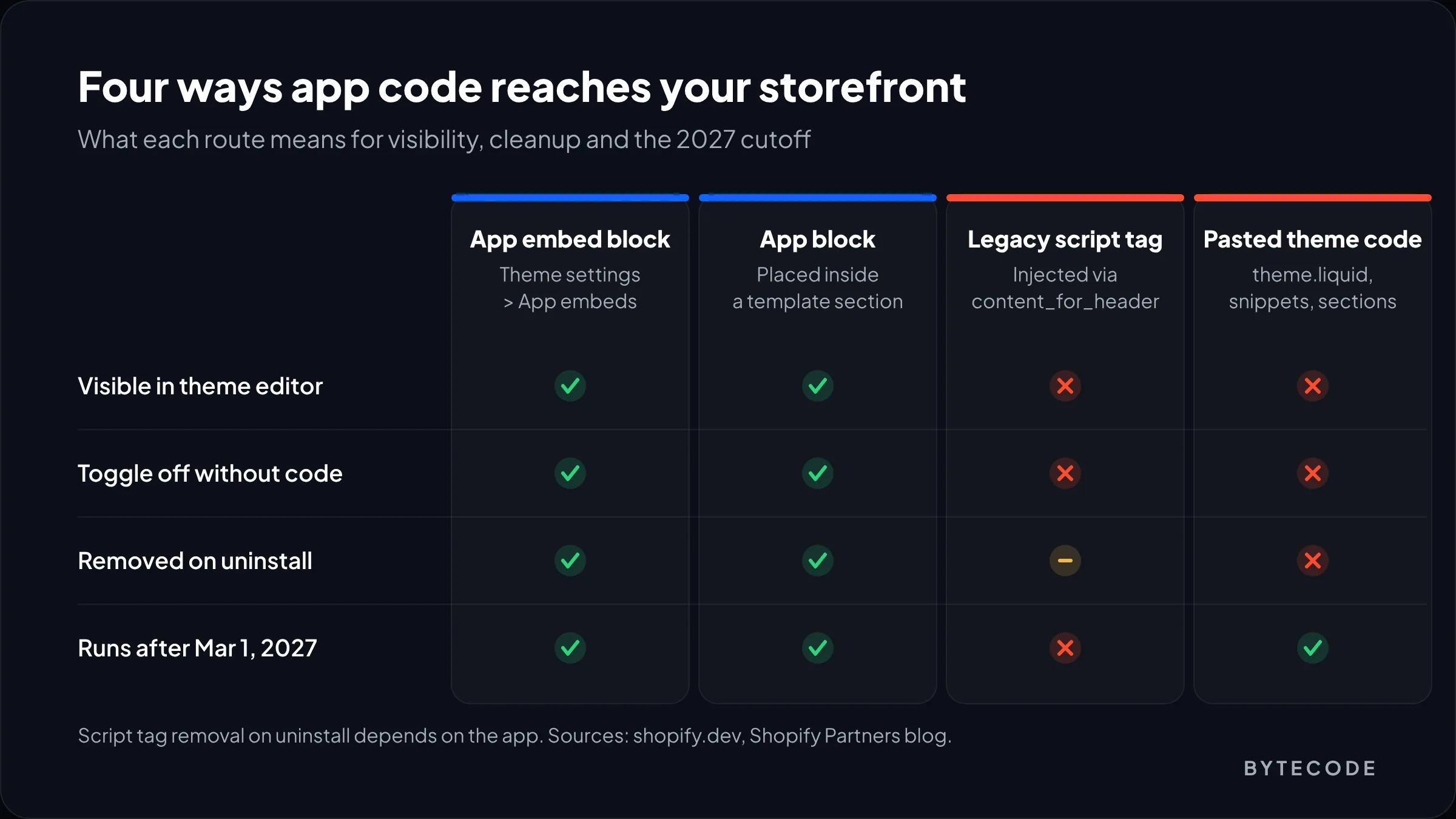
An app can only slow your storefront if it puts code there, and there are four ways that happens. The route tells you where to switch an app off and whether uninstalling cleans it up.
App embed blocks
The current standard for scripts with no fixed place on the page, like chat bubbles and pop-ups. Shopify injects them just before the closing </head> or </body> tag. According to Shopify’s theme app extension configuration docs, embeds are off by default after installation and the merchant switches them on in the theme editor under Theme settings > App embeds. The same docs suggest app developers keep compressed JavaScript referenced by a block to 10 KB and CSS to 100 KB. Those are suggestions, not enforced limits. Plenty of apps ship far more.
App blocks
App blocks are the visible version, like a review stars row or a size chart button. You drag them into a section on a specific template, and they load only where you place them.
Legacy script tags
Before theme app extensions existed, apps called the ScriptTag API and Shopify injected their JavaScript into every storefront page through content_for_header. You never see these in the theme editor. To spot them, view the page source and find the asyncLoad function: each URL in its array is a script tag some app registered.
Code pasted into theme files
The messiest route. Older install guides asked merchants to paste a snippet into theme.liquid, and some apps edited theme files directly. That code is now part of your theme. Shopify’s own Partners blog said it plainly back in 2022: without theme app extensions, when an app is uninstalled, “the code that was added isn’t removed” (Shopify Partners blog).
| Route | Visible in theme editor? | Can you toggle it off? | Removed on uninstall? | Works after March 1, 2027? |
|---|---|---|---|---|
| App embed block | Yes, under App embeds | Yes, per theme | Yes | Yes |
| App block | Yes, inside sections | Yes, remove or hide the block | Yes | Yes |
| Legacy script tag | No | Only by uninstalling or asking the vendor | Depends on the app | No, Shopify stops injecting them |
| Code in theme files | No (code editor only) | Only by editing code | No | Yes, until someone deletes it |
Shopify’s Built for Shopify requirements back this up from the vendor side. Apps with that badge must use theme app extensions for storefront code, must not edit your theme files, and must not drop the storefront Lighthouse performance score by more than ten points. Useful filter, not a guarantee: ten points per app adds up fast across a dozen apps.
The March 2027 script tag cutoff
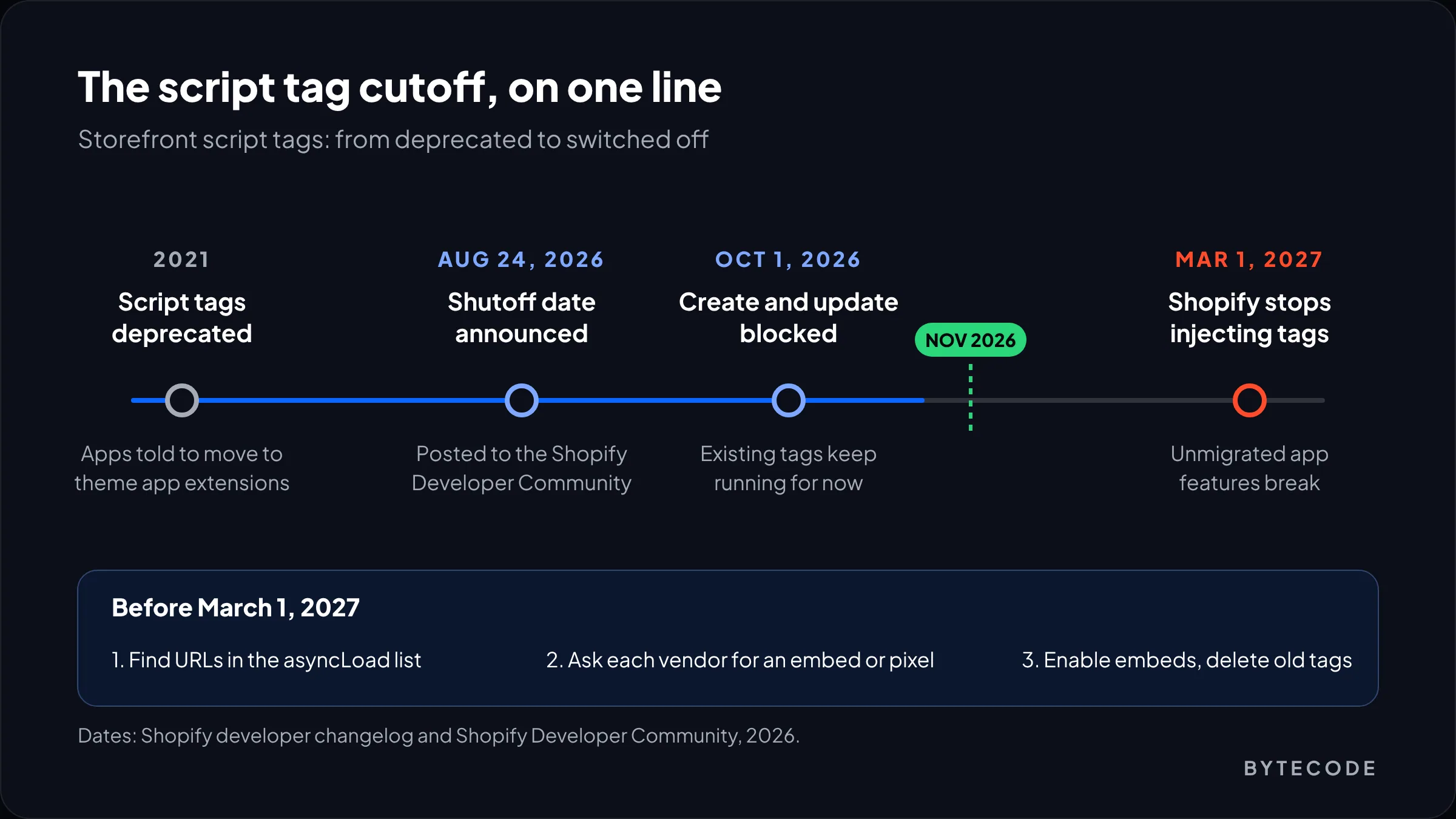
Storefront script tags stop working on March 1, 2027, when Shopify stops injecting them. Since October 1, 2026, apps cannot create or update them on any API version, though existing tags still run. Both dates come from the Shopify developer changelog.
For speed, this is mostly good news, since script tags load on every page and merchants cannot see them. Shopify’s migration guide for developers points general scripts to app embed blocks and analytics or conversion scripts to web pixels, which run without any theme editor step.
The risk is the transition. The same guide warns that if an app’s old script tag and its new embed run together, the script loads twice. On the Shopify developer forum announcement, app developers report there is no way for them to switch on an embed for existing merchants. You have to do it. Shopify has also dropped a planned install warning and says it will review usage again in January 2027.
Watch out: when a vendor emails “please enable our app embed,” do it on your published theme and then check the page source. If the app’s URL still appears in the asyncLoad list as well as in the embed, ask the vendor to delete the old script tag. Until they do, you are paying for that script twice.
So until March, every app audit has a second job: list the apps still loading through asyncLoad and confirm each vendor has a replacement. A vendor who has gone quiet is telling you something. Replace that app on your schedule, not theirs.
How to find the Shopify apps slowing store pages
Start with field data to confirm there is a real problem, then use lab tools to pin it on specific apps. Skip the first step and you can spend a week trimming a script that never mattered.
Step 1: check field data first
Look at Core Web Vitals from real visitors first, in Google Search Console’s Core Web Vitals report. Shopify grades the admin side of Built for Shopify apps on the familiar targets: LCP of 2.5 seconds or less, CLS of 0.1 or less and INP of 200 ms or less, at the 75th percentile. Use the same bar for your storefront. If mobile product pages pass all three, you probably have better uses for your week. If INP fails, suspect apps first, because INP suffers when JavaScript keeps the main thread busy.
Step 2: group the Network panel by domain
Open a product page in a Chrome incognito window (extensions skew results), open DevTools, tick Disable cache in the Network tab and reload. Filter to JS and sort by size. App scripts load from the vendor’s own domain or from cdn.shopify.com/extensions/, where theme app extension assets live. Ten minutes of this usually names the worst offenders.
Step 3: use Coverage to see what actually runs
The Coverage tool in DevTools (open the command menu and type “coverage”) shows how much of each file actually executed. When most of an app’s bundle sits unused on the product page, the vendor is shipping every feature to every page. You cannot fix that yourself, but it gives you a pointed question for the vendor.
Step 4: block one app at a time in WebPageTest
This is the step most guides skip, and the one that gives you a number per app. Run WebPageTest on a mobile profile against your product page, three runs, and keep the median. Rerun with the vendor’s domain listed under the Block tab in the advanced settings. The change in LCP, Total Blocking Time and requests is that app’s cost on that page. Block whole domains, because many apps load a small loader that pulls in more scripts.
For app embeds there is an even simpler version: open the theme editor on a duplicate theme, go to the App embeds panel, switch one embed off, save and retest. Switch it back on before the next one so each result isolates a single app. A disabled embed is not deleted (the docs say it stays in settings_data.json marked disabled), so re-enabling is safe. Click through add-to-cart after each toggle, because some apps share scripts and break each other quietly.
Step 5: profile Liquid with Shopify Theme Inspector
App blocks and pasted snippets also run Liquid on Shopify’s servers, and slow Liquid delays the first byte. Shopify Theme Inspector for Chrome draws a flame graph of server render time, with the filename and line for each node. You need the Themes permission, and checkout cannot be profiled. Watch for app snippets inside loops: Shopify’s guide cites a node taking about 0.05 ms that runs 2,000 times.
From our team: test on a duplicate of your live theme through its preview link. Embeds are set per theme, so you can toggle freely. Legacy script tags ignore the theme and load on the copy too.
For everything beyond apps, our guide to speeding up a Shopify store covers the other fixes in priority order.
Leftover app code after you uninstall
Leftover app code is any snippet, file or setting an app or developer added to your theme that stayed behind after the app was removed. Apps built on theme app extensions remove their blocks automatically on uninstall, which is a Built for Shopify requirement. Everything else needs a manual cleanup.
The usual hiding places:
layout/theme.liquid:<script>tags or{% render %}calls just before</head>or</body>. This is where most “paste this snippet” installs went.snippets/: files named after the app, such as avendor-widget.liquid, that are still rendered from product or cart templates.- Section and template files: hard-coded divs with app classes that now render empty containers.
- Theme settings: custom Liquid blocks in the theme editor where someone pasted a vendor script by hand.
The fastest way to find it all is on a local copy. Pull the theme with Shopify CLI and search for every app name you have ever used:
shopify theme pull --store your-store.myshopify.com --theme 123456789
grep -rniE "judge|klaviyo|privy|bold|loox|yotpo" layout snippets sections templates
grep -rn "<script src=" layout snippets
Settings > Apps and sales channels only lists what is installed today, so we rebuild the list of past apps from old invoices under Settings > Billing.
Watch out: do not delete a snippet just because its name matches an old app. Check whether anything current still renders it, remove code on a duplicate theme, and publish only after a test order goes through. Editing theme files also takes the theme off its automatic update path, which we explain in our guide to Shopify theme customization.
Not sure which apps are costing you sales?
We will audit every app on your storefront, measure each one on your top templates and hand back a keep, replace or remove list with the numbers behind it.
Remove Shopify apps or consolidate them?
Remove an app when its speed cost is real and its business value is not. Consolidate when apps overlap and one vendor, or Shopify itself, can cover the job. A heavy app that clearly earns its weight stays, and the work shifts to loading it only where needed.
| What the audit shows | Decision | What we usually do |
|---|---|---|
| Measurable cost, no one can name the revenue it drives | Remove | Uninstall, then clean leftover code on a duplicate theme |
| Two apps doing overlapping jobs (two pop-up tools, two review apps) | Consolidate | Keep the one with lighter storefront code and better data export |
| Feature now covered by a Shopify app or theme feature | Replace | Move to Shopify Search & Discovery, Shopify Forms or Shopify Bundles where they fit |
| Heavy, but drives a lot of revenue (subscriptions, search) | Keep and contain | Ask the vendor to load only on relevant templates; move app blocks below the fold |
| Still on legacy script tags, vendor silent about migration | Replace before March 2027 | Shortlist alternatives with the Built for Shopify badge |
| Small feature used on one page | Rebuild | Build it as a theme section |
Consolidation has a catch. A suite that does reviews, loyalty and referrals in one app often ships one large bundle to every page, so you can end up with fewer apps and the same weight. Measure the replacement before you migrate.
A word on Shopify speed apps
We would skip most Shopify speed apps that promise a better score by delaying every script until the visitor scrolls or taps. The Lighthouse number improves; the first real tap often gets slower. And you have added an app to a stack you were trying to shrink. If you try one anyway, judge it on field INP over a few weeks.
When the fix needs code rather than a toggle, that is the work our website speed optimization services team handles.
Worked example: a Shopify app audit on a hypothetical store
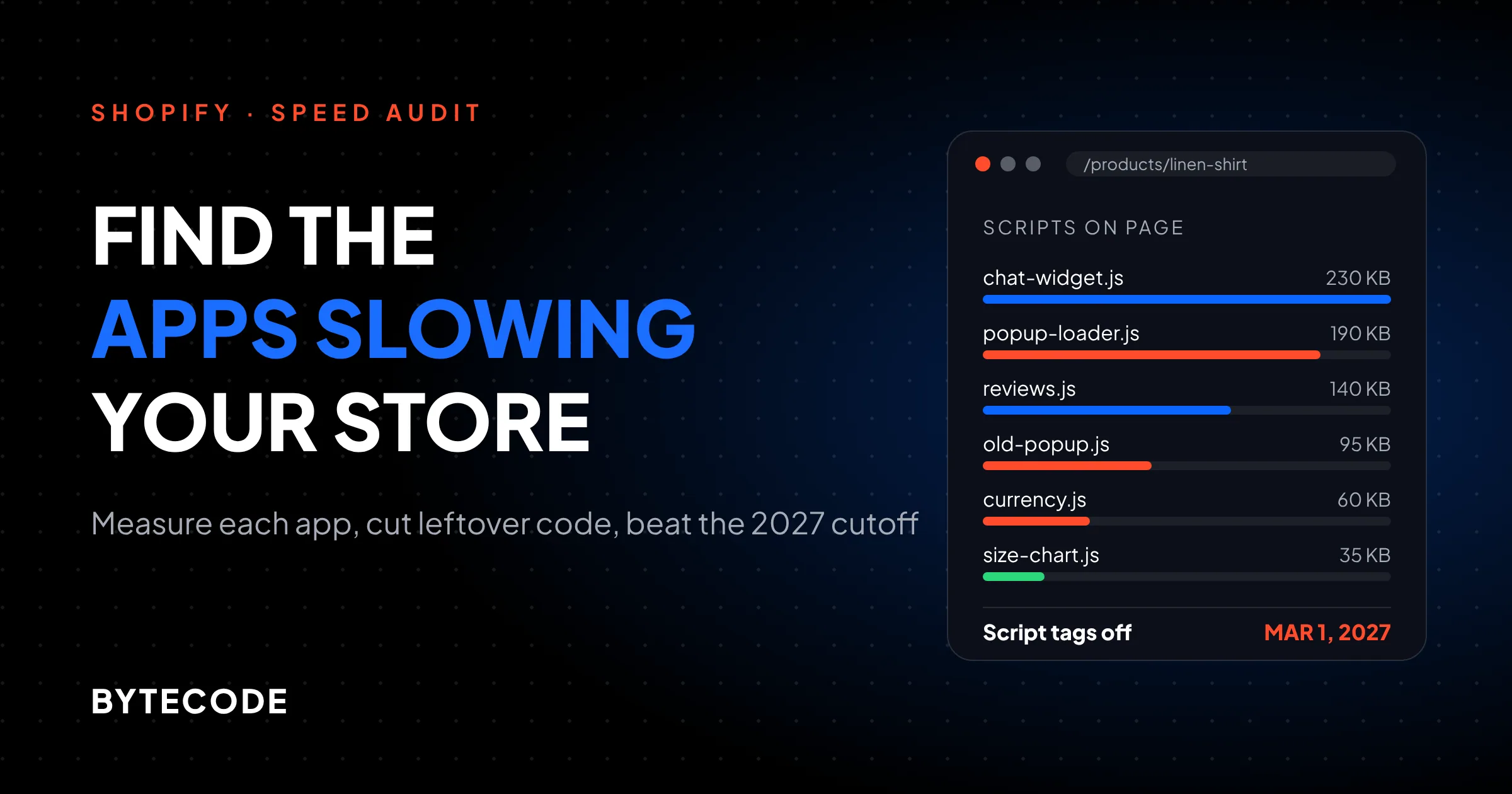
Here is a hypothetical audit, with illustrative numbers, to show how measurements turn into decisions. Say you run an apparel store on a vintage theme with 11 installed apps and a mobile product page that fails INP in Search Console. We blocked each app’s domains in WebPageTest on the product page (mobile profile, median of three runs).
| App (by type) | Route | JS on product page | Change in TBT when blocked | Decision |
|---|---|---|---|---|
| Reviews widget | App block | 140 KB | -210 ms | Keep, move below the fold |
| Pop-up and email capture | Script tag | 190 KB | -320 ms | Replace (vendor has no embed yet) |
| Second pop-up tool from a past campaign | Pasted in theme.liquid |
95 KB | -140 ms | Remove |
| Live chat | App embed | 230 KB | -260 ms | Keep, load chat on click only |
| Currency converter | Script tag | 60 KB | -70 ms | Remove, use Shopify Markets pricing |
| Size chart | App block | 35 KB | -30 ms | Rebuild as a theme section |
| Five admin-only apps | None | 0 KB | 0 ms | Keep (no storefront cost) |
Five of the 11 apps have no storefront code at all, so app count tells you little. Two of the worst offenders use the routes merchants cannot see in the theme editor. And dropping the pasted pop-up and the currency converter and swapping the script tag pop-up takes about 345 KB of JavaScript off the product page and, on these hypothetical numbers, around 530 ms of blocking time, before you add back whatever the replacement pop-up weighs. Savings rarely add up perfectly, so retest the combined change.
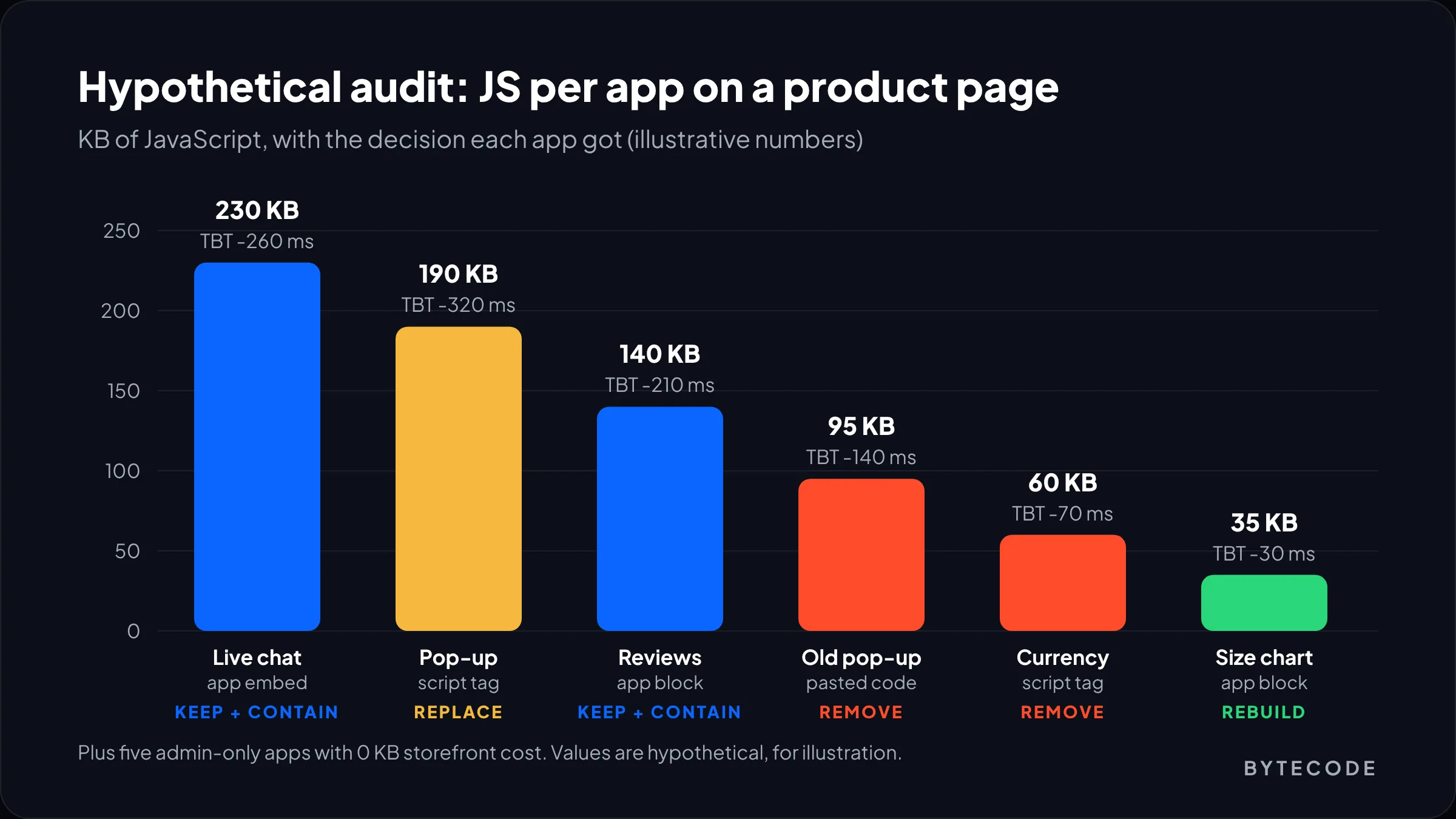
The live chat app is the heaviest and still stays. Support closes sales through it, so the fix is to load it on click. Only the business can make that call. The audit just puts a price on it.
Shopify app audit checklist
Run this once now, before the March 2027 cutoff, and then each quarter alongside the other items in our Shopify store maintenance checklist.
- List every app from Settings > Apps and sales channels, plus past apps from billing history. Mark storefront or admin-only.
- Check field data for mobile LCP, INP and CLS on your top templates. Note which metric fails.
- Map each storefront app to its route: embed, block, script tag (
asyncLoadin the page source) or pasted code. - Duplicate the live theme and do all testing on the copy through its preview link.
- Record a baseline in WebPageTest: product page and homepage, mobile, median of three runs.
- Measure each app by toggling its embed or blocking its domains. Write down the change in LCP, TBT and requests.
- Profile Liquid with Shopify Theme Inspector on collection and product pages to catch slow app snippets.
- Ask script tag vendors for their app embed or web pixel replacement and a date. No answer means find an alternative.
- Decide keep, contain, consolidate, replace, rebuild or remove for each app, with the business owner in the room.
- Clean leftover code on the duplicate theme, test an order, publish.
- Retest and record the new baseline for next quarter.
Keep the results in a spreadsheet with one row per app. Next time someone wants to install something, that sheet is the conversation.
Frequently asked questions
Do Shopify apps slow down your store?
Some do and many do not. Apps that only work in the admin, such as inventory or accounting tools, add nothing to your storefront. Apps that add widgets, pop-ups, chat or tracking load JavaScript and CSS for every visitor, and those are the ones that hurt loading speed and responsiveness. Measure each one rather than judging by app count.
How do I know which app is slowing down my Shopify store?
Block or disable one app at a time and measure the difference. Toggle its app embed off on a duplicate theme, or block its domain in WebPageTest, then compare LCP, Total Blocking Time and request count against a baseline. Repeat for each storefront app. Use Shopify Theme Inspector to catch apps that slow down Liquid rendering on the server.
Does uninstalling a Shopify app remove its code?
Only if the app used theme app extensions. App blocks and app embeds are removed automatically when you uninstall. Code that an app or developer pasted directly into theme files, such as a script in theme.liquid or a snippet file, stays until someone deletes it. Check your layout, snippets and section files after every uninstall.
What happens to Shopify script tags in 2027?
Shopify stops injecting storefront script tags on March 1, 2027, so any app that still relies on them will stop loading on your store. Since October 1, 2026, apps cannot create or update script tags. Apps should move to app embed blocks or web pixels, and merchants may need to switch on the new embed in the theme editor.
Are Shopify speed optimizer apps worth it?
Usually not. Most speed apps delay scripts until a visitor interacts, which can raise a lab score while making the first tap or click feel slower. They also add one more app to the stack. Removing or fixing the slow apps directly gives a more reliable result. If you try one, judge it on field INP data over several weeks.
What we’d do first
This week, open your product page source and search for asyncLoad. Every URL in that list belongs to an app on legacy script tags, and every one of those either migrates or breaks by March 1, 2027. Email those vendors and ask for a date. Their answers tell you which apps have a future.
Then run the toggle and blocking tests on your product page only, because that is where speed and revenue meet. Usually two or three apps account for most of the problem. Fix those, clear out code from apps you dropped years ago, and record the new baseline.
We have built and supported Shopify stores for brands like Delsey, EcoFlow, Kerbholz and Maker & Moss,. If you would rather hand the audit over, our Shopify speed optimization team will measure every app on your storefront and tell you exactly what to cut.