On this page
- Kubernetes vs serverless: the short answer
- Serverless vs containers: what each bill actually pays for
- The cost model: one API on Lambda, Fargate and EKS
- Kubernetes cost is mostly people
- Cold starts in 2026: smaller, but now on the bill
- AWS Lambda vs Kubernetes under a traffic spike
- The middle options most teams should start with
- Team-size thresholds: when Kubernetes starts to make sense
- The decision table we use
- Frequently asked questions
- What we’d do first
A five-person team asks us to “set up Kubernetes properly” about once a month. Usually they have one API, one worker and a Postgres database, and the cluster they want would cost more to keep alive than everything else on their AWS bill. Kubernetes vs serverless is rarely a question about technology. It is a question about who pays for idle capacity, and who gets paged when a node falls over at 3 a.m.
The short version, with the working shown below: on current AWS prices, a single API is cheaper on Lambda until roughly 27 million requests a month, then cheaper on ECS Fargate. EKS only beats Lambda on infrastructure past 200 million requests, and once you count the engineering hours a cluster eats, it never wins for a single app. Kubernetes earns its keep when many services share one cluster and someone’s job is the platform.
Key takeaways
- Lambda is cheapest at low and spiky volume. In our worked example it costs about $44 a month at 20 million requests, against about $54 on ECS Fargate and about $329 on EKS.
- The line crosses early. For an always-busy API, Fargate becomes cheaper than Lambda at around 27 million requests a month because its cost barely moves with traffic.
- Kubernetes cost is mostly people. An EKS control plane is $73 a month, but version upgrades arrive roughly every four months and someone has to do them.
- Cold starts matter less than their reputation, but they are now billed. Since August 2025, Lambda charges for the INIT phase on every function type.
- For most teams under about 20 engineers, the right answer is a middle option: ECS Fargate or Cloud Run for services, Lambda for events, and no cluster.
Kubernetes vs serverless: the short answer
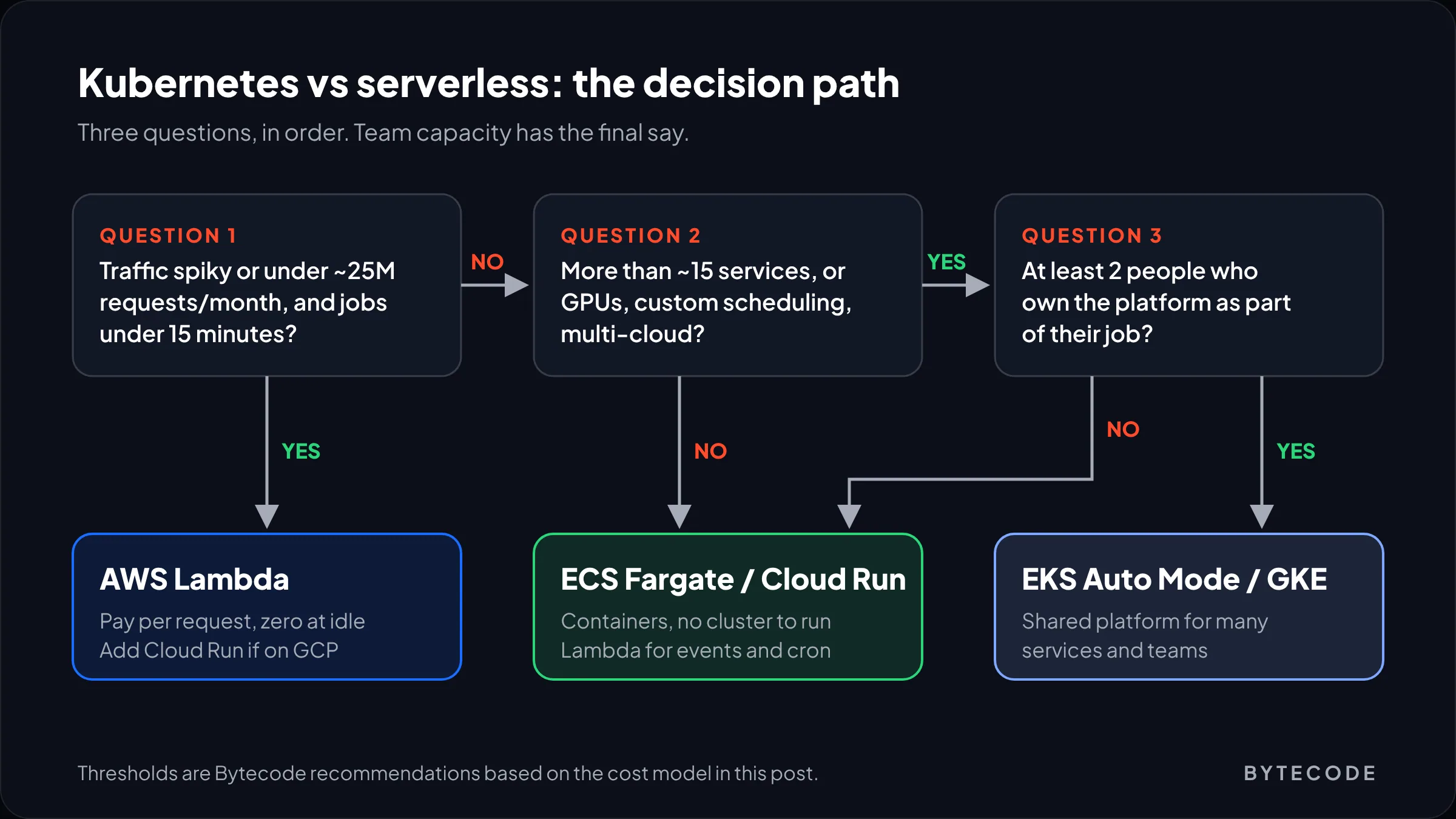
Pick serverless when traffic is uneven, the team is small and nobody wants to own infrastructure. Pick Kubernetes when you run many services, need control over scheduling or networking, and can staff the platform with at least two people. Everything in between belongs on a managed container service.
That is not a hedge, because each option fails differently. Serverless fails when steady traffic makes per-request pricing expensive, or a job outlives Lambda’s 15-minute limit. Kubernetes fails when the team is too small to keep it patched. Managed containers fail at the edges: GPUs, custom schedulers, or a hard multi-cloud requirement.
The wider delivery picture lives in our guide to DevOps best practices. This post stays on where your code runs, and what that costs.
Serverless vs containers: what each bill actually pays for
The real difference between serverless vs containers is the billing unit. Lambda bills per request and per millisecond. Containers bill for capacity you reserve, busy or not. The patching split follows the same line: on Lambda, AWS owns the OS and runtime; on EKS, you own nodes, add-ons and upgrades.
Here are the current US East (N. Virginia) unit prices we used for the model below:
| Service | What you pay for | Current price |
|---|---|---|
| AWS Lambda (Event Functions, x86) | Requests plus GB-seconds of run time | $0.20 per million requests, $0.0000166667 per GB-second |
| ECS on Fargate (Linux/x86) | vCPU and memory per second while a task runs, 1-minute minimum | About $0.0405 per vCPU-hour and $0.0044 per GB-hour |
| Amazon EKS | Control plane per cluster, plus nodes (or Fargate pods) | $0.10 per cluster-hour on standard support |
| Application Load Balancer | Hourly fee plus Load Balancer Capacity Units (LCUs) | $0.0225 per hour, $0.008 per LCU-hour |
Sources: the AWS Lambda pricing page, the EKS pricing page and Elastic Load Balancing pricing. The Fargate pricing page did not render its rate table for us, so those hourly figures come from the per-second rates in its own worked examples. AWS’s Fargate or Lambda decision guide (updated August 2026) says Lambda is usually cheaper at low or sporadic traffic and Fargate for sustained work. Our model puts numbers on where that flips.
The cost model: one API on Lambda, Fargate and EKS
On infrastructure alone, our example API costs $19 a month on Lambda at 2 million requests, against $53 on Fargate and $328 on EKS. By 300 million requests, the order flips: Fargate is $167, EKS $352 and Lambda $436.
The setup is hypothetical, so here are the assumptions, all in US East:
- The workload: a JSON API where each request runs for 120 ms and needs 512 MB on Lambda. Responses average 10 KB.
- Front door: one Application Load Balancer in front of all three, priced on processed bytes. An LCU covers 0.4 GB an hour for Lambda targets against 1 GB for containers, so Lambda pays more LCUs.
- Fargate: 0.5 vCPU, 1 GB tasks handling 50 requests a second each, sized all month for a peak three times the average, never fewer than two.
- EKS: two m7g.xlarge nodes at $0.1632 an hour on demand (the price in AWS’s Lambda Managed Instances example). Two nodes is the smallest setup we would call production.
- Left out: free tiers, Savings Plans, NAT gateways, logs and data transfer. NAT and logging alone often add $30 to $100 a month to the container options.
| Monthly requests | Lambda + ALB | ECS Fargate + ALB | EKS (2 nodes) + ALB | Cheapest |
|---|---|---|---|---|
| 2 million | $19 | $53 (2 tasks) | $328 | Lambda |
| 20 million | $44 | $54 (2 tasks) | $329 | Lambda |
| 50 million | $86 | $56 (2 tasks) | $332 | Fargate |
| 100 million | $156 | $78 (3 tasks) | $336 | Fargate |
| 200 million | $296 | $123 (5 tasks) | $344 | Fargate |
| 300 million | $436 | $167 (7 tasks) | $352 | Fargate |
How we got the Lambda line: 0.5 GB × 0.12 s × $0.0000166667 is $1.00 of compute per million requests, plus $0.20 in request fees. Add the load balancer and Lambda costs about $1.40 per million requests plus $16.43 a month. A Fargate task at 0.5 vCPU and 1 GB costs about $18 a month whether it serves one request or four million. EKS starts at $311 a month before a single request, because the $73 control plane and $238 of nodes run all month.
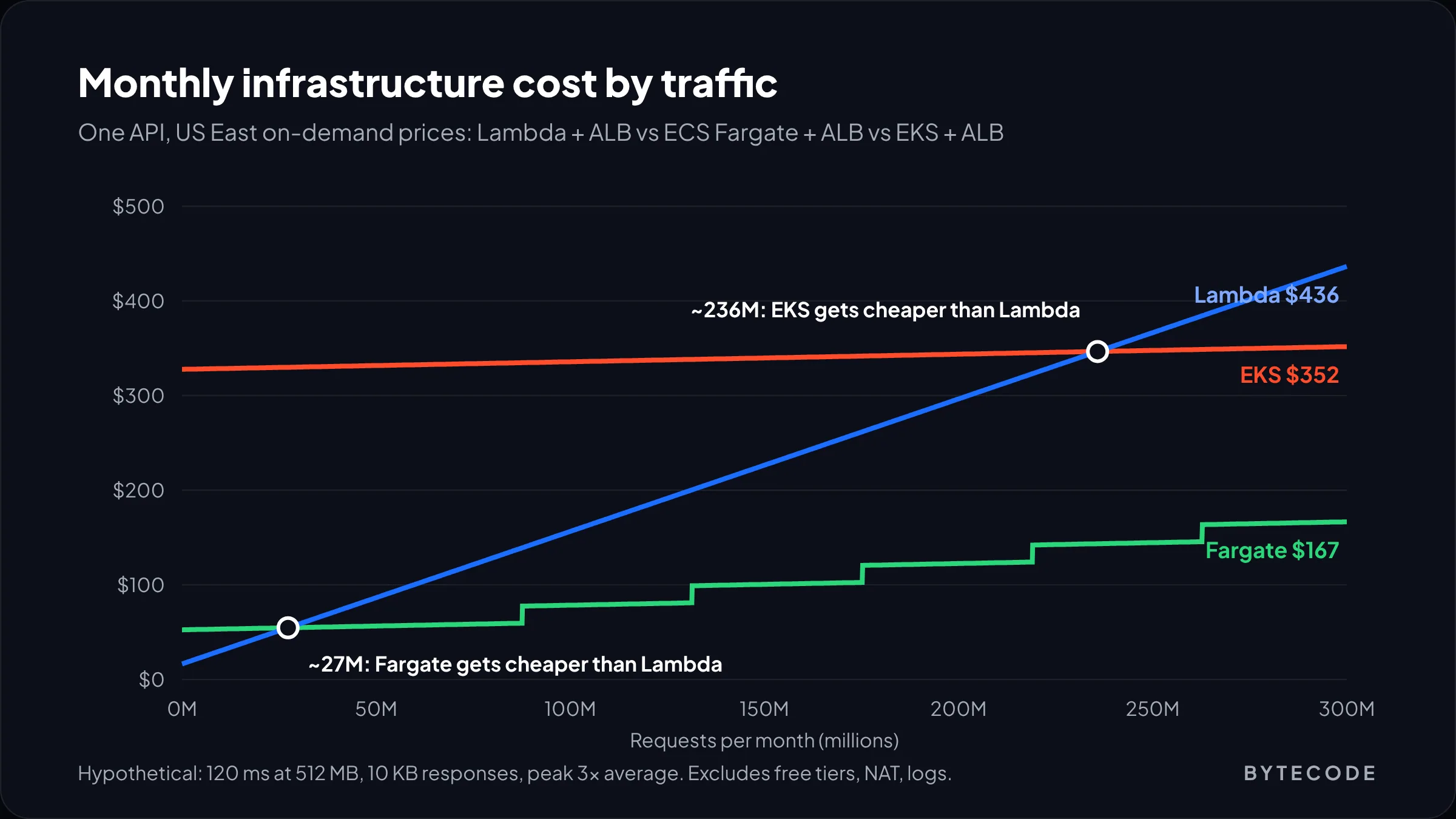
The crossovers sit at about 27 million requests a month (Lambda against Fargate) and about 236 million (Lambda against EKS). Change the inputs and they move. A heavier function at 1 GB and 300 ms makes Lambda’s compute five times more expensive per request, and the Fargate crossover drops to under 7 million. A bursty API that idles most of the day pushes it the other way, because Fargate pays for those idle hours and Lambda does not.
From our team: before trusting any break-even chart (ours included), pull a week of real traffic and check the peak-to-average ratio. Above about 10, Lambda keeps winning long after the simple math says it should not.
Kubernetes cost is mostly people
The AWS line on a cluster is small. The hours are not, and on a one-app cluster they dwarf the compute bill.
Start with the release treadmill. Per the EKS version lifecycle docs, Kubernetes ships a minor version about every four months. EKS supports each one for 14 months, then 12 more on extended support, which is on by default. After that, EKS upgrades the control plane itself, unannounced and with no rollback, and leaves your nodes and add-ons behind. Version 1.31 hits that date on November 26, 2026, so this is not theoretical.
Watch out: extended support is the easiest way to triple a control plane bill without noticing. It costs $0.60 per cluster-hour instead of $0.10, which is about $438 a month per cluster against $73. Check the upgrade policy on every cluster you own (it sits in the cluster’s details in the EKS console), including the forgotten staging one.
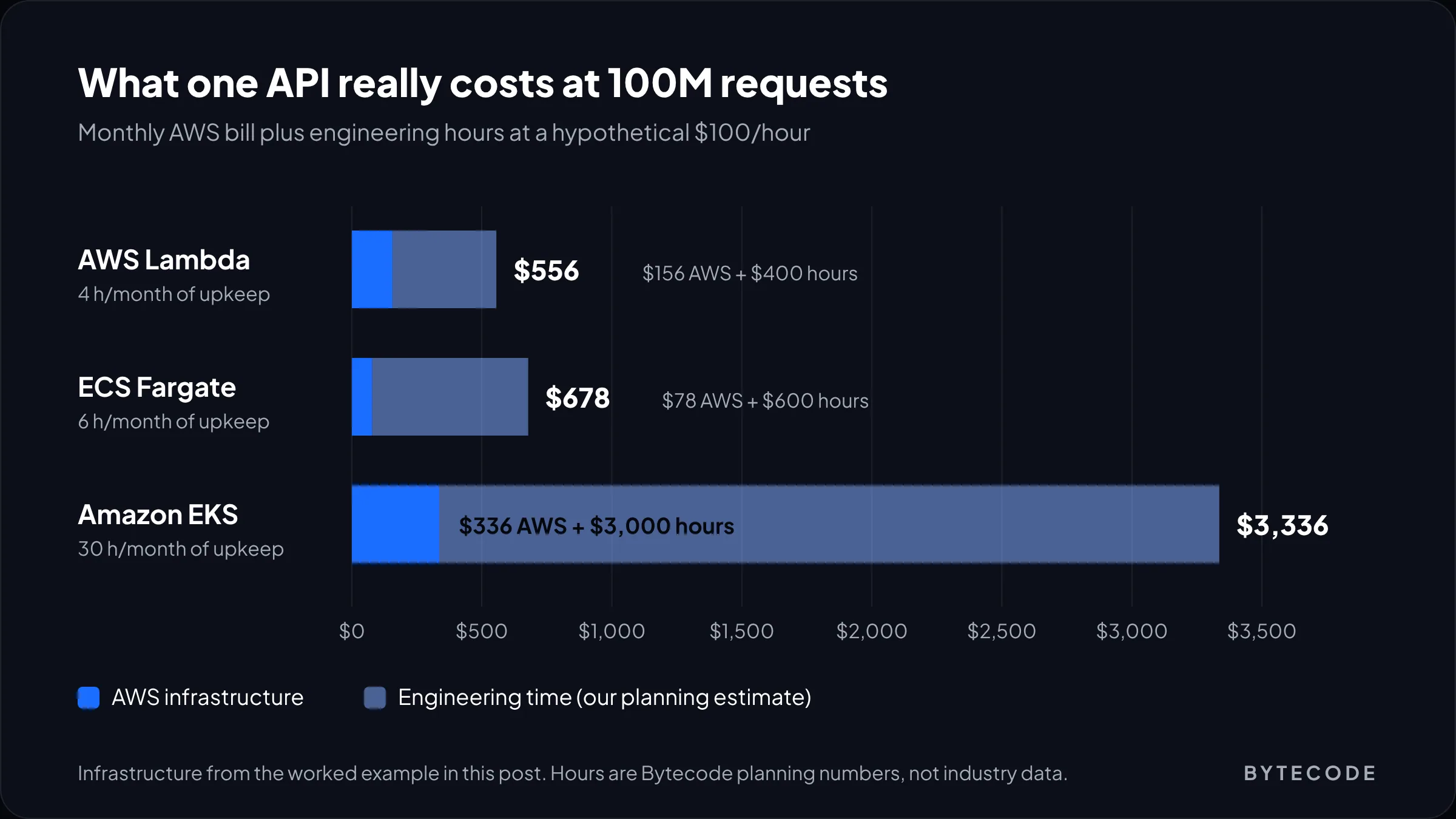
Now the hours. These are our planning numbers for a single production service, not industry data:
- Lambda: about 4 hours a month. Runtime deprecations, dependency bumps, alarm tuning, the occasional concurrency limit increase.
- ECS Fargate: about 6 hours. Base image patching, task definition changes, autoscaling tweaks.
- EKS: about 30 hours. Three upgrades a year, each touching node groups, CoreDNS, the VPC CNI and the load balancer controller. Then node image rotation, Helm chart drift, and on-call people who understand all of it.
Price those hours at a hypothetical blended $100 an hour and the 100-million-request month looks very different: about $556 on Lambda, $678 on Fargate and $3,336 on EKS. Lambda and Fargate trade places again near 230 million requests. EKS never catches up for one service.
AWS’s answer is EKS Auto Mode, which takes node management and core add-ons off your plate. It helps, but it is not free: in the worked example on the EKS pricing page, the fee is 12% of the EC2 on-demand price ($0.03672 an hour on a $0.306 instance). On a busy cluster that is a fair trade. On a tiny one, it is 12% on top of a cluster you did not need.
Where the math turns: the $73 control plane and the platform hours are mostly fixed. Spread them over 15 services and three teams and the per-service overhead looks reasonable. Spread them over one API and it never will.
Cold starts in 2026: smaller, but now on the bill
Cold starts are a real cost and a smaller latency problem than most teams fear. AWS puts a typical Lambda cold start anywhere from under 100 ms to over a second, mostly down to runtime and startup code. Fargate’s equivalent is the image pull, which is slower but far rarer.
The change worth knowing about is billing. Since August 1, 2025, AWS bills the INIT phase for on-demand ZIP functions on managed runtimes, which had been free until then. In AWS’s own example log, a 251 ms billed duration became 351 ms once a 100 ms init was added. AWS says cold starts hit under 1% of invocations, so most bills barely move. A function that loads an ML model at startup and scales out often is the exception.
What we actually do about cold starts, in order:
- Measure first. Filter CloudWatch Logs for
Init Durationin theREPORTlines. If p99 latency is fine, stop here. - Shrink the startup. Lazy-load clients and drop unused dependencies. Free, and usually the biggest win.
- Use SnapStart where your runtime supports it. It restores from a snapshot instead of running init again.
- Pay for provisioned concurrency only for the paths users wait on. It costs $0.0000041667 per GB-second while switched on, and AWS’s own guidance is that it pays off above roughly 60% utilization.
If every function needs provisioned concurrency, you have rebuilt an always-on server with extra steps. Move that service to Fargate.
AWS Lambda vs Kubernetes under a traffic spike
Lambda scales faster from zero. Kubernetes is steadier once warm. The gap shows in the first minutes of a spike, like a launch email going out.
Per the AWS decision guide, Lambda creates one execution environment per concurrent request and can add up to 1,000 environments every 10 seconds, but your account starts with a default limit of 1,000 concurrent executions per Region. Past that, requests are throttled, and every function in the account shares the limit, so a runaway batch job can starve your checkout API. Set reserved concurrency on anything customer-facing.
On ECS, the scheduler can launch up to 500 tasks per service in under a minute, per the same guide. On Kubernetes, pods start quickly when there is spare node capacity. When there is not, you wait for a node to boot and join, which on the clusters we run takes a minute or two even with Karpenter. So teams keep spare headroom, and pay for it. That is AWS Lambda vs Kubernetes in one line: pay per request for instant scale, or pay for idle nodes so scale feels instant.
The middle options most teams should start with
For most growing apps the answer is a managed container service, with Lambda for the event-driven edges.
ECS on Fargate
The same image you would run on Kubernetes, with no cluster to upgrade. Tasks go up to 32 vCPU with no time limit, so WebSockets and slow report jobs fit. Fargate Spot runs interruptible tasks at up to a 70% discount, ideal for workers that retry. Most client APIs we build land here.
Google Cloud Run
The closest thing to serverless containers. On Cloud Run’s default request-based billing, you pay $0.000024 per vCPU-second and $0.0000025 per GiB-second only while instances handle requests, plus $0.40 per million requests. One instance serves many requests at once, so a busy service often costs less per request than Lambda, and steady services can switch to instance-based billing at $0.000018 per vCPU-second. On Google Cloud, start here.
Lambda Web Functions and Managed Instances
AWS is closing the gap from the other side. Lambda Web Functions, the newest option, let one environment serve many concurrent requests and bill $0.30 per million requests plus active vCPU time and memory. The Lambda pricing page prices a server-rendered app doing 15 million requests a month at $25.78. Lambda Managed Instances run functions on EC2 capacity you choose, for a 15% fee on top of the on-demand price. Both are too new for us to put a core system on, but they blur the crossover in our model.
Not sure which side of the crossover you are on?
Send us a month of traffic data and your current AWS bill, and we will model Lambda, Fargate and EKS for your actual workload.
Get a compute cost review
Team-size thresholds: when Kubernetes starts to make sense
Team size is the best single predictor we know. These thresholds are our opinion, not survey data.
- 1 to 5 engineers, no dedicated ops person. Lambda, Cloud Run or ECS Fargate. No cluster. The risk that matters is shipping slowly, not cloud spend. If you are still at the MVP stage, this is you.
- 6 to 20 engineers, up to about 15 services. ECS Fargate or Cloud Run by default, Lambda for events and cron. Spend the effort on CI/CD instead of a platform.
- 20+ engineers, 15+ services, several teams deploying on their own schedule. Kubernetes starts paying back, ideally on EKS Auto Mode or GKE Autopilot. Only do it if at least two people own the platform as a real part of their job.
Why two? One person cannot be on call every night of the year, and a cluster with a single expert becomes one nobody else dares touch. We have inherited a few.
Some needs pull you toward Kubernetes earlier: GPU workloads, a contractual need to run on-premises, or a SaaS where each customer gets an isolated stack. For multi-tenant products, our guide on how to build a SaaS covers the tenancy choice that often drives this.
The decision table we use
Find your row. If two conflict, the team row beats the traffic row, because a cheaper platform your team cannot run is not cheaper.
| If this is true | Start with | Why |
|---|---|---|
| Traffic under ~25M requests a month, or very spiky | Lambda | Zero cost at idle, nothing to patch |
| Event-driven work: uploads, queues, webhooks, cron | Lambda | It is what Lambda was built for |
| Steady API traffic above ~25M requests a month | ECS Fargate or Cloud Run | Capacity pricing beats per-request pricing |
| Jobs longer than 15 minutes, WebSockets, long-lived connections | ECS Fargate | No execution time limit |
| Already on Google Cloud, container-based team | Cloud Run | Serverless billing with container portability |
| 15+ services, several teams, 2+ platform owners | EKS Auto Mode or GKE Autopilot | Shared platform cost spreads across services |
| GPUs, custom scheduling, service mesh, multi-cloud | Kubernetes | Managed services cannot give you the control |
| Fewer than 5 engineers and someone wants Kubernetes “for scale” | ECS Fargate | You can move the same image to EKS later |
The last row matters most. A well-built image with health checks and config in environment variables runs on Fargate today and on EKS later with no code changes. That is the cheapest insurance in this decision. If you are moving an older system into containers first, our post on custom web application development covers how we structure that work, and our DevOps services team can run the migration with you.
Frequently asked questions
Is serverless cheaper than Kubernetes?
Usually, yes, for a single app or a small team. In our worked example on current AWS prices, Lambda costs $44 a month at 20 million requests against $329 for a minimal EKS cluster. Kubernetes only gets cheaper per service when many services share one cluster and traffic is steady, and even then the engineering hours to run it often cancel the savings.
When should you not use serverless?
Avoid pure serverless for steady, high-volume traffic, jobs longer than Lambda’s 15-minute limit, long-lived connections like WebSockets, and workloads that need specific hardware such as GPUs. In those cases a container service like ECS Fargate or Cloud Run is usually cheaper and simpler, and it still spares you from managing servers or a cluster.
How much does an EKS cluster cost per month?
The EKS control plane costs $0.10 an hour, about $73 a month, on standard support, and $0.60 an hour (about $438) if the cluster falls into extended support. Nodes come on top: two m7g.xlarge nodes on demand add about $238 a month in US East. Auto Mode adds a management fee that varies by instance type.
Are Lambda cold starts still a problem in 2026?
For most APIs, no. AWS puts typical cold starts between under 100 ms and over a second, and says they affect under 1% of invocations. They are now billed, though: since August 2025, Lambda charges for init time on all functions. Trim startup code first, then use SnapStart or provisioned concurrency only on latency-sensitive paths.
Is ECS Fargate serverless?
Fargate is serverless compute for containers: you never manage servers or a cluster, and AWS patches the hosts. It is not serverless in the pay-per-request sense, because you pay for each running task’s vCPU and memory by the second whether or not it is handling traffic. That makes it cheaper than Lambda for steady workloads and more expensive for idle ones.
How many engineers do you need to run Kubernetes?
We recommend at least two people who own the platform as part of their job before running production Kubernetes, so upgrades and on-call never depend on one person. In practice that tends to fit organizations with 20 or more engineers or 15 or more services. Smaller teams usually get the same results with ECS Fargate or Cloud Run.
What we’d do first
Pull last month’s request counts and the peak-to-average ratio for each service, then drop them into the cost model above with your own memory and duration numbers. That takes an afternoon and settles most arguments before they start.
Under the crossover, stay on Lambda and work on startup time and reserved concurrency. Over it, move steady services to ECS Fargate or Cloud Run and keep Lambda for events. Reach for Kubernetes only when service count and team both point that way, and then start on Auto Mode with the upgrade policy set on purpose.
We have run all three for clients, from Shopify-adjacent APIs to enterprise backends. If you want a second opinion on your setup or a modelled bill for your real traffic, talk to our DevOps and cloud team.