On this page
- The web application security checklist, on one page
- What changed in the OWASP Top 10 2025
- The OWASP Top 10 in plain English, with business impact
- Security headers: the cheapest web app security win
- MFA and login security
- Dependency scanning and the software supply chain
- Penetration testing: when it is worth paying for
- What an application security checklist costs
- Frequently asked questions
- What we’d do this month
The app works, customers are paying, and nobody has looked at it through an attacker’s eyes. That describes most of the web apps we inherit. Usually the first serious problem is not exotic. It is an API route that returns another customer’s invoice if you change one number in the URL.
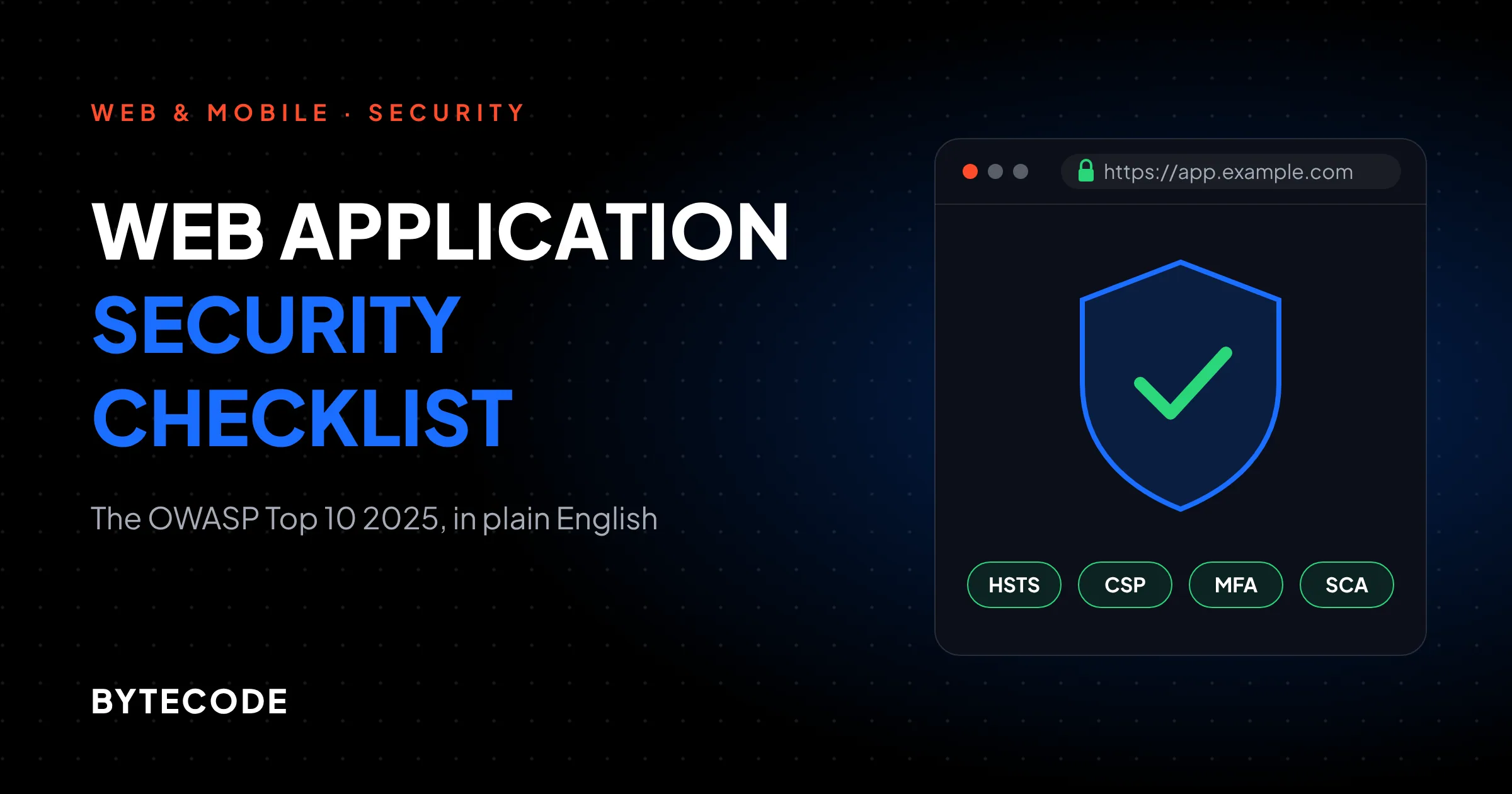
This web application security checklist is for the people who sign off on the work: founders, product owners and CTOs. It walks through the current OWASP Top 10 (the 2025 edition) in plain English, then the controls that do most of the work, from security headers and MFA to dependency scanning and a properly scoped pen test. We finish with a budget you can adapt.
Key takeaways
- The OWASP Top 10 2025 is the current edition. Broken access control is still number one, and two categories are new: software supply chain failures and mishandling of exceptional conditions.
- Most of the checklist is cheap. Security headers, admin MFA and dependency scanning cost days of developer time, not a security budget.
- Access control is where the expensive breaches hide, and scanners are bad at finding it. Write tests for it yourself.
- A web app pen test typically costs $5,000 to $30,000 in 2026. Book it after the basics are fixed, not before.
- In our worked example, a growing SaaS spends roughly $25,000 to $44,000 on security in year one. The pen test is the largest single line, but the developer hours add up to more.
The web application security checklist, on one page
If you read one section, read this table. Each row is a control, the OWASP 2025 risk it reduces, its owner and its deadline, roughly in the order we would tackle them on an existing app.
| Control | Main OWASP 2025 risk | Owner | When |
|---|---|---|---|
| Server-side permission check on every route and API endpoint, with tests | A01 Broken Access Control | Developers | Before launch |
| MFA on every admin, staff and developer account (passkeys where possible) | A07 Authentication Failures | Product owner + developers | Before launch |
| HTTPS everywhere, HSTS, modern TLS | A04 Cryptographic Failures | DevOps / host | Before launch |
| Security headers, including a Content Security Policy | A02 Misconfiguration, A05 Injection | Developers | Before launch (CSP in report-only first) |
| Parameterized queries and output encoding, never string-built SQL | A05 Injection | Developers | Always |
| Dependency scanning on every pull request, lockfiles committed | A03 Supply Chain Failures | Developers | Week one |
| Secrets in a vault or the host’s secret store, not in the repo | A02, A08 | DevOps | Week one |
| Debug mode off, generic error pages, separate staging data | A02, A10 | DevOps | Before launch |
| Logs for logins, permission failures and admin actions, with alerts | A09 Logging & Alerting Failures | DevOps + product owner | First month |
| Signed builds and protected CI/CD, branch protection on main | A08 Integrity Failures | DevOps | First quarter |
| Threat model for payments, roles and any multi-tenant data | A06 Insecure Design | Tech lead + product owner | Before you build the feature |
| Grey-box penetration test, then a retest | All | External tester | Before a major launch, then yearly |
Notice the owner column. On most projects we audit, half these rows have no owner. Developers assume the host handles logging, the host assumes the app does. Write a name next to each row and the checklist starts working.
What changed in the OWASP Top 10 2025
The OWASP Top 10 2025 replaced the 2021 list, and OWASP’s project page confirms it is the most current released version. It is the eighth edition.
According to Qualys’s category-by-category breakdown, the list draws on more than 175,000 CVE records and 589 CWEs (the catalogue of weakness types). The moves that matter for a business owner:
- Software supply chain failures (A03) is new. It grew out of the old “vulnerable and outdated components” entry and now covers your build pipeline and update delivery too, not just libraries.
- Mishandling of exceptional conditions (A10) is new. It covers apps that fail open, leak internals in error messages or leave half-finished transactions behind.
- Server-side request forgery (SSRF) is no longer its own entry. It now sits inside broken access control.
- Misconfiguration rose to A02. Every application in OWASP’s test data had some form of it.
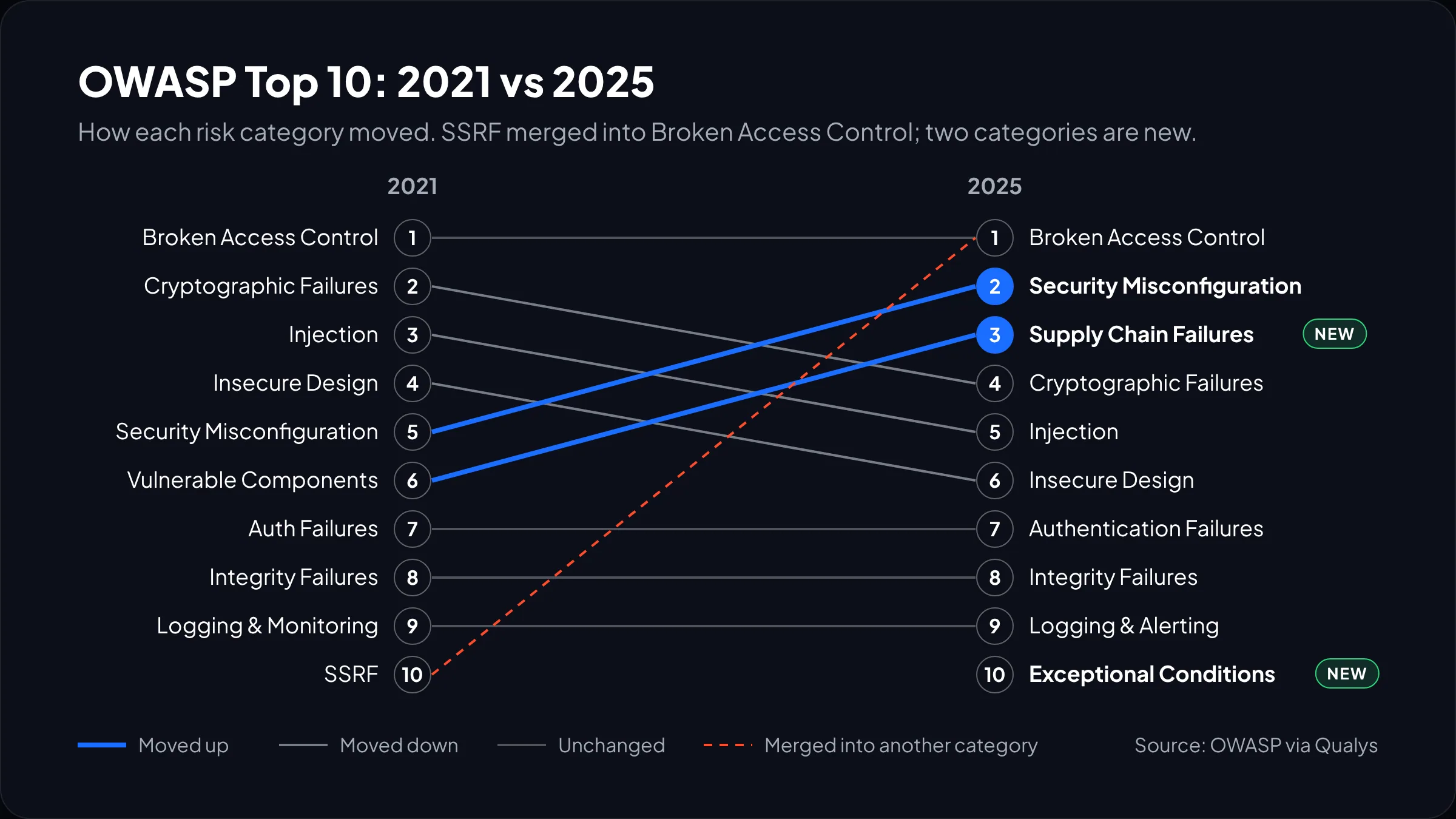
The list is an awareness document, not a standard. Passing it does not make you secure, but it gives you and your developers a shared vocabulary.
The OWASP Top 10 in plain English, with business impact
For each risk: what it looks like in a real app, what it costs you, and the question we would put to the development team.
A01: Broken access control
A user can see or do something they should not. The classic case: /api/orders/1042 returns your order, and /api/orders/1043 returns a stranger’s. The server checked that you were logged in but never checked that the order was yours. The impact is a reportable breach, usually across every customer at once. Ask: “Where is the permission check for each endpoint, and which tests prove a user cannot read another tenant’s data?”
A02: Security misconfiguration
The code is fine but the setup is not. A storage bucket is public, a debug page is live in production, the default admin password still works. Cheap to fix, embarrassing to explain. Ask: “Are staging and production built from the same scripted config?”
A03: Software supply chain failures
Your app is mostly other people’s code: hundreds of packages, plus the CI/CD pipeline that builds it. Any piece can be compromised or simply out of date. The 2026 Verizon DBIR found a third party involved in 48% of breaches, up 60% year on year, per SecurityInfoWatch’s coverage of the report. Ask: “What tells us when a dependency has a known vulnerability, and how fast do we patch?”
A04: Cryptographic failures
Sensitive data is stored or sent without proper protection. Think passwords hashed with MD5, card or health data in plain text, or a missing HSTS header that lets a first visit go over HTTP. Ask: “Which fields are encrypted at rest, and how are passwords hashed?” (The right answer names Argon2, scrypt or bcrypt.)
A05: Injection
User input gets treated as code. SQL injection and cross-site scripting (XSS) both live here. It dropped two places because modern frameworks make it harder to get wrong, not because it went away. Ask: “Do we ever build SQL or HTML by concatenating strings?”
A06: Insecure design
The flaw is in the plan, not the code. A password reset that emails a guessable link. A coupon system with no limit on reuse. It is cheapest to fix on a whiteboard. Ask: “Did anyone think through how this feature could be abused before we built it?”
A07: Authentication failures
Attackers log in as someone else. Credential stuffing (trying leaked passwords from other sites) is the everyday version. The fix is mostly MFA plus rate limiting, covered below. Ask: “What happens after 50 failed logins from one IP in a minute?”
A08: Software or data integrity failures
The app trusts something it should verify: an unsigned update, a script loaded from a CDN without an integrity hash, a build artifact anyone with repo access could swap. Impact ranges from defaced pages to card-skimming code on your checkout. Ask: “Could one compromised developer laptop push code to production without review?”
A09: Security logging and alerting failures
Something bad happens and nobody notices. OWASP renamed it from “monitoring” to “alerting” for a reason: logs nobody reads do not count. IBM’s 2026 Cost of a Data Breach study put the average time to identify and contain a breach at 247 days, according to eSecurity Planet’s summary. Ask: “Who gets paged if an admin account logs in from a new country?”
A10: Mishandling of exceptional conditions
The app breaks in an unsafe way. A payment provider times out and the order is marked paid anyway. An error page prints a stack trace with database names in it. Ask: “When something fails halfway, do we fail closed and roll back?”
From our team: if you only push on one item from this list, make it A01. Scanners find outdated packages well but cannot know that user 17 should not see project 204. Those tests have to come from people who know your business rules.
Security headers: the cheapest web app security win
Security headers are a few lines of server config that tell the browser to refuse whole classes of attack, and they take hours, not weeks. Here is the starter set we put on most new projects, based on the values in the OWASP HTTP Headers Cheat Sheet, shown as nginx config:
add_header Reporting-Endpoints 'csp="https://example.com/csp-reports"' always;
add_header Strict-Transport-Security "max-age=63072000; includeSubDomains" always;
add_header Content-Security-Policy-Report-Only "default-src 'self'; frame-ancestors 'none'; report-to csp" always;
add_header X-Content-Type-Options "nosniff" always;
add_header Referrer-Policy "strict-origin-when-cross-origin" always;
add_header Permissions-Policy "geolocation=(), camera=(), microphone=()" always;
add_header Cross-Origin-Opener-Policy "same-origin" always;
server_tokens off;   # hides the nginx version in the Server header
Where the defaults bite:
- HSTS: the cheat sheet’s recommended value adds
preload, and it warns that a mistake can lock users out for the whole max-age. We start with a short max-age on a new domain, confirm every subdomain serves HTTPS, then raise it to two years and add preload last. - CSP: ship it as
Content-Security-Policy-Report-Onlyfor a week or two, read the violation reports, then enforce. Enforcing a strict policy cold breaks analytics tags and payment iframes, and someone will turn it off in a panic. - X-XSS-Protection: leave it out or set it to
0. OWASP says to rely on CSP instead, because the old filter could cause XSS problems of its own. - X-Powered-By: remove it. In Express that is
app.disable('x-powered-by').

Recheck after every infrastructure change. CDNs and load balancers have a habit of dropping headers set at the origin.
MFA and login security
Turn on multi-factor authentication for every account that can change data for other people: admins, staff, support agents and developers on your cloud, GitHub and DNS accounts. Microsoft’s study of Azure AD accounts found MFA cut the risk of compromise by 99.22% across the population, and by 98.56% even where credentials had already leaked, per the 2023 Microsoft Research paper.
Not all MFA is equal. Our order of preference:
- Passkeys or hardware security keys (FIDO2/WebAuthn). They are bound to your real domain, so a phishing page cannot replay them. Use these for admins.
- Authenticator app codes or push with number matching. Fine for most staff and for customers who opt in.
- SMS codes. Better than nothing, open to SIM swaps. Offer it only as a fallback.
For customer logins, the trade-off is friction, and forced MFA on a consumer app costs sign-ups. We usually make it optional for customers, mandatory for admins, with a step-up check for risky actions like changing a payout bank account. Add rate limiting and a breached-password check at signup.
Watch out: the account that hurts most is rarely in your app. It is the cloud console, the domain registrar or the GitHub organization owner. One of those with a reused password undoes every control above it, so put hardware keys on them first.
Dependency scanning and the software supply chain
Dependency scanning compares your packages against databases of known vulnerabilities and tells you when to upgrade. Every project should run it from week one, and for most teams it costs next to nothing.
On GitHub, Dependabot alerts fire when a new advisory lands in the GitHub Advisory Database or when your dependency graph changes. The GitHub docs spell out limits worth knowing: only GitHub-reviewed advisories trigger alerts, only the default branch is scanned, and for GitHub Actions, alerts cover only actions referenced by version tag, not by commit SHA. That last one matters, because SHA pinning is good integrity practice, so if you pin, keep those pins current another way, such as Dependabot version updates in .github/dependabot.yml.
The routine we set up on most projects:
- Commit the lockfile (
package-lock.json,poetry.lock) and install withnpm ciin CI, so builds use exactly what was reviewed. - Fail the pull request on new critical or high findings. Warn on the rest, or the team learns to ignore red builds.
- Give someone a recurring hour each week to triage alerts. Unowned alerts pile into the hundreds within a quarter.
- Check that any package an AI coding assistant suggests actually exists and is maintained.
Scanning will not catch a malicious package published yesterday under a name one letter off a popular one, so dependency changes still need human review. We cover how this fits into a wider pipeline in our DevOps best practices guide.
Penetration testing: when it is worth paying for
A penetration test is a time-boxed attempt by a skilled human to break into your app, and it is worth paying for once the basics are in place. Book one before a major launch or a big enterprise deal, then yearly.
Blaze Information Security’s October 2026 pricing guide puts the average web app pen test at $5,000 to $30,000, by scope:
| App complexity | Typical scope | Price | Testing time |
|---|---|---|---|
| Simple | Basic login and sessions, OWASP Top 10 coverage | $4,999–$8,999 | 3–7 days |
| Medium | Several roles, APIs, file upload, access control | $8,999–$20,000 | 1.5–2 weeks |
| Complex | Multi-tenant, SSO/OAuth, payments, admin portals | $20,000–$30,000+ | 2–3+ weeks |
The same guide lists indicative US day rates of $1,600 to $2,800, and £800 to £1,200 in the UK. It also says grey-box testing, where the tester gets accounts for each role and some documentation, is often the best value for web apps. We agree: black-box testing spends paid days on reconnaissance you could have handed over in an email.
What we would skip: a pen test on an app that has never had a dependency scan or a header check. You pay to be told what a free tool would have found, and time on your real business-logic flaws gets squeezed. Run free scanning first (a ZAP baseline scan against staging is a good start), fix what it finds, then bring in the humans. Make sure the quote includes a retest. Our guide to software testing types explains where security testing sits next to QA.
Not sure where your app stands against this checklist?
Send us the stack and a staging login, and we will tell you which rows are missing and roughly what closing them costs.
Book a security review
What an application security checklist costs
Working through this application security checklist costs anywhere from a few thousand dollars of developer time for a simple app to $40,000 or more in year one for a multi-role SaaS with a pen test. Most controls are hours. The pen test is the one large invoice.
Here is a clearly hypothetical example. Say you run a B2B SaaS on Node.js and PostgreSQL with three user roles, about 60 API endpoints and two in-house developers. The hours are our planning estimates at an assumed $100 an hour blended rate: swap in your own.
| Item | Hours (low–high) | Cost at $100/h |
|---|---|---|
| Security headers and CSP rollout | 12–20 | $1,200–$2,000 |
| Admin MFA via your auth provider, step-up for risky actions | 16–30 | $1,600–$3,000 |
| Dependency scanning setup and CI gate | 4–8 | $400–$800 |
| Weekly alert triage for a year | 48 | $4,800 |
| Access-control test suite across all endpoints | 40–60 | $4,000–$6,000 |
| Security logging and alerts | 20–30 | $2,000–$3,000 |
| Fixing pen test findings, then retest | 20–40 | $2,000–$4,000 |
| Grey-box pen test, medium tier (external) | n/a | $8,999–$20,000 |
| Year-one total | 160–236 | $24,999–$43,600 |
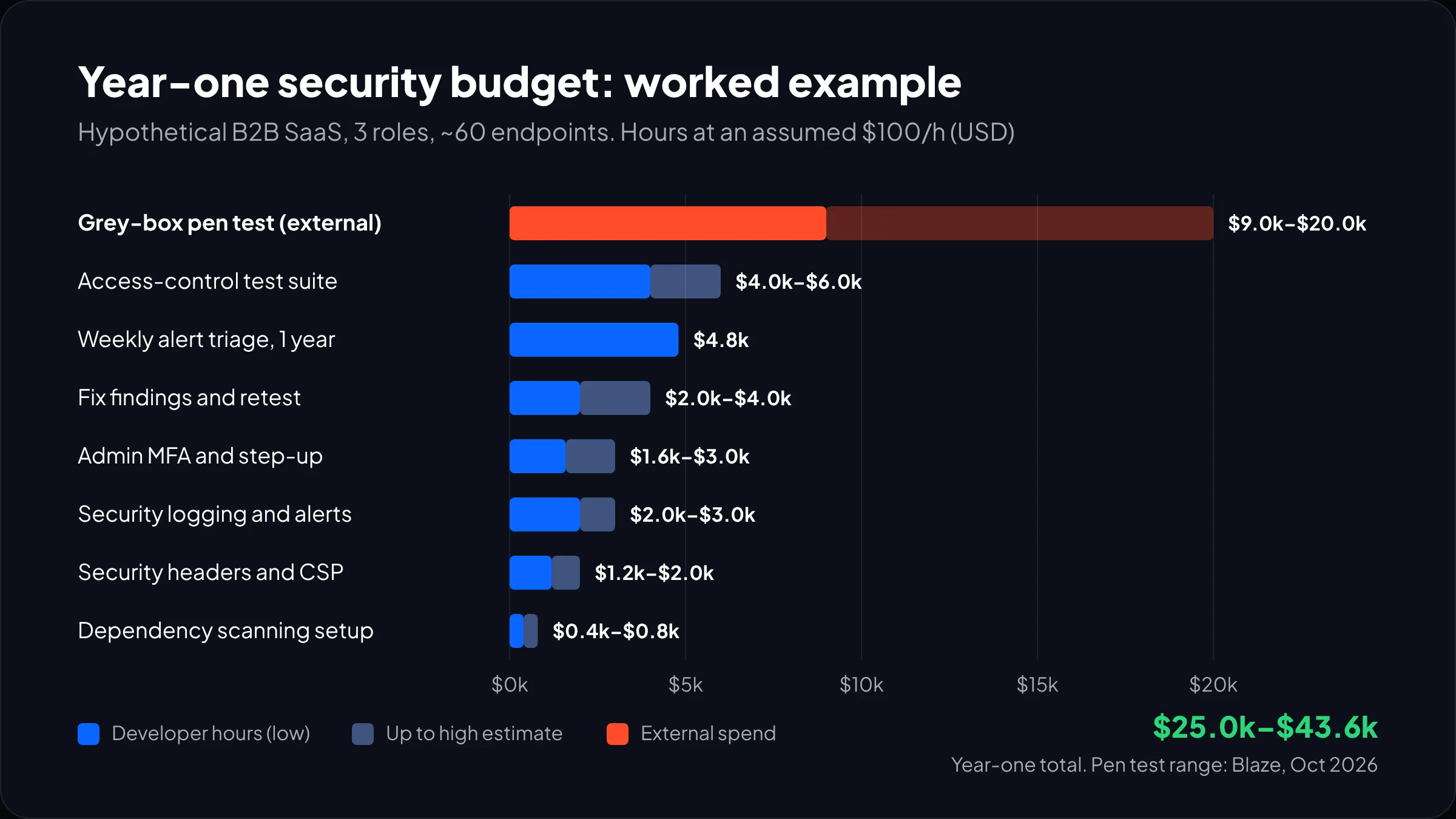
Year two is cheaper because headers, MFA and the test suite are done: very roughly $16,000 to $29,000 on these assumptions.
Is that worth it? The breach averages are large but do not translate neatly to a small company: IBM’s 2026 figure is $4.99 million globally and $11.5 million in the US, per the same eSecurity Planet summary. For a startup, the realistic cost is a lost enterprise deal or a week of engineering spent on incident response instead of the roadmap. Our post on taking a vibe-coded prototype to production covers what usually needs hardening.
When we build apps through our custom web application development service, the first eight rows of the checklist are part of the build rather than a separate line item. Writing access tests alongside the endpoints is far cheaper than retrofitting them, a point we also make in our guide to custom web application development.
Frequently asked questions
What is the OWASP Top 10 2025?
The OWASP Top 10 2025 is the current edition of OWASP’s list of the most serious web application security risks, replacing the 2021 version. Broken access control stays first, security misconfiguration rises to second, and two categories are new: software supply chain failures and mishandling of exceptional conditions. SSRF is now part of broken access control.
How often should a web application be penetration tested?
Most web applications should be penetration tested at least once a year, plus after any major change such as new user roles, a payments flow or a move to multi-tenancy. Test before big launches and enterprise sales cycles too. Between tests, run automated dependency and DAST scanning continuously so the pen tester can focus on business-logic flaws.
How much does a web application penetration test cost?
A web application pen test typically costs $5,000 to $30,000 in 2026. A simple app with basic login runs about $5,000 to $9,000, a multi-role app with APIs about $9,000 to $20,000, and a complex multi-tenant platform $20,000 or more. Make sure the quote includes a retest of fixed findings.
Is HTTPS enough to make a website secure?
No. HTTPS encrypts traffic between the browser and your server, which stops eavesdropping, but it does nothing about broken access control, injection, weak passwords or vulnerable dependencies. It is one row of a web application security checklist. Add HSTS so browsers never fall back to plain HTTP, then work through the rest.
Do small businesses need a web application security checklist?
Yes, and small businesses benefit most because the cheapest controls cover the most common attacks. MFA on admin accounts, security headers and dependency scanning cost a few days of developer time. Customers and enterprise buyers increasingly ask for evidence of these basics, so a written checklist also helps you win deals.
What we’d do this month
Start with the two rows that cost almost nothing and stop the most damage. Put MFA, ideally hardware keys or passkeys, on every account that can deploy code or change DNS. Then switch on dependency scanning and give one named person an hour a week to work the alerts.
Next, ask your team the A01 question above. If the answer is not a test suite proving users cannot read each other’s data, that is your first real project, and it matters more than any header. Ship the headers in report-only mode the same week.
Book the pen test only once those are done. The report will be shorter and the findings will be about your business. If you would rather have a team build those controls in from the start, our custom web app development team works this checklist into every project we ship.