On this page
- What an AI shopping assistant should do on a Shopify store
- Your three options in 2026: Inbox agent, an app, or a custom build
- Shopify Inbox and its built-in Inbox agent
- Shopify AI chatbot apps: what you are really paying for
- Building a custom assistant on Shopify’s MCP servers
- Shopify Sidekick vs custom: different jobs
- AI product recommendations that hold up
- Wrong prices and phantom stock: the risks to design out
- How to measure an AI shopping assistant: conversion, AOV and deflection
- What an AI shopping assistant costs
- Frequently asked questions
- What we’d do first
The AI part of an AI shopping assistant is rarely what goes wrong. A model can describe a linen shirt well enough. Projects fail on the boring plumbing: a price quoted from last week’s catalog, or a cheerful “yes, that’s in stock” for a variant that sold out an hour ago.
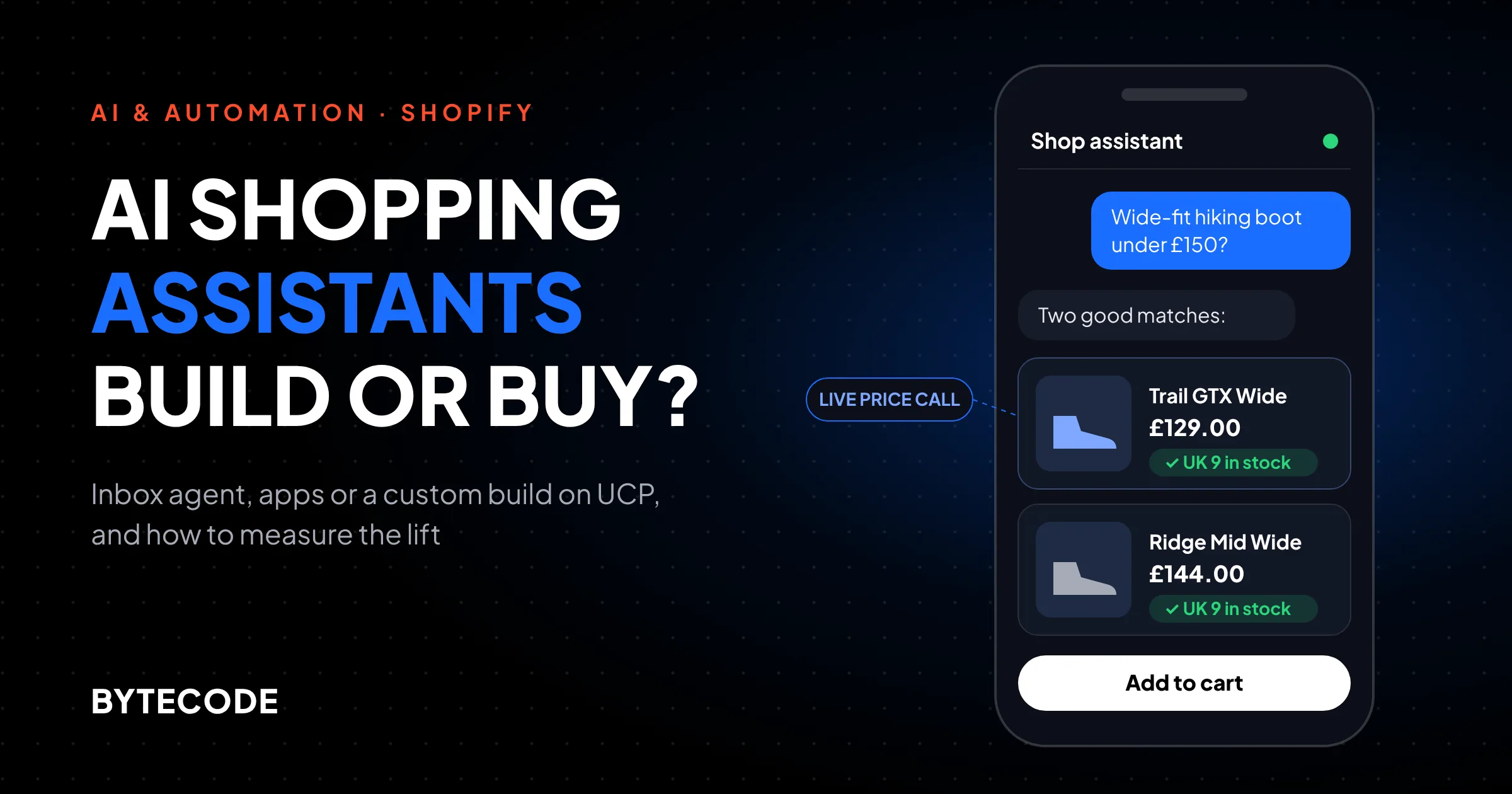
So the useful question for a Shopify brand in late 2026 is not “should we add AI chat?” It is which route you take, and how you will prove it pays. You can switch on the free Inbox agent inside Shopify Inbox, pay for a per-resolution app, or build your own assistant on Shopify’s commerce MCP servers. We build all three for clients. This guide covers what each can do today, what Shopify changed underneath developers this year, how to measure the result honestly, and what each option costs at three traffic levels.
Key takeaways
- Start with Shopify Inbox’s built-in agent. It is free, it can add products to the cart, and it shows whether shoppers use chat at all.
- Shopify removed the old Storefront MCP endpoint at
/api/mcp. Custom builds now use the Universal Commerce Protocol servers at/api/ucp/mcp. - “Assisted orders” is not incremental revenue. Only a holdout test tells you what the assistant added.
- Prices and stock must come from a live tool call on every turn, never from the model’s memory or a cached index.
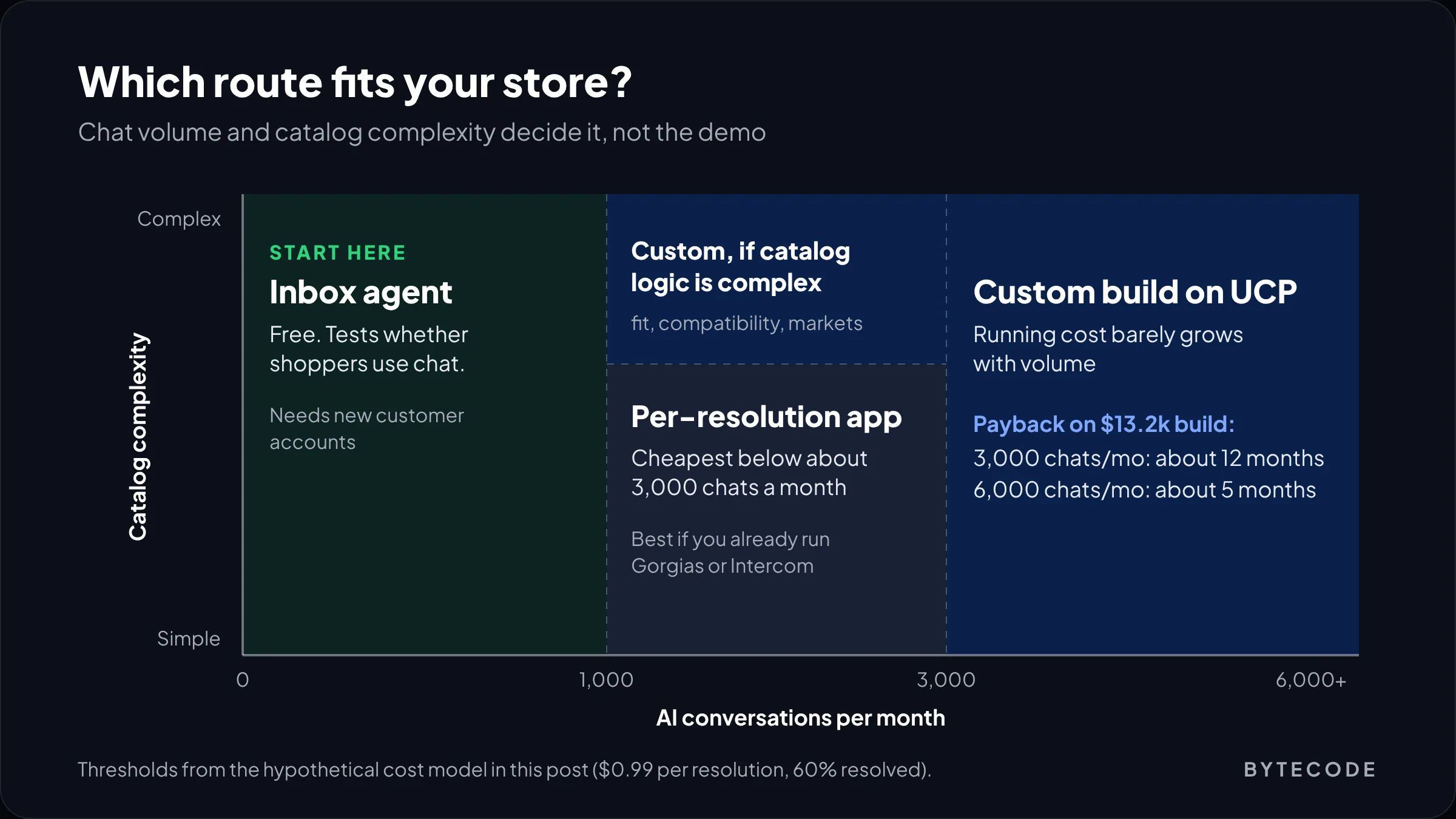
- Per-resolution apps win at low volume. In our worked example, a custom build pays back somewhere above 3,000 conversations a month.
What an AI shopping assistant should do on a Shopify store
A good AI shopping assistant does four jobs: it narrows the catalog to the right two or three products, answers pre-purchase questions from your real policies, builds the cart, and hands off to a human when it should. Anything beyond that belongs in phase two.
On the stores we work with, the chats that matter commercially are fit and compatibility questions (“will this fit a 2019 Model 3?”) and delivery questions in the last minutes before checkout. Both need live catalog data far more than clever prose.
What we leave out of version one:
- Refunds, cancellations and address changes. These touch money and fulfilment. Route them to your helpdesk.
- Open-ended discounting. If the bot offers 10% to anyone who hesitates, shoppers learn to hesitate.
- Medical or safety advice about products, even when the shopper pushes. Supplements and baby products are where this bites.
One distinction helps when you brief vendors. A support chatbot is judged on tickets it closes; a shopping assistant is judged on revenue per visitor. Decide which one you are buying before you watch demos. If support deflection is the main goal, our guide to building an AI chatbot for your website covers that side.
Your three options in 2026: Inbox agent, an app, or a custom build
Most Shopify stores should begin with the Inbox agent, move to an app when they need helpdesk integration or more control, and build custom only when volume or catalog complexity justifies owning the stack. Here is how they compare in November 2026.
| Shopify Inbox agent | Third-party AI app | Custom build on UCP MCP servers | |
|---|---|---|---|
| Software cost | Free app | Monthly fee, often plus a per-resolution charge | Model usage plus hosting; no licence |
| Time to live | An afternoon | Days to a couple of weeks | Roughly 6 to 12 weeks, in our scoping |
| Data it uses | Catalog, policies, pages, Knowledge Base | Varies; ask how often it syncs | Whatever you wire in, read live |
| Cart actions | Adds recommended products to cart | Most leading apps do | Full cart and checkout handoff |
| Brand and UX control | Persona and tone; AI notice is fixed | Moderate | Total |
| Analytics | Four headline metrics | Usually richer dashboards | Your own events and holdout |
| Best fit | Any store testing demand for chat | Stores already on Gorgias, Intercom or similar | High volume, complex catalogs, many markets |
Shopify Inbox and its built-in Inbox agent
Shopify Inbox now ships with an opt-in AI agent that answers product and policy questions, recommends products and adds them to the cart. The app is listed as free on the Shopify App Store, with 4.5 stars from 5,817 reviews and 21 supported languages when we checked.
Go to Sales channels > Inbox and find the Inbox agent section. There are three modes: All conversations, Only when your staff is unavailable, or Never. Stores that installed Inbox before the agent existed default to Never, so plenty of merchants have it and don’t know.
The details that matter, from Shopify’s Help Center page on assigning the agent:
- It needs new customer accounts (Settings > Customer accounts). Legacy accounts are the usual reason it won’t switch on.
- It answers questions on product details, availability and pricing, and looks up orders only after the customer signs in.
- Its sources are your catalog, policies, pages and Knowledge Base, with web search used only as a secondary source for product-adjacent content.
- Shoppers see a notice that they are talking to AI powered by Shopify. You cannot remove or reword it.
- You, the merchant, are responsible for accuracy, and Shopify asks you to update your privacy policy because chats are processed to improve the agent.
Handoff is decent for a free tool. If staff are online, the conversation moves to them with the AI’s context attached. If not, the agent gives out your sender email address.
Training is lighter than the word suggests. Under Sales channels > Inbox > Training you rate practice scenarios or real conversations, and Shopify proposes an updated persona. That shapes tone, not knowledge. If the agent gets your returns window wrong, fix the policy page.
From our team: run the agent on Only when your staff is unavailable for two weeks before going to All conversations. Then read 50 overnight transcripts. You will find the gaps in your product data faster than any audit.
The limits: it lives only in the online store chat widget, you cannot add your own tools, and reporting is thin.
Shopify AI chatbot apps: what you are really paying for
A third-party Shopify AI chatbot makes sense when you already run a helpdesk and want one agent covering pre-sale and post-purchase questions, or when you need proactive prompts and deeper analytics than the Inbox agent offers.
Pricing models differ more than features do. The comparison Intercom publishes for its own Fin product shows the spread (read it knowing who wrote it): Fin for Ecommerce at $0.99 per outcome, Gorgias at $0.90 to $1.00 per AI resolution on top of a helpdesk plan of $10 to $750 a month, Rep AI from $39 a month on session pricing, and Tidio with a free tier and paid plans from $29.
Per-resolution pricing sounds fair until you read the definition of a resolution. Ask before you sign:
- What counts as resolved? If a shopper simply leaves, is that billed? Some vendors count it.
- How does it learn price and stock changes? Product and inventory webhooks are fine. A nightly storefront crawl is not.
- Does it quote market prices? If you sell in GBP and EUR through Shopify Markets, test it.
- Can you export transcripts? You need them for quality review and your own holdout analysis.
Our view: if you already run Gorgias or Intercom, use their AI rather than adding a second widget.
Building a custom assistant on Shopify’s MCP servers
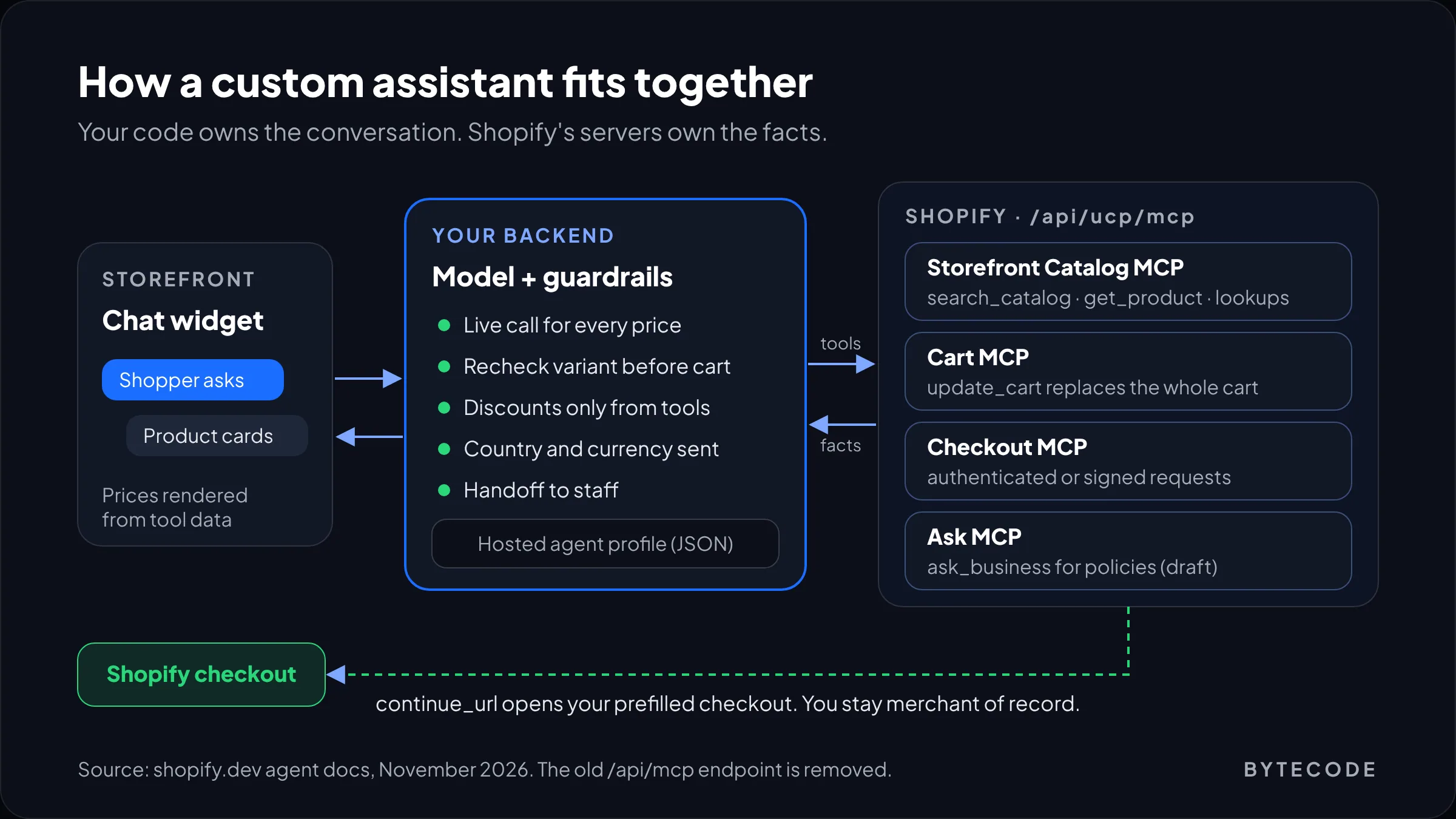
A custom AI shopping assistant on Shopify now means your own chat front end and model, talking to Shopify’s Universal Commerce Protocol (UCP) MCP servers at https://{your-store}/api/ucp/mcp for catalog, cart, checkout and policy answers. This changed a lot this year, and many articles ranking for the topic are out of date.
The original Storefront MCP endpoint at /api/mcp is gone. The migration page on shopify.dev opens with a “Removed” notice and maps old tools to new ones:
- Storefront Catalog MCP:
search_catalog,lookup_catalogandget_product. - Cart MCP:
create_cart,get_cart,update_cart,cancel_cart. - Checkout MCP: checkout sessions; requests must be authenticated or signed.
- Ask MCP:
ask_businessfor policy and FAQ questions, still a draft capability. - Customer Accounts MCP: unchanged, with order tracking also available through Order MCP.
The catalog needs no API key. Every request instead carries a link to your agent profile, a small hosted JSON file declaring which UCP capabilities your agent supports. A trimmed call looks like this (the Storefront Catalog MCP reference has the full schema):
POST https://your-store.com/api/ucp/mcp
{
  "jsonrpc": "2.0", "id": 1, "method": "tools/call",
  "params": {
    "name": "search_catalog",
    "arguments": {
      "catalog": {
        "query": "waterproof hiking boot, wide fit",
        "context": { "address_country": "GB", "currency": "GBP" },
        "pagination": { "limit": 5 }
      },
      "meta": { "ucp-agent": { "profile": "https://example.com/agent.json" } }
    }
  }
}
Three details that save debugging time. Prices come back in minor units, so 1899 means 18.99, and a template that forgets to divide will show a $1,899 sock. Availability is a flag on each variant, so read the variant, not the product. And buyer context changes what comes back, so send it on every call.
The cart has its own trap. Per Shopify’s carts and checkout docs, update_cart replaces the whole cart with what you send. Send only the new item and you have deleted everything else. Checkout usually ends with a continue_url into your normal, prefilled Shopify checkout, and you remain merchant of record.
Watch out: many tutorials and starter repos from 2025 and early 2026 call /api/mcp with the old tool names. They no longer work. If someone quotes a “quick build from Shopify’s template,” ask which endpoint it calls.
For data the MCP tools don’t expose, such as compatibility tables in metafields, we add a small service the model calls as one more tool, so the model never queries Shopify with free-form input. If ask_business handles your returns rules poorly, retrieval over your help content works well; see our explainer on retrieval-augmented generation. This pattern is the build our Shopify AI development team does most often.
Shopify Sidekick vs custom: different jobs
Shopify Sidekick is not a shopping assistant. It is the AI assistant for you and your staff inside the Shopify admin, and shoppers never see it, so “Shopify Sidekick vs custom” is usually the wrong comparison. The real one is Inbox agent versus custom.
Sidekick still helps with prep, such as finding products missing sizes or materials. More in our Shopify Sidekick guide.
AI product recommendations that hold up
AI product recommendations in chat are only as good as the attributes in your catalog. If “wide fit” lives inside a paragraph of description, the assistant guesses. If it is a metafield or variant option, it can filter.
Our pre-launch catalog pass:
- Decision attributes as structured data: fit, material, compatibility, capacity, whatever your support tickets ask about most.
- Complementary pairs set by hand for your top 50 products, so “what goes with this?” has a merchant-chosen answer.
- Out-of-stock behaviour decided in advance: nearest in-stock alternative, a back-in-stock alert, or both.
One rule we hold to: offer two or three options with a one-line reason each. That fails more gracefully than a single confident pick when the model misreads the question.
Wrong prices and phantom stock: the risks to design out
The biggest risk with any AI shopping assistant is a confident, wrong statement about price, stock, delivery or discounts that a shopper then screenshots. Shopify’s own Inbox documentation puts responsibility for accuracy on the merchant.
| Failure | How it happens | Control we build in |
|---|---|---|
| Wrong price | Model repeats a price from earlier in the chat or a cached index | Render prices from the tool response in a UI card, never from model text |
| Wrong currency | Buyer context not passed | Send country and currency on every catalog call |
| Phantom stock | Product-level availability read instead of the variant | Recheck the chosen variant just before add-to-cart |
| Invented discount | Shopper asks for a code; model obliges | Only codes returned by a tool, never free text |
| Delivery promise | Model guesses dates | Quote shipping policy text or a live estimate only |
| Prompt injection | Instructions hidden in reviews or third-party content | Treat retrieved text as data; no tool can change prices or orders |
Caching deserves its own line. Shopify’s catalog docs tell agents not to cache search results or reuse images, and catalog queries are rate limited. A nightly vector index is fine for “what do you sell?” questions. It is not fine for any sentence containing a number.
Watch out: test on the morning a sale starts, not the week before. Ask the assistant for the sale price of five products and compare with the storefront.
Not sure which assistant fits your store?
Share your monthly sessions, catalog size and current chat tool, and we will recommend a route with a cost and timeline attached.
Get a shopping assistant plan
How to measure an AI shopping assistant: conversion, AOV and deflection
Measure an AI shopping assistant with a holdout test: hide it from a random share of visitors and compare conversion rate, AOV and revenue per visitor between groups. Every other number is a proxy.
The Inbox agent’s Overview page, per Shopify’s conversations guide, shows assisted sessions, assisted orders, satisfaction rate and average response time. Assisted orders is the number people quote, and the one that misleads. A shopper asking about sizing is already deep in the funnel. Many would have bought anyway.
| Metric | How to calculate it | What it tells you |
|---|---|---|
| Incremental conversion | Assistant group rate minus holdout rate | Whether it creates sales or sits next to them |
| Revenue per visitor | Revenue divided by sessions, per group | Conversion and AOV in one number |
| AOV | Revenue divided by orders, per group | Whether recommendations add items or swap them |
| Deflection rate | Chats resolved without a human, over all chats | Support savings, kept apart from sales impact |
| Wrong-answer rate | Errors in a weekly sample of 50 transcripts | The number that protects your brand |
A worked example with hypothetical numbers. Your store gets 80,000 sessions a month at 2.0% conversion. You hold out 10%, so 72,000 sessions see the assistant. If that group converts at 2.15% against the holdout’s 2.0%, that is a 7.5% relative lift: about 108 extra orders, or roughly $7,560 a month at a $70 AOV. Run it for at least four full weeks.
From our team: the Inbox agent gives you no randomised holdout. A rough substitute is alternating weeks between All conversations and Only when your staff is unavailable, then comparing out-of-hours conversion. Noisy, but better than quoting assisted orders.
What an AI shopping assistant costs
The Inbox agent costs nothing beyond staff time. Apps run from a free tier to a few thousand dollars a month at volume, mostly through per-resolution fees. A custom build has a one-off build cost and a running cost that grows slowly with traffic. Which is cheapest depends on conversation volume.
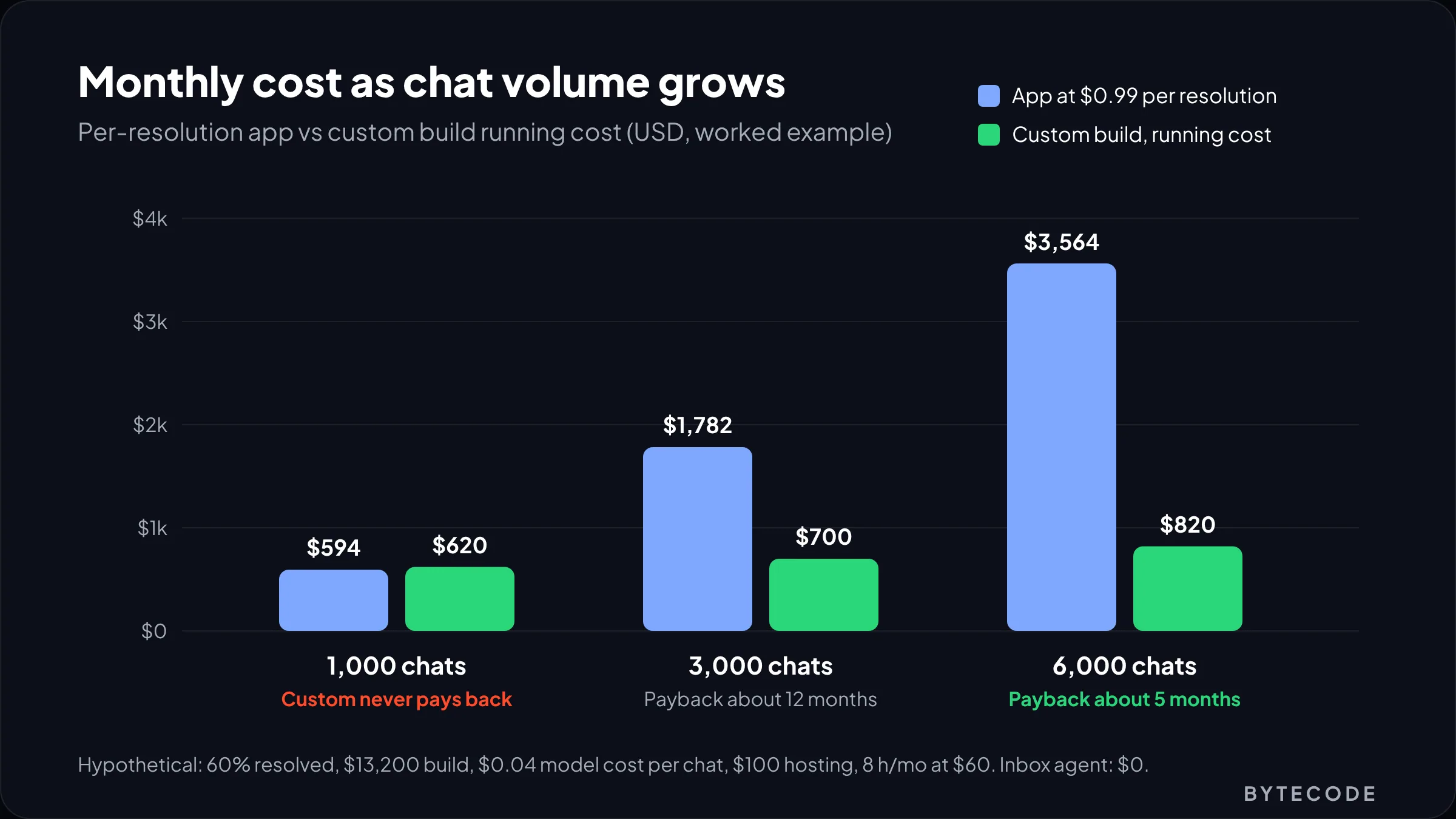
A hypothetical model, with our assumptions stated:
- 60% of conversations become billable resolutions at $0.99 each (the Fin rate above); helpdesk seats excluded.
- Custom build: 220 hours at a blended $60 an hour, so $13,200 one-off.
- Custom running cost: $0.04 of model usage per conversation (check your provider’s current prices), $100 a month for hosting and logging, and 8 maintenance hours a month at $60.
| Conversations per month | Inbox agent | Per-resolution app | Custom (running) | Custom payback on $13,200 |
|---|---|---|---|---|
| 1,000 | $0 | $594 | $620 | Never |
| 3,000 | $0 | $1,782 | $700 | About 12 months |
| 6,000 | $0 | $3,564 | $820 | About 5 months |
The custom column ignores the cost of getting version one wrong, which is real. Falling model prices help it over time; model routing and prompt caching keep spend low without touching the price-and-stock rules above. Our Shopify intelligence solutions discovery produces exactly this table with your own numbers.
Frequently asked questions
Does Shopify have a built-in AI shopping assistant?
Yes. Shopify Inbox, a free app, includes an opt-in Inbox agent that answers product and policy questions, recommends products, adds them to the cart and looks up orders for signed-in customers. You switch it on under Sales channels > Inbox. It requires new customer accounts and works on the Basic, Grow, Advanced and Plus plans.
How much does an AI shopping assistant cost for a Shopify store?
It ranges from free to several thousand dollars a month. The Shopify Inbox agent is free. Apps often charge about $0.90 to $1.00 per AI resolution, sometimes on top of a helpdesk plan. A custom build adds a one-off development fee, commonly five figures, plus model usage and hosting that grow slowly with traffic.
Can an AI chatbot add products to the cart on Shopify?
Yes. The Shopify Inbox agent can add recommended products to the cart, and most leading apps can too. A custom assistant uses Shopify’s Cart MCP tools, then sends the shopper to the normal Shopify checkout through a prefilled link, so the merchant stays merchant of record and checkout works as usual.
Is Shopify Sidekick a shopping assistant for customers?
No. Sidekick is Shopify’s AI assistant for merchants and staff inside the admin, used for reports, product edits and store setup. Shoppers never see it. For a customer-facing assistant, use the Inbox agent in Shopify Inbox, a third-party chat app, or a custom build on Shopify’s commerce MCP servers.
How do you measure the ROI of an AI shopping assistant?
Run a holdout test. Hide the assistant from a random 10% to 20% of visitors for at least four weeks, then compare conversion rate, AOV and revenue per visitor between groups and subtract the assistant’s monthly cost. Don’t judge it on assisted orders, because shoppers who open chat were already likely to buy.
What happened to Shopify’s Storefront MCP server?
Shopify removed the catalog and cart tools from the original Storefront MCP endpoint at /api/mcp. Developers now use the Universal Commerce Protocol servers at /api/ucp/mcp, including Storefront Catalog MCP, Cart MCP, Checkout MCP and Ask MCP. Requests identify your agent with a hosted profile, so code written for the old endpoint needs rewriting.
What we’d do first
This week, switch on the Inbox agent in Only when your staff is unavailable mode and fix whatever blocks it, usually legacy customer accounts. Read the first 50 overnight transcripts. Every vague answer points at a missing attribute or an unclear policy page, and fixing those helps whichever route you take later.
Then decide on evidence. If chat volume stays low, stop there; it cost you nothing. If it climbs into the thousands of conversations a month, or your catalog needs compatibility logic the built-in agent can’t handle, price an app against a custom build with the table above, and plan the holdout before launch.
We have built for brands like Delsey, EcoFlow and Kerbholz. If you want help choosing or building an assistant, our Shopify AI team starts from your transcripts and catalog, not a sales deck. And if you also want to sell through ChatGPT and other outside agents, our guide to agentic commerce on Shopify shows how the same catalog work pays off there.