On this page
- The Shopify development process, phase by phase
- What to have ready before week one
- Discovery (weeks 1–2): agree what you’re building
- Design (weeks 3–5): templates, not pages
- Build (weeks 5–10): theme, data, apps and integrations
- QA and user acceptance testing (weeks 10–12)
- Launch week and the first 30 days
- Why Shopify project timelines slip: a worked example
- Frequently asked questions
- Where we’d start this week
A typical Shopify development process runs through six phases: discovery, design, build, QA, launch and post-launch support. For a customized premium theme that takes about 6 to 10 weeks to launch. A custom theme takes 3 to 6 months, and a Shopify Plus build 4 to 9 months. Every one of them needs another 2 to 4 weeks of close support after go-live.
The code rarely sets the launch date. On most projects we run, the critical path goes through the client’s inbox: the product spreadsheet that is “nearly done”, the design round that waits a week for a founder at a trade show, the registrar login nobody can find on launch morning. So for each phase you get the weeks it usually takes and what you need to hand over to keep it that short. The week counts are our own planning numbers. The platform details we re-checked against Shopify’s documentation in November 2026.
Key takeaways
- Six phases, with lengths set by project type: 2 to 4 weeks for a theme setup, 6 to 10 for a customized premium theme, 3 to 6 months for a custom theme, 4 to 9 months for Plus.
- Most delays come from inputs, not development. In our hypothetical example below, slow sign-offs and late product data turn a 13-week project into a 20-week one.
- Do the boring things in week one: collaborator access, a paid plan, payment and tax details, the domain registrar login.
- Product data is the longest lead item. Start cleaning it the day you sign, not the week before launch.
- Plan launch as a week, not a day, and keep a named person on your side watching orders for the month after.
The Shopify development process, phase by phase
Here is the whole Shopify development process in one table: six phases, their length for four common project types, and the gate that closes each one. A phase ends when someone with authority signs it off, not when the calendar says so.
| Phase | Theme setup | Customized premium theme | Custom theme | Shopify Plus build | The phase ends when |
|---|---|---|---|---|---|
| Discovery | 2–3 days | 1 week | 2 weeks | 2–4 weeks | You sign off scope, sitemap and app list |
| Design | Folded into build | 1–2 weeks | 3–5 weeks | 4–6 weeks | You approve the key templates in writing |
| Build | 1–2 weeks | 3–4 weeks | 6–12 weeks | 10–20 weeks | Every template, app and integration works on the preview theme |
| QA and UAT | 2–3 days | 1–2 weeks | 2–3 weeks | 3–5 weeks | You sign the test list with no open blockers |
| Launch | 2–3 days | 3–5 days | 1 week | 1–2 weeks | The store is public, real orders flow, redirects are live |
| Total to launch | 2–4 weeks | 6–10 weeks | 3–6 months | 4–9 months | |
| Post-launch | 2 weeks | 2–4 weeks | 4 weeks | 4+ weeks | Hypercare ends and a maintenance plan takes over |
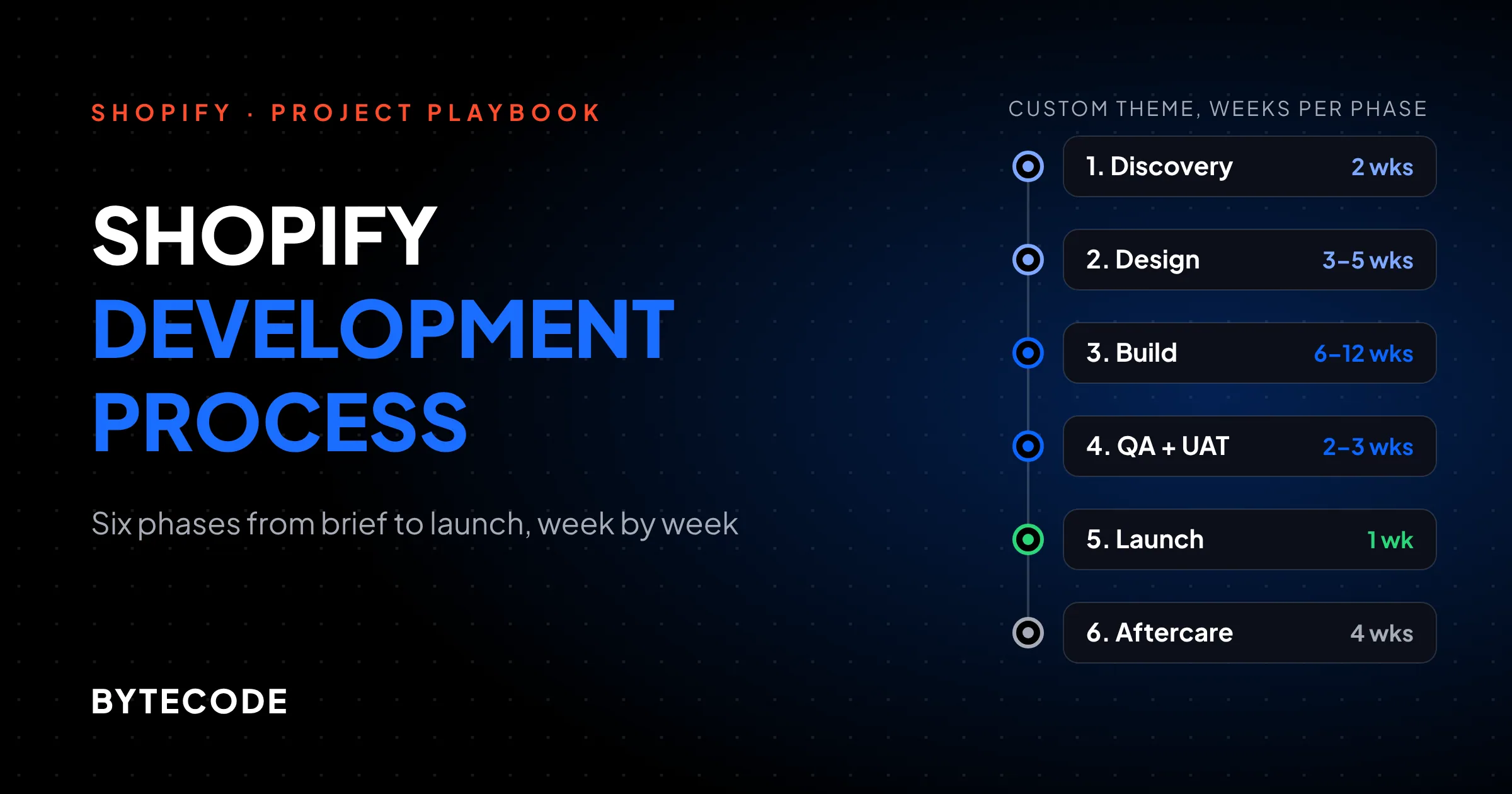
Those totals assume phases run back to back. In practice we overlap design and build: a developer starts the product page as soon as it is approved, while the designer moves on. That is how the hypothetical custom-theme project below reaches launch in 13 weeks instead of 14. It only works if approvals are final. The phase headings below use that example’s weeks.

For the hours and rates behind each project type, see our breakdown of Shopify development cost.
What to have ready before week one
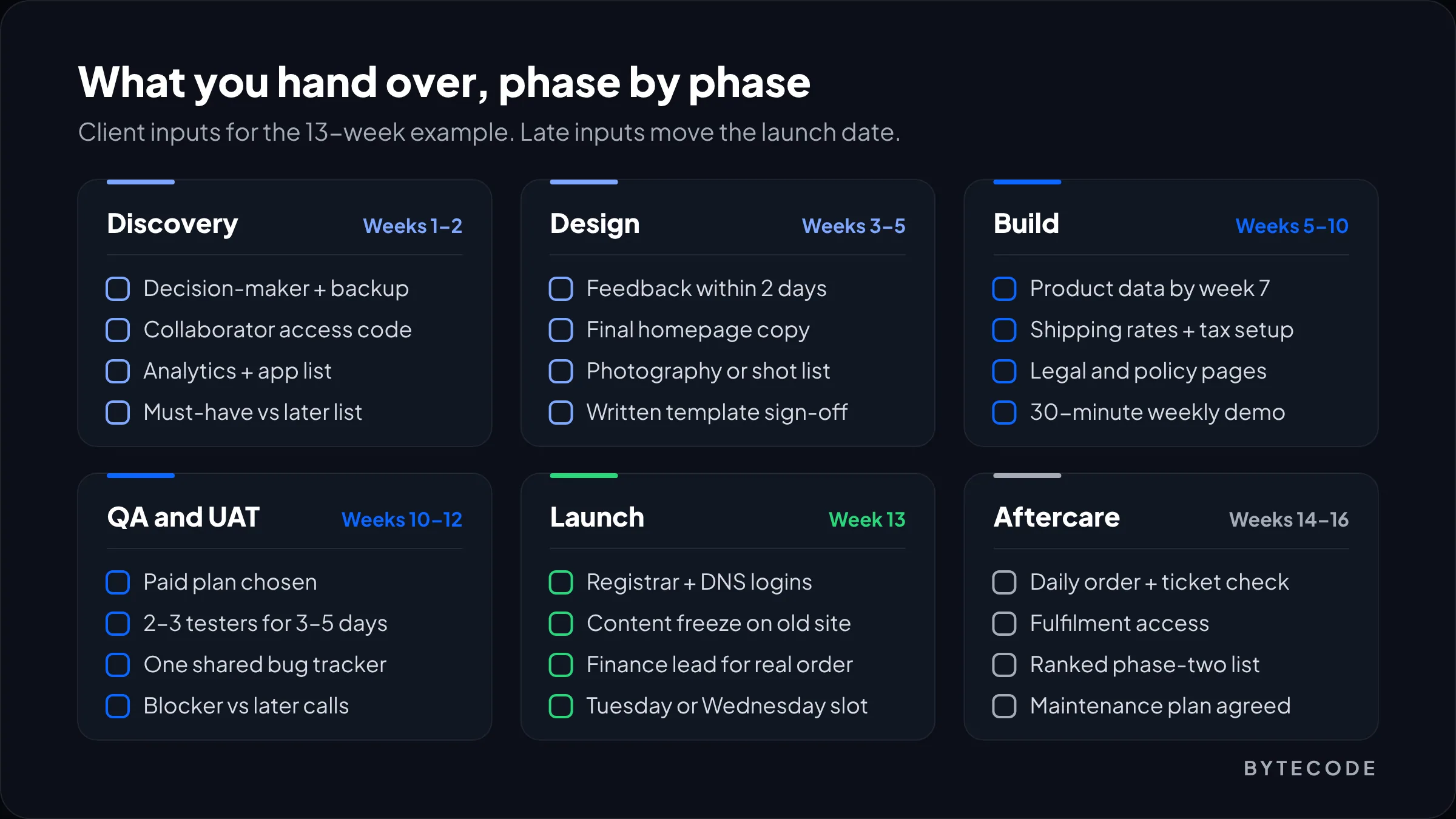
Before a Shopify project starts you need five things: one decision-maker, store access for your agency, payment and business details, your product data in one place, and your brand assets. Everything else can be worked out in discovery.
- One decision-maker, plus a named backup. Not a committee. Four approvers means four sets of feedback that contradict each other.
- Store access. If your store already exists, give your agency collaborator access instead of sharing the owner login. The 4-digit request code sits under Settings > Users > Security, and per Shopify’s collaborator documentation, collaborators don’t count towards your store’s user limit.
- Business and payment details. Legal entity, business address, payout bank account, VAT or sales tax registrations. Payment verification is the one launch blocker no developer can fix for you.
- Product data. An export of every product with variants, prices, SKUs, barcodes, weights and descriptions, plus images in one shared folder with file names that match SKUs.
- Brand assets. Logo as SVG, fonts with a web licence, colour values and the photography you already own.
Also collect logins for everything the store touches: domain registrar, DNS host, email platform, ERP or 3PL, Google Analytics, Search Console.
From our team: we build in a store you own, on an unpublished theme, for anything beyond a prototype. Dev stores are fine for sandboxing, but Shopify’s developer docs confirm they are always password protected and can’t take real transactions through live payment providers. Plan, payments and domain should be yours from day one, so launch is a switch, not a handover.
Discovery (weeks 1–2): agree what you’re building
Discovery turns your brief into a signed scope, sitemap, app list and dated plan. It takes about a week for a customized premium theme, two for a custom theme and up to four for a Plus build. It is the cheapest phase to change your mind in, so have the arguments here.
What we actually do in those two weeks:
- A 2 to 3 hour workshop with whoever owns revenue, ops and brand, about how orders really get fulfilled.
- An analytics review: which templates earn money, on which devices. On most stores we audit, mobile product pages carry the business, so they get designed first.
- An app audit. Every app is kept, replaced by a native feature, or removed.
- A URL inventory if you are replatforming, so redirects are planned now rather than discovered at launch. Our WooCommerce to Shopify migration checklist covers that mapping in detail.
What we skip: 40-page strategy decks and personas nobody opens again. A five-page scope you can hold a vendor to is worth more.
What you provide in discovery
- Analytics and Search Console access.
- Your current app list and what each one costs you a month.
- Two or three reference sites, each with the specific thing you like. “The filter drawer here” is useful. “Clean and modern” is not.
- A split of must-have-for-launch against later.
Watch out: anything outside the signed scope goes on a phase-two list, not into the current sprint. “Just one more section” is how 8-week projects become 14-week projects. A good agency writes those requests down and prices them, rather than absorbing them and missing the date.
Design (weeks 3–5): templates, not pages
Design takes 1 to 2 weeks when we are customizing a premium theme and 3 to 5 weeks for a custom theme. Shopify stores are built from templates, so we design the templates that make money first: product page, collection page, cart, then home. Mobile first, every time.
We work in Figma, wireframes before visuals, with two revision rounds per template. A third round is fine, but it moves the date, and we say so at the time.
Design with real data. Ask to see the product with your longest title, the one with 14 variants, and the one with a single blurry photo. We also design against WCAG 2.2 AA from the first wireframe (contrast, focus states, tap targets), because retrofitting accessibility after the build is slower and costs more.
What you provide in design
- One set of consolidated feedback per round, within two working days. Comment in Figma, not in email.
- Final copy for the homepage, about page and any landing pages in scope.
- Photography, or a shot list with dates if the shoot hasn’t happened yet.
- Written approval of each key template. A thumbs-up emoji is not a sign-off.
Build (weeks 5–10): theme, data, apps and integrations
Build is the longest phase: 3 to 4 weeks on a customized theme, 6 to 12 on a custom theme and 10 to 20 on a Plus build. It runs as parallel workstreams: theme development, product data, and apps with integrations.
Theme development
We build on an unpublished theme in your store, with code in Git and deployments through Shopify CLI, so nothing is edited live. Sections and blocks are built so your team can rearrange content in the theme editor without calling us. Specs and size charts go into metafields instead of being pasted into descriptions.
Product data
This is where most builds lose time. per Shopify’s import guide, a file can’t exceed 15 MB and an import can’t be cancelled once it starts. The rule that hurts most: changing values in the Option1 to Option3 columns deletes existing variant IDs and creates new ones, which can break reviews, ad feeds and anything keyed to those IDs. For catalogs in the thousands, we use Matrixify instead of the native importer.
Apps and integrations
Only apps from the signed list get installed, each checked for the scripts it adds to the storefront. ERP, 3PL and email connections are built against sandbox credentials first. Ask for those in week one: an ERP vendor’s sandbox can take longer to arrive than the connector takes to build.
What you provide during build
- Final product data and images by the agreed date (week 7 in our example plan).
- Shipping zones, rates and carrier accounts. Tax registrations for every region you will sell into.
- Legal pages: privacy policy, terms, refund and shipping policies. Shopify can generate templates, but your lawyer should read them.
- 30 minutes a week for a demo on the preview link, so a misunderstanding shows up in week six, not week twelve.
Comparing vendors? Our guide on how to hire a Shopify developer lists the process questions that filter out teams who miss dates. Our Shopify development team runs strategy from Alpharetta and most build hours from Mohali.
QA and user acceptance testing (weeks 10–12)
QA takes 1 to 3 weeks for most stores. Our testers go first, then your team runs user acceptance testing (UAT) against a written list. We test the spec. You test how your business actually works.
What our QA pass covers:
- Devices. Real iPhones on Safari and Android phones on Chrome, then the desktop browsers.
- Checkout paths. Shopify lets you simulate orders with its Test payment gateway or run Shopify Payments in test mode. Two details from Shopify’s test order guide shape the plan: you can only test a payment gateway after choosing a paid plan, and customers can’t place live orders while your payment providers are in test mode. So pick your plan before QA starts, and put “turn test mode off” on the launch list.
- Edge cases. Discount codes that stack or shouldn’t, gift cards, subscriptions, out-of-stock variants, every market and currency in scope.
- Integrations. Does a test order reach the 3PL, ERP and email platform with the right data?
- Accessibility. A keyboard-only pass and a screen reader check on product, cart and checkout pages.
- Performance. Lighthouse on home, collection and product templates, taking the median of three runs. Shopify’s performance guide notes a single run can swing 5 to 10 points, and that Theme Store themes need an average Lighthouse performance score of at least 60 across those three pages. We treat 60 as a floor, not a target.
What you provide in QA
- Two or three people for 3 to 5 days of UAT, including someone from customer service. They know the strange orders.
- One shared bug tracker with a severity on each item, not email plus WhatsApp.
- A clear call on what blocks launch and what can wait.
Planning a Shopify build for early 2027?
Send us your target launch date, product count and the systems the store must connect to, and we will send back a phase-by-phase plan with your deadlines marked on it.
Get a dated project plan
Launch week and the first 30 days
Launch is a planned week, not a button: content freeze, redirects, payments, domain, go-live, then 2 to 4 weeks of hypercare where both teams watch the store daily. Launch on a Tuesday or Wednesday morning, never on a Friday or mid-sale.
A note for anyone reading this in November: we don’t launch stores between mid-November and early December. If you aren’t live by early November, launch in January. Peak season is the wrong time to find the bug in your discount logic.
Our Shopify store launch checklist
| When | Task | Owner |
|---|---|---|
| Launch minus 2 days | Lower the DNS TTL on your domain so the switch propagates faster | You or your IT contact |
| Monday | Content freeze on the old site. Final product, inventory and customer sync | Both |
| Tuesday | Import redirects under Content > Menus > View URL redirects, and check a sample of them | Agency |
| Tuesday | Turn payment test mode off. Place one real order and refund it | Agency and your finance lead |
| Wednesday a.m. | Connect the domain, publish the theme, open the store to the public | Agency |
| Wednesday | Submit the sitemap in Search Console, confirm analytics and ad pixels fire on purchase | Agency |
| Thursday–Friday | Watch orders, 404s, payment errors and support tickets hourly, then daily | Both |
Two platform details decide how that week goes. First, redirects. Shopify’s redirect documentation allows up to 100,000 redirects on standard plans and 20 million on Plus, and a redirect only fires when the old URL is broken. Second, the domain. You connect it under Settings > Domains > Connect existing domain, pointing the A record to 23.227.38.65 and the www CNAME to shops.myshopify.com, and Shopify warns it can take up to 48 hours to be fully live. Hence Wednesday, not Friday.
Hypercare: the first 2 to 4 weeks
Someone checks orders, failed payments, 404s and Search Console every day. Expect search traffic to wobble if URLs changed. Google’s guidance on site moves says a small to medium site can take a few weeks for most pages to move, and recommends keeping redirects for at least a year. We re-crawl the old URL list after week one and fix what slipped through.
Bugs in this window are fixed under warranty, new ideas go to phase two, and then a maintenance plan takes over. Our Shopify store maintenance checklist covers what it should include. Your part: one person reading order and support data daily, and a ranked phase-two list.
Why Shopify project timelines slip: a worked example
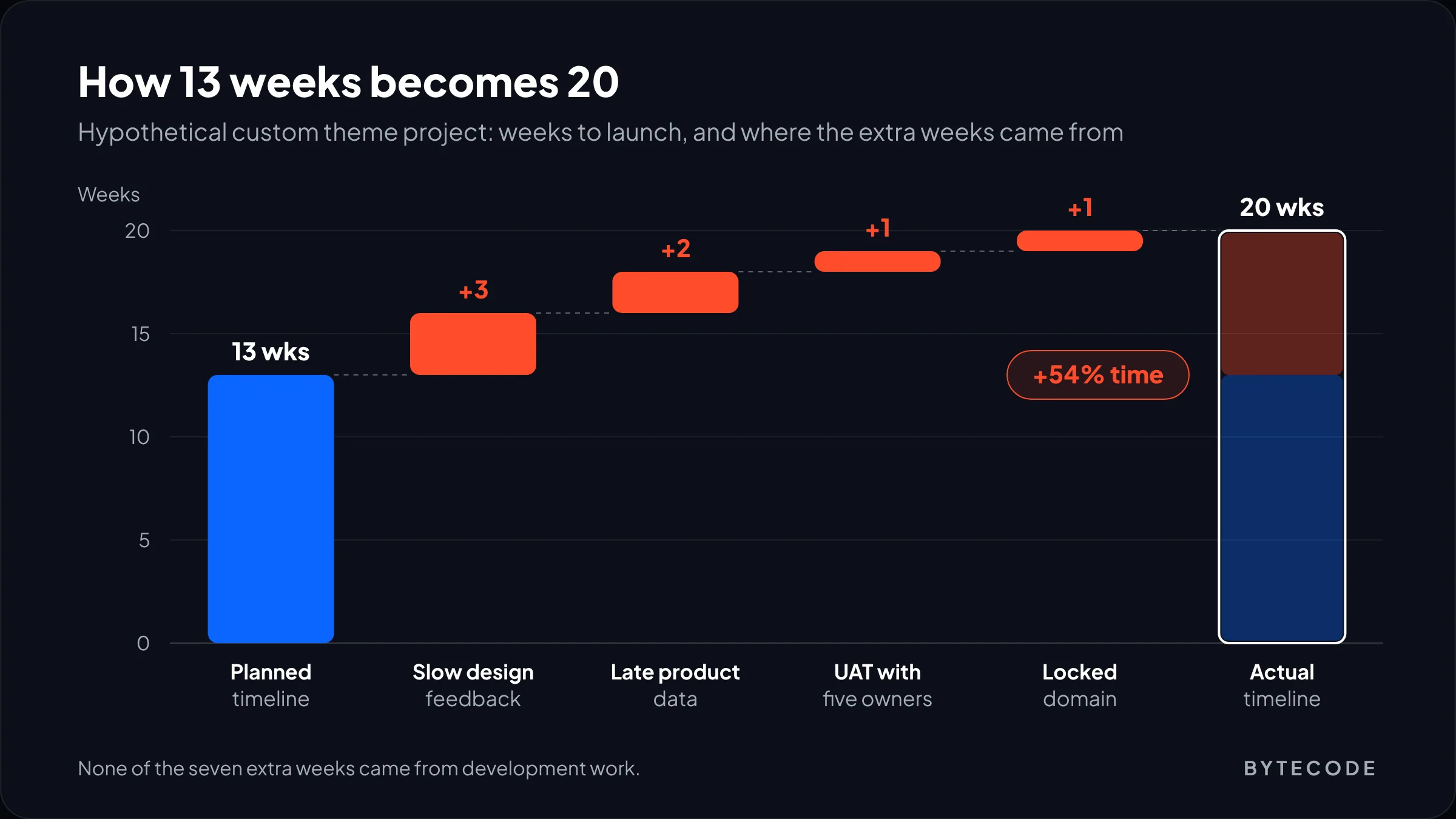
Shopify project timelines slip mostly through waiting for feedback, data or a decision, rarely through code. Say a homeware brand (hypothetical) plans a custom theme with the 13-week path in the first chart. Four things go wrong, none of them technical:
- Design feedback is slow. Each of three design rounds takes 7 working days to come back instead of 2. That is 15 extra working days: +3 weeks.
- Product data arrives late. The final spreadsheet lands two weeks after the week-7 deadline. Import and data QA shift with it: +2 weeks.
- UAT has five owners. Nobody consolidates, and sorting bugs from preferences takes +1 week.
- The domain is locked away. Nobody can log in to the registrar, set up years ago under a freelancer’s email. Recovery: +1 week.
Thirteen weeks becomes twenty, about 54% longer, and development was never the bottleneck. Every slip could have been avoided in week one.
How we protect a date: the plan lists your deadlines next to ours, feedback windows are 48 hours both ways, product data has a hard date, and one person on each side owns decisions. None of it is clever. It just has to be agreed in discovery, before anyone is under pressure.
Frequently asked questions
How long does it take to build a Shopify store?
Building a Shopify store takes 2 to 4 weeks for a theme setup, 6 to 10 weeks for a customized premium theme, 3 to 6 months for a custom theme and 4 to 9 months for a Shopify Plus build. Add 2 to 4 weeks of post-launch support. In our experience, late product data and slow design sign-off cause more delay than development does.
What do I need before starting a Shopify project?
Before starting a Shopify project you need one decision-maker, collaborator access to your store, business and payment details, your product data in one spreadsheet, and brand assets such as logo files, fonts and photography. Also gather logins for your domain registrar, DNS, email platform and any ERP or 3PL, since those block launch if they surface late.
Can I keep my old website live while the Shopify store is built?
Yes, your old website stays live for the whole build, and customers never see the new store until launch. The new theme is built unpublished or behind Shopify’s password page. The switch happens in launch week, when the domain is pointed at Shopify and redirects are imported.
Who should own the Shopify store account during development?
You should own the Shopify store account from day one, and give your agency collaborator access rather than your owner login. That way the plan, payment verification, domain and customer data are already yours at launch. Collaborator access can be scoped to the permissions the agency needs and removed when the project ends.
How many design revisions are normal in a Shopify project?
Two rounds of revisions per key template is normal and is what most agencies include in a fixed quote. A third round is fine but usually moves the launch date. What matters more is speed: consolidated feedback returned within two working days keeps a 3-week design phase at three weeks.
What happens after a Shopify store launches?
After launch comes a 2 to 4 week hypercare period where both teams watch orders, payments, 404 errors and search traffic daily and fix bugs under warranty. After that the store moves to ongoing maintenance: app and theme updates, monthly checks, and building the phase-two list of features held back from launch.
Where we’d start this week
If launch is three months away, do these before you talk to any developer:
- Name the decision-maker. One person, with a backup, and tell everyone else.
- Export your product data and start cleaning it. Titles, variants, SKUs, weights, images named by SKU. This protects more weeks than anything else here.
- Find every login. Registrar, DNS, payment provider, email, analytics. If a former freelancer owns any of them, start recovery now.
- Write the must-have list. Everything else goes to phase two, in writing.
- Work backwards from the date. Take the totals in the first table, add two weeks of buffer, and if that lands in late November, move launch to January.
That preparation shortens any Shopify development process, whoever builds it. We’ve built for brands like Delsey, EcoFlow, Kerbholz and MyHarry, and in our experience a date holds or slips on one thing: whether inputs arrive when the plan says. If you want a team that plans your deadlines as carefully as its own, look at our shopify development services and send us your date.