On this page
- AI assistant UX design changes once the assistant can act
- Risk tiers: which actions need explicit approval
- Action previews and confirmations people actually read
- AI agent undo: design reversibility windows into the backend
- Human-in-the-loop approval and permission scopes
- Show your work: sources, reasoning and progress
- When the agent gets it wrong: errors and apologies
- The AI agent audit trail: who did what, and why
- Accessibility, and how confirmations differ in voice and chat
- Frequently asked questions
- What we’d do first
Good AI assistant UX design for agents that act comes down to one rule: the harder an action is to reverse, the more the person should see and approve before it runs. Looking up an order needs no ceremony at all. Issuing a refund needs a preview with the exact amount and destination, plus a button that says “Refund $48.00” instead of “OK”.
Chat mistakes are cheap: a wrong answer costs a follow-up message. An agent that refunds the wrong order, or books the 9 a.m. slot instead of the 9 p.m. one, costs real money and an awkward afternoon. This guide is about assistants that do things in Shopify, a helpdesk, a calendar or an inbox. For the basics of chat and voice conversation, start with our guide to conversational UI design principles. Here we cover what changes once the assistant has write access.
Key takeaways
- Sort every tool the agent can call into risk tiers by reversibility and impact. Approval rules follow from the tier, not from gut feel per screen.
- A confirmation only works if it shows the specific thing about to happen: verb, object, amount, recipient and what cannot be undone.
- Undo is a backend feature. Delayed commits and version history beat an “Undo” button that can only apologize.
- Approval on every step trains people to click yes. Anthropic’s data shows experienced users shift from approving to monitoring, so design the monitoring.
- Status updates for long tasks must reach screen readers without stealing focus. WCAG 2.2 makes that a Level AA requirement.
AI assistant UX design changes once the assistant can act
The risky moment moves from the reply to the action. In a chat product, the worst output is a wrong sentence the person can ignore. In an agent, it is a tool call that has already changed something by the time anyone reads it.
Most actions are not dangerous, though. When Anthropic studied close to a million tool calls made through its public API, most scored low on its risk scale and only 0.8% looked irreversible, according to its February 2026 report Measuring AI agent autonomy in practice. It also found 80% of tool calls came from agents with at least one safeguard, such as restricted permissions or a human approval step.
The irreversible slice is tiny, and it is where all the damage lives. Agentic UX design is mostly about finding it in your product and putting friction there, and only there.
Published guidance agrees. Microsoft’s 18 Guidelines for Human-AI Interaction include support efficient correction (G9), make clear why the system did what it did (G11) and provide global controls (G17). Apple’s Human Interface Guidelines for generative AI tell developers to avoid automating destructive or hard-to-undo actions, with a purchase made on someone’s behalf as the example, and to confirm significant actions first. None of them tells you where your refund threshold should sit. That part is yours.
Risk tiers: which actions need explicit approval
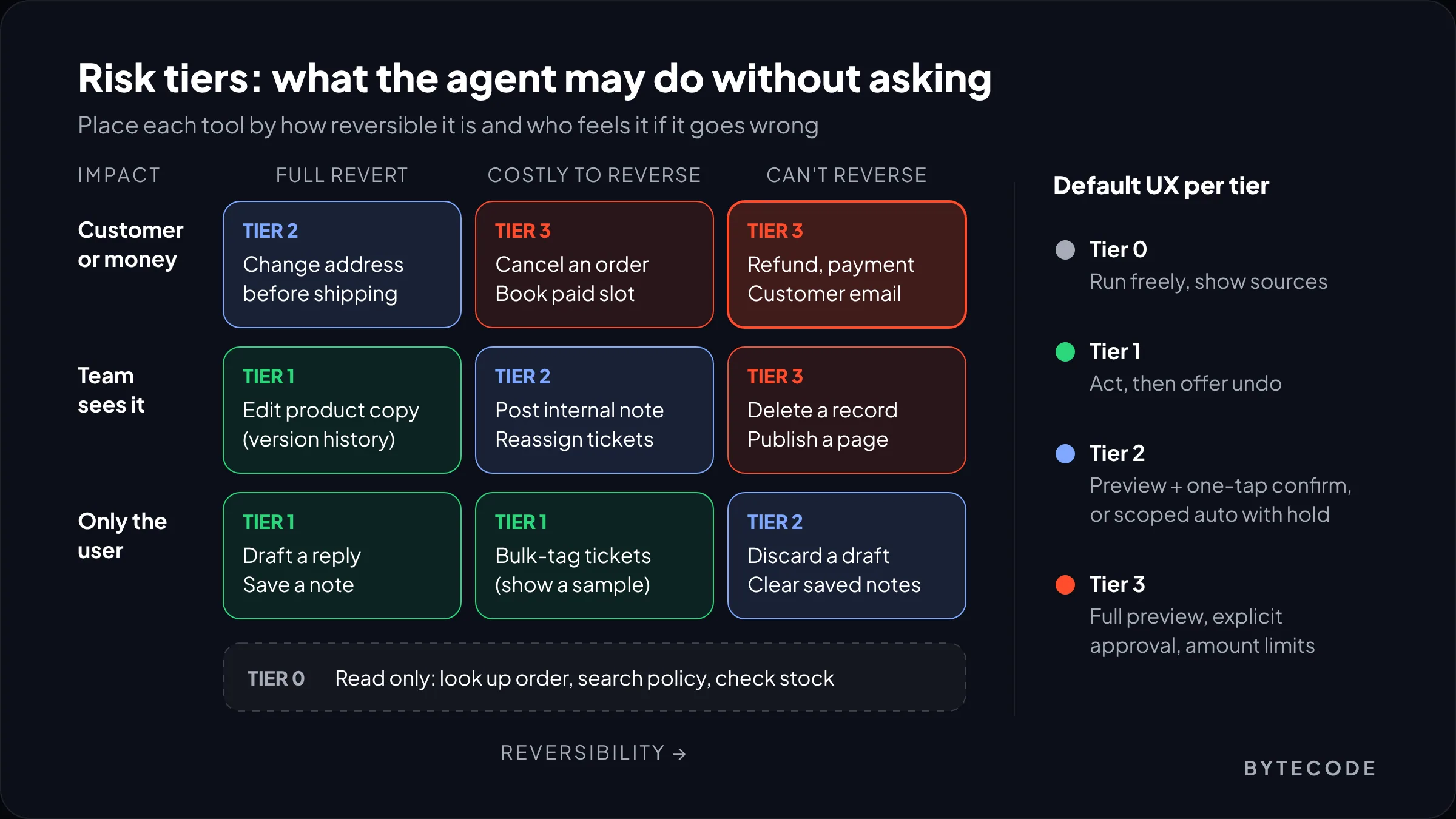
An action needs explicit approval when it is hard to reverse, moves money, or reaches someone outside the conversation. Everything else can usually run with a clear record and an undo. We put every tool into one of four tiers before we design a single screen.
The scoring inputs come almost straight from OpenAI’s A practical guide to building agents, which suggests rating each tool low, medium or high by whether it reads or writes, whether it can be reversed, what permissions it needs and its financial impact. The guide says cancelling orders, authorizing large refunds and making payments should keep a human in the loop until you trust the agent’s reliability. We add one factor it leaves implicit: who else sees the result.
| Tier | What it covers | Typical actions | Default UX |
|---|---|---|---|
| 0. Read | No state change | Look up an order, search the returns policy, check stock | Run freely. Show what was read. |
| 1. Private and reversible | Changes only the user sees, with full revert | Draft a reply, tag a ticket, edit product copy with version history | Act, then show the result with an undo. |
| 2. Visible or costly, still reversible | Others may notice, or reversal has a cost | Change a shipping address before fulfillment, book a cancellable slot, post an internal note | One-tap confirm on a preview, or auto-run inside a scope with a hold window. |
| 3. Irreversible, financial or external | Cannot be taken back cleanly | Refund, payment, cancel an order, email a customer, delete, publish | Full preview and explicit approval every time, with amount limits. A second approver above a threshold. |
Refunds are the clearest Tier 3 case in ecommerce. Shopify’s help center says plainly that you can’t cancel or reverse a refund once you start it from the admin. Its fix for a mistaken refund is a new draft order and collecting payment from the customer again. No undo button can repair that. Only the approval step can.
From our team: do the tiering in a spreadsheet with your ops lead, one row per tool, before any design work. For a support agent with ten to fifteen tools it takes about an hour, and it settles the “should this have a modal?” arguments before design review.
Action previews and confirmations people actually read
A good confirmation shows the specific action in the terms the person would use to check it, and names what cannot be undone. “Are you sure?” fails because it asks for trust without giving anything to check.
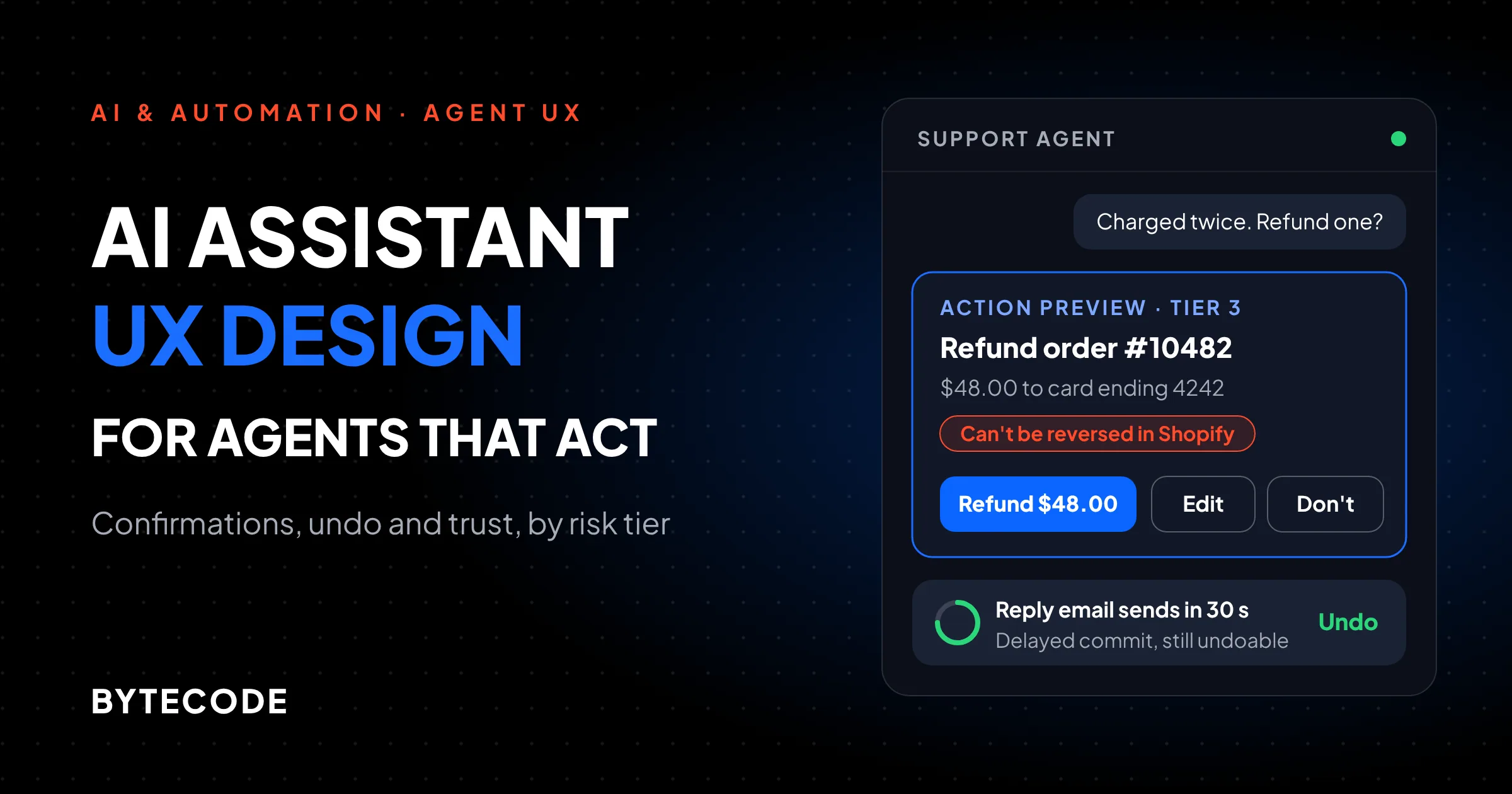
Our Tier 3 preview card always carries the same parts:
- Verb and object. “Refund order #10482”, not “Process request”.
- The numbers. Amount, currency, quantity, date and time zone, formatted the way the destination system shows them.
- Recipient or destination. Which customer, which card ending, which calendar.
- The consequence. One line: “This can’t be reversed in Shopify” or “The customer gets an email now”.
- The reason, with a link to its source (more on that below).
- Buttons named by outcome. “Refund $48.00”, “Edit amount”, “Don’t refund”. Never a bare OK and Cancel.
For content edits, show a diff. For bulk actions, show the count and a sample: “Tag 214 tickets as Shipping delay. First 5 shown.” Nobody reads 214 rows. Five, they will.
A hypothetical example shows why the format matters. A customer writes “I was charged twice, please refund one”. The agent finds charges of $48.00 and $480.00, because the second order was a bulk purchase. A preview reading “Refund duplicate charge?” invites a yes. One reading “Refund $480.00 on order #10491 (placed 2 days after #10482)” makes the person stop, because the amounts do not match the complaint. The agent did not need to be smarter. The card needed to show the number.
Confirmation fatigue is a design bug
Ask for approval on every step and people stop reading. Anthropic’s report found new Claude Code users ran with full auto-approve in roughly 20% of sessions, rising past 40% by around 750 sessions, while interruptions rose from about 5% of turns to about 9%. Experienced people did not stop supervising. They switched from approving steps to watching and stepping in. Anthropic advises product teams not to mandate approval of every action and to invest in visibility and easy intervention instead.
Our take: confirm Tier 3 every time, batch Tier 2 (“Approve these 3 changes”), and never confirm Tiers 0 or 1. An agent that asks more than twice in a normal task has its tiers wrong.
AI agent undo: design reversibility windows into the backend
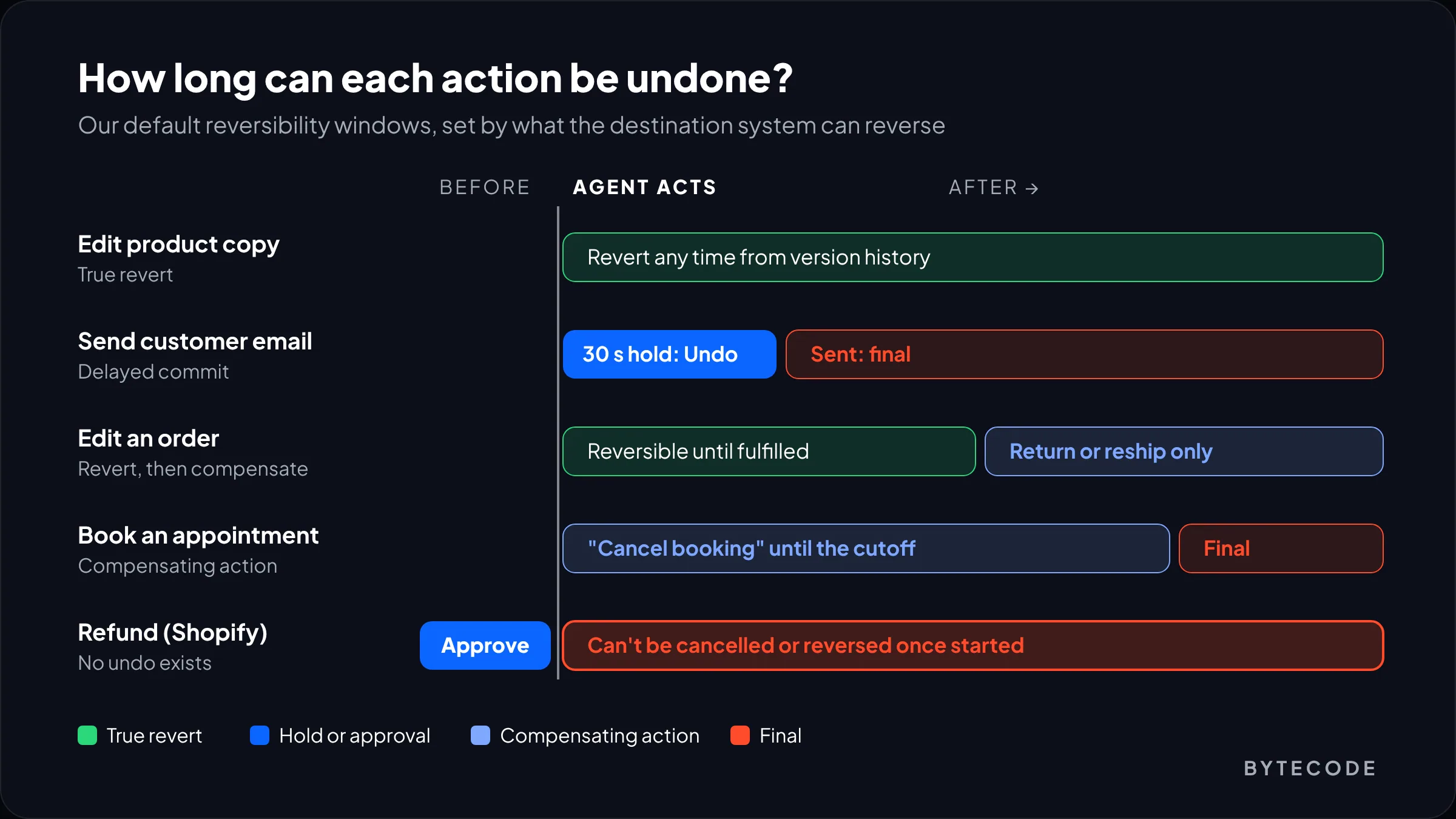
Real undo is a backend feature. The UI can only offer what the system can actually reverse, so pick one of three mechanisms per action before anyone draws a toast.
- True revert. The system keeps the previous state and restores it. Version history on product copy, CMS pages and settings works this way, and the window can be indefinite.
- Delayed commit. The action is queued, shown as done, and executed after a hold window, the way undo-send works in email clients. It is the only way to make an outbound message undoable.
- Compensating action. The original cannot be reversed, so “undo” means doing something new: cancelling a booking, issuing a credit. Label it honestly as “Cancel booking”, not “Undo”.
Apple’s guidance asks for controls like Edit, Undo and Retry near generated output, plus a clear signal when a correction takes effect. For agents we add a rule: show the deadline. “Sending in 30 s. Undo” is honest. A toast that silently disappears is not.
Watch out: approval does not guarantee an action runs once. The OpenAI Agents SDK docs warn that if a process crashes after a tool runs but before the run state is saved, resuming can repeat the action. Give every Tier 2 and 3 tool an idempotency key, or a double refund is one server restart away.
Human-in-the-loop approval and permission scopes
Permission scopes decide what the agent may do without asking, and they should be narrower than the API token allows. Refund access on a Shopify app token does not mean the agent should refund anything up to the order total.
We scope along three axes: which tools, which limits (amount, record count, date range) and how long a grant lasts (this action, this session, always). The OpenAI Agents SDK maps onto that neatly. A tool takes a needs_approval setting, which can be a function that inspects the arguments. When a call needs a decision, the run pauses with an interruption you can store, show to a person and resume later, and always_approve=True makes a decision sticky. A simplified sketch:
async def refund_needs_approval(ctx, params, call_id) -> bool:
    # Tier 3. Auto-approve only inside the owner's scope.
    limit = ctx.context.auto_refund_limit_cents   # e.g. 2500
    return params["amount_cents"] > limit or params["order_age_days"] > 30

@function_tool(needs_approval=refund_needs_approval)
async def issue_refund(order_id: str, amount_cents: int, reason: str) -> str:
    ...
Check the current SDK signature before copying. The point is that the limit lives in configuration the store owner controls, and the agent cannot raise it.
In the UI, offer allow once, always allow this kind of action, or decline, and list every standing grant on one settings page with a revoke button. That is Microsoft’s G17 in practice.
Start narrow. We ship new agents with Tiers 2 and 3 on manual approval, then widen scopes per tool once the approval log shows a run of clean decisions. If your agent is one step in a larger pipeline, where the gates go is covered in our post on multi-agent systems.
Show your work: sources, reasoning and progress
People trust an action when they can see what it was based on: the inputs and a one-line reason, not a transcript of the model’s thinking.
For a refund that means the customer message, the order record and the policy clause, each one a link: “Policy: refunds within 30 days for damaged items (Returns policy, section 2)”. If the agent guessed, say so. A long reasoning dump looks transparent but buries the one fact that matters.
Long tasks are their own problem. Anthropic’s report found the longest Claude Code turns (the 99.9th percentile) grew from under 25 minutes to over 45 minutes between October 2025 and January 2026. For anything over a few seconds we show:
- A step list with the current step in plain words. Apple’s example is “Finding substitutions for ingredients” in place of “Processing…”.
- What has already changed, as it happens, so stopping does not leave a mystery.
- Stop and Pause controls that work mid-task.
- A notification when the agent finishes or needs a decision.
Pending approvals need their own inbox, and a card raised at 2 a.m. must re-check its data before it runs at 9.
Building an assistant that touches orders, money or customer email?
Send us the list of tools it will call and we will come back with a risk-tier map, approval rules and the screens that go with them.
Get a risk-tier review
When the agent gets it wrong: errors and apologies
When an agent makes a mistake, say what happened, what has already been fixed, and what the person needs to do, in that order. A vague apology is worse than none, because it signals the system does not know what it did.
Google’s People + AI Guidebook chapter on errors describes context errors, where the system works as built but assumes wrongly about the person’s time, place or needs. That is the classic agent failure. Its advice: return control with enough context to carry on, offer alternatives, and handle mistakes with “humanity and humility”.
A hypothetical message in the pattern we use:
I booked your consultation for 9:00 a.m. Pacific instead of 9:00 a.m. Eastern. I’ve cancelled that slot and the client received a cancellation email. The 9:00 a.m. Eastern slot is still open. Book it now?
Fault, repair, decision. Skip “I sincerely apologize for any inconvenience”, which gives the person nothing to act on.
Two backend rules make this possible. The agent must read its own result back after acting, or it cannot notice the mistake. And it needs failure thresholds: OpenAI’s guide recommends limits on retries and actions, with escalation to a person past them. In our builds, two failed attempts at the same call hand the case to a human.
The AI agent audit trail: who did what, and why
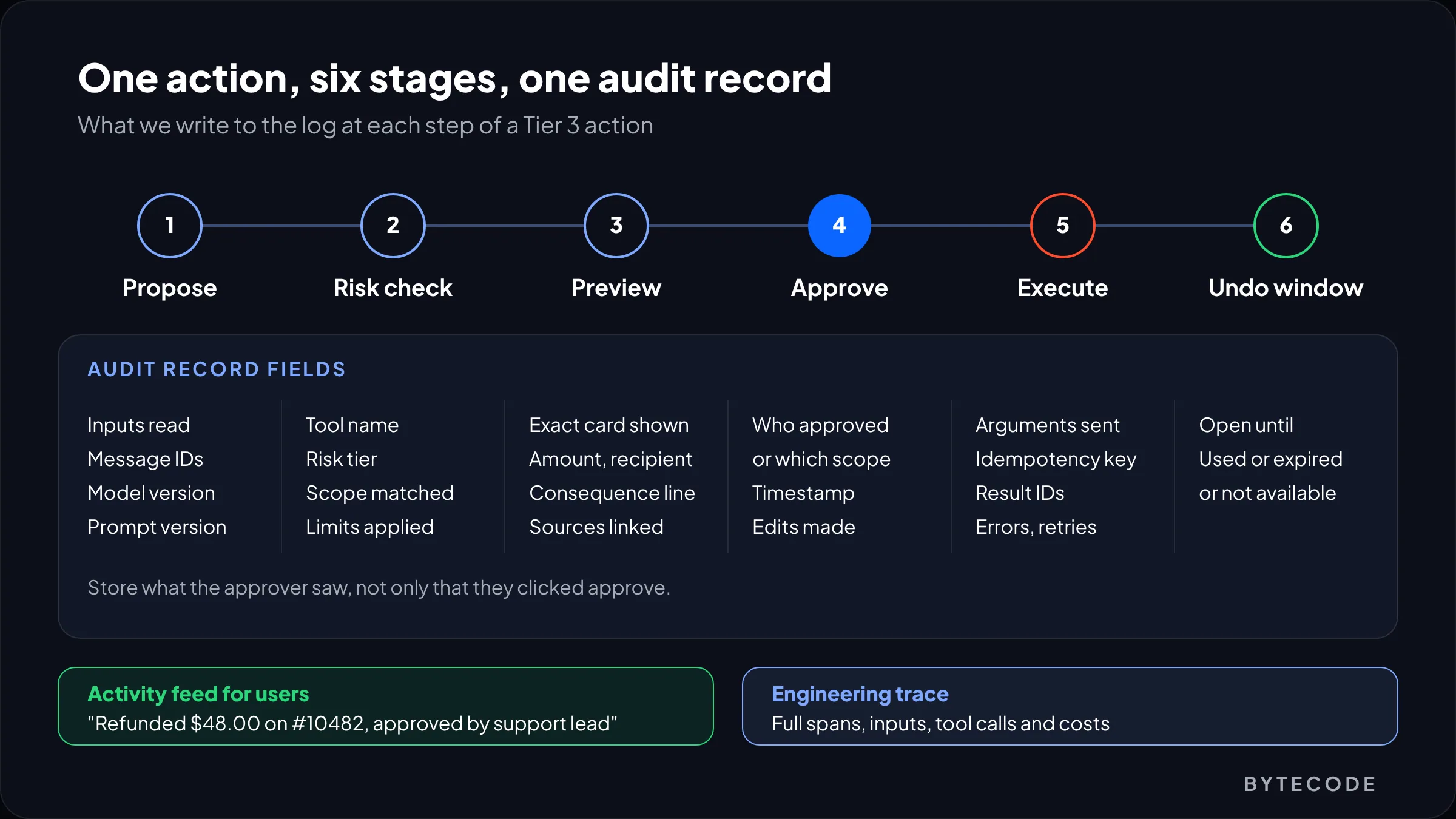
An AI agent audit trail records every action with enough detail to answer three questions later: what changed, who allowed it, and what the agent saw when it decided. Without the last one, you cannot fix the agent.
- Timestamp, tool name and the exact arguments sent.
- The result from the destination system, with its IDs (refund, message, booking).
- Approval: auto under which scope, or approved by whom, and what the preview showed.
- The inputs behind the decision, the model and prompt version.
- Undo status: open until a given time, used, expired or not available.
Build two views on one log. The activity feed is short and plain (“Refunded $48.00 on #10482, approved by support lead”), with undo links where they still work. The engineering view is the full trace, which we cover in our guide to LLM observability.
From our team: store what the approver saw, not just that they clicked approve. When a refund dispute arrives weeks later, “approved by support lead” means little until you can show the exact card they were looking at.
Accessibility, and how confirmations differ in voice and chat
Agent status updates must reach assistive technology without moving focus, and confirmations must not depend on color or a timer someone might miss.
WCAG 2.2 success criterion 4.1.3 (Level AA) covers exactly the messages agents produce: results, progress, waiting states and errors. The W3C’s Understanding document points to role="status" for results and progress, role="alert" for errors and role="log" for sequential updates. It also counts alerts on unimportant, non-urgent content as a failure, so not every step should be assertive. In practice:
- Put the task step list in a
role="log"region and announce step changes, not every streamed token. - Move focus into a Tier 3 confirmation dialog when it opens, and back where the person was when it closes.
- Pair red or green states with text: “Not reversible”, “Undo until 14:32”.
- Keep every undo in the activity feed too. A 10-second toast is gone before many screen reader or switch users reach it.
Our website accessibility guide covers the wider WCAG 2.2 and European Accessibility Act picture.
Voice vs chat confirmations
Voice has no preview card, so the confirmation must be spoken, short and hard to mishear. Read back only the values that matter: “Refund forty-eight dollars to the card ending four two four two. Should I go ahead?” Then require a clear yes. “Sure, but…”, silence and background noise all count as no. Callers cannot scroll back, so for Tier 3 actions we also send a text or email summary with the cancel path, and some actions (deleting data, large refunds) we keep off voice entirely.
Frequently asked questions
How do you make an AI assistant trustworthy?
You make an AI assistant trustworthy by making its actions predictable, checkable and reversible. Tell people what it can do, show the sources behind each decision, ask for explicit approval before irreversible or financial actions, and offer real undo for the rest. Then keep a plain activity log. Trust grows from a track record people can see, not from a confident tone.
What is the difference between chat UX and voice UX?
Chat UX is visual and persistent, while voice UX is linear and has to work from memory. In chat, people can scan a preview card, scroll back and tap a named button. In voice, every option and value must be spoken briefly and confirmed out loud. For agents, voice confirmations should read back only key values, need a clear yes, and be followed by a written summary.
When should an AI agent ask for confirmation?
An AI agent should ask for confirmation before any action that is hard to reverse, moves money or reaches someone outside the conversation. Refunds, payments, cancellations, deletions and customer emails fall in that group. Read-only lookups and private, revertible edits should not ask at all, because frequent prompts train people to approve without reading.
How long should an undo window be for AI agent actions?
An undo window should last as long as the destination system can genuinely reverse the action, and the interface should show the deadline. Content edits with version history can stay revertible indefinitely. Outbound emails need a delayed send, often around 30 seconds. Refunds in Shopify cannot be reversed once submitted, so they need approval before running, not an undo after.
What should an AI agent audit trail include?
An AI agent audit trail should include the tool called, the exact arguments, the result and IDs from the destination system, and who or what approved it. Add the inputs the agent relied on, the model and prompt version, and the undo status. Store the preview the approver saw, so you can reconstruct any decision during a dispute.
What we’d do first
Good AI assistant UX design starts in a spreadsheet, not a mockup. List every tool your assistant can call and tier it with the person who owns the business process in the room. Then test each Tier 3 tool: does the preview show the exact amount and recipient, can the backend run it only once, and does the log store what the approver saw? On the agent projects we get asked to review, at least one answer is usually no. Fixing it takes days, not months.
Then cut prompts. Drop confirmations on Tiers 0 and 1, batch Tier 2, and add the undo, activity feed and status messages that let people supervise without clicking yes all day.
If you want a second pair of eyes, our team does conversational ui design for assistants that read and write to Shopify, helpdesks and internal tools. See how we approach AI assistant and agent interface design, then send us your tool list or prototype and we will tell you where the risky clicks are.