On this page
- What’s in Shopify Editions Fall ’26
- Agentic commerce: your catalog is now a sales channel
- Shopify Sidekick updates: from answers to actions
- Canvas, Rollouts and the new theme architecture
- Payments, checkout and fraud
- Shopify Flow, the admin and analytics
- The developer deadlines hiding behind the Edition
- Which new Shopify features matter by store size and plan
- Worked example: triaging the Edition on a Grow store
- Your 30/60/90-day plan after Shopify Editions Fall ’26
- Frequently asked questions
- What we’d do first
Updated each Edition. This version covers the Fall ’26 Edition, released October 28, 2026. We rewrite this page when Shopify ships the next one.
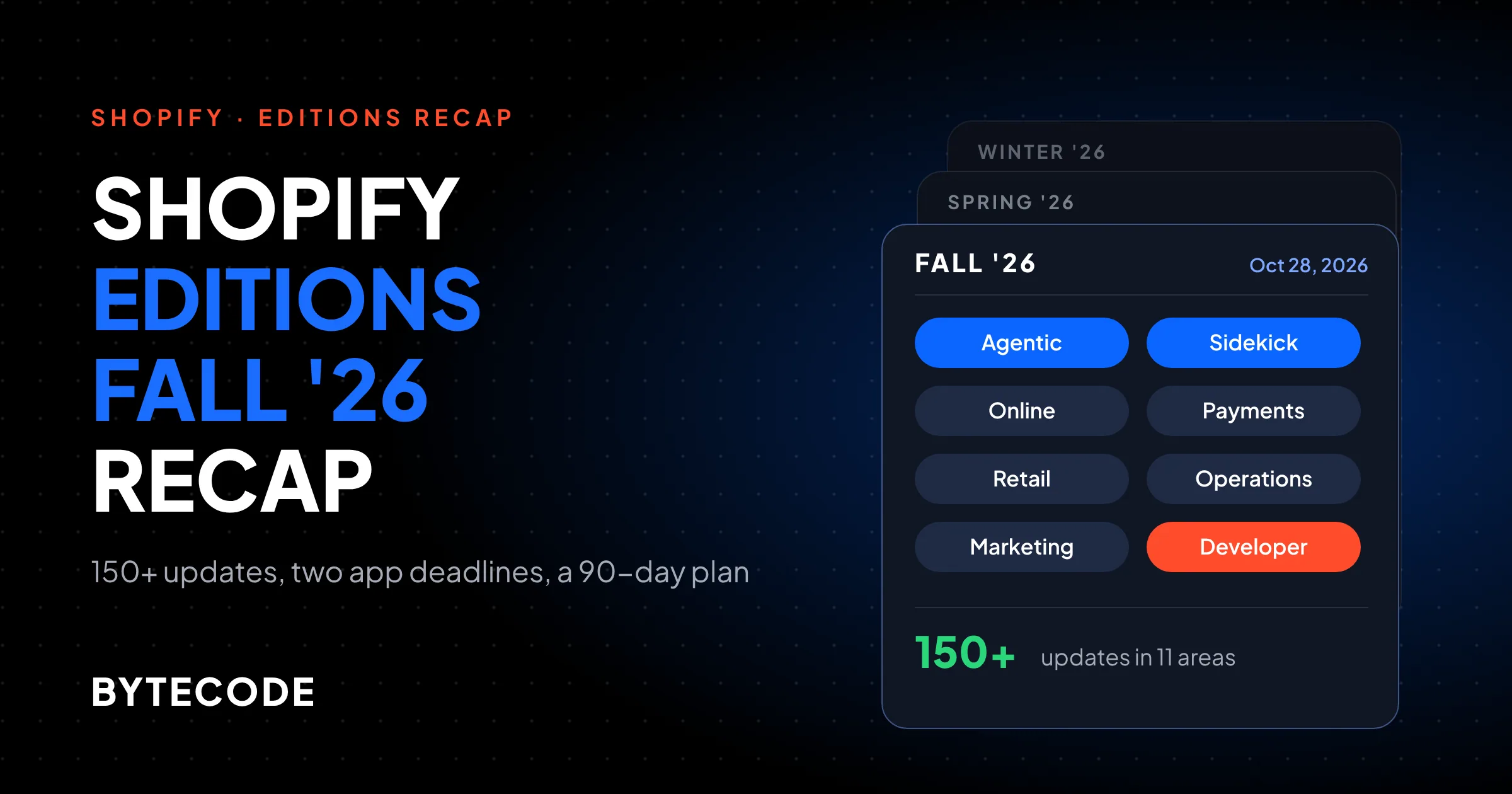
Shopify Editions Fall ’26, which Shopify themed “Exponential”, is a 150+ item release built around three things: selling through AI agents, a Sidekick that now makes changes instead of just suggesting them, and a new way to edit and launch online stores (Canvas and Rollouts). The most urgent items, though, are two developer deadlines in the next five months that can quietly break apps you already pay for.
We read the full Fall ’26 Edition page and the matching entries in the shopify.dev developer changelog, which lists “Editions: Fall 2026” on October 28. Plenty of it is marked “coming soon” or “early access”, and we flag that where it applies. A feature you cannot switch on yet does not belong in this month’s plan.
Key takeaways
- The Fall ’26 Edition has 150+ updates across 11 areas. Agentic commerce leads, with Shopify selling in Google AI Mode, Gemini, ChatGPT and Claude through Shop Pay.
- Sidekick can now plan and apply bulk changes, build checkout customizations and edit draft orders. Treat it like a junior staff member with admin access: useful, and worth reviewing.
- Canvas and Rollouts change how stores get edited and launched. The new theme architecture behind them is a developer preview, so do not rebuild your theme for it yet.
- Two dates matter more than any feature: public apps must move to expiring tokens before January 1, 2027, and script tags stop running on storefronts on March 1, 2027.
- Black Friday is November 27. Do the audits now, ship the bigger changes in December and January.
What’s in Shopify Editions Fall ’26
The Fall ’26 Edition is Shopify’s second-half release for 2026, published October 28 with 150+ updates grouped into Agentic, Sidekick, Online, Merchandising, Retail, Payments, Operations, Shop, Marketing, Fulfillment and Developer. Shopify’s headline numbers: 1B+ catalog products discoverable across AI channels, 400M+ Shop Pay accounts (as of September 30, 2026) and 12K+ high-risk payments blocked every minute.
Short on time? Here is the one item per section of the Fall ’26 Shopify Editions release we would look at.
| Section | The update we’d look at first | Status on Shopify’s page |
|---|---|---|
| Agentic | Catalog eligibility check and business details for AI channels | Available |
| Sidekick | Bulk changes from one approved plan | Available |
| Online | Rollouts: scheduled launches bundling theme, checkout, catalog and discounts | Available |
| Merchandising | Catalog scheduling by market with automatic rollback | Available |
| Retail | Customer recognition in POS through Shopify Payments | Available |
| Payments | Shopify Protect with custom fraud rules | Rolling out soon |
| Operations | Shopify Flow triggers on field changes, plus version history | Available |
| Marketing | WhatsApp consent at checkout and abandonment flows | Available |
| Fulfillment | Return rules by market | Available |
| Developer | Script tag deprecation and expiring tokens | Enforced on fixed dates |
One oddity: the main Shopify Editions hub still showed Spring 2026 (“Everywhere”) as the newest release when we opened it in November, even though the Fall ’26 page is live.
Agentic commerce: your catalog is now a sales channel
The biggest shift in this round of Shopify Editions is that AI agents can now find, recommend and check out your products without the shopper visiting your storefront. Shopify lists a Shop skill that lets ChatGPT, Claude and other agents check out with Shop Pay, plus selling through Google AI Mode and the Gemini app with Shopify handling checkout.
Two quieter features matter more for day-to-day work:
- Catalog eligibility check. It tells you whether your store qualifies for Shopify Catalog and what to change if not. Run it before anything else in this section.
- Business details for AI channels. You review and approve the policies, FAQs and facts agents are given about your business, and Shopify suggests content. This is your brand voice inside someone else’s chat window. Read every line.
Our position: agents read structured data, not your hero banner. On most stores we audit, the gap is product data: vague titles, missing variant attributes, empty metafields and return policies that contradict the FAQ page. Fix those and the agent features mostly take care of themselves. We cover the data side properly in our guide to agentic commerce on Shopify.
On the developer side, the Fall ’26 developer announcement says every Liquid and Hydrogen storefront and checkout now exposes WebMCP tools, so browser agents can search, update carts and reach checkout once the buyer approves. No build work needed for the default behaviour.
From our team: Shopify’s pricing page now lists an Agentic plan at $0 a month for selling only in AI channels, with card rates from 2.9% + 30¢. Fine for testing demand. If your storefront already sells, nothing here is a reason to switch.
Shopify Sidekick updates: from answers to actions
Sidekick in Fall ’26 does work, not just chat. Per the Edition page it runs multi-step technical tasks, writes code, searches the web, remembers context, and applies bulk changes once you approve a plan, such as rewriting descriptions across a collection. It also edits draft orders, builds checkout customizations (including with Checkout Blocks) and gives product-level pricing advice.
Shopify says daily Sidekick sessions grew 4.2x year over year, and its pricing page lists Sidekick on every plan from Basic to Plus.
Two updates we would try this month:
- Markdown teaching files. You describe your theme, tone and design preferences once and Sidekick applies them across conversations. Write one. It takes an hour and makes everything else it produces less generic.
- Tested recommendations. Proposed store changes are run through SimGym (Shopify’s shopper simulation) and you pick which to apply. Useful as a second opinion, not a replacement for a real A/B test on real traffic.
Watch out: one-click bulk changes are great in January and risky on Black Friday week. Bulk edits to descriptions, prices or SEO fields are hard to eyeball afterwards. Export the collection to CSV first, and limit who on staff can approve Sidekick’s plans.
For setup, prompts that work and the limits we still run into, see our Shopify Sidekick guide.
Canvas, Rollouts and the new theme architecture
Canvas is a new editor for the whole store in one view, and Rollouts let you schedule a launch that bundles theme, checkout, catalog and discount changes together. Shopify claims stores launch 20% faster with Canvas. Rollouts can also run across headless builds, POS, Google Shopping and the Shop app, and the Merchandising section adds catalog scheduling by market with automatic rollback.
Rollouts is the update we expect to use most. A sale launch on a mid-size store today usually means someone in the theme editor at midnight, a discount app on a timer and a price import in a third tab. One scheduled object with rollback replaces a lot of nervous checking. Test it in December on something small.
The theme architecture is a preview, not a migration
Underneath Canvas is a new theme architecture: Liquid blocks, typed contracts, partial updates, markdown files that guide AI agents, and built-in Tailwind. Shopify’s Edition page labels it a developer preview, and the developer announcement says Canvas itself is in early access.
Do not commission a theme rebuild for it this quarter. Previews change. Wait for general availability and theme vendor support, then fold it into your next redesign. Meanwhile, keep custom work in sections and blocks rather than hard-coded templates, since that ports most easily.
Headless teams get firmer news: Hydrogen is now generally available and framework-agnostic, as is Vercel Shop, an open source Next.js template.
Payments, checkout and fraud
Fall ’26 adds a lot to fraud and dispute handling plus a few long-requested checkout tweaks, though several checkout items are not live yet.
- Shopify Protect blocks fraud before authorization and uses AI to fight disputes. Rolling out soon. Shopify says product-not-received disputes won rose 60%.
- Chargeback protection extended to non-Shop Pay orders. Coming soon.
- Managed Markets with all-in international prices including duties and taxes. Shopify reports a 50% lift in international conversion for brands using it.
- Managed Tax calculates, collects and remits US sales tax for new businesses.
- Multi-currency payouts in Australia, France, Singapore and Hong Kong, on Advanced and Plus only.
- Checkout custom fields (delivery instructions and similar) and a tiled payment layout. Both rolling out soon.
The 60% and 50% figures are Shopify’s own, from merchants who opted in, not independent studies. We would still turn on the fraud and dispute tooling as soon as it reaches you. Disputes are pure cost, and better evidence has almost no downside.
Paying for a checkout app just to collect delivery notes? Native custom fields may replace it. Do not cancel anything until they appear in your admin.
Shopify Flow, the admin and analytics
Operations is the least glamorous section and the one that saves the most hours. Shopify Flow can now trigger automations on changes to price, tags, metafields and other fields, existing staff roles control who can view, edit or activate a workflow, and version history lets you restore an earlier version as a draft. Flow automations can also be built and managed by an AI agent through Shopify’s AI Toolkit.
Field-change triggers fix a common Flow workaround: scheduled workflows that scan every product nightly to spot a price change. A direct trigger reacts faster and wastes fewer runs. Version history is the other quiet win, as anyone who has broken a working Flow at 6pm knows. Our Shopify Flow guide has the workflows we set up first on most stores.
Also in Operations: passkeys for staff sign-in (turn them on), inline metafield editing on any admin page, analytics annotations, better bot filtering for sessions, and a coming-soon activity log that attributes store changes to staff, apps or services. That last one will be very welcome the next time an app quietly edits products.
The developer deadlines hiding behind the Edition
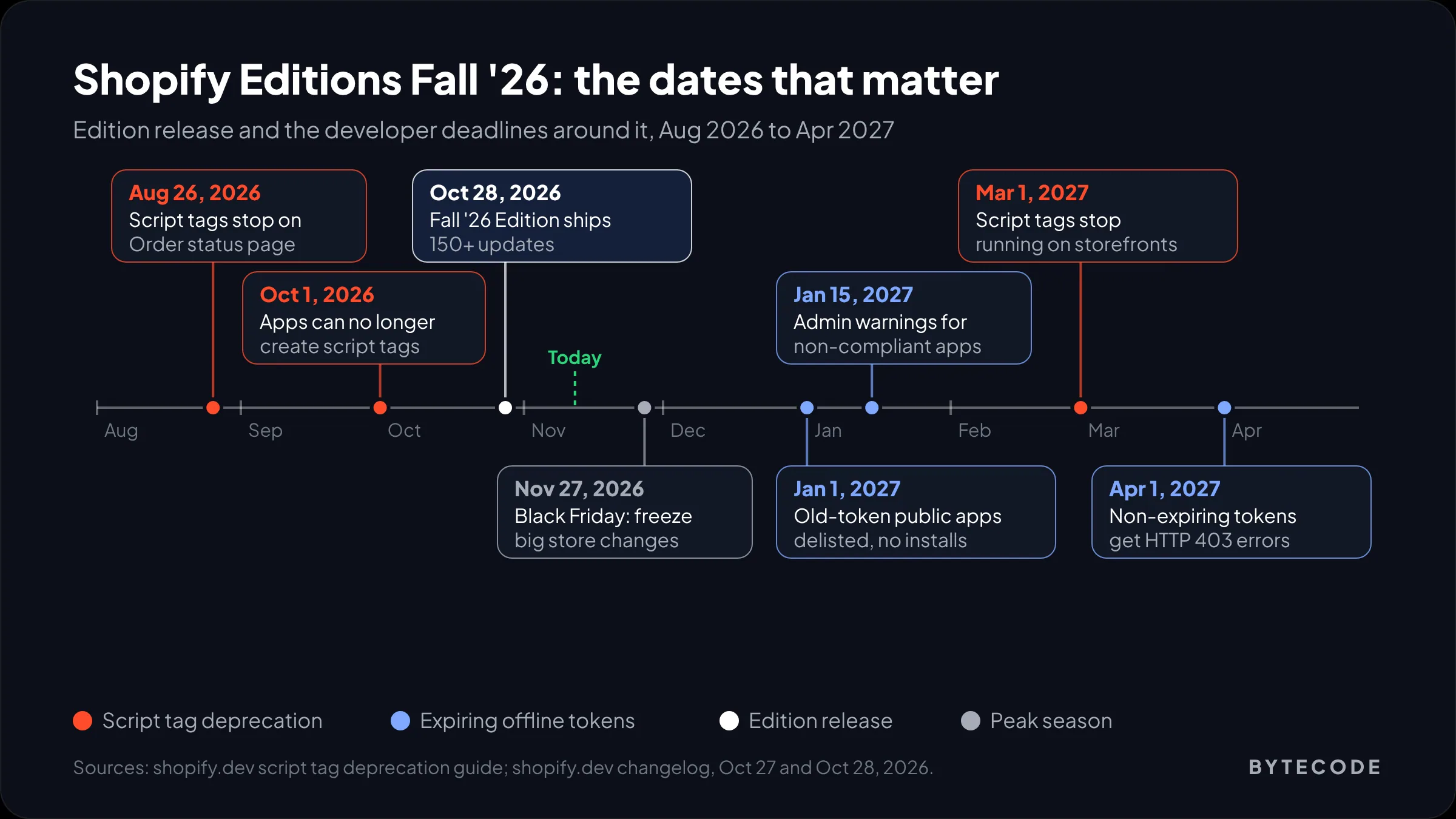
The two items most likely to break a live store in the next five months are script tag removal and expiring access tokens. Both have fixed dates, and the detail is on shopify.dev.
Script tags
Per Shopify’s script tag deprecation guide, apps lost the ability to create or update script tags on October 1, 2026, script tags stopped working on the Order status page for all stores on August 26, 2026, and they stop running on storefront pages on March 1, 2027. The replacements are theme app extensions (app embed blocks the merchant turns on in the theme editor) or, for analytics-only scripts, web pixels.
Existing tags still run until March. That is the trap: nothing looks broken, so nobody checks. Older review widgets, pop-ups, chat bubbles and tracking apps are the usual suspects. Ask every app vendor directly whether they have moved to an app embed, then check Online Store > Themes > Customize > App embeds to confirm it is switched on.
Expiring offline access tokens
Shopify’s October 27 changelog entry says public apps still using non-expiring offline tokens must migrate before January 1, 2027. On that date non-compliant apps are delisted and blocked from new installs. Merchants see admin warnings from January 15, and from April 1, 2027 the affected Admin API calls return HTTP 403. Custom and merchant-created apps are excluded. The same security update adds IP allowlists for Admin API calls and a shopify app security check command to run before each release.
If you only use apps, the risk is one you depend on going dark in April. We explain the migration step by step in our post on Shopify expiring offline access tokens.
Which new Shopify features matter by store size and plan
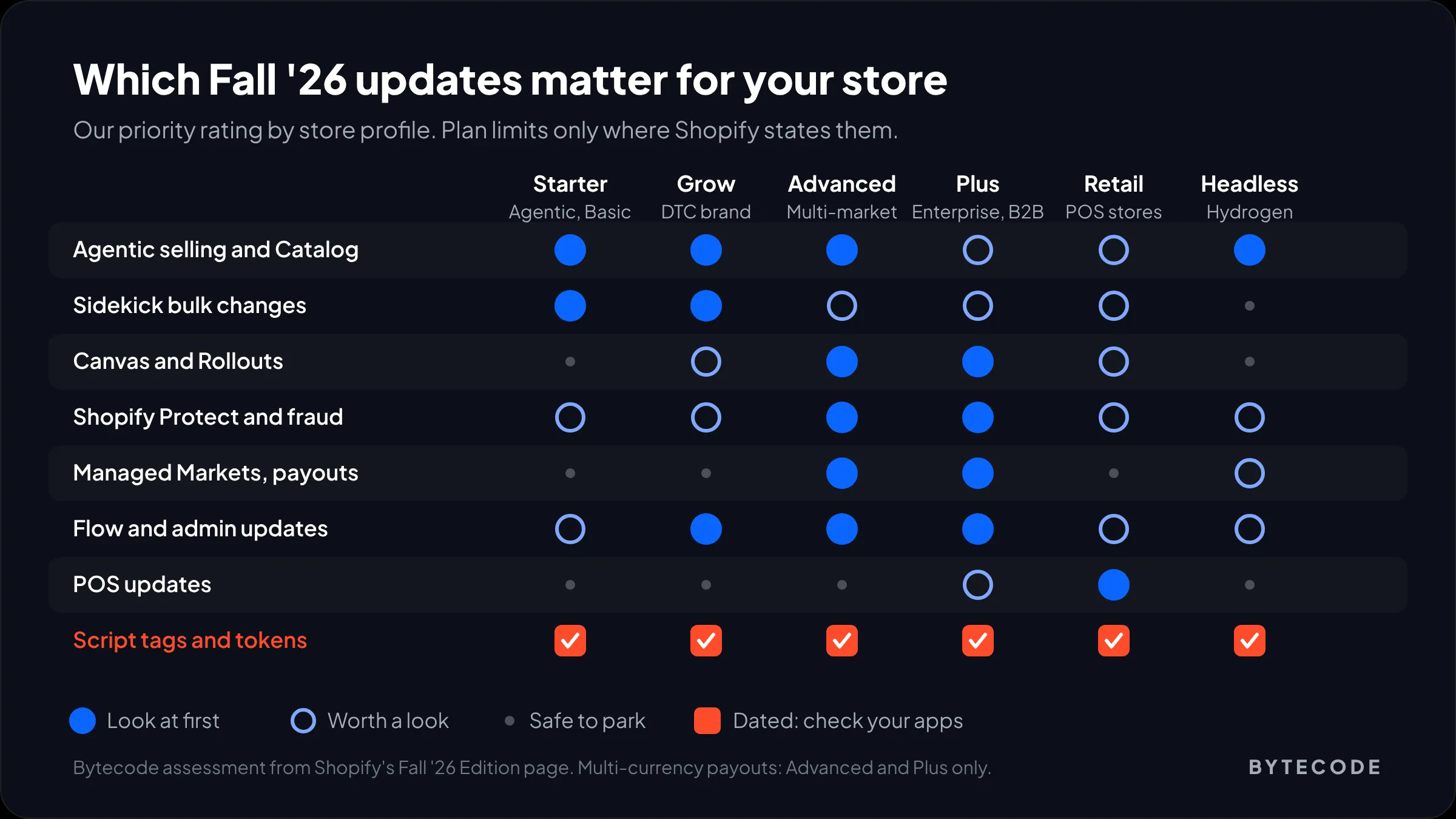
Which Fall ’26 features matter depends mostly on your plan and on whether you sell in person, across borders or to other businesses. Shopify only states plan limits for a few items (multi-currency payouts on Advanced and Plus, organization-level POS roles on Plus), so the rest of this table is our judgment of where the value is, not an availability list.
| Store profile | Look at first | Safe to ignore for now |
|---|---|---|
| New or testing demand (Agentic, Basic) | Catalog eligibility check, business details for AI channels, Managed Tax for new US businesses, automatic policies | Rollouts, custom risk rules, new theme architecture |
| Growing DTC brand (Grow) | Sidekick bulk changes with teaching files, Flow field-change triggers, WhatsApp consent and abandonment flows, script tag audit | Multi-entity payments, B2B search |
| Multi-market brand (Advanced) | Catalog scheduling by market, market return rules, Managed Markets, multi-currency payouts, right-to-left languages | Print-on-demand in Sidekick, Collective sourcing |
| Enterprise and B2B (Plus) | Rollouts across channels, custom risk rules, organization-level roles, B2B search and exports, Purchase order API for ERP sync | Store preview, Agentic plan |
| Retail with stores (any plan with POS) | Customer recognition, saved carts, scheduled stock counts, staff activity log, local delivery | Shop app campaigns, until online basics are right |
| Headless or custom build | Hydrogen GA, Checkout Kit v4, WebMCP tools, Catalog API filters | Canvas, until it supports your stack |
Too much to triage during peak season? Our Shopify development team runs this audit as a fixed-scope job, and most of it is checking, not building.
Not sure which of your apps still use script tags?
We will audit your theme, apps and Flow setup against the Fall ’26 changes and send back a dated fix list before the March 2027 cutoff.
Book an Editions audit
Worked example: triaging the Edition on a Grow store
A hypothetical store, to show how we cut 150 updates down. Say you run a US apparel brand on Grow, about 900 SKUs, 16 installed apps, no physical retail, roughly 8% of orders shipping to Canada and the UK.
- Remove what doesn’t apply. No POS, so the Retail section goes. No B2B and no headless build, so B2B search, Hydrogen and Checkout Kit go too. That clears a big share of the Edition in one pass.
- Find what is dated. Of the 16 apps, check which inject script tags and which are public apps you rely on for orders or fulfillment. Say three still use script tags (a review widget, a size-guide pop-up, an old pixel). Those three get vendor emails this week.
- Pick two features to try. Flow field-change triggers for low-stock tagging, and a Sidekick bulk description rewrite on one test collection.
- Park the rest with a date. Rollouts for the January sale, Managed Markets in February.
The output is about ten items, three of them urgent. That is what an Edition should turn into.
Your 30/60/90-day plan after Shopify Editions Fall ’26
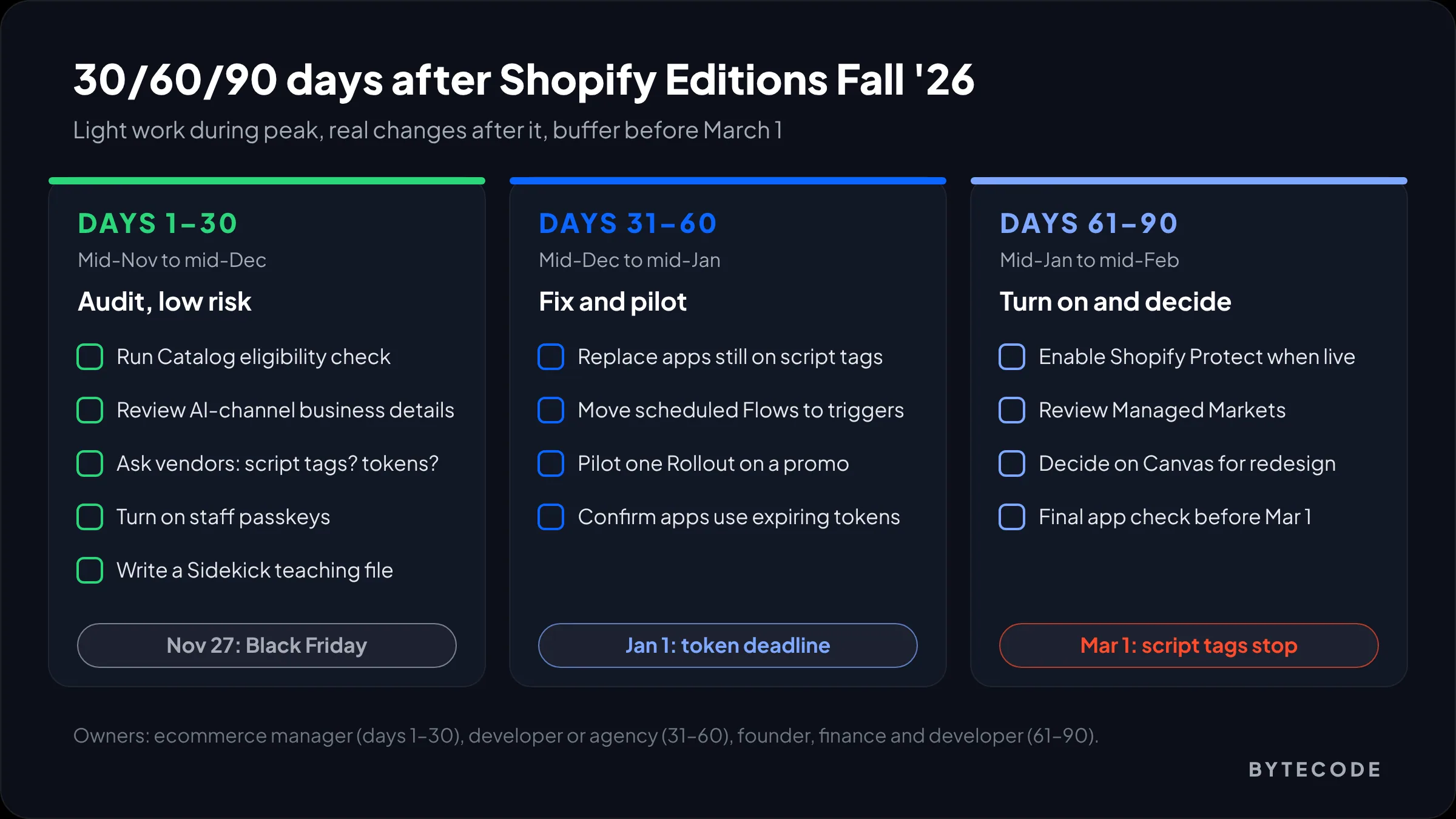
Do audits and low-risk switches before Black Friday, ship real changes after Cyber Monday, and finish app fixes before the January and March deadlines. Black Friday is November 27, 2026, so keep the first 30 days light.
| Window | What to do | Who owns it | Why now |
|---|---|---|---|
| Days 1–30 (mid-Nov to mid-Dec) | Run the Catalog eligibility check. Review business details for AI channels. List every app and ask vendors about script tags and expiring tokens. Turn on passkeys for staff. Write a Sidekick teaching file. | Ecommerce manager | Read-only or low-risk work that is safe during peak |
| Days 31–60 (mid-Dec to mid-Jan) | Replace or remove any app still on script tags. Rebuild scheduled Flows with field-change triggers. Pilot one Rollout on a small January promotion. Confirm every public app you rely on has moved to expiring tokens. | Developer or agency | January 1 delisting and the post-peak lull |
| Days 61–90 (mid-Jan to mid-Feb) | Turn on Shopify Protect and custom risk rules once available. Review Managed Markets and market return rules. Decide whether Canvas or the new theme architecture belongs in this year’s redesign. Check for anything still flagged before March 1. | Founder, finance and developer | Gives a month of buffer before script tags stop on March 1 |
From our team: resist switching on every new feature the week it appears. The stores that get the most from an Edition pick two or three changes, ship them properly and measure them. The rest can wait.
Frequently asked questions
What’s new in the latest Shopify Edition?
The latest Shopify Edition is Fall ’26, released October 28, 2026, with 150+ updates. The main themes are selling through AI agents such as Google AI Mode, Gemini, ChatGPT and Claude with Shop Pay, a Sidekick that applies bulk changes, Canvas and Rollouts for editing and launching stores, Shopify Protect for fraud, and Flow triggers on field changes.
Which new Shopify features matter most?
For most stores, the features that matter most are the Catalog eligibility check for AI channels, Sidekick bulk changes, Rollouts and Flow field-change triggers. More urgent than any feature are two deadlines: public apps must use expiring tokens before January 1, 2027, and script tags stop running on storefronts on March 1, 2027.
How often does Shopify release Editions?
Shopify releases a new Edition roughly every six months, named after the season. The Editions hub lists Winter and Summer releases through 2025, then Winter ’26 and Spring ’26, and the Fall ’26 Edition shipped on October 28, 2026. Fall ’26 alone bundles 150+ updates, and many of them are labelled coming soon or early access.
Are Shopify Editions features available on all plans?
Most are, but not all. Shopify lists Sidekick on every plan from Basic to Plus. The Fall ’26 page names multi-currency payouts as Advanced and Plus only and organization-level POS roles as Plus only. Many other features are rolling out gradually, so check your own admin before planning around one.
When do Shopify script tags stop working?
Shopify script tags stop running on storefront pages on March 1, 2027. Apps lost the ability to create or update script tags on October 1, 2026, and they already stopped working on the Order status page. Apps should move to theme app extensions or, for analytics-only scripts, web pixels.
Should I rebuild my theme for the new Shopify theme architecture?
Not yet. Shopify labels the new theme architecture a developer preview, and Canvas, the editor built on it, is in early access. We would wait for general availability and for theme vendors to support it, then fold it into your next planned redesign rather than paying for a rebuild now.
What we’d do first
Open your apps list today and write down, next to each one, two answers from the vendor: does it still use script tags, and has it moved to expiring offline tokens? That single sheet covers the two parts of Shopify Editions Fall ’26 that have a hard date. Everything else in the Edition is optional. Those are not.
Then run the Catalog eligibility check and read what Shopify tells AI agents about your business. After Cyber Monday, pick two features (we would pick Rollouts and Flow field-change triggers) and ship them properly.
We have built and supported Shopify stores for brands like Delsey, EcoFlow, Kerbholz and Maker & Moss, and we go through every Edition line by line for the stores we maintain. If you would like the same for yours, see our shopify development services. This page will be updated when the next Edition lands.