On this page
- How Shopify demand forecasting works with your order data
- What Shopify gives you without an app
- How much sales history AI forecasting needs
- Clean the order data first
- Shopify inventory planning apps vs a custom model
- Worked example: reordering a hero SKU
- Where AI demand forecasting helps, and where it doesn’t
- How to tell if your forecast is any good
- Frequently asked questions
- What we’d do first
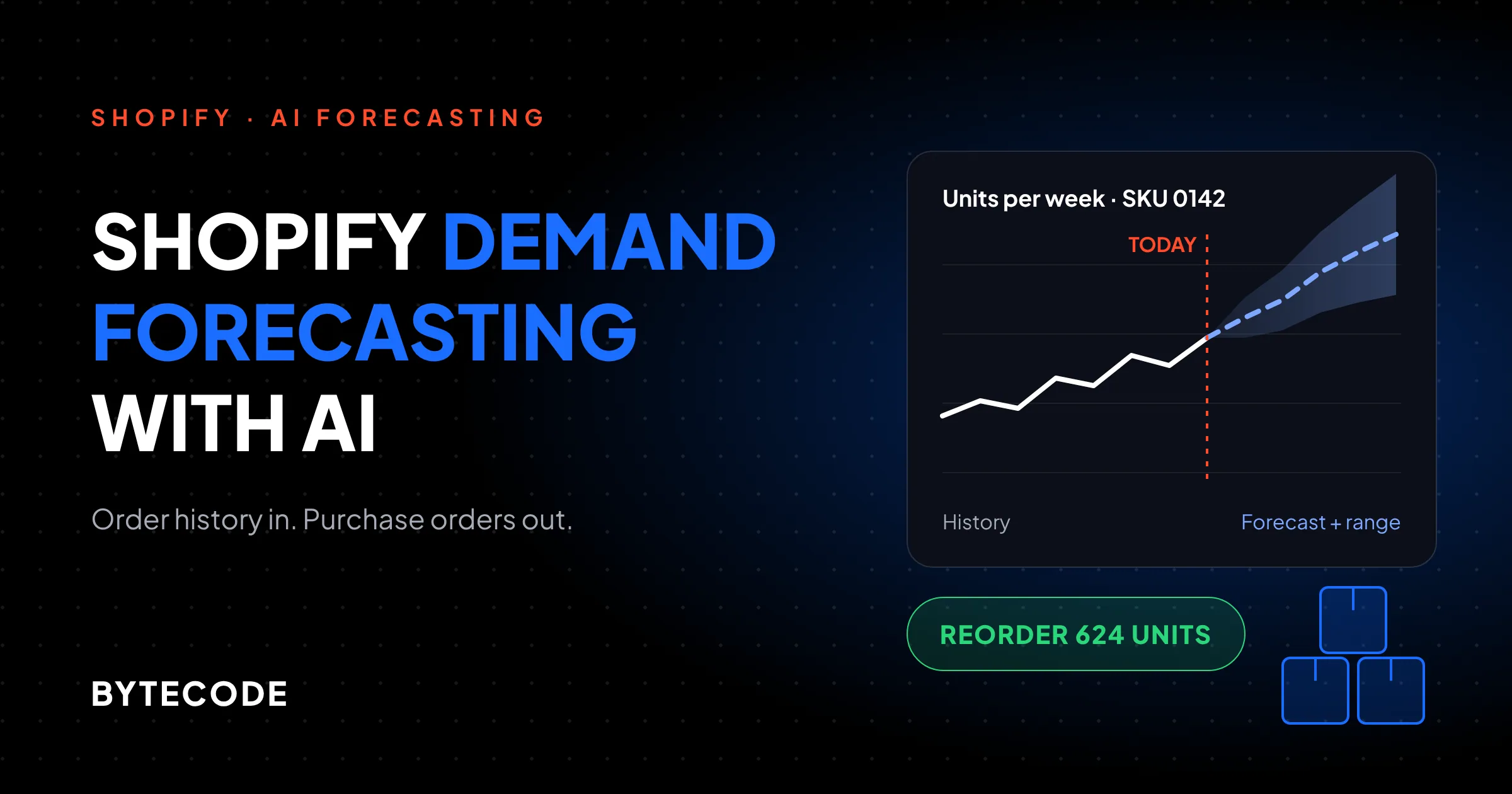
Shopify demand forecasting with AI comes down to turning your order history into a daily sales series for each SKU, correcting it for the days you were out of stock, and projecting it forward over your supplier’s lead time. The model is the easy part. The order data you feed it, and the lead times you give it, decide whether the purchase order it suggests is right.
Most stores we audit before a forecasting project have the same problem. The hero product sold out twice last year, and neither stockout shows up as lost demand, because Shopify records what you sold, not what you would have sold. Any tool trained on those numbers learns to under-order. Below: how forecasting works on Shopify data, how much history you need, which apps still exist in November 2026, when custom pays, and a worked reorder for one SKU.
Key takeaways
- Shopify has no built-in demand forecast. Its inventory reports give days of stock remaining from a 28-day average, and Stocky, its old purchase-order app, stopped being available after August 31, 2026.
- Twelve months of clean history is the practical line for seasonal forecasts. Steady sellers can be planned on a few months of recent sales.
- Correct for stockouts before anything else. In our hypothetical example, ignoring 10 sold-out days makes a hero SKU look like it sells 9 a day instead of 14, and the reorder comes out 245 units short.
- Prediko and Inventory Planner by Sage are both live and priced publicly at the entry level. Cogsy’s Shopify App Store listing says it is not currently available.
- Build custom only when your demand drivers live outside Shopify: wholesale, marketplaces, bills of materials, or forecasts that need to land in an ERP.
How Shopify demand forecasting works with your order data
A demand forecast on Shopify takes order line items, rolls them up into units sold per SKU per day or week, and fits a model that predicts the next few weeks or months of that series. The prediction then gets converted into a reorder quantity using your lead time, how often you place orders, and how much safety stock you want to carry.
Most of what gets sold as “AI” here is one of two method families. Classic time-series statistics (moving averages, exponential smoothing, same-month-last-year seasonal models) work one SKU at a time and are hard to beat on steady sellers. Machine learning trained across many SKUs lets a new or slow product borrow patterns from similar ones. That is how a tool forecasts a colour you launched three weeks ago.
Neither family reads your marketing calendar unless you tell it. A planned 30%-off weekend, a TikTok spike, a wholesale order from a retailer: these are inputs you supply, or the model treats them as noise.

What the model actually sees
Per variant and per day: units sold, whether it was in stock, price or discount, channel, and ideally a promo flag. Lead time stays out of the forecast and goes into the reorder maths afterwards, so a perfect forecast with a stale lead time still produces a bad purchase order.
If you build your own, history older than 60 days needs an extra permission. Per Shopify’s access scopes documentation, the standard read_orders scope only covers orders from the last 60 days, and an app needs read_all_orders alongside it, with approval, to reach older ones. Ask for it on day one. A forecast trained on two months of orders cannot see last December.
What Shopify gives you without an app
Shopify itself does not forecast demand. What it offers are inventory reports that describe the recent past, plus native purchase orders for recording what you buy. That covers reporting, and for a small catalogue with steady sales it can be enough to plan from.
The useful reports sit under Analytics > Reports, filtered to the inventory category. According to Shopify’s inventory reports help page, they include:
- Inventory remaining per product: days of inventory remaining, calculated as ending quantity divided by average units sold per day over the last 28 days.
- Products by sell-through rate: units sold divided by units sold plus units left, over the most recent 30 days, with roughly a two-day processing delay.
- ABC product analysis: grades each variant A, B or C by its share of revenue over the last 28 days.
“Days of inventory remaining” is the closest thing to a forecast in the admin, with a blind spot: the 28-day average counts calendar days, so ten sold-out days put ten zeros into it. Fine for spotting dead stock. Risky for ordering your best seller.
Watch out: if you planned purchasing in Stocky, that workflow is gone. Shopify’s Stocky documentation says the app would no longer be available after August 31, 2026, and points merchants to the built-in inventory tools. Those tools record purchase orders, suppliers and incoming transfers. They do not suggest what to order. Export any Stocky history you still can, because it is often the only record of past stockouts.
Native purchase orders let you save drafts, mark them ordered and receive stock against a linked transfer. A decent system of record. Pair it with a forecasting tool, or a spreadsheet that applies the stockout correction below.
How much sales history AI forecasting needs
You need about 12 months of reasonably clean sales history for a forecast that understands seasonality, and much less for products that sell at a steady rate. The vendors draw the line in the same place. Inventory Planner’s forecasting documentation reserves its seasonal method for items with 12 or more months of history, and falls back to category-level forecasts split across variants when a product has less. Prediko’s help centre treats 12 months of consistent sales as high confidence and flags products with gaps as medium.
Twelve months is one look at each season, and one look is thin. If last November had a one-off influencer spike, a seasonal model repeats it. For gift-heavy brands we treat 24 months as the comfortable number.

If you have less than that
Plan on recent velocity and keep the order cycle short. For a product a few months old, we use the last 4 to 8 weeks of in-stock days, reviewed every week or two. Brand-new products need analogues: Prediko forecasts from the product’s Shopify category and how similar products sold, and can merge history from a product it replaces. Inventory Planner’s Essentials guidance is to watch new variants for their first 30 days, then drop the launch spike from the lookback.
With six months of history and a big Q4 ahead, no model knows your Q4 yet. Use last year’s orders from your old platform, or set the holiday uplift by hand and own the assumption.
Clean the order data first
These fixes change the forecast more than switching models does. We would skip a fancier algorithm before skipping any of them.
- Correct for stockouts. A day with zero sales because you had zero stock is not a day of zero demand. Divide units sold by in-stock days, not calendar days. Inventory Planner does this by default and lets you turn it off under Account > Settings > Forecast if you allow overselling.
- Remove cancelled, refunded and test orders. Partial refunds need care. A returned unit was still demand, so for forecasting we usually count the sale and handle returns as a separate rate.
- Explode bundles into components. If a “starter kit” SKU ships three products from your shelf, the forecast has to see three component sales, or you will run out of the parts while the kit looks healthy.
- Split wholesale and B2B from direct-to-consumer. One 400-unit retailer order in March will teach a model that March is huge. Forecast wholesale separately, or feed it in as a known future order.
- Flag promotions and one-off events. A tag on the date is enough. Without it, every Black Friday looks like organic growth.
From our team: the first export we pull on a forecasting project is inventory history, not orders. If daily stock levels were never stored, we rebuild sold-out periods from Stocky exports or 3PL records. Tedious, and it moves the reorder number more than anything else here.
Shopify inventory planning apps vs a custom model
For most brands under a few million in revenue, a Shopify inventory planning app is the right first step and a custom model is overkill. Here are the main options as we found them in November 2026:
| Option | Price we found | Forecasting approach | Best fit |
|---|---|---|---|
| Shopify reports + spreadsheet | Included in your plan | 28-day averages, sell-through, ABC grades; you add the maths | Under ~100 active SKUs, steady demand, one warehouse |
| Prediko | $49/month under $100K GMV, up to $3,999/month at $45M–$50M; lower rates on annual billing | AI inventory forecasting, purchase orders, optional raw-materials and BOM add-on | DTC brands that want forecasting and POs in one Shopify-billed app |
| Inventory Planner Essentials | $119.99/month, one location | One simplified forecasting method, Shopify-only sync | Small single-warehouse stores |
| Inventory Planner (full) | Quote only | Recent-trend, last-sales and seasonal methods; stockout adjustment | Multi-location brands with 30+ integrations to connect |
| Cogsy | Could not verify | n/a | Not currently listed on the Shopify App Store |
| Custom model | Engineering time plus hosting | Whatever fits: statistical models per SKU, ML across SKUs, external drivers | Wholesale plus DTC, marketplaces, BOMs, ERP-bound forecasts |
Prices come from Prediko’s pricing page, which tiers by annual GMV rather than SKU count, with unlimited SKUs, users and purchase orders on every plan, and Inventory Planner’s Essentials page. Both offer a 14-day trial. A $1M-a-year brand lands in Prediko’s $500K–$2M tier at $199 a month, or $169 on the annual rate.
On Cogsy: its Shopify App Store page says the app is not currently available, and when we tried its pricing page it redirected to a different company’s site. We could not confirm whether the product is still sold, so we would not start a new rollout on it.
When an app is enough
Choose an app if your demand flows through Shopify and you buy finished goods. Run the trial on your real catalogue, look up three products you know well, and check the suggested orders against your gut. If one is off, find out why before trusting it with the other 300.
When custom pays for itself
Custom makes sense when some of these are true: a large share of volume goes through wholesale or Amazon, you manufacture from components, forecasts must flow into NetSuite or another ERP, or demand reacts to things no app ingests, such as weather, launch drops or paid-media spend. Our first version is usually a nightly job: pull orders and inventory, apply the cleaning rules above, fit a model per SKU group, write suggested quantities to a sheet or the ERP. If the ERP side is the hard part, our Shopify ERP integration guide covers the data mapping. This is the kind of work our shopify ai solutions team scopes, and we tell brands to skip it if an app already gets them 90% of the way.
Worked example: reordering a hero SKU
This example is hypothetical, built to show the maths. Say you sell a candle whose best-selling scent sold 252 units in the last 28 days. It was sold out for 10 of those days while a delivery was late. You have 120 units on hand and nothing on order. Your supplier’s lead time is 35 days (21 days to produce, 14 to ship), you place orders every 14 days, and daily demand varies with a standard deviation of about 5 units.
Step 1: fix the velocity. Shopify-style averaging divides by 28 calendar days: 252 ÷ 28 = 9 units a day. Dividing by the 18 days you actually had stock gives 252 ÷ 18 = 14 units a day. That 5-unit gap is the stockout.
Step 2: cover lead time plus the review period. Today’s order must last until the next one lands: 35 + 14 = 49 days.
Step 3: add safety stock. A common formula is z × daily standard deviation × √(protection days). For roughly a 95% chance of not running out in a cycle, z is about 1.65, so 1.65 × 5 × 7 ≈ 58 units.
Step 4: subtract what you have. Order quantity = expected demand over 49 days + safety stock − on hand − on order.
| Line | Calendar-day average | Stockout-corrected | Corrected + holiday uplift (1.6×) |
|---|---|---|---|
| Daily demand | 9 | 14 | 22.4 |
| Demand over 49 days | 441 | 686 | 1,098 |
| Safety stock | 58 | 58 | 92 |
| Order-up-to level | 499 | 744 | 1,190 |
| Minus on hand (120) | −120 | −120 | −120 |
| Units to order | 379 | 624 | 1,070 |
The calendar-day version orders 245 units fewer than the corrected one. At 14 a day, that is about 17 and a half days of sales you would not be able to fill, and you would sell out again for the same reason you sold out last time.
The third column is for a window that runs into the holidays. We assume, hypothetically, that last year’s in-stock sales over those weeks ran 1.6 times the autumn baseline, and scale safety stock to match. A seasonal model does this for you, provided last year’s peak was not itself cut short by a stockout.

Not sure your reorder numbers account for stockouts?
Send us a 12-month export of your orders and inventory for your top 20 SKUs, and we will show you where the forecast is short and what it would cost to fix.
Request a forecast review
Where AI demand forecasting helps, and where it doesn’t
AI demand forecasting for ecommerce earns its keep on catalogues too big to review SKU by SKU, and on long-tail and new products where pooled learning beats a guess. On your top ten sellers, a seasonal average and a buyer who knows the supplier often do as well.
Large language models are a separate question. A chat assistant is not a forecasting engine, and we would not let one invent order quantities. They help around the forecast: explaining why a number changed, or answering “which SKUs run out before Black Friday?” from a real model’s output. Our guide to Shopify Sidekick covers what the built-in assistant can do with your store data today.
Two things no tool fixes for you:
- Supplier reality. Minimum order quantities, case packs and a factory that closes for two weeks in February all override the forecast. Model them as constraints on the order, not as demand.
- Your own plans. A model cannot know about next month’s influencer campaign. Enter planned promotions as adjustments, then compare to actuals so you learn how big your promos really are.
Once a reorder point exists, alerting on it is easy. Our Shopify Flow workflows guide has low-stock versions you can copy.
How to tell if your forecast is any good
Judge a forecast by backtesting it against a period it never saw, and compare it to a naive baseline such as “same as the last 4 weeks”. If the expensive model does not beat the naive one on your data, it is not earning its subscription.
Hide the last 8 to 12 weeks, forecast them, and compare to actual units at SKU-week level. Then check:
- Weighted error. Sum of absolute errors divided by total actual units. We prefer it to average percentage error, where a slow SKU selling 2 instead of 1 dominates the score.
- Bias. Consistently low is easier to fix than randomly wrong, and low is the expensive direction for a hero product.
- Stockout and overstock days. The real test is whether, three months on, you sold out less and wrote off less.
Repeat it quarterly. Forecasts drift when channel mix or suppliers change, and nothing warns you.
Frequently asked questions
Can Shopify forecast inventory?
Not on its own. Shopify’s inventory reports show days of inventory remaining based on the last 28 days of sales, plus sell-through and ABC analysis, but they describe the past rather than predicting demand. Stocky, Shopify’s former purchase-order app, was discontinued after August 31, 2026. For real forecasts and reorder suggestions, you need an app such as Prediko or Inventory Planner, or a custom model.
How much sales history do I need for AI forecasting?
About 12 months of clean sales history is enough for a forecast that captures seasonality, and 24 months is better for gift-heavy brands. Steady sellers can be planned on a few months of in-stock sales. Inventory Planner only applies its seasonal method with 12 or more months of data, and Prediko treats 12 months of consistent sales as high confidence.
How much does a Shopify inventory forecasting app cost?
Shopify inventory forecasting apps cost roughly $49 to $3,999 a month, depending on the app and your revenue. Prediko prices by annual GMV, starting at $49 a month under $100K and reaching $3,999 at $45M to $50M. Inventory Planner Essentials costs $119.99 a month for one location, and the full Inventory Planner is quoted individually.
How do you forecast demand for a new product on Shopify?
You forecast a new product from similar products, because it has no sales history of its own. Tools like Prediko use the product’s Shopify category and how comparable products sold, or merge history from the product it replaces. Order conservatively, watch the first 30 days closely, and drop the launch spike from the lookback once sales settle.
Why does my inventory forecast keep running out of stock?
The most common reason is that past stockouts are counted as low demand. If a product was sold out for part of the period, averaging over calendar days understates how fast it sells, so the next order is too small. Divide sales by in-stock days, check your lead times are current, and add safety stock for demand swings.
What we’d do first
Start with your top 20 SKUs by revenue. Pull 12 months of daily sales and stock levels, mark every sold-out day, and take the real lead time from your last three purchase orders, not the supplier’s quote. Recalculate velocity on in-stock days only. On most stores, that one correction moves a few hero-product reorders more than any app switch would.
Then trial an app and check its suggestions against those numbers. If it agrees and your demand lives in Shopify, buy it and move on. If you are exporting its forecast every week to adjust for wholesale, components or an ERP, that is the signal to build.
We have built Shopify stores and back-office systems for brands like EcoFlow, Delsey and Kerbholz, and forecasting is often where that work ends up, because it touches orders, inventory and purchasing at once. More use cases that tend to pay back sit in our roundup of AI in ecommerce. If you want help connecting forecasting to your store and suppliers, see our Shopify AI and forecasting services.